
Whether you are joining us in San Diego or tuning in virtually, the 2026 Esri User Conference is set to be an exceptional experience. This guide covers everything you need to make the most of your ArcGIS Pro learning opportunities at UC, from the must-visit Expo stops to a curated lineup of sessions organized by topic and format. Whatever your Pro proficiency level, we have you covered.

Navigating the Showcase
Attending in person? The ArcGIS Pro area features expert-staffed demo stations covering the topics below.
For help with data management, geodatabases, and attribute rules, visit the ArcGIS Enterprise area. For support with 3D data and editing, head over to the Imagery & 3D area.
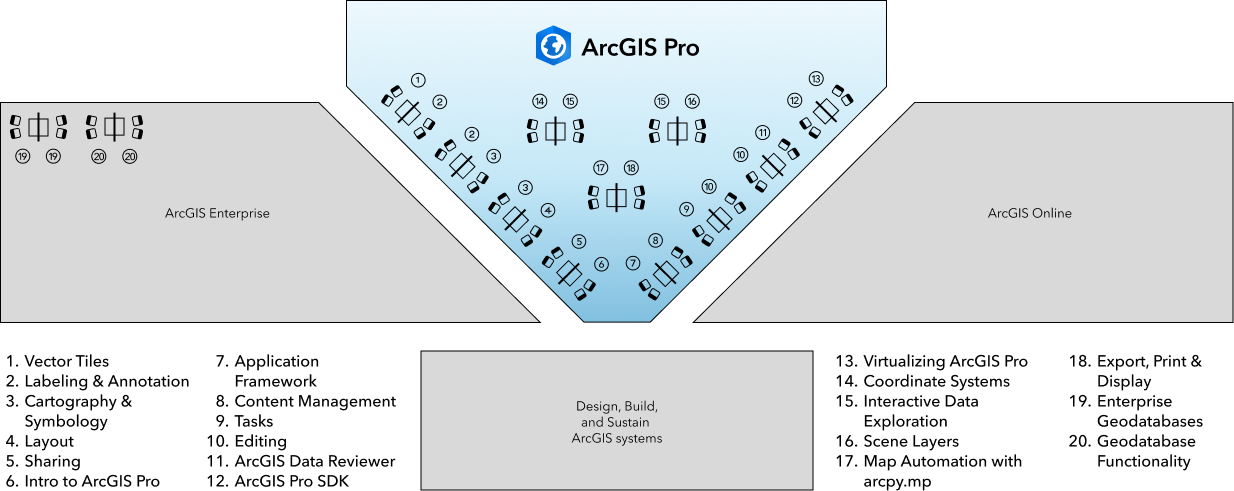
| ArcGIS Pro | |
| Demo Station | Topic |
| Sharing | Share maps, data, and analysis across ArcGIS |
| ArcGIS Data Reviewer | Automate and simplify data quality management |
| ArcGIS Pro SDK for .NET | Customize and extend ArcGIS Pro, using Microsoft Visual Studio and C# |
| Cartography & Symbology | Learn best practices to author maps, symbology, and styles in ArcGIS Pro |
| Application Framework | Learn how to configure project and application settings to tailor ArcGIS Pro to your workflows |
| Coordinate Systems | Work with coordinate systems in ArcGIS Pro |
| Editing | Edit features and attributes in ArcGIS Pro |
| Export, Print, & Display | Display and share your maps in ArcGIS Pro |
| Interactive Data Exploration | Explore data using selection, tables, time, animations, flood simulation, pop-ups, presentations, and reports |
| Intro to ArcGIS Pro | Get started with ArcGIS Pro |
| Labeling & Annotation | Learn best practices for putting text on your map in ArcGIS Pro with labels, annotations, graphic text, and dimensions |
| Layout | Create and manage layouts and map series in ArcGIS Pro |
| Map Automation with arcpy.mp | Use Python to automate the contents of ArcGIS Pro projects |
| Content Management | Explore how to apply project settings, manage catalog items and metadata, organize projects, and reuse GIS content in ArcGIS Pro |
| Scene Layers | Build 3D scenes and work with volumetric data in ArcGIS Pro |
| Tasks | Automate your best-practice GIS workflows and business processes in ArcGIS Pro |
| Vector Tiles | Author multiscale maps and learn best practices for vector tile creation and use |
| Virtualizing ArcGIS Pro | Deploy ArcGIS Pro in virtualized (on-premises or cloud-hosted) environments such as Azure, AWS, VMware, or Citrix |
Must-Attend ArcGIS Pro Sessions
From foundational mapping principles to cutting-edge AI capabilities, there is a session designed for every skill level. Can’t make it to San Diego? No problem. Several sessions are livestreamed and will be available to watch virtually. If you have a time conflict with one or more sessions, check if any presentations will be recorded or are only live, like user and demo-theater presentations. This will help you prioritize which to attend.
We have curated a list of sessions from the 2026 Esri User Conference to help you plan your experience. These three collections include In-Person Sessions, Virtual Sessions, and Popular Sessions, which offer a well-rounded starting point. The Popular Sessions show what users like most. This makes them a great starting point for creating a schedule that’s both relevant and inspiring.
Attend In-Person
2026 Esri User Conference | In-Person Sessions
Attend Virtually
2026 Esri User Conference | Virtual Sessions
Popular Sessions
2026 Esri User Conference | Popular Sessions
From advanced map design and cartographic refinements to geospatial AI and geoprocessing workflows, there are sessions for everyone. Whether you want to sharpen your ArcGIS Pro skills, uncover time-saving tips and tricks, or explore the frontier of map wizardry, there is a session for you.
Top Five
- Map Wizardry – An inspiring exploration of advanced map design techniques that showcase what is possible in ArcGIS Pro. Arrive early to secure a seat.
- ArcGIS Pro: An Overview – New to GIS? Explore the fundamentals of ArcGIS Pro — creating maps and layouts, setting up a geodatabase, editing, and analysis. No prior experience is required.
- ArcGIS Pro: Tips and Tricks – Practical efficiency boosters for all skill levels covering mapping, data management, analysis, and sharing, plus an opportunity to share your own favorite tips.
- ArcGIS Pro: Mapping and Visualization – Explore what is new in mapping and visualization, including layer and map properties, cartographic refinements, and organizing symbols into styles.
- ArcGIS Pro: Geoprocessing Tips and Tricks – An overview of geoprocessing and spatial analysis workflows in ArcGIS Pro covering environment settings, parallel processing, batch processing, ModelBuilder, Python, and scheduling tools for solving spatial problems more efficiently.
We’ll See You at UC 2026
Whether in person or joining from elsewhere in the world, there has never been a better time to learn, connect, and grow with ArcGIS Pro. We look forward to welcoming you in San Diego or virtually. Here’s to another unforgettable Esri UC.
Be sure to sign into MyEsri to sign up for sessions – Detailed Agenda


Commenting is not enabled for this article.