More and more organizations are using Elasticsearch or OpenSearch to store and analyze large volumes of operational, observational, and event driven data – and maybe your organization is following a similar pattern. Increasingly, this data also has spatial value, whether it represents locations, assets, sensors, or activity over time.
With ArcGIS Pro 3.5 and ArcGIS Enterprise 12.0, ArcGIS natively supports Elasticsearch and OpenSearch, making it easier to integrate data from these document databases directly into your GIS for visualization, analysis, and sharing, without custom connectors or intermediate data movement.
Initial support was first introduced in ArcGIS Pro 3.5 in May 2025, with web services support made available in ArcGIS Enterprise 12.0 in November 2025. Together, these releases allow you to connect to document databases, work with the data in ArcGIS Pro, and publish query layers to ArcGIS Enterprise as map image layers and feature layers.
To see this integration in action, watch the video below.
What is a document database?
Document databases are a type of non‑relational, or NoSQL, database designed for both flexibility and scale. Unlike relational databases, they do not enforce a fixed schema, which allows datasets to evolve over time as their data structure requirements change. They are also built to scale horizontally, distributing data across multiple nodes and supporting both high availability and high‑velocity read/write throughput.
Elasticsearch and OpenSearch are commonly used as distributed search and analytics engines, and many organizations also use them as primary or secondary data stores for large volumes of semi‑structured data. This includes observational data, logs, events, and other records that grow continuously and are frequently queried for analysis.
For GIS users, this means valuable spatial or location‑aware data may already exist in these systems, data that can now be brought directly into ArcGIS for mapping and analytics.
Connect to Elasticsearch and OpenSearch in ArcGIS Pro
To connect to Elasticsearch or OpenSearch, you will need ArcGIS Pro 3.5 or later. Unlike many traditional database connections, no client drivers are required. Instead, connections are made directly over HTTP, simplifying setup and reducing machine‑level dependencies.
Once connected, users can securely integrate their data with ArcGIS Pro. For more details, see:
Bring your data into ArcGIS
After establishing a database connection, you can create a query layer to bring data from Elasticsearch or OpenSearch into your map or scene. Query layers allow you to define exactly how data is retrieved and structured, including filtering, aggregation, and spatial fields. Alternatively, you can drag and drop a table into your project and let ArcGIS Pro create the query layer for you behind the scenes.
Once added, query layers behave like other layers in ArcGIS Pro. You can symbolize them, query them, and use them as inputs to geoprocessing tools, all while the data remains in the source database.
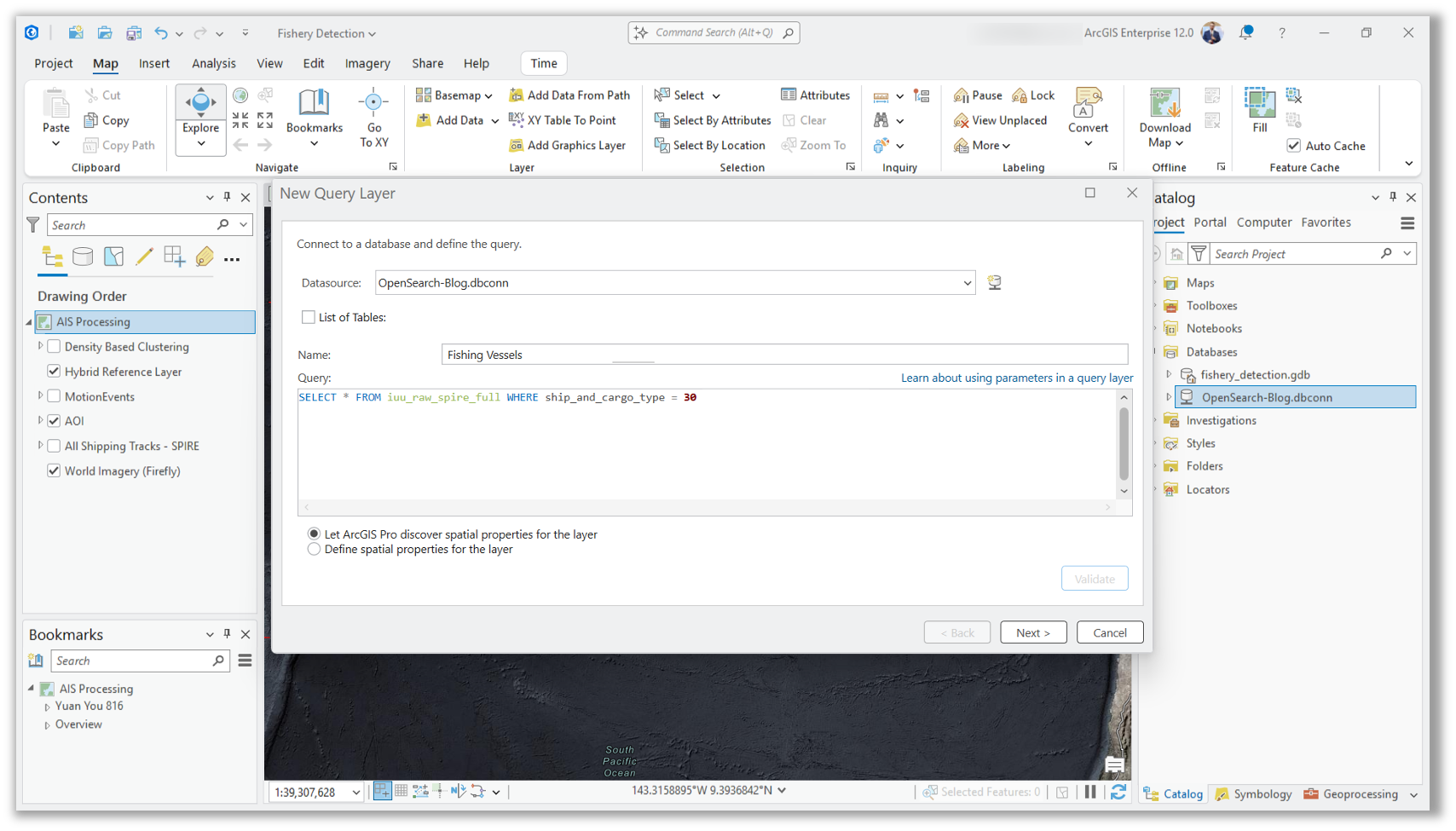
In the workflow above, a query layer is created from an AIS (Automatic Identification System) dataset stored in OpenSearch. It contains granular, time-series data points transmitted by maritime vessels that can be used to monitor traffic, ensure safety, and analyze routes over time. While this example used point data, ArcGIS also supports multipoint, line, and polygon geometries from OpenSearch and Elasticsearch.
Refer to this documentation to learn more about creating a query layer for data in a document database.
Visualize large datasets effectively with feature binning
Document databases often contain millions of records, presenting a challenge to effectively extract insights or render all of that data on a map. Rendering millions of individual features in a map can impact performance and make the data difficult to interpret.
To solve this problem, we offer feature binning, which is a visualization technique that aggregates features into bins that both improve display performance and make it easier to detect patterns and insights compared to showing a high density of features on a map.
By default, feature binning is enabled for all point layers sourced from document databases. In ArcGIS Pro, feature bins are displayed automatically when a map’s view contains more than 10,000 point features. As you zoom in and the number of visible features drops below 10,000, ArcGIS Pro dynamically transitions from displaying bins to rendering individual point features.
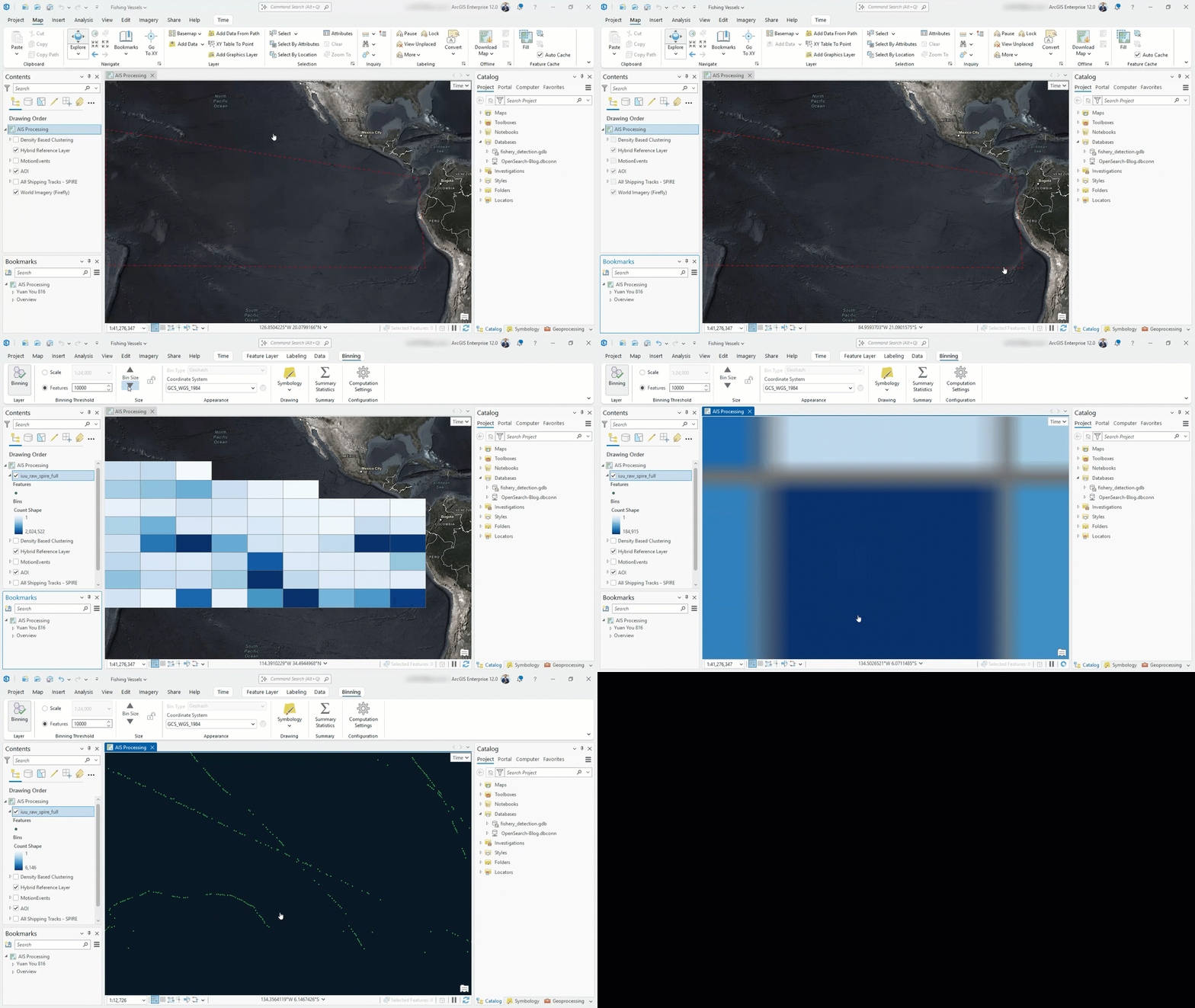
To learn more about the database-driven feature binning, refer to this documentation: Use database-driven feature binning.
Share layers by reference to ArcGIS Enterprise
Query layers created from Elasticsearch and OpenSearch can be shared from ArcGIS Pro to ArcGIS Enterprise as map image layers and feature layers. This support was added in ArcGIS Pro 3.6 and Enterprise 12.0 across Windows, Linux, and Kubernetes.
To publish a map image layer or feature layer that references data in Elasticsearch or OpenSearch, you will need to register the database as a data store with ArcGIS Enterprise, using ArcGIS Pro. While ArcGIS Pro supports several authentication types for these document databases, only basic authentication or username and password can be registered with ArcGIS Enterprise.
Once the web layer is published, you can use it in ArcGIS Enterprise and enrich your mapping and analytics workflows to reference data stored in Elasticsearch and OpenSearch.
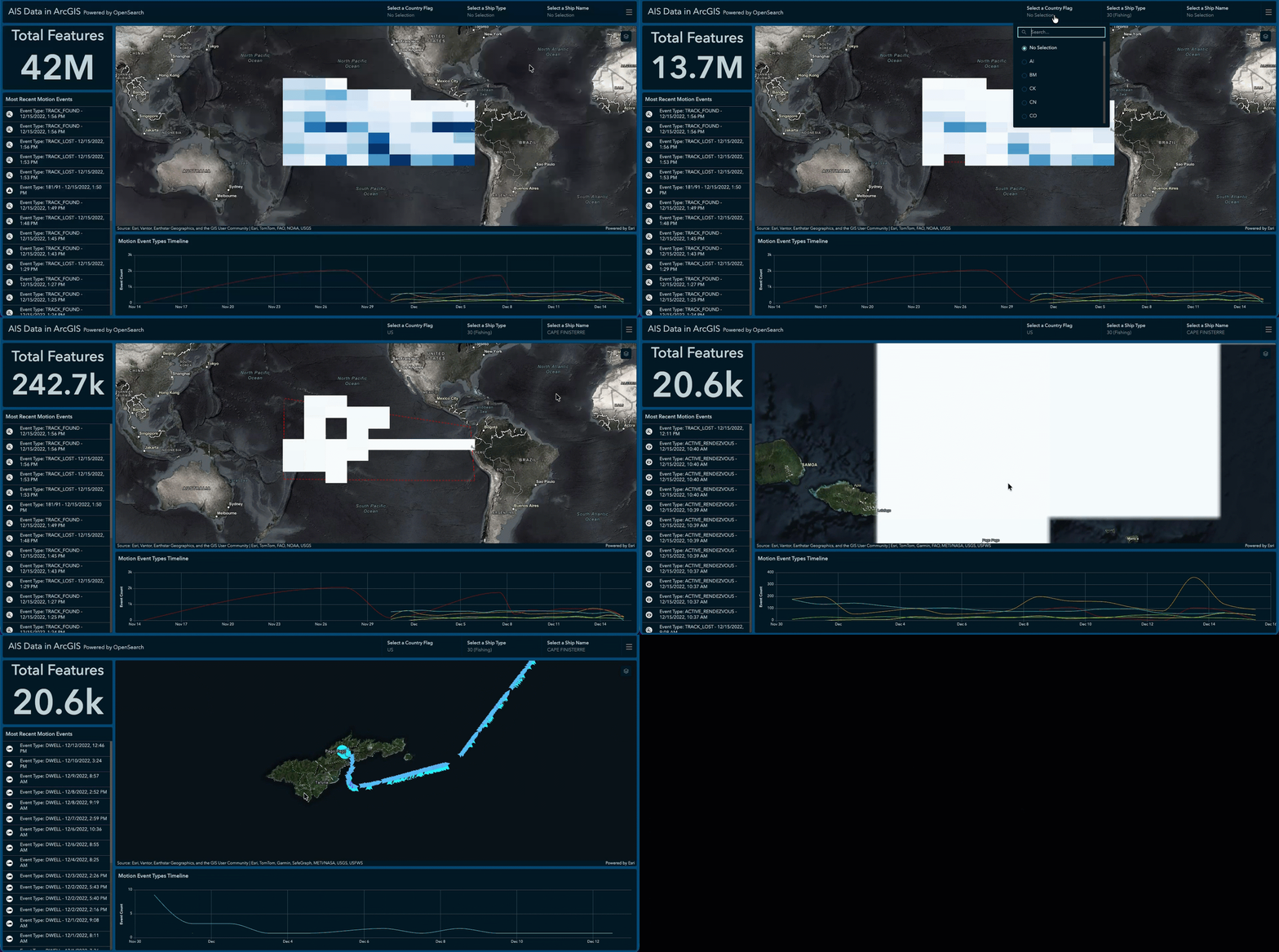
Today, feature layers shared from document databases cannot support editing. However, editing support for feature layers published from Elasticsearch and OpenSearch to ArcGIS Enterprise is planned for a future release, in addition to expanding support for additional authentication types beyond username and password.
Summary
Query layers are a powerful way to integrate data from other enterprise systems with ArcGIS Pro and ArcGIS Enterprise. Previously supported for relational databases and cloud data warehouses, with the ArcGIS Pro 3.5 and ArcGIS Enterprise 12.0 releases, document databases are also now supported.
We can’t wait to hear how this will positively impact your workflows in ArcGIS and across the enterprise.
Questions, ideas, or feedback? Engage with us on Esri Community.



Commenting is not enabled for this article.