What Security Best Practices should ArcGIS Developers consider when implementing OAuth 2.0 User Authentication, OAuth 2.0 App Authentication, API Key Authentication?
OAuth 2.0 User Authentication
Implement OAuth 2.0 User Authentication for private applications.
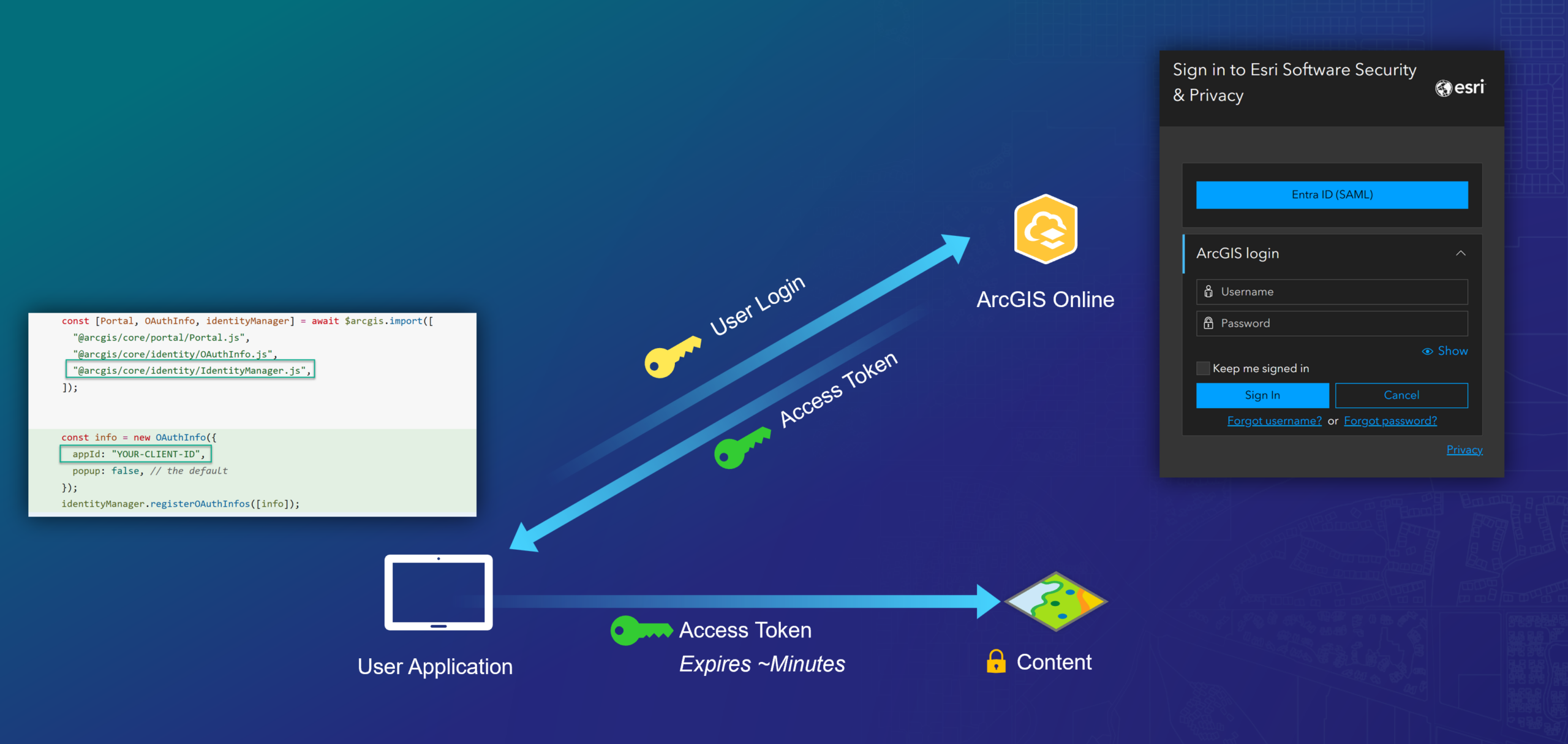
OAuth 2.0 User Authentication is suited to the majority of developer use cases where interactive login is required. OAuth 2.0 User Authentication carries relatively low implementation risk because there is no static secret or key for the developer to manage. User Authentication requires the human user of the application to sign in interactively with an ArcGIS account, preserving their identity for the purpose of accessing the application and dependent services. While using the application, content the user is permitted to access will be available for use within the application; content the user is not allowed to access will be denied. Additionally, data reads and writes will occur under the logged in user’s context and will be tracked through audit records.
User authentication is fully supported by all interactive authentication flows (ArcGIS Login, SAML, OIDC, & WebAuthn) and ArcGIS applications, services, APIs, and SDKs. User Authentication can be implemented with minimal code/effort by leveraging the Identity Manager class (Implement user authentication | ArcGIS Maps SDK for JavaScript). For more details, see: Introduction to user authentication | Documentation | Esri Developer.
Monitoring OAuth 2.0 User Authentication Activity within ArcGIS Online
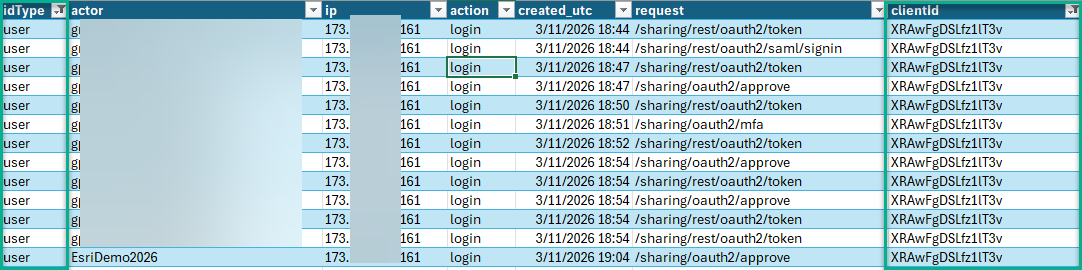
Upon implementing User Authentication within a developer application, organizations should schedule and review Organization Activity Reports to ensure the User Application is used as expected. Upon downloading and viewing the Organization Activity Report for a given timeframe, the following columns/filters are useful to identify User Authentication workflows relative to applications you have published:
- Column: idType, Filter Value: user
- Column: clientid, Filter Value: <Client ID associated with Developer User Application>
These reports can help ArcGIS Online Developers and Administrators trace source IP, User, Action, Request, and Timestamp details related to User Authentication operations specific to each application published within their organization:
OAuth 2.0 App Authentication
Implement OAuth 2.0 App Authentication for non-interactive (scripted) processing.
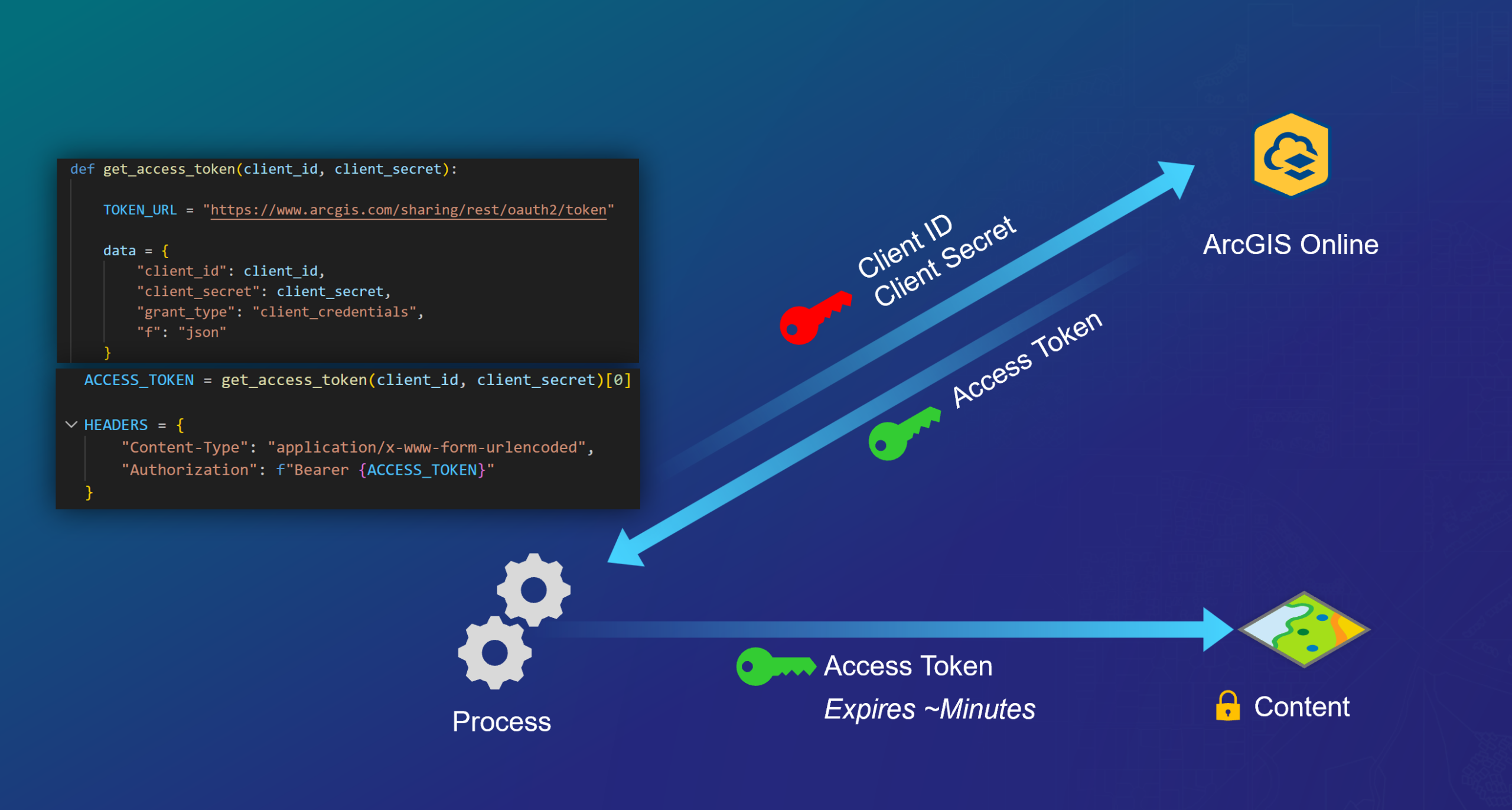
App Authentication makes use of an OAuth Client ID, Client Secret exchange that returns a short-lived OAuth 2.0 Bearer token which can authenticate non-interactive processes against sensitive content; this is analogous to a “service account” or “service principal”. OAuth 2.0 App Authentication presents moderate implementation risk because it requires the application developer manage the Client Secret carefully (never embed in static code). OAuth 2.0 App Authentication is most suitable for scenarios where human user interaction is not possible, such as CI/CD Pipelines and other non-interactive automation. App Authentication utilizes the identity of the application and its privileges; thus audit records record these changes as the Application Identity, not any specific human user.
App Authentication is NOT appropriate for public applications that access sensitive content, including public-facing web applications, mobile applications, or user distributed ArcGIS Notebooks. Using app authentication for sensitive access in this environment leads to issues of non-repudiation and potential organization compromise. For more details, see: Introduction to app authentication | Documentation | Esri Developer.
Monitoring OAuth 2.0 App Authentication Activity within ArcGIS Online
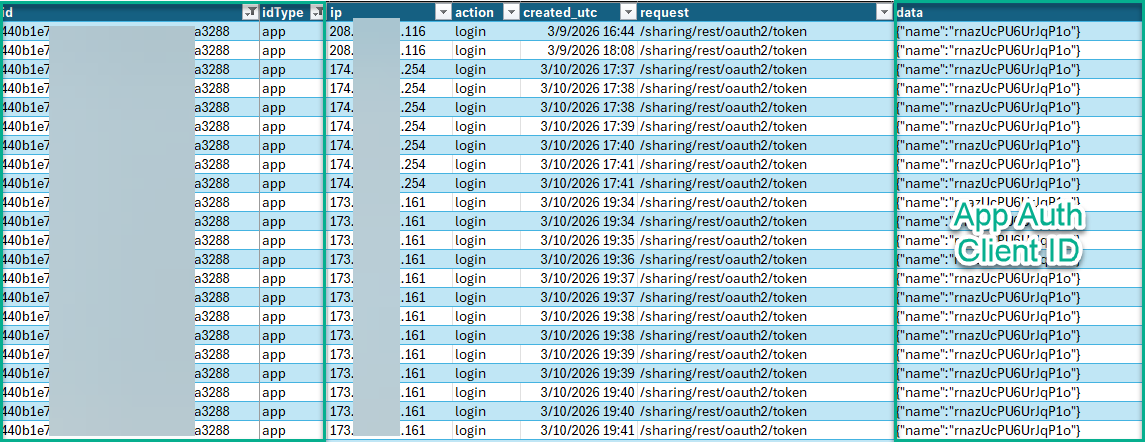
Upon implementing App Authentication within a developer application, organizations should schedule and review Organization Activity Reports to ensure the App Auth Item is used as expected. Upon downloading and viewing the Organization Activity Report for a given timeframe, the following columns/filters are useful to identify App Authentication workflows relative to applications you have published:
- Column: id, Filter Value: <Published Application Item ID>
- Column: idType, Filter Value: app
These reports can help ArcGIS Online Developers and Administrators trace source IP, Action, Request, and Timestamp, and Client ID details related to App Authentication operations specific to each application published within their organization.
API Key Authentication
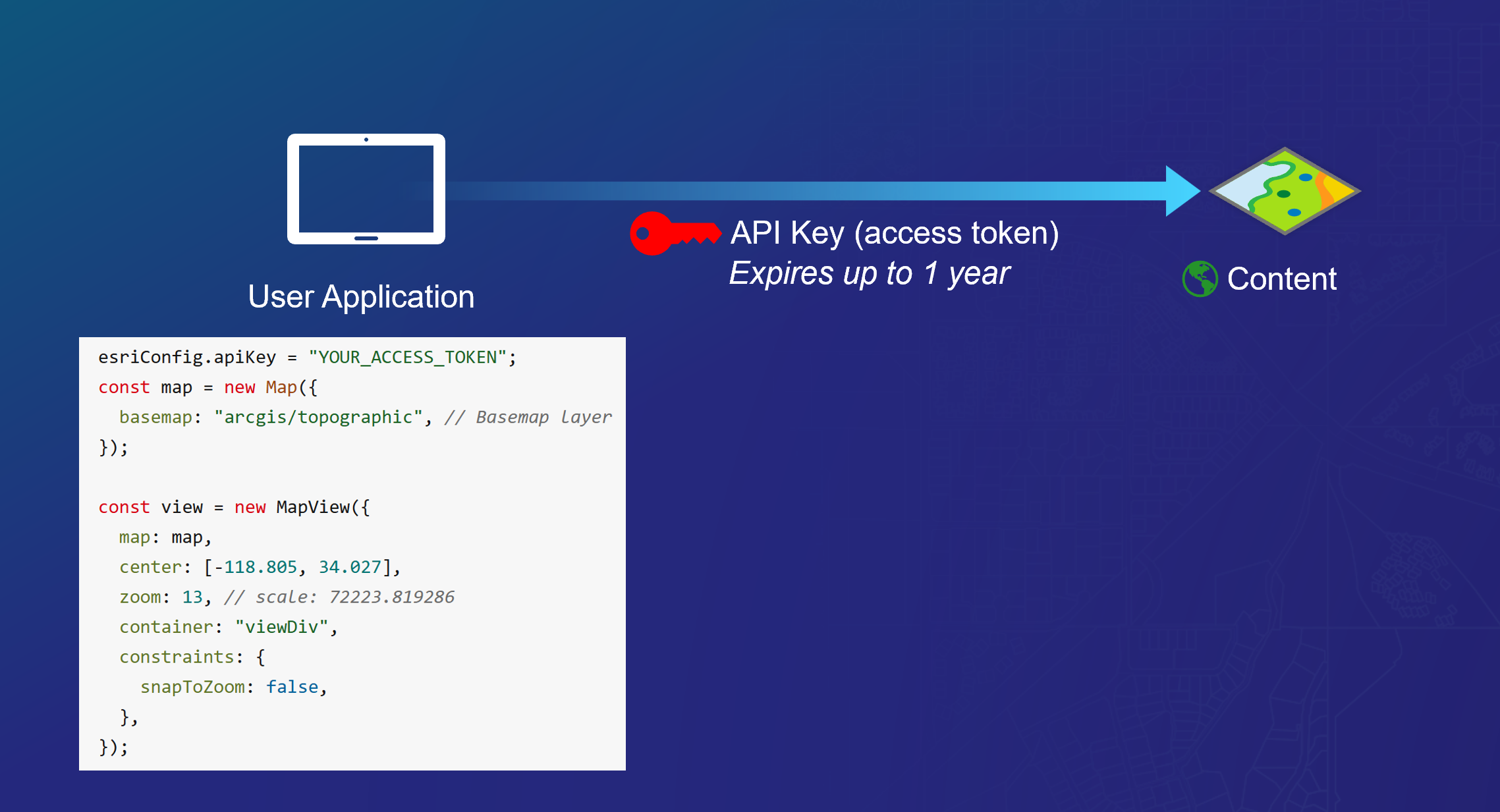
API Key Authentication should be limited to use with ArcGIS Location Services and other non-sensitive data in public applications.
An API key is a long-lived static authenticator that can be embedded into client applications and personal scripts. API keys can be assigned specific privileges, including admin-level permissions, and can even impersonate a human identity depending on how they were created. Given these attributes, API Keys present considerable implementation risk and should be limited to accessing ArcGIS Location Services and other non-sensitive workflows when deployed in public applications.
API Key Authentication is NOT appropriate for public applications that access sensitive content, including public-facing web applications, mobile applications, or user distributed ArcGIS Notebooks. Using API keys for sensitive access in this environment leads to issues of non-repudiation and potential organization compromise. For further details, see: Introduction to API key authentication | Documentation | Esri Developer.
Monitoring OAuth 2.0 API Key Authentication Activity within ArcGIS Online
Upon implementing API Authentication within a developer application, organizations should schedule and review Organization Activity Reports to ensure the API Key item is used as expected. Upon downloading and viewing the Organization Activity Report for a given timeframe, the following columns/filters are useful to identify App Authentication workflows relative to applications you have published:
- Column: id, Filter Value: <Published API Key Item ID>
- Column: idType, Filter Value: app
These reports can help ArcGIS Online Developers and Administrators trace source IP, Action, Request, and Timestamp details related to API Key Authentication operations specific to each application published within their organization.

Web Tier Authentication
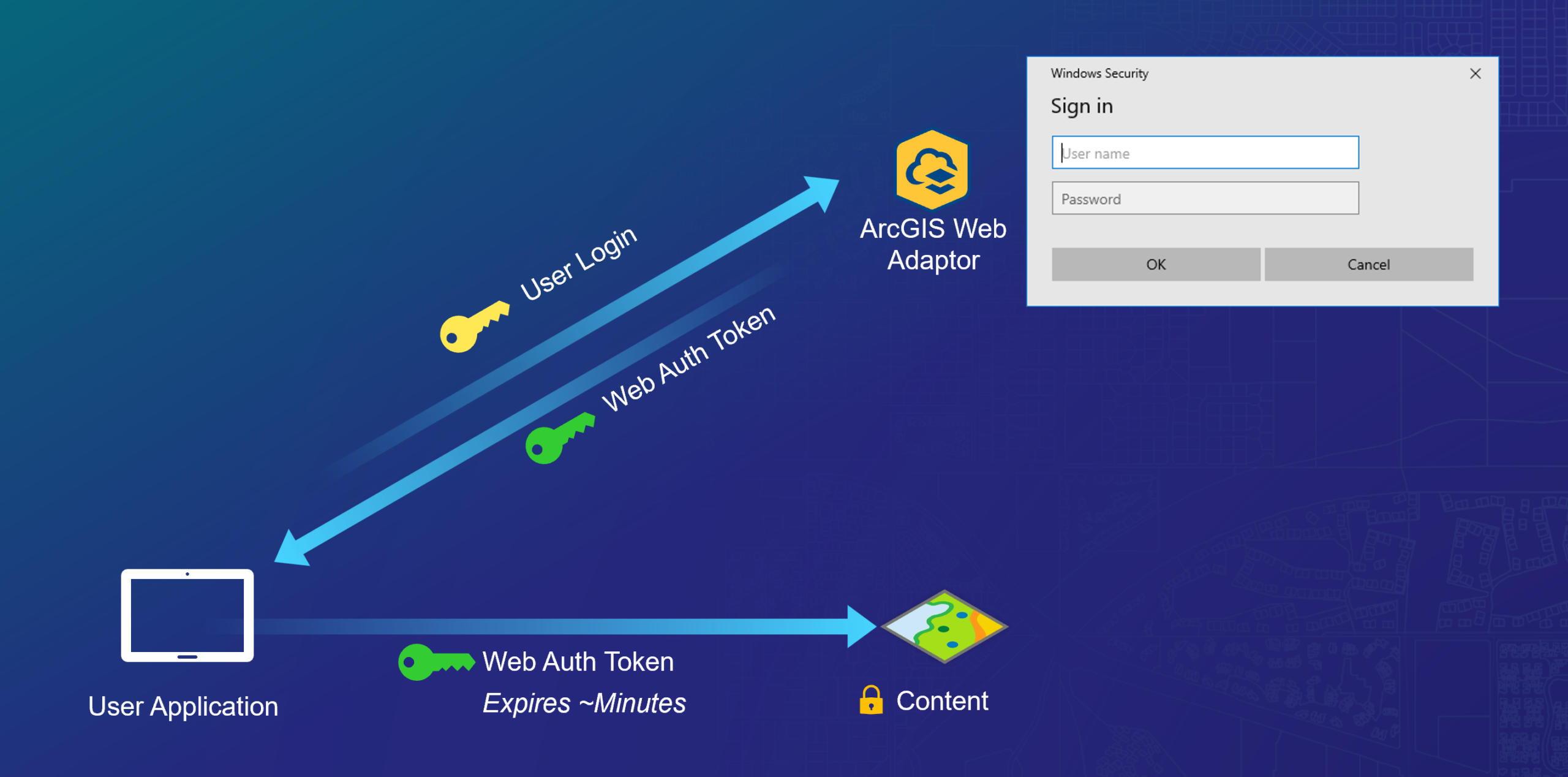
Web Tier Authentication is a form of User Authentication implemented at the Web Server Tier.
Web Tier Authentication makes use of thick client / web server authentication features (such as Windows Integrated Authentication) to perform an authentication handshake between the client (e.g. web browser) and the service. This flow requires the use of the ArcGIS Web Adaptor and deployed on a .NET Application Server (e.g IIS) or Java Application Server (e.g. Tomcat) and is suited to increasingly niche use cases where all user identities exist exclusively within the scope of an enterprise identity management platform integrated with the web server. Web Tier Authentication is a highly opinionated implementation option, offering little to no room for developer customization. These guardrails reduce implementation risks because sensitive features such as secrets handling are held outside the scope of what the application itself needs to process or handle.
Web Tier Authentication is supported within ArcGIS Enterprise environments and requires the deploment of the ArcGIS Web Adaptor. See: Integrated Windows Authentication | ArcGIS Maps SDK for .NET | Esri Developer
Commenting is not enabled for this article.