Professional Headshot Sponsor
$12,000
Feature your brand at the event photo station and on the digital poster ad. You’ll also get the opted-in contact list of everyone who participates.

Apply by December 4, 2026
Get a complete overview of sponsor and exhibitor opportunities, including packages, tiers, perks, and à la carte items.
Submit your application using the Esri Events portal. Applications are only open to members of the Esri Partner Network.
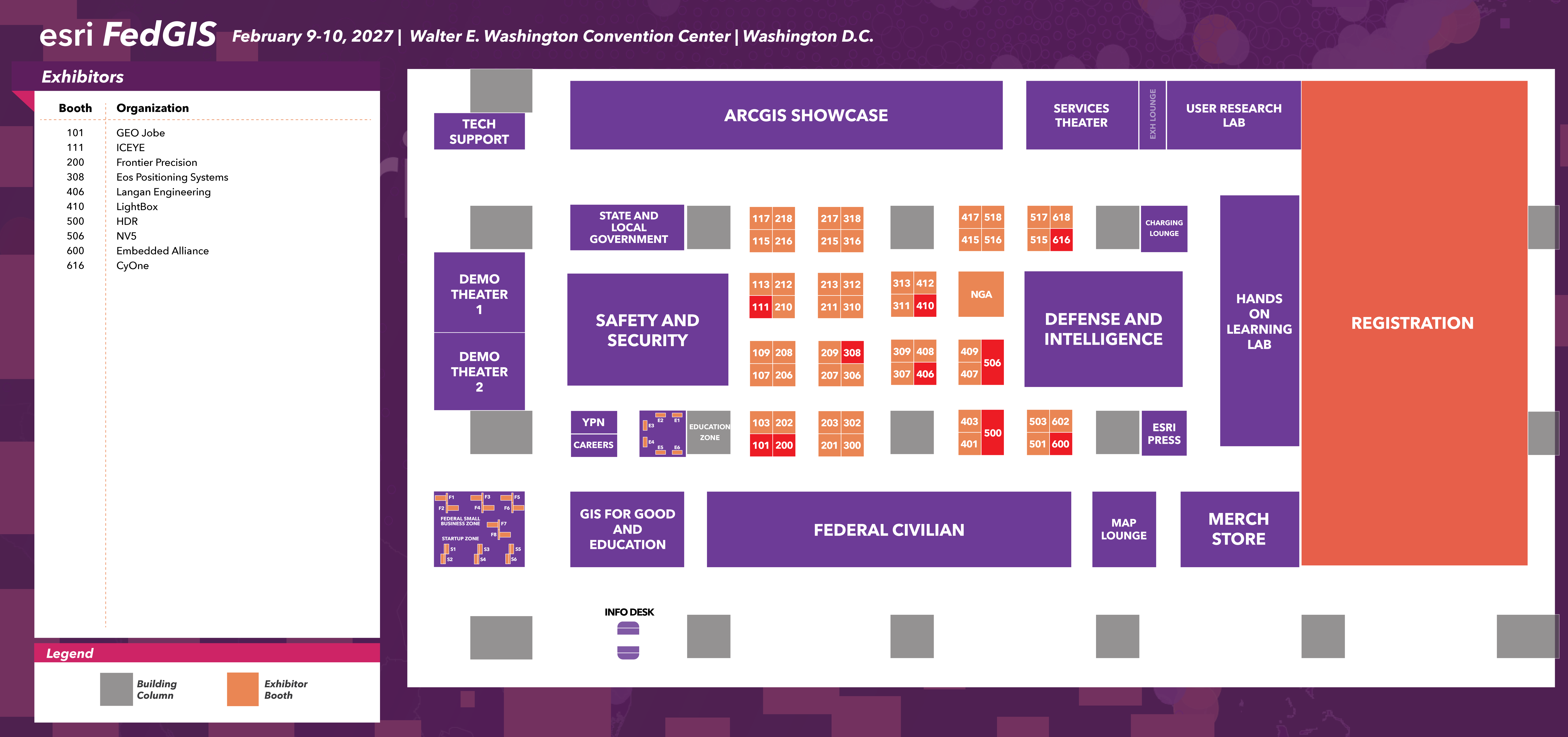
Browse the Expo layout, including available booth spaces, main aisles, and key industry and ArcGIS product areas.
Browse these featured items for a glimpse of what’s available. Download the prospectus for the full list of à la carte offerings.
Put your brand in front of thousands of GIS professionals, leaders, and decision-makers at the premier geospatial professional development event for government.
To register your staff, visit the exhibitor portal and find the task “Invite Staff to Register” to send emails to your team.
The user list is proprietary information, so it is not provided to sponsors, exhibitors, or attendees.
Make sure you know your organization’s customer number, as you’ll need it to apply. To find your customer number, contact your organization’s administrator or account manager, or email us at exhibits@esri.com.
You will need a new Esri Events account to become an exhibitor. If you do not have one, you can create an account during the application process.
Once you’ve established your account, access the portal to submit your application by clicking the Apply Now button.Include details to help conference attendees understand your organization.
Customize your participation with the à la carte menu to build your ideal sponsorship and exhibitor package.
All orders are invoiced, and no payment is due with your application. You’ll be sent an invoice for your participation total once your application is accepted.
All applications are vetted and approved based on the order we receive them. You’ll get a confirmation email within 48–72 hours.