For the City of San Diego’s Public Utilities Department (PUD), giving staff quick access to accurate infrastructure data is essential to keeping the United States’s eighth-largest city running. Thousands of employees rely on this information daily, whether responding to a water main break, planning maintenance, or supporting critical field operations. To make this data easier to access, PUD developed CompassGIS Viewer, an application with dozens of tools that delivers critical GIS information to staff across the organization quickly and reliably, without the need for individual Esri licenses.
The original data viewing application was built using ArcGIS API for JavaScript. It served its purpose for years, but the tool’s aging architecture and design were beginning to create challenges and disruptions for city staff.
“It was deprecating and creating risks and vulnerabilities, as some of the code was no longer supported,” said Rod Miramontez, GIS analyst at PUD. “There were times when some of the functionality wouldn’t be there. For instance, a map service might go down or a FEMA [Federal Emergency Management Agency] layer might not load. Staff would submit tickets, but it was time-consuming and reactive.”
A modernized data access platform with less back-end complexity was needed. This would allow future enhancements to be delivered more quickly and improve both performance and user experience. Esri partner Quartic Solutions worked closely with PUD to make that vision a reality.
Over a two-year period, the Quartic team planned, built, and delivered an updated data viewing platform using ArcGIS Experience Builder, enhanced with custom widgets and integrations. ArcGIS Experience Builder was instrumental in designing the application’s complex layout, including the placements and configurations of header items, application navigation, and map data handling.
Easier Access and New Workflows
With CompassGIS Viewer, city staff can easily access utility data and explore infrastructure data, look up attributes, set filters, and generate custom maps with ease.
“It’s a tremendous upgrade from what we had,” said Miramontez.
Once signed in, users can see the locations and information related to over 100 asset types such as water valves, sewer mains, and recycled water services. Additional useful layers include items like council districts, easements, capital improvement projects, and topographic lines. The department’s assets are updated weekly, providing the latest infrastructure data to city users.
Behind the scenes, a new ASP.NET API delivers sewer inspection closed-circuit television videos, images, and other detailed information directly to the data viewer, making inspection data available with a single click. A custom JavaScript integration with the city’s Microsoft Power BI Report Server allows staff to generate and view sewer inspection reports on demand, straight from the map interface.
The team leveraged the flexibility of Experience Builder for supporting custom widgets to address city staff workflows and needs. Utility datasets, for instance, are huge. Smart search capabilities allow users to quickly locate assets across all layers or within a specific layer, select and highlight map features, and view results in a custom table. The Integrated Document Viewer gives users access to records like as-built drawings, inspection videos, and related documents without leaving the map via integration with unstructured data and content management software from OpenText.
Additionally, the enhanced pop-up widget provides a consolidated view of asset information by displaying key attributes alongside related OpenText documents, sewer inspection videos, images, and reports, all directly within the map. Right-click tools give users instant location context. Users can jump to Google Street View, geolocate an address, or preview the surrounding area. And simplified, dynamic tables keep the user’s view focused by only showing layers with active selections. These tables also include a layer drop-down menu and direct links to OpenText documents and sewer inspection details for selected features, saving time and reducing the back-and-forth between systems.
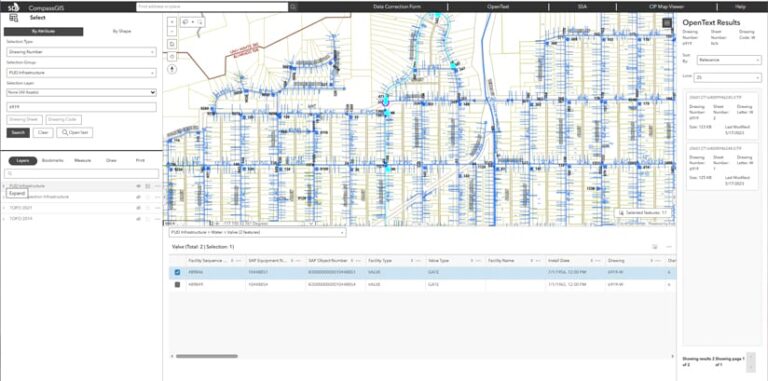
“One of the most important customizations was OpenText integration,” said Miramontez. “OpenText is the repository where all our records and drawings are stored, and it’s incredibly valuable to have a user interface within the data viewer that is much faster than going to the hosted website that’s designated for OpenText.”
The custom widgets leverage developer settings panes to simplify the selection of the application environment and associated integrations. For example, in the OpenText Integrated Document Viewer widget, a developer settings menu can be used to set the production URL for the OpenText API. ArcGIS Maps SDK for JavaScript is then used to obtain the CAD drawing number from a selected feature’s attributes, set the OpenText viewer widget’s visibility in the sidebar to true, and pass the drawing number to the OpenText API.
Experience Builder allowed Quartic staff to build the app layout and include the required functionality in a fraction of the time it would have taken without it. While re-creating that functionality in custom widgets with React (the underlying framework for Experience Builder) came with a steep learning curve, the ability to design and set widget parameters using the developer settings panes graphically made the process much easier. With the custom widgets’ structures, it’s now simpler to understand and document how different aspects of the application are connected.
Out-of-the-Box Widgets in Action
Twenty out-of-the-box widgets were included in the solution. Two of the most-used widgets are the Layers widget and the Selection Tool widget.
The wastewater collection division uses the Layers widget to visualize sewer mains and underground-access points by their preventive maintenance cycles. Each asset is assigned a maintenance frequency based on a risk analysis: High-risk assets are scheduled for more frequent cleanings, while lower-risk assets are maintained less often. The widget’s gradient color ramp allows quick identification of high-risk areas, with red indicating assets needing immediate attention and green for lower-risk areas.
“Before this visualization, we relied on BusinessObjects report tables,” said Miramontez. “Planners had to manually look up each asset from the reports. This color-coded visualization has improved planning and allocation of field resources.”
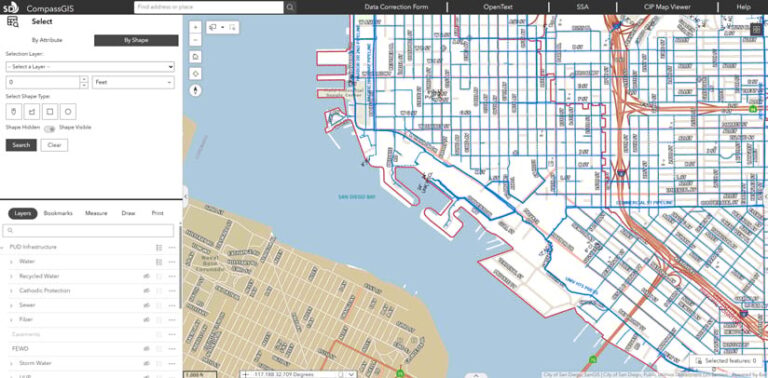
The Selection Tool widget enables staff to make custom selections of infrastructure within a defined area. Users can select assets like water mains, valves, or other utilities and immediately view key attributes in a tabular format. Selections can also be exported as CSV files for reporting or operational planning. During a water main break or planned valve maintenance, staff can quickly see which services will be affected, understand the scope of the impact, and use that information to guide response efforts and communicate clearly during the event.
“The older selection tools were limited in enabling customization for an area of interest,” said Miramontez. “The new selection tool, specifically the lasso option within it, is faster and allows users to tailor their selection of specific assets within a customized area.”
A Faster, More Connected Way for Staff to Work
CompassGIS Viewer launched in September 2025 and is already changing operations. Staff use the data viewing tool for valve maintenance, hydrant replacements, engineering planning, sewer video inspections, and emergency response coordination. The app runs on multiple servers with load balancing to improve performance.
“Previously, field crews had to manually email corrections with a PDF form and image attachments. Now, they can drop photos and details directly into the map viewer using the data correction form. It’s all automated,” said Miramontez.
Staff feedback on the modernized map viewer has been enthusiastic, thanks to its speed and intuitive interface. Training sessions take just under two hours, and most users pick it up simply by exploring. Staff who were used to the old data viewing application can find comparable capabilities in locations similar to those that previously existed, reducing the overall learning curve.
“It’s evolving into a one-stop shop for all city mapping and data needs,” said Miramontez.