The addition of configurable data catalogs to ArcGIS Hub gives Hub users and content curators more control over how they share open data and organize and showcase content.
If you’re familiar with the content library on sites created in the classic edit mode, think of this as an upgrade—the new Hub catalog offers more flexibility over how you organize and discover spatial data and content. Plus, you can use the catalog to create tailored collections for specific stakeholders, audiences, and your community and find content that
matters most.
While the classic content library has limited customization options, configurable Hub catalogs provide greater flexibility and ease of customization for data sharing. Additionally, Map Viewer now enables users to add content directly from ArcGIS Hub catalogs, making it easier to incorporate curated datasets into
your workflows.
Here are some of the capabilities that catalogs offer:
- Configure catalog content to decide exactly what appears in your catalog by using groups.
- Easily organize collections by grouping similar content or events together, so users can navigate more quickly to what matters most.
- Adjust catalog search appearance with an instant preview. Catalogs will also integrate with more search attributes that will allow greater customization.
Configuring Catalog Content
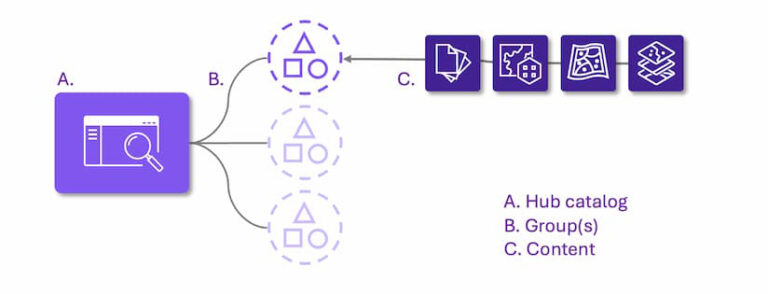
Like the classic content library, Hub catalogs are configured in workspaces by adding one or more groups. As needed, go to the site workspace, select Catalog and Content, and select Configure catalog. Then use the Select groups button to configure the catalog content.
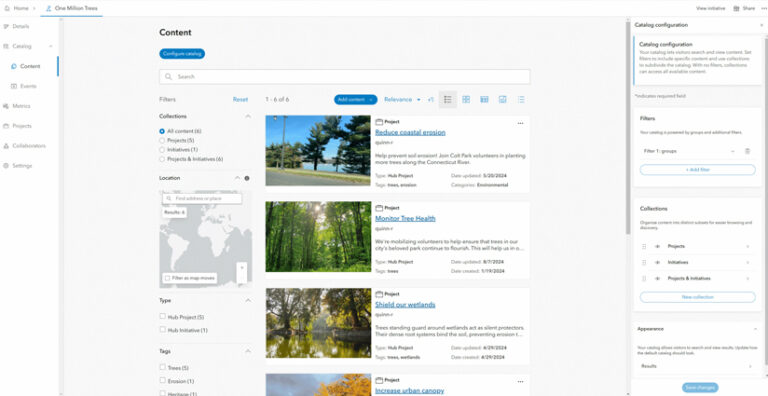
Content shared with groups is indexed by your catalog. The items’ share settings are respected, which supports GIS data management and content governance. This allows you to create public open data catalogs, secure private catalogs, or mixed-privacy catalogs.
Catalog Collections
Unlike catalog searches that dynamically filter all available content, collections let you create custom groupings within the catalog. These groupings serve as an additional way to organize content based on theme, purpose, or topics you define. The default collections in Hub organize content by documents, data, maps and apps, and sites. Site managers can show or hide, rename, and reposition the order of these default collections.
Configurable collections offer even more control to expand these groupings. ArcGIS Hub Premium users can configure up to 10 collections per catalog using advanced filters. This makes it easier and faster for users to find specific resources based on their objectives.
Search Appearance
Hub Premium users will soon be able to determine how catalogs appear to visitors, including the ability to configure the following:
- Default layout (grid, list, table, map, compact)
- Default sort order
- Default card appearance
- Default search facets
Additionally, a major bonus with the configurable catalogs is the introduction of an instant preview function. This means you can configure your catalog on the fly; visualize how content, collections, and appearance settings will display before saving; and eliminate guesswork, making customization more intuitive.
Using Curated Data from ArcGIS Hub Catalogs in Map Viewer
Finding and using curated data collections in maps and applications can be challenging. Even when your community’s data catalog contains valuable data, there can be a frustrating disconnect in putting that data to use. Additionally, it often feels like data analysts spend up to 80 percent of their time wrangling data from various sources, leaving only 20 percent for actual analysis. This is where ArcGIS Hub comes in.
As of the October 2025 update to ArcGIS Online, Map Viewer users can add layers directly from ArcGIS Hub catalogs. This integration makes it possible to browse and use curated datasets with ease, enhancing both accessibility and usability for data providers and users alike.
Data providers can increase the reach and impact of their data by sharing content through interoperable, standards-based Hub catalogs. When users explore your data in a Hub catalog, they can create a map using Map Viewer and, if signed in, save the maps they create. Users can now view and add content from Hub catalogs when browsing layers in the Map Viewer item browser. Moreover, you can designate favorite hub sites from your ArcGIS Online home page, making it easy to return to your curated content.
Here’s how you can browse layers directly in Map Viewer from Hub sites that you recently visited and marked as favorites.
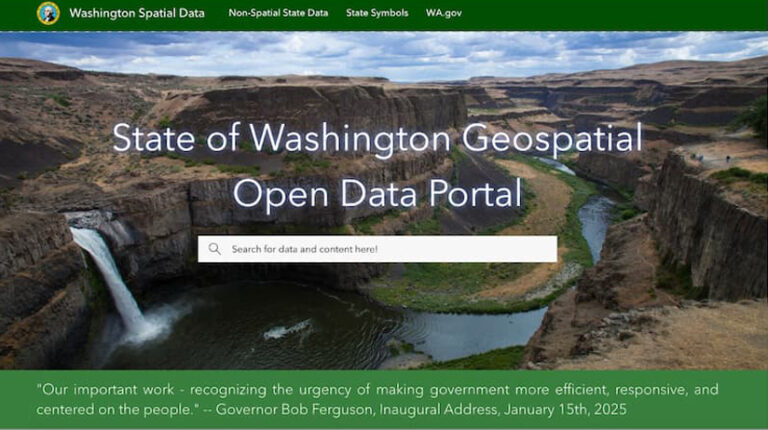
Begin by browsing, searching, and exploring content in a Hub site. For instance, a researcher investigating beach access in the Pacific Northwest might explore the Washington State Geospatial Program Office’s State of Washington Geospatial Open Data Portal, which provides agencies, businesses, and residents with readily accessible, high-quality geographic information.
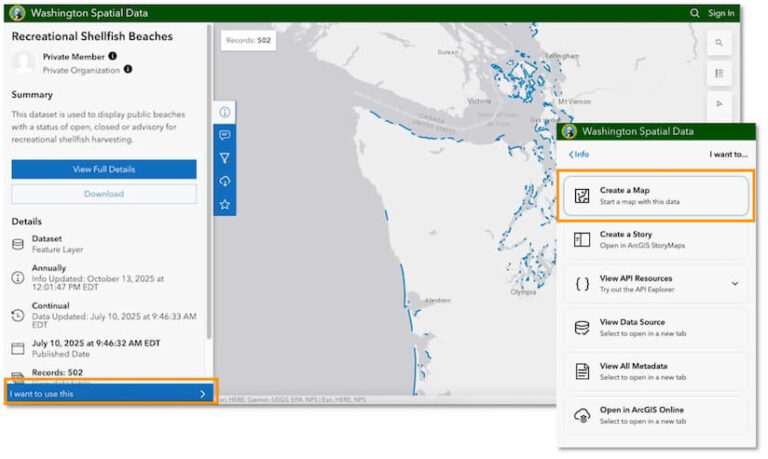
By searching for keywords like “beach,” users can find relevant datasets, such as Recreational Shellfish Beaches. After previewing the data, simply select I want to use this. Then, click the Create a map button to open the data directly in Map Viewer.
Previously, adding additional curated layers from a hub site required returning to the catalog and manually searching for each item. Now, Map Viewer integrates Hub catalogs, allowing users to browse and add layers from recently visited sites directly within the mapmaking environment. The browser cache keeps track of recently visited sites and can be cleared if needed.
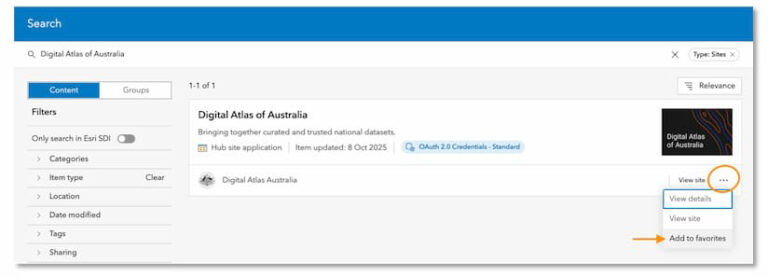
Users who frequently visit Hub sites can mark them as favorites on their ArcGIS Online home page. By marking a favorite Hub site, users automatically include its catalog, making it easier to add content from favorite catalogs in Map Viewer.
To designate a favorite Hub site, find the site item on the home page, click the more actions menu (three dots), and select Add to favorites.
Configurable catalogs are now available using workspaces, the default Hub management experience. Existing sites must upgrade their catalog to leverage this expanded functionality. Hub Premium users can also configure focused catalogs for events, projects, discussion boards, and initiatives.