The ArcGIS API for Python released version 2.4.3 on March 31, 2026. This version expands what you can automate across ArcGIS, with key upgrades for ArcGIS Dashboards, the addition of the arcgis.ai module, new capabilities for raster analytics, and additions to the mapping module. The release also improves how you build and move connected content by adding support to convert an item graph to a knowledge graph as well as introducing the ability to create surveys in Python. This update also adds new SDK guidance for interacting with the improved StoryMaps module of the API. You can read the full release notes here, which includes a detailed list of bug fixes.
The arcgis.apps.dashboards module
As part of the shift toward the newer dashboards experience, the classic ArcGIS Dashboards module has been removed from the code base and documentation. If you have existing scripts that reference it, now is the time to plan a transition to the updated dashboards tooling.
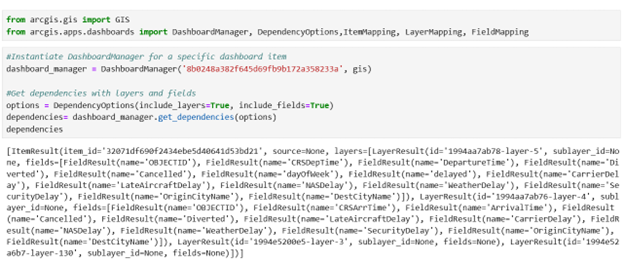
Cloning and migrating Dashboards is a lot smoother in 2.4.3 thanks to the new arcgis.apps.dashboards module. The focus here is on managing item dependencies within Dashboard content so you can clone with more confidence, especially when your dashboards rely on layers, fields, and other referenced content that needs to come along for the ride.
The arcgis.ai module brings extended capabilities
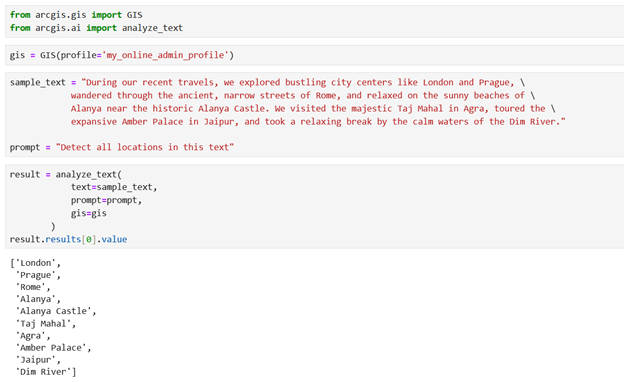
This release introduces arcgis.ai, a new module that brings image and text analysis capabilities into a more dedicated home in the API. If you’re experimenting with AI in notebooks or building repeatable pipelines, this module is designed to help you move from exploration to operational workflows. This new module expands the Python API’s built-in AI capabilities by adding higher-level helpers for working with image and text analysis workflows and also introducing support for translation. For instance, developers can use the module to translate text, analyze imagery, summarize documents, and extract text, turning manual work into automated GIS workflows.
The arcgis.ai module currently depends on ArcGIS Online AI-powered services that are still in beta and are expected to transition to general availability in a future release. These services may also incur ArcGIS Online credit usage for transactions made through the arcgis.ai module once they graduate from beta to general release in the future.
The Raster Function Landscape Continues to Mature
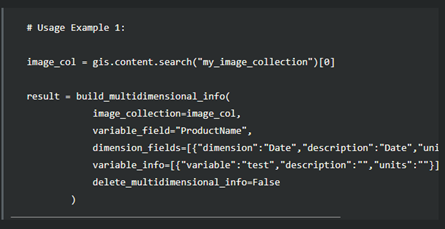
The release adds new capabilities in arcgis.raster.analytics for imagery and raster-centric workflows, including tools that support spectral workflows and image anomaly detection. The Build Multidimensional Info function can create image cubes from collections that span multiple times, depths, or heights. These additions help broaden what you can detect, measure, and derive from imagery directly from Python within the automation space.
Administrative Workflow Improvements
There is also an effort to further administration workflows in this release. Updates under arcgis.gis.admin add new classes and functions—particularly for ArcGIS Enterprise on Kubernetes—so common management tasks can be handled more directly in Python as your deployments scale and mature.
SDK Documentation
- Newly added guides and samples highlight ways to help you keep scripts and workflows aligned with upcoming changes and newer platform capabilities. These include expanded authentication guidance for developer-centric efforts via the DeveloperCredentialManager class, refreshed admin and app-focused walkthroughs for ArcGIS applications, the new arcgis.apps.dashboards experience, and ArcGIS StoryMaps (including cloning/editing StoryMaps, plus introductions to Briefings and Collections).
Supported platforms
- Python version 3.13, with secondary support for 3.10, 3.11, 3.12 and 3.14
- Stand-alone Python environments, available through Conda or PyPI
- Esri products and their versions
- ArcGIS Pro 3.7 and later, default and cloned environments
- ArcGIS Enterprise 12.1 (included with ArcGIS Notebook runtime v14.0)
- ArcGIS Online June 2026 release.
Conclusion
We want to remind you that there are excellent resources available for getting help with the API and sharing your feedback. You can use the ArcGIS API for Python Esri Community page to ask specific questions, suggest ideas for enhancements and improvements, connect with other users, and read recent blogs. You can also use the ArcGIS API for Python public GitHub repo to submit bugs, enhancement requests, and other issues. The team actively monitors these pages and greatly appreciates your feedback and suggestions, which guide our priorities for future API development. We encourage you to share your thoughts.



PyPI is still showing version 2.4.2 as the latest. Can this be updated please?