Increasingly, the ArcGIS community is making use of web-based apps to open up GIS for more people in their organizations, and in some cases augmenting more desktop workflows. Web-based workflows help organizations bring powerful GIS tools to more users across the organization. They provide simple-to-use focused apps for data editing and maintenance. The ArcGIS platform provides a variety of applications and developer tools to support data editing and maintenance workflows, ranging from out-of-the-box apps to apps you can customize and configure.
In identifying which web-based editing app to choose, it’s helpful to have a common definition of editing in ArcGIS.
Editing is fundamental to GIS, ubiquitous across many workflows, and required across most types of users. From GIS professionals using ArcGIS Pro in the office, to mobile crews collecting asset data in the field, to occasional users updating their specific data on a web app, users are creating new GIS data, updating existing data, and maintaining their geographic information across ArcGIS.
Desktop editing isn’t going anywhere; for many workflows it remains the richest, most capable environment. As GIS becomes more pervasive across the organization, the need to provide focused editing experiences for non-GIS professionals has grown. We’ve responded by adding web editing options, giving more people a way to contribute to their data through web apps. Web editing capabilities and tools in ArcGIS have been steadily growing, with more options today than ever before. That can be both good and slightly overwhelming. You can edit using Map Viewer, ArcGIS Web Editor, ArcGIS Instant Apps, and ArcGIS Experience Builder, and each one is a great fit for a specific kind of workflow. Additionally, the ArcGIS Maps SDK for JavaScript allows organizations to create truly custom editing experiences focused on their unique requirements.
In this blog, we’ll walk through how to evaluate these options. Let’s start where every good web editing experience starts, with the web map. Then we will step through each of the five options and when it makes sense to use them.
Choosing the Web Editing Option That Works for You
When evaluating the different apps that support web editing, it’s important to understand that each is designed to support different purposes. One app is not inherently better than a different app. Instead, the value of a given option is dependent on the goal you are trying to reach by providing users the app. One quick side note: if an app works for you or your team and you are comfortable editing there, then it might make sense to just stick with that app.
Regardless of which app you choose for editing, you will need to start by creating a web map and configuring it for editing.
Background: Setting Up the Map for Editing
Every web editing experience in ArcGIS starts with a well-configured web map. At the layer level, you decide which layers are editable and what operations are allowed. Forms handle editable fields, Arcade-driven logic, related records, utility network associations and more (visit this blog for curated resources on forms for editing). Visibility, symbology, filters, labels, pop-ups, and items like feature templates all shape the editing experience. A thoughtful web map setup carries through to every downstream editing app you choose.
You can use ArcGIS Pro or Map Viewer to create your map. You will need to create your map and then configure it for editing in Map Viewer. Of course, Map Viewer can be used for much more than just editing, but for the rest of this article, we will focus on editing capabilities.
With a thoughtfully configured web map, the next step is to start configuring and creating the editing application. Before doing that, ask yourself and your team a few questions to pick the app that will best meet your requirements.
Quick Links
Jump to a section in this blog using the links below.
Is there a map-focused app that can do basic edits in ArcGIS?
Map Viewer
The app that allows for basic editing with minimal configuration is Map Viewer. Most configuration is done within the web map itself and its layers. With Map Viewer, you can create interactive web maps that you can share. It features responsive mapping and real-time updates to the map as you work. Map Viewer allows you to view and manage content in one set of tools and to configure a map with a different set of tools, all within the same app.
When it comes to the different apps in ArcGIS, Map Viewer has the most options for analysis, printing, cartography, and more. The use case for Map Viewer is when you need more than just editing in your workflow, or you have a mix of users where some will edit while others will be viewers of the map.
Map Viewer allows users to add, delete, and update features, their attributes, and related data, but because of its broad capabilities, Map Viewer is best suited for editors who are already comfortable with GIS and don’t need an editing-focused application.
The next question to consider is:
Is there an out of the box option for an editing focused app within ArcGIS?
ArcGIS Web Editor
ArcGIS Web Editor is a strong option, this app is exclusively focused on data editing. It provides a straightforward approach to editing that makes workflows streamlined for both GIS and non-GIS users.
The tools you need appear contextually as you work; select features, create new ones, or update attributes directly in a table, and the interface adapts to what you’re doing, surfacing the right options at the right time. From there, the full range of editing capabilities, including UN editing, is at your fingertips: draw and add features, reshape or split them, merge and move them, copy and paste across layers, edit vertices, refine attributes, create, switch, and manage versions in a branch versioned geodatabase, undo & redo, and many more. It’s built to be approachable for occasional editors while still powerful enough for GIS professionals handling complex workflows.
Web Editor provides a great editing experience; however it does not provide much configurability. If you need more than just editing in your application or you need more control of the tools available to the users, then we can ask the following question:
Is there an app that can be quickly configured and deployed for editing in ArcGIS?
ArcGIS Instant Apps
While the actual amount of time will vary based upon your requirements, the simpler, quicker approach is provided by template-driven, focused apps created with ArcGIS Instant Apps. ArcGIS Instant Apps offers straightforward configuration options, so you can stand up your editing app in minutes.
The ArcGIS Instant Apps Web Editor template allows the admins to author a tailored UX for their specific workflows. Some good use cases for using the Web Editor template include:
- Remove the Split and Merge tools from the UI so that users cannot edit geometries with those tools.
- Provide the ability for users to create features in the app, but not delete them.
- Provide different apps for users with different skills who are editing a common dataset. Configure the apps with the tools needed for each user type.
While other Instant App templates support editing, the Web Editor template is the app that provides the focused data editing experience. Take a look at the Instant Apps website for more details on the other templates.
Is there a no-code or low-code configurable editing app builder in ArcGIS?
ArcGIS Experience Builder
ArcGIS Experience Builder is the approach for you if you’re willing to configure a no-code or low-code based app. ArcGIS Experience Builder is a robust app builder with many configuration and customization options.
ArcGIS Experience Builder allows you to create unique web experiences using flexible layouts, content, widgets, and components that interact with your 2D and 3D data. You can start with templates, create mobile and web-adaptive apps, modify template layouts for a custom design on different screen sizes, or build apps from scratch for more creative freedom.
Experience Builder apps can provide users with a combination of editing capabilities along with other capabilities exposed through Esri widgets, 3rd party widgets, or custom developed in-house widgets. For instance, if you want an app that allows users to make edits and then print out a map with the changes, you configure the two widgets to support that and have a very focused application.
Experience Builder is available within ArcGIS Enterprise and ArcGIS Online, with an even more customizable Developer Edition. Experience Builder gives you the control to make any kind of editing app you need, either from helpful templates or with your own designs in mind.
Is there an SDK that I can use to create a custom editing app in ArcGIS?
ArcGIS Maps SDK for JavaScript
The ArcGIS Maps SDK for JavaScript (JavaScript Maps SDK) provides all the components necessary to build your own custom web application while leveraging your investment in GIS.
If you have the skills and the time needed to create a custom app, the JavaScript Maps SDK allows developers to build advanced editing capabilities on top of the Editor component. You can also use the JavaScript Maps SDK to build custom editing interfaces tailored to your requirements, with the full SDK available to support your end-to-end workflows.
With this approach, you will have complete control over the entire application. Editing-specific capabilities are provided through the arcgis-editor component. The editor component is used to manage both geometric and attribute editing, simple feature creation, and the use of group & preset templates natively in the component. It also includes snapping options, undo/redo, selection tools, and much more.
A custom developed app also allows organizations to ensure that their specific editing requirements are being enforced and they can also integrate the GIS application with other enterprise systems.
Conclusion
There is no single best web editing option in ArcGIS. The right choice depends on your audience, the complexity of your data, and how much customization or focus you need.
Here is a quick visual to summarize what we just walked through to choose the editing app that fits your editing workflows.
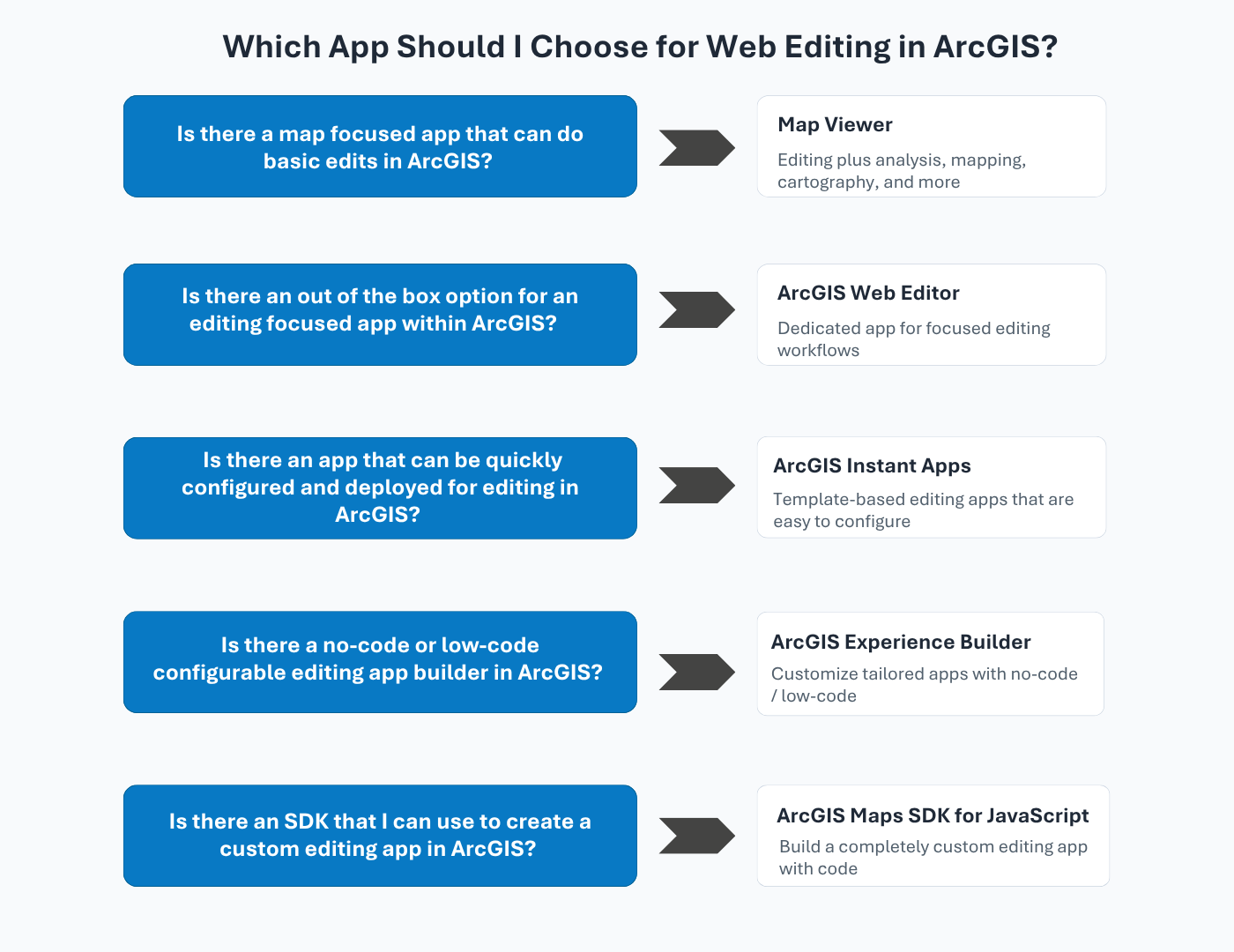
Of course, it is important to understand the finer details of all these apps. Once you settle on an approach that you think will work for you, take some time to review the documentation available for that app.
No matter which app, or apps, you implement, start with a well-configured web map–these configuration decisions carry through to every option. Then let the needs of your workflow guide you to the right choice. It’s okay to simply choose the app you’re most comfortable with. Familiarity is a valid reason, because the best editing app is often the one you and your team know and will use. Hopefully this framework helps point you and your team in the right direction.


Commenting is not enabled for this article.