ArcGIS Enterprise on Kubernetes represents a fundamental shift in how GIS infrastructure is deployed and managed. Built on cloud-native principles, it introduces a microservices-based architecture that changes everything from installation to scaling and monitoring.
This guide explains the key architectural concepts, deployment requirements, migration strategies, and operational considerations for ArcGIS Enterprise on Kubernetes.
ArcGIS Enterprise on Kubernetes is built on cloud-native architecture.
ArcGIS Enterprise on Kubernetes is a cloud-native deployment option based on containerization and microservices. Instead of traditional monolithic components (Portal, Server, Data Store), the system is broken into smaller services managed by Kubernetes orchestration.
Kubernetes handles:
- Deployment and scheduling of services
- Scaling based on demand
- Health monitoring and recovery
- Resource allocation across nodes
This allows ArcGIS Enterprise to operate as a distributed, resilient system across a Kubernetes cluster.
Microservices architecture replaces separate GIS components.
Architecturally, there are no longer separate components such as ArcGIS Server, Portal for ArcGIS, and the ArcGIS Data Store. Instead, these components are broken down into smaller microservices. This means that certain constructs like an ArcGIS Server site are replaced by computing resources managed entirely at the service level. As a result, organizations can fine-tune compute and memory resources for individual services, scale workloads independently based on demand, and isolate failures so that issues can be recovered without affecting the entire system. This approach helps improve resource efficiency, operational flexibility, and overall system resilience.
Within the infrastructure, there are also many differences. A Kubernetes cluster is made up of interchangeable nodes where work can be scheduled as appropriate to deliver resources to microservices that need them. Nodes are logically similar to virtual machines and used by Kubernetes to provide services automatically in response to dynamically changing demand. Administrators no longer manage distinct servers or virtual machines, but rather direct Kubernetes as it manages workloads delivered by pods and ultimately delivers the GIS services your users need. By treating infrastructure as a shared resource pool rather than a fleet of servers, Kubernetes provides a more consistent operational model. This simplifies deployment and upgrade workflows and helps ensure workloads are deployed in a predictable and repeatable manner.
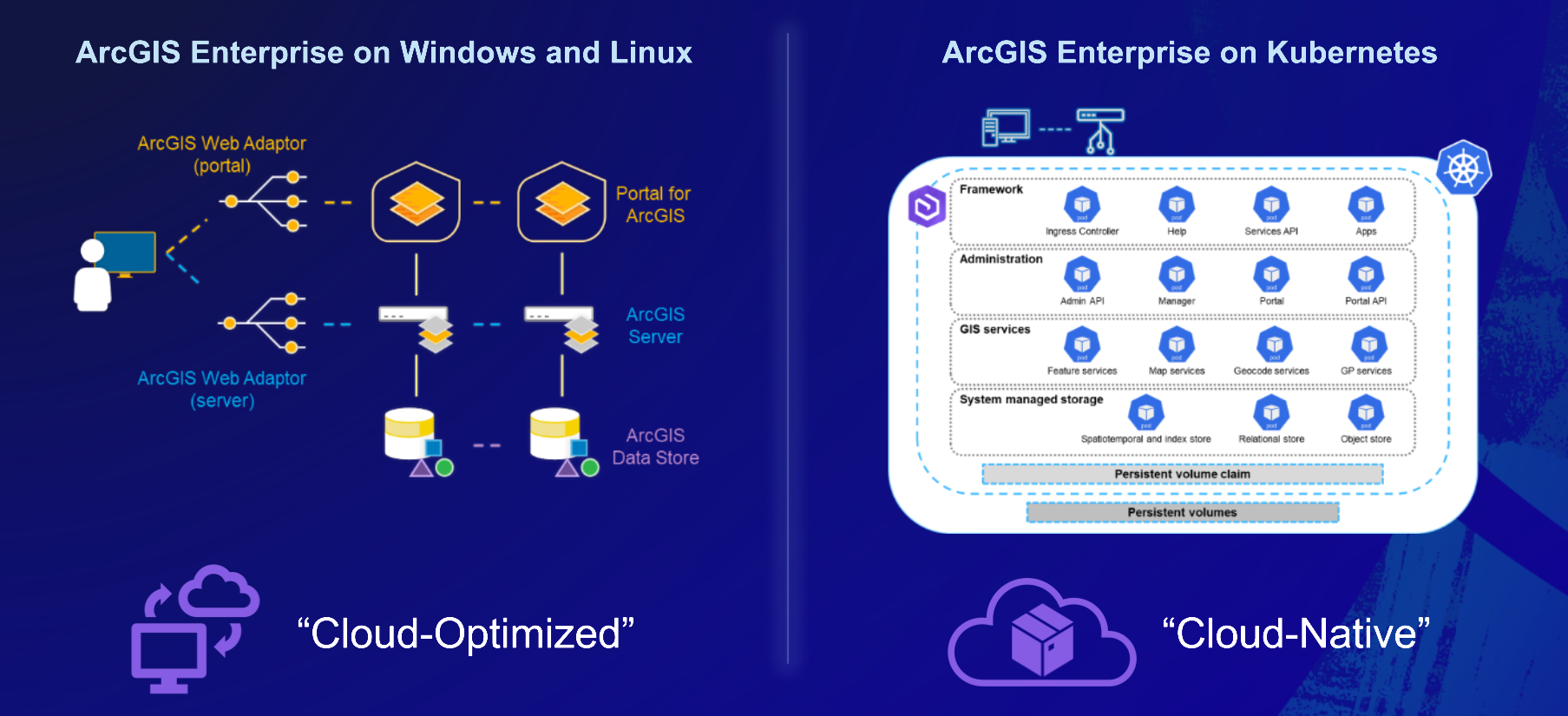
Administrative focus shifts from managing individual machines to managing policies and configurations that Kubernetes uses to run the system.
Watch the following video for a demonstration of the administrative experience.
These architectural and operational differences provide organizations with an alternative approach to deploying ArcGIS Enterprise. Organizations can choose between a traditional server-based architecture or a microservices-based architecture, depending on the operational requirements and IT strategy. ArcGIS Enterprise continues to be fully supported on Windows, Linux, and Kubernetes, giving organizations the flexilibity to deploy GIS capabilities using the model that best fits their needs.
Deployment is automated through Kubernetes and Esri deployment tools.
Deployment is executed using automation provided by Esri:
- Administrators define the parameters for their ArcGIS Enterprise environment, and Esri deployment tooling automates the deployment of containerized software into the target Kubernetes environment. This follows a build, configure, and run approach, where infrastructure is prepared, deployment settings are defined, and Kubernetes orchestrates the services required to run ArcGIS Enterprise.
- You will need to have a Kubernetes cluster environment available that meets certain system requirements. This can run on your own infrastructure on-premises or in the cloud.
- The deployment is streamlined and after it is run once, properties are saved to enable silent subsequent deployments.
Kubernetes provides built-in scalability and high availability.
Kubernetes provides built-in mechanisms for:
- Scaling: Services scale horizontally based on demand, with no fixed upper bound outside the underlying infrastructure
- High availability: Pods can be restarted or rescheduled automatically in case of failure
- Resource efficiency: Administrators define resource limits, and Kubernetes ensures services operate within them
This results in more consistent performance under fluctuating workloads. See it in action with this demonstration, which shows how to design, load-test, and monitor a scalable system:
Successful deployments require Kubernetes infrastructure and expertise.
To deploy ArcGIS Enterprise on Kubernetes, organizations need:
- A supported Kubernetes environment (e.g., managed cloud or on-prem cluster)
- Administrative capability to manage that environment
Because of the architectural shift, adoption typically requires coordination between GIS and IT teams and is not a low-effort deployment.
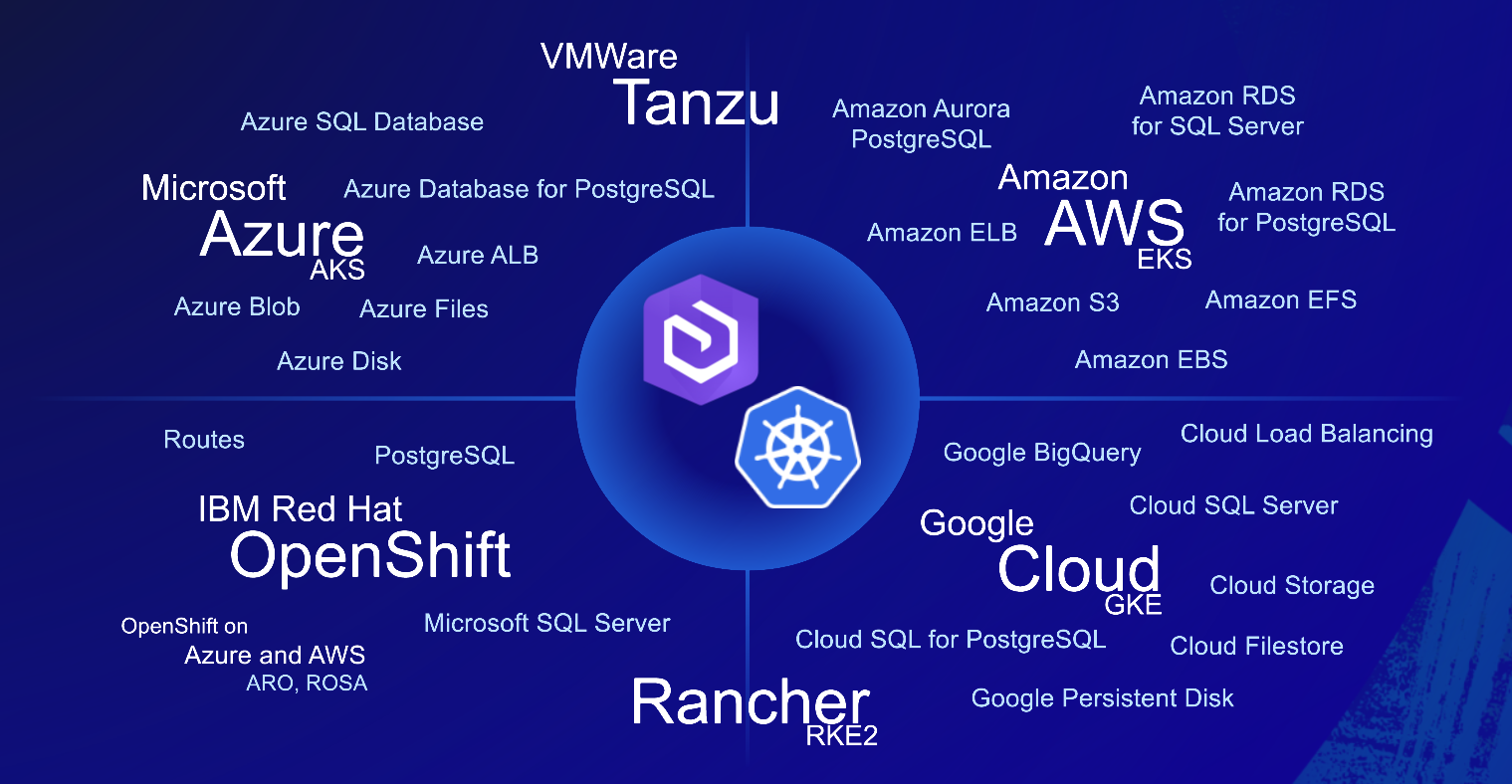
Migration to Kubernetes is typically phased and incremental.
Migration is typically phased rather than a lift-and-shift. Organizations often:
- Identify workloads suited for Kubernetes
- Stand up a parallel deployment
- Gradually migrate services and content
- Optimize architecture as they gain experience
For some organizations, a hybrid environment that combines Windows, Linux, and Kubernetes deployments may be the long-term destination rather than an intermediate step in a full migration. In either case, because of the architectural differences, migration involves rethinking how services are deployed and managed, not just moving infrastructure.
Updates follow a lifecycle appropriate for cloud-native architecture.
Releases are aligned with Windows and Linux, and the choice of when to upgrade to new versions will be up to each individual customer and administrator. However, the product lifecycle and support timeframes for the Kubernetes deployment option are different and require faster upgrades to stay current. In addition, we also provide patches at a frequency appropriate to cloud-native software. This recognizes the speed with which Kubernetes is updated and ensures Esri continues to provide effective support for the Kubernetes deployment option, for more details please visit our product lifecycle support page.
IT teams can prepare through training and readiness planning.
Preparation typically includes:
- Learning Kubernetes fundamentals (concepts and architecture)
- Evaluating infrastructure readiness
- Taking the instructor-led Esri training course on Deploying ArcGIS Enterprise on Kubernetes
- Starting with an evaluation and staging license (contact your Esri representative for more details)
Where to learn more?
To go deeper, explore:
- ArcGIS Enterprise on Kubernetes documentation
- Explore best practices and system design recommendations applicable to any ArcGIS system
- Read these recent customer success stories to see how organizations are using ArcGIS Enterprise on Kubernetes to make an impact:
- Tensio deployed ArcGIS Enterprise on Kubernetes to modernize their GIS, improve reliability, and scale energy services across Norway
- Quiet Professionals is using ArcGIS Enterprise on Kubernetes to deliver secure, reliable, mission-critical GIS workflows



Commenting is not enabled for this article.