Starting with ArcGIS Enterprise 12.0, expected later this year, there will be an update to the ArcGIS Enterprise product lifecycle on Windows and Linux. With this update, all supported versions of ArcGIS Enterprise will always be eligible for security patches; long-term support releases will be supported for four years, and short-term support releases will be supported for one year. This update will not impact any versions of ArcGIS Enterprise released prior to ArcGIS Enterprise 12.0.
Esri is making this update to further clarify the level of support Esri plans for each release, enabling you and your organization to make informed decisions to best fit your business needs. Additionally, this will enable us to continue to streamline the number of releases under support so that we can continue to provide quality software and support for our many different customers.
It should be noted that this update does not impact the ArcGIS Enterprise on Kubernetes product lifecycle. Any references to “ArcGIS Enterprise” in this blog will be referring to ArcGIS Enterprise on Windows and Linux.
Read on for more information about the new product lifecycle in further detail.
Quick Links
ArcGIS Enterprise product lifecycle phases | Long-term support versus short-term support releases | ArcGIS Enterprise product lifecycle: 11.5 and earlier | New ArcGIS Enterprise product lifecycle| Next steps
ArcGIS Enterprise product lifecycle phases
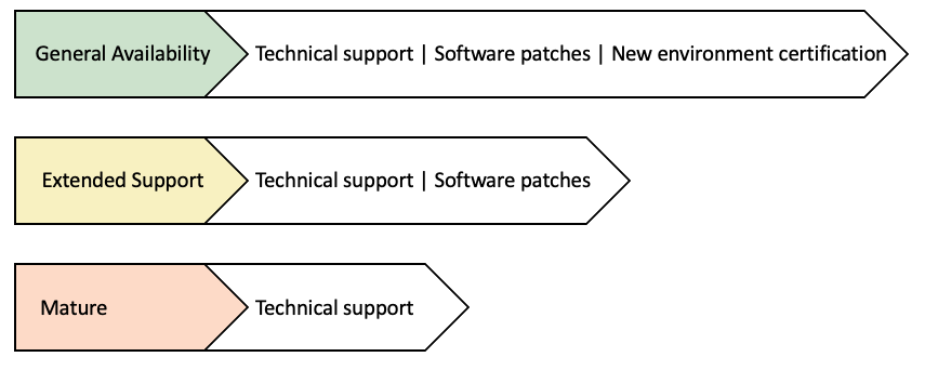
To understand the updates to the ArcGIS Enterprise product lifecycle, it’s first crucial to understand the ArcGIS Enterprise product lifecycle includes both long-term support and short-term support releases. Each release can go through three phases as part of its lifecycle before it’s ultimately retired:
- General Availability. This is the first stage of the product lifecycle, starting with the release of a new version of the software. During this phase, the software is eligible for technical support, software patches, and new environment certification.
New environment certification includes support for new versions of operating systems, DBMS, .NET, Java, etc. after the software has been released. - Extended Support. This phase follows general availability and means the software is eligible for technical support and software patches, but not new environment certification.
- Mature. This is the final phase of the product lifecycle before retirement. In the Mature phase, the software is eligible for technical support but does not include software patches.
When a version of ArcGIS Enterprise is retired, it is no longer supported – meaning no technical support or software patches will be available. It should be noted that not all versions necessarily go through all three phases of the product lifecycle. For example, in the current ArcGIS Enterprise product lifecycle, short-term support releases do not go through the extended support phase.
Long-term support versus short-term support releases
The ArcGIS Enterprise product lifecycle includes both long-term support (LTS) and short-term support (STS) releases. Since ArcGIS Enterprise 11.0, odd numbered minor versions (11.1, 11.3, etc.) have been long-term support releases and even numbered minor versions (11.0, 11.2, etc.) have been short-term support releases. More on this can be found in the, “What’s in a number?” blog.
While both long-term and short-term support releases are both fully certified and offer equivalent quality, you should still consider all aspects of the product lifecycle when planning for, deploying, or upgrading ArcGIS Enterprise.
ArcGIS Enterprise product lifecycle: 10.7 through 11.5
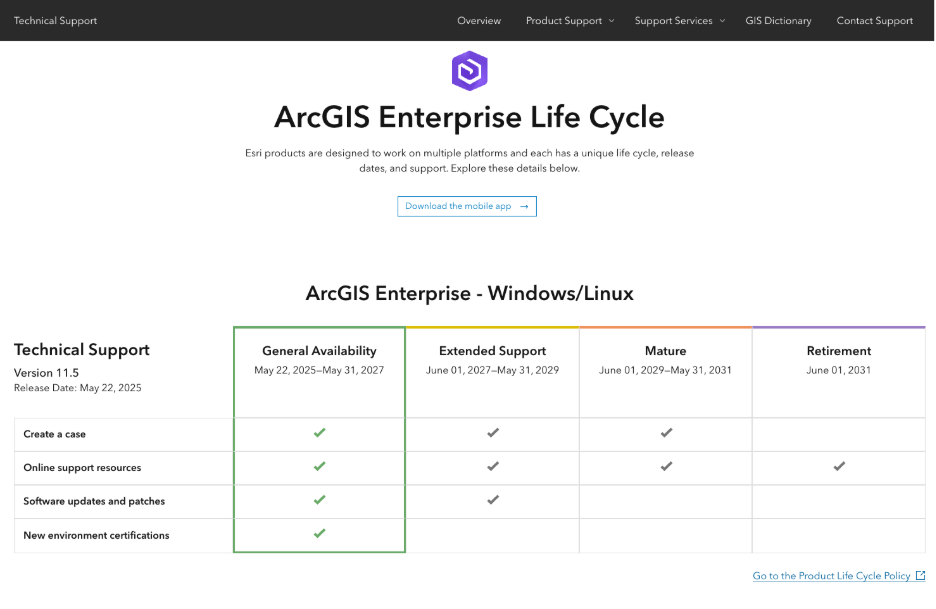
With the background of the ArcGIS Enterprise product lifecycle phases, it’s important to also understand the product lifecycle at ArcGIS Enterprise 11.5 and earlier. It is detailed as follows:
| General Availability | Extended Support | Mature | Retirement | |
| Long-term support (LTS) | 2 years | 2 years | 2 years | After 6 years |
| Short-term support (STS) | 1.5 years | – | 1.5 years | After 3 years |
New ArcGIS Enterprise product lifecycle
With this background, we can finally get into why you’re all here: the new ArcGIS Enterprise product lifecycle. Starting with ArcGIS Enterprise 12.0, the ArcGIS Enterprise product lifecycle will be detailed as follows:
| General Availability | Extended Support | Mature | Retirement | |
| Long-term support (LTS) | Until next LTS release | 3 years | – | After approximately 4 years |
| Short-term support (STS) | Until next release | 6 months | – | After approximately 1 year |
To summarize the changes between the current product lifecycle and new product lifecycle:
- Each long-term support release will be in the General Availability phase until the next long-term support release of ArcGIS Enterprise is made available. In contrast, each short-term support release will only be in the General Availability phase until the very next release of ArcGIS Enterprise, regardless of whether that is a long-term support release or a short-term support release.
- There will no longer be a Mature phase of support.
- There will be a reduced Extended Support phase for short-term support releases.
The new ArcGIS Enterprise product lifecycle presents administrators with no more than two versions of ArcGIS Enterprise in the General Availability phase, simplifying the decision-making process during upgrades or installations. Eliminating the Mature phase ensures all supported version remains eligible for software patches; this is critical for enterprise-ready software such as ArcGIS Enterprise.
Next steps
With this new product lifecycle for ArcGIS Enterprise, it is critical to think about how this may impact your move to ArcGIS Enterprise 12.0. Remember that not only is ArcGIS Enterprise 11.5 a significant release to consider before upgrading to 12.0, its product lifecycle remains unchanged and will be supported by Esri technical support into June 2031. This means that you have plenty of time to plan and execute upgrading to ArcGIS Enterprise 12.x, once your organization is ready.
Esri strives to support our customers in ways that align with their preferred workflows and this change in product lifecycle is designed to do just that. We understand that customers want a simplified experience in choosing which version to upgrade to and full assurance that they will be able to receive critical patches when using support versions of software. If you have any questions, please reach out to your Esri representative. You can also learn more on our Technical Support page.

Commenting is not enabled for this article.