ArcGIS Knowledge is an enterprise capability that brings knowledge graphs and graph analytics to ArcGIS Enterprise, desktop and web applications, and developer tools. Organizations and analysts can leverage knowledge graphs to map and fuse their enterprise data, spatial and nonspatial, together into living networks of insight. These networks power enhanced analytics by mapping relationships, accelerating investigations, drive connected operations by expanding situational context and understanding cascading impacts in real time, and enable AI agentic workflow by grounding AI agents reliably in graph data.
With ArcGIS Enterprise 12.2, ArcGIS Pro 3.8, and ArcGIS AllSource 1.7 releases, ArcGIS Knowledge introduces more intuitive data loading, connected desktop and enterprise workflows, natural-language graph exploration, and expanded web app integration. These capabilities help analysts bring data into knowledge graphs, work with graphs offline, ask questions in plain language, and share graph-derived insights with broader audiences.
Key Highlights Include:
- Visual data loading: A new drag-and-drop Load Data experience in ArcGIS Pro and ArcGIS AllSource makes it easier to import tabular data into knowledge graphs.
- Offline sync: Analysts can take parts of an enterprise knowledge graph offline as a file knowledge graph, work locally, and sync updates back when reconnected.
- Web-based data loading: Load feature services and table items from ArcGIS Enterprise portals directly into knowledge graphs in ArcGIS Knowledge Studio.
- Natural-language queries: The ArcGIS Knowledge Studio assistant (beta) lets users ask questions in plain language and generate reusable graph queries.
- Experience Builder support: Expanded support for knowledge graphs as data sources helps organizations share graph-derived insights through dashboards and applications.
- Additional enhancement: Saved query parameters, persistent root entities, filtered graph exports, faster bulk deletion, ArcPy support, and sync and replica administration.

ArcGIS Knowledge in ArcGIS desktop applications
ArcGIS desktop applications – ArcGIS Pro 3.8 and ArcGIS AllSource 1.7 – introduce a more visual way to load data into knowledge graphs, along with enhancements to file knowledge graphs that make it easier to work between desktop and enterprise environments.
Visual Load Data experience for importing tabular data into a knowledge graph
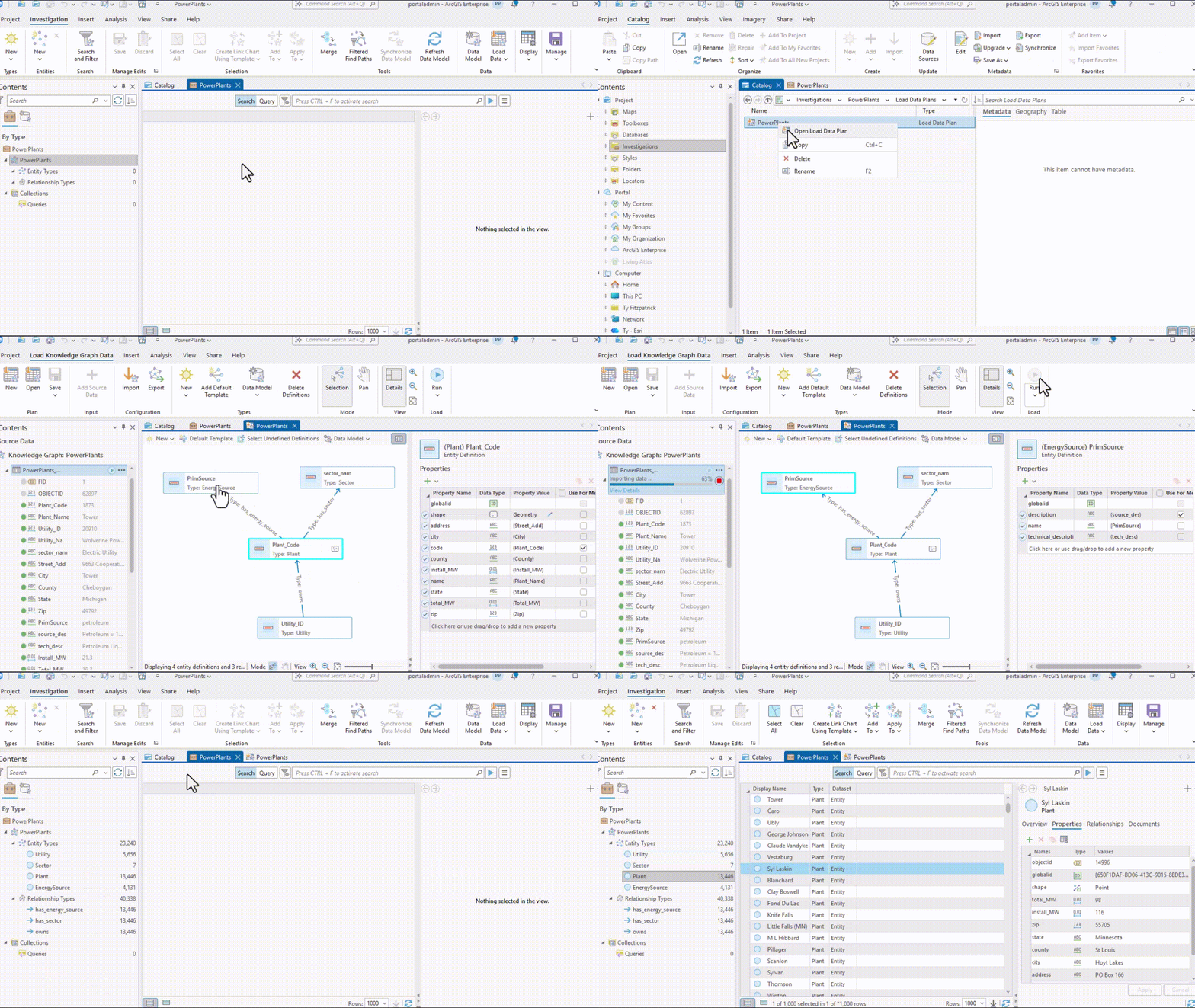
Using the new Load Data experience, analysts can drag-and-drop columns from the csv or tabular data source they want to import into their knowledge graph. A visual diagram of the existing graph data model appears side by side with the table being loaded, making it easier to see how tabular data will be transformed into graph data. Previously, the Load Table experience had no integrated visual data model component and required more analyst imagination or trial and error to see how the load configuration would map to the target data model.
For example, an analyst loading a CSV of utility asset records can drag the “asset_id,” “location,” and “owner” columns and map them to existing entity and relationship types in the knowledge graph, visually confirming the mapping before loading.
The enhanced experience also supports importing existing load table and data-loading configurations, a quick remapping pane if the source schema changes, and the ability to save reusable load plans. The workflow builds on the existing Load Table experience, giving analysts a more intuitive way to configure and repeat data-loading workflows.
Work with knowledge graphs offline and sync back to enterprise
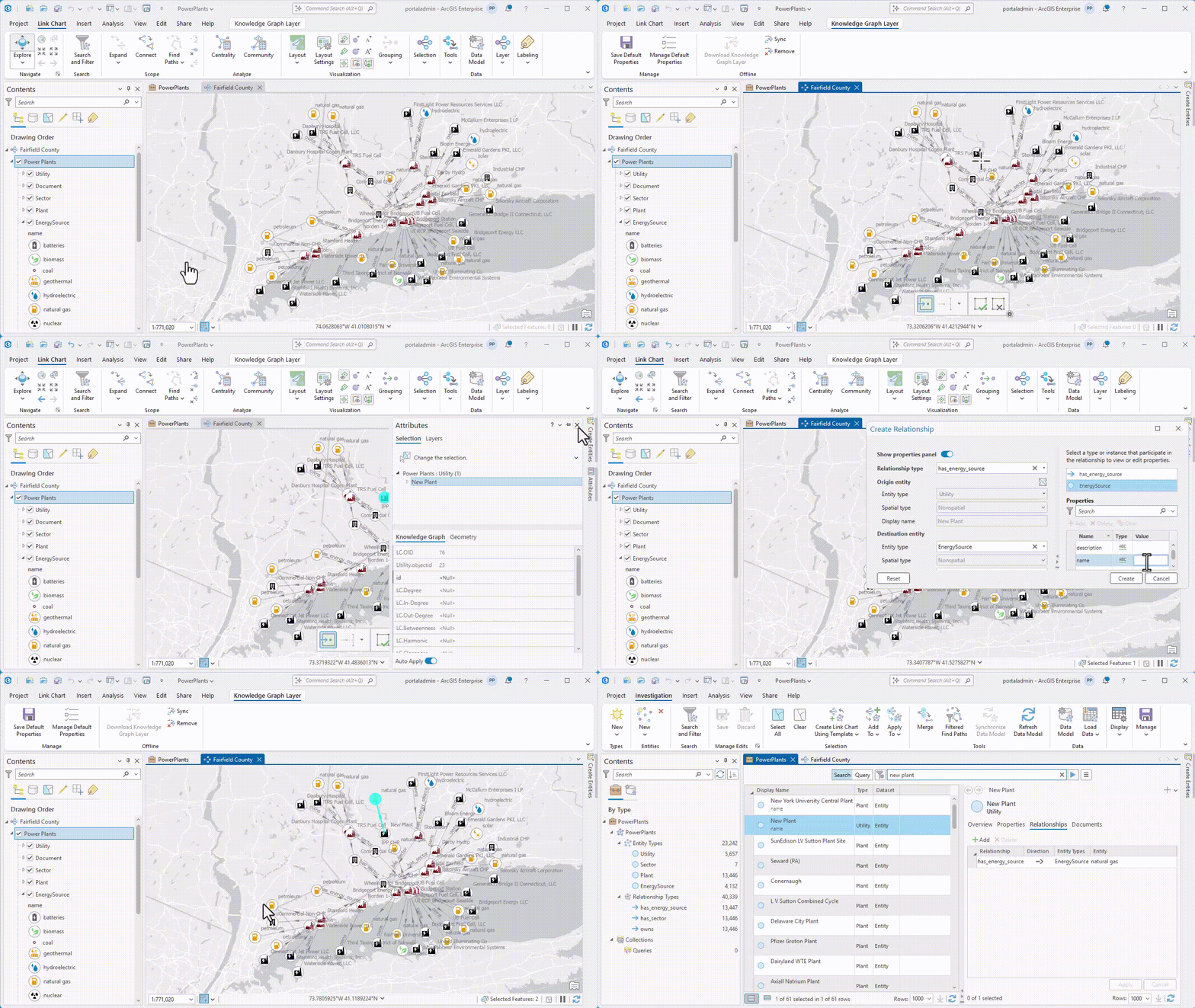
In ArcGIS Pro Advanced and ArcGIS AllSource, analysts can now take enterprise knowledge graphs offline, in part or in whole, work with the graph locally, and sync updates back when reconnected to their ArcGIS Enterprise server.
This functionality works by making a local copy of the enterprise graph as a file knowledge graphs with a single click of the Download button; no specialized scripting required. This ensures analysts can continue to analyze and update their data locally even when in environments disconnected from ArcGIS Enterprise services and then sync local updates back to the parent enterprise knowledge graph when reconnected. It also enables analysts to share local copies of the graph with stakeholders who don’t have access to the enterprise knowledge graph.
For example, analysts moving out to a particular area of interest can each download the portions of relevant to that area or their tasks, still run graph queries, visualize information in new maps and link charts and add information from the field while disconnected to their enterprise system. Then they can sync their data updates back to the shared graph when reconnected.
In order to enable this offline continuity, file knowledge graphs have also received significant enhancements, including improved graph query support and provenance (source-tracking) capabilities previously available only in ArcGIS Enterprise knowledge graphs.
Together, these improvements enable more consistent and synchronized workflows when moving between ArcGIS Enterprise and ArcGIS desktop applications, reducing disruption and improving productivity.
ArcGIS Knowledge Studio
ArcGIS Knowledge Studio adds new ways to bring information into a knowledge graph and explore connected data directly from the web. A new visual data-loading experience lets users import portal items into their graphs from their browser, while the Knowledge Studio assistant (beta) brings the power of large language models to graph exploration.
Load data into a knowledge graph from the web
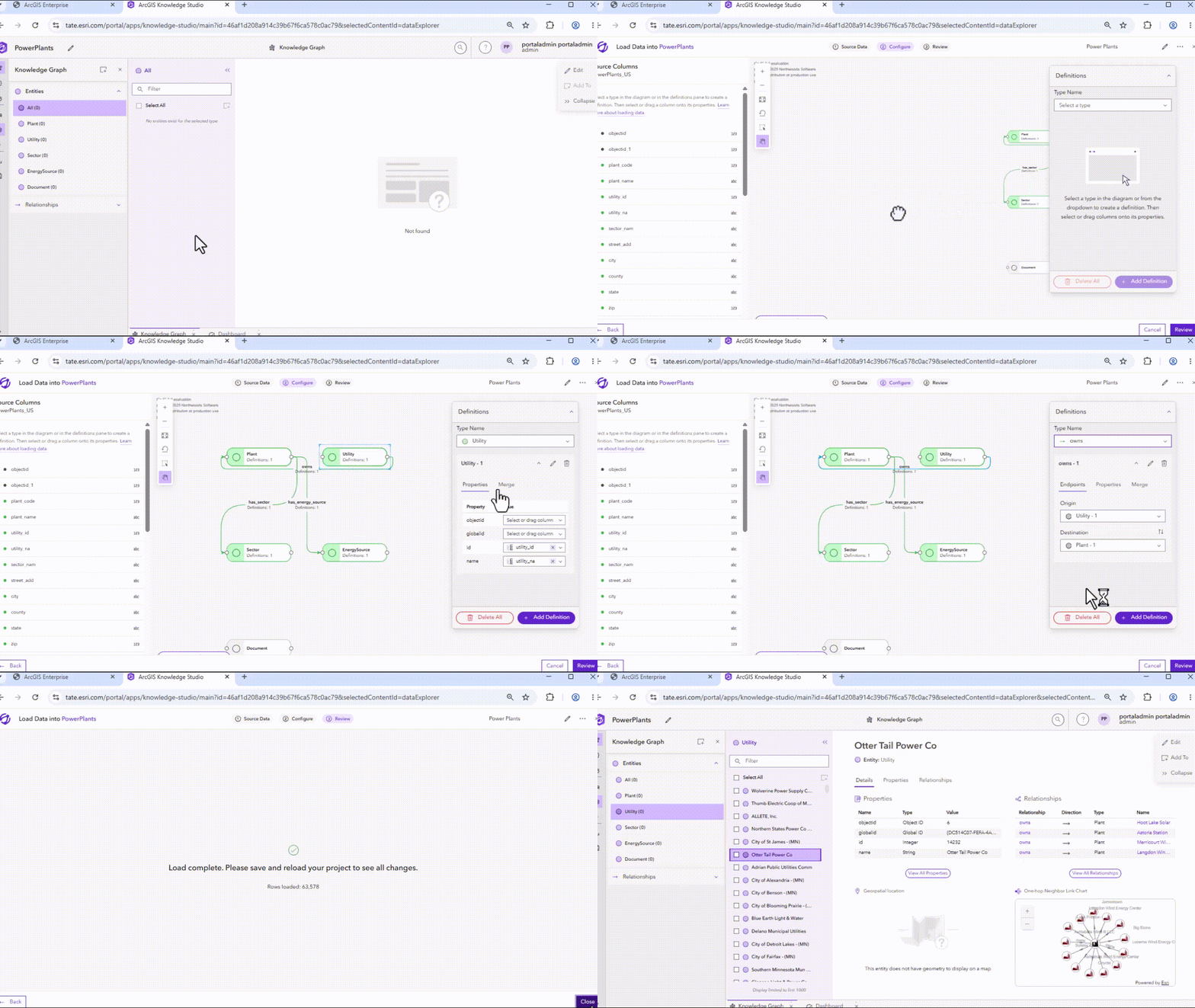
For analysts who primarily work in web applications, ArcGIS Knowledge Studio introduces a new way to load data in bulk directly into a knowledge graph.
ArcGIS Knowledge Studio, a web-based application, introduces a new visual data-loading experience that allows users to load feature services and table items from their ArcGIS Enterprise portals directly into the active project’s knowledge graph. Users can map source fields to graph entities and relationships through an intuitive interface and create reusable configurations for recurring workflows.
For some users, this feature removes a key dependency on desktop applications and tools to accomplish common, repeat data-ingestion tasks.
Ask questions in natural language with the Knowledge Studio assistant (beta)
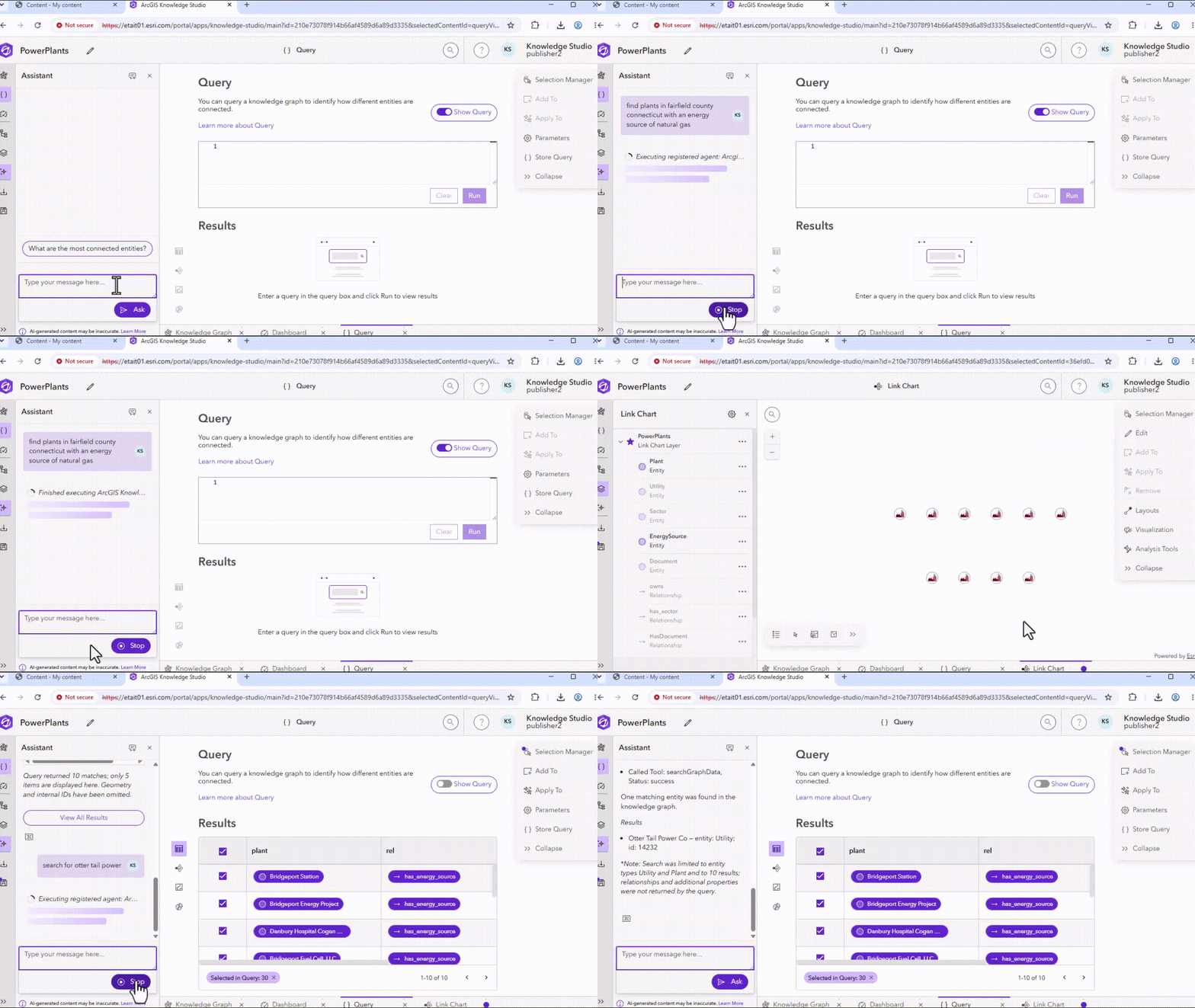
Ever stared at a blank query window, knowing the question to ask, but not quite sure how to express it in openCypher, the graph query language? The new ArcGIS Knowledge Studio assistant in beta can help with that.
The ArcGIS Knowledge Studio assistant (beta) allows users to ask exploratory questions in natural language to get immediate answers from their knowledge graph, as well as generate graph queries analysts can save for reuse. Users can streamline workflows, find insights faster, and create queries with less specialized query language expertise, lowering barriers to adoption and helping more analysts leverage graph analytics successfully.
For example, analysts can ask the assistant, “Which parcels are linked by one or more owners?” or “What customers are indirectly dependent on assets within a given location?”, then save the generated queries to monitor similar patterns over time or apply the same analysis to new investigations.
The experience mirrors the ArcGIS Pro assistant, which has been available as a beta capability for several releases.
ArcGIS Knowledge in Experience Builder
Bring knowledge graph insights into Experience Builder
The most powerful insights only matter if they reach the people who can act on them. This release takes a step toward closing that gap.
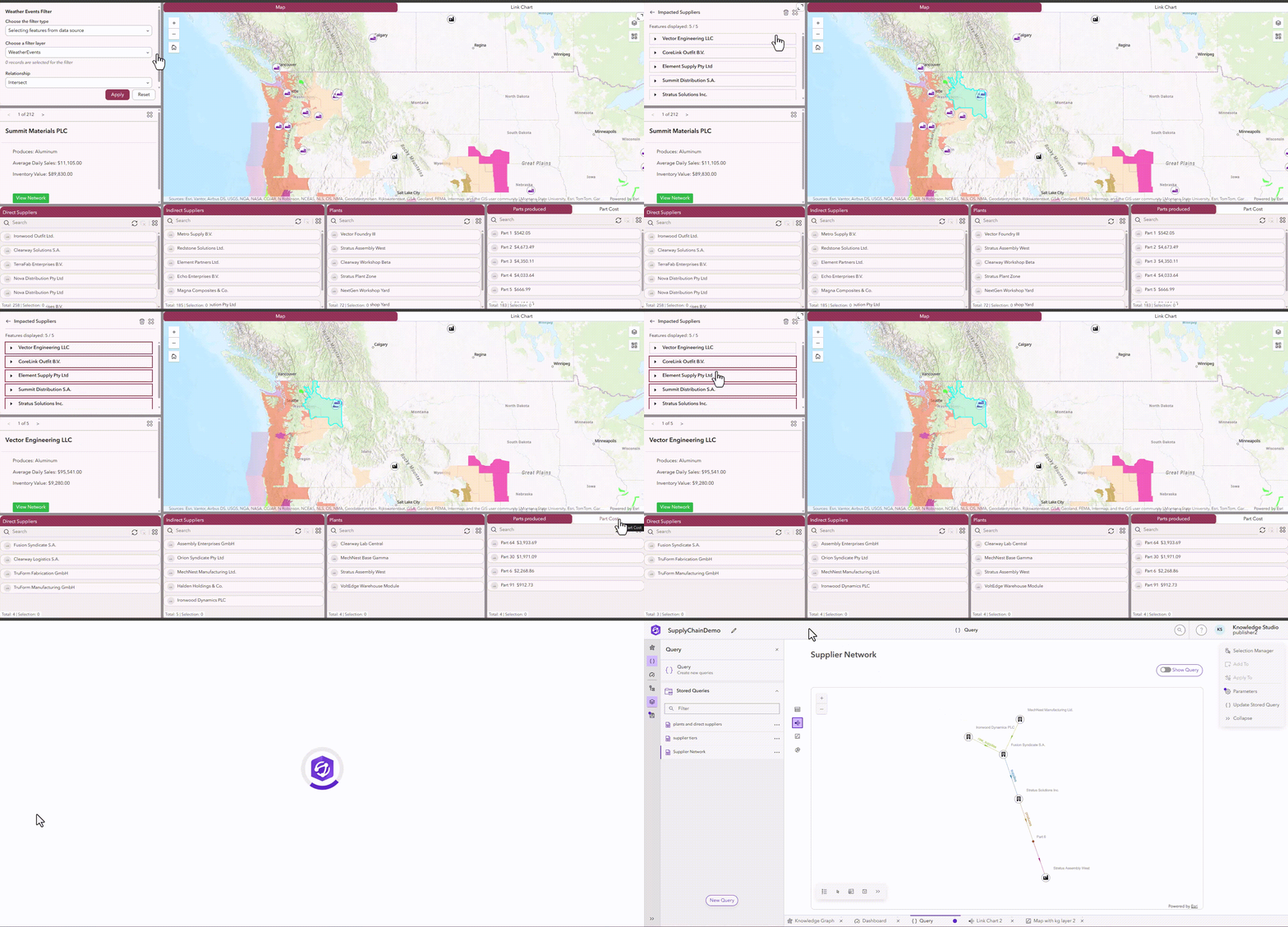
ArcGIS Experience Builder now offers expanded support for knowledge graphs as data sources, including support within ArcGIS Enterprise environments. This extends the ability to operationalize knowledge graph insights across an organization and expose graph-derived information to broader operational audiences through applications.
Analysts can bring graph data through graph queries in Arcade expressions directly into Experience Builder as a data source. This opens up flexibility in how users present data from the graph, using out-of-the-box elements like the spatial query widget, passing parameters between widgets, and building custom workflows that support targeted use cases for different stakeholders.
For example, an analyst can build an Experience Builder app that connects utility assets with inspection findings, work orders, and equipment manufacturers in the knowledge graph, with widgets that let asset managers filter by equipment model, condition, or service area. An asset manager can then use the app to identify equipment with recurring maintenance issues, locate other assets of the same model, and prioritize inspections or replacements.
Additional Enhancement
This release of ArcGIS Knowledge includes additional improvements across desktop and enterprise applications to streamline and enhance advanced analysis, data management, and solution development workflows:
- Change display names: Change and save which property displays to represent each Entity or Relationships type within the navigation and search results in your Knowledge Studio project.
- Saved query parameters: Bind parameters to saved queries in ArcGIS Pro and AllSource.
- Persistent root entities: Root entities used in link chart visualizations can persist across desktop sessions and when sharing a link chart.
- Filtered graph exports: Filter exported graph content by types and WHERE clauses to create more focused knowledge graph exports.
- Faster bulk deletion: Truncate support improves performance when deleting highly connected graph content.
- ArcPy support: arcpy.kg provides Python capabilities for working with knowledge graph data models, searches, and queries.
- Sync and replica administration: ArcGIS API for Python adds capabilities for administering synchronization and replica services.
FAQ
Which ArcGIS products are included in the ArcGIS Knowledge 12.2 release?
The release includes updates to File Knowledge Graphs in ArcGIS Pro 3.8 and ArcGIS AllSource 1.7, ArcGIS Knowledge Server for ArcGIS Enterprise 12.2, and ArcGIS Knowledge Studio for ArcGIS Enterprise 12.2.
Can I load tabular data in ArcGIS Knowledge Studio?
Yes, a new Load Data experience is available in both ArcGIS Knowledge Studio and in ArcGIS Pro and ArcGIS AllSource this release. In Knowledge Studio, users can load feature services and table items from their ArcGIS Enterprise portals only. In ArcGIS Pro and ArcGIS AllSource, users can import any supported tabular data formats into either enterprise or file knowledge graphs using a similar visual, drag-and-drop workflow.
Can I share knowledge graph insights with a broader audience?
ArcGIS Experience Builder now offers expanded support for knowledge graphs as data sources, within ArcGIS Online and Enterprise environments. Analysts can expose graph data and graph-derived insights through using Arcade expressions or Maps to create dashboards and applications tailored to specific workflows for other operational users. This expands previous support for ArcGIS Knowledge graphs within ArcGIS Dashboards, ArcGIS Instant Apps and Map Viewer.
Is the Knowledge Studio assistant available in ArcGIS Pro?
An AI assistant to help users explore and query knowledge graphs has been available as a beta capability in ArcGIS Pro for several releases. With ArcGIS Knowledge 12.2, a similar experience is now available in ArcGIS Knowledge Studio as the Knowledge Studio Assistant (beta), allowing users to ask questions in natural language and generate reusable graph queries from the web.
Can I work with a knowledge graph offline?
Users can take an enterprise knowledge graph offline, in part or in whole, and store them locally as file knowledge graphs with a single click, no specialized scripting required. Updates can be synced back to the parent enterprise knowledge graph when reconnected.
Can I sync my file knowledge graphs back to the Enterprise knowledge graph?
When reconnected to ArcGIS Enterprise services, users can sync local updates from a file knowledge graph back to the parent enterprise knowledge graph, keeping both versions synchronized.
Can I share a knowledge graph with stakeholders who don’t have access to ArcGIS Enterprise?
Users can share replicas of a knowledge graph with stakeholders who don’t have access to the enterprise knowledge graph. File knowledge graphs can be stored and shared locally, making graph data accessible to teams outside the enterprise deployment.
Learn More
ArcGIS Knowledge 12.2 expands how analysts can load, explore, manage, and share connected data across ArcGIS. New data-loading workflows make it easier to bring information into knowledge graphs, file knowledge graph enhancements support connected and disconnected workflows, and the Knowledge Studio assistant provides a new way to explore graph data using natural language.
Explore these new capabilities and find additional ArcGIS Knowledge resources or connect with other users through Esri Community.



Article Discussion: