
Today’s metadata moment of zen is brought to you by the ArcGIS Living Atlas team. In this blog article, you can learn about the latest guidance from September 2026 for your Living Atlas item details and maintenance.
Living Atlas releases two or three updates to its Item Detail Guidance per year, around the same time as ArcGIS Online releases. This guidance shares the best practices and recommendations for content (layers, maps, apps, tools) that their creators share in Living Atlas.
This month, we focus on a setting which reduces latency and maximizes the end user experience for hosted feature layers.
A moment of zen: Set the CDN
Every hosted feature layer has a Cache control setting that is often referred to as a CDN setting. When content is shared with the public, it is cached by a Content Delivery Network (CDN). A CDN can dramatically decrease latency when delivering your content around the globe.
In September 2026, the Living Atlas advisory check for content delivery network (CDN) setting on hosted feature layers was strengthened to become a recommended check. This means that this guidance will be checked and scored. In this case, if you have not set the CDN, you receive a score of 0; if you set the CDN, you receive a score of 2.
Who benefits from this change? The users of your hosted feature layer experience improved load times and an overall better user experience whenever they interact with your layer. Your ArcGIS Online organization account benefits, in that less traffic is coming all the way back to the servers to fetch data, consume disk I/O and bandwidth.
What is a CDN and why do I need to know about it?
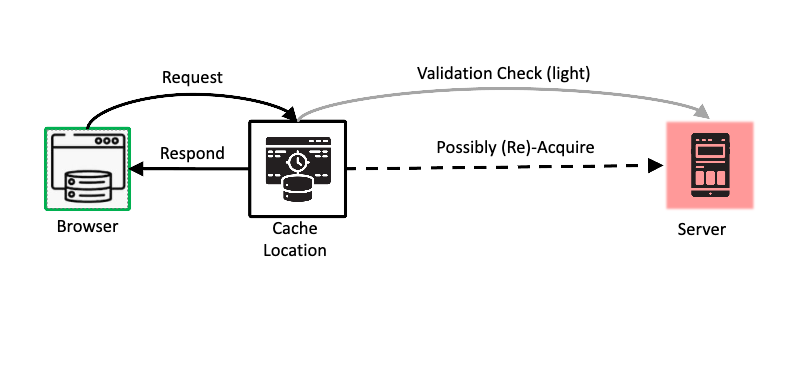
CDN stands for Content Delivery Network, which is a system that caches your feature layer on servers that are closer to the user. Using a CDN enhances performance and scalability by delivering content from servers geographically closer to users, significantly reducing latency.
How do you set the CDN for an item?
To set the CDN, open your item for editing. Click the Settings tab and scroll down to the Cache control setting. Your item must be shared to the public but with editing disabled.
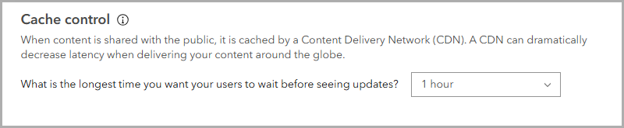
If the data does not change many times each day, it is recommended that you set the cache duration to the maximum (one hour) for best performance.
For more information, see Control cache age.
Another option
You can also go to https://livingatlas.arcgis.com, log in, and go to the “Contribute” tab and hit “Evaluate Your Content” button to open the “Evaluate and Nominate” page. Search for your item and click on its title to see how your item compares to all of the Living Atlas guidance, including the CDN setting. For your hosted feature layer items, you can update their CDN settings and other settings from this page. The Living Atlas guidance on what is needed is provided on the page.

Administrator’s moment of zen: Manage multiple items with ArcGIS Online Notebooks
If one layer needs a change, chances are good that there are other layers in your organization that would benefit from that same change. An administrator often is the person who detects and addresses such changes.
If you have scores of items needing a CDN change, you have a choice:
- open each item an fix each one, taking less than 1 minute per item, or
- contact your administrator and ask for help.
Administrators often already have tools, scripts or notebooks to assist when many items require a change.
ArcGIS Online Notebooks is a web-based interface with the power to automate tasks and perform analysis. For example, you can create a notebook for content management, such as checking CDN settings, checking for broken URLs, and validating item metadata.
For more information, see Get started with notebooks.
Resources
To continue your Living Atlas journey, visit the following resources:


Article Discussion: