How a Standalone ArcGIS Enterprise + ArcGIS Mission Keep Agencies in Sync
From parades to marathons, to disasters, or dignitary visits – multi‑agency events can unravel at the seams between jurisdictions, agencies, and contractors, creating holes or gaps in critical information. Radios amplify noise, normal chat threads fragment key pieces of information or remove context, and the full picture gets cloudy… sometimes almost as soon as an operation commences.
The fix isn’t another app. Consider simplifying through a shared environment that every partner already trusts. A host agency can deploy ArcGIS Enterprise to establish this dedicated, shared environment. This proven deployment pattern is well-suited for external collaboration and, when equipped with ArcGIS Mission, it provides integrated command and control capabilities for multi-agency field operations. The host agency invites partners to work in this platform without potentially compromising internal networks or sensitive data. Mobile personnel connect, enabling all parties to develop unified real-time situational awareness throughout events, while still adhering to the host organization’s security policies.
Consider it a secure collaboration zone.
Capabilities and Benefits of a Standalone Collaboration Zone
The collaboration zone provides shared access to event common operating pictures (COPs), location awareness for mobile assets and personnel, field reporting, tasking, chat, and seamless maps and data updates, as needed.
Because the collaboration zone’s environment may be deployed either as a standalone environment or connected to your core environment, it will be configured to align with your security, data sharing, and editing requirements.
Here is what users can do and why it matters.
What Users Can Do |
Why It Matters |
| See one live map | Everyone stays aligned as conditions and plans change for an event or multiple events |
| Direct and monitor teams, tasks, and field observations, in real-time | Information flows seamlessly between field and command elements, facilitating true shared situational awareness |
| Capture every decision automatically | All command and mobile activities are time and location-enabled for analysis, review, and compliance |
| Onboard and remove partners in minutes | Pre‑approved accounts enable efficient administration of partner login credentials and access permissions |
What it Looks Like
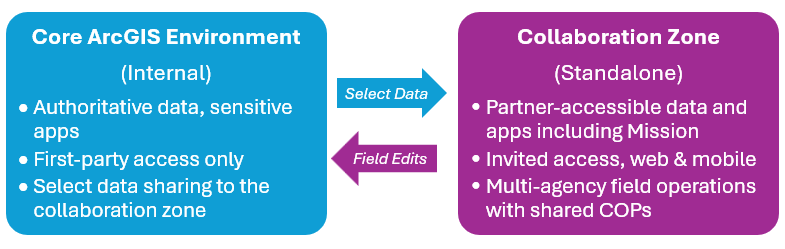
The solution is simple: an instance of ArcGIS Enterprise is made available to non-organization partners and is configured to share data, maps, and apps. The hosting organization governs what “hydrates” this shared environment and associated access permissions.
In ArcGIS, any environment can be hydrated with data from another ArcGIS environment. This data hydration is ideal for keeping organizations internally and externally aligned on foundational or other critical data. Options include automated and manual 1-way push processes between environments and the enablement of dynamic bidirectional read & write capabilities on select data. Field users leverage this data for decision-making and can send updates via mobile data capture workflows.
Consider this high-level conceptual diagram for sharing data with the secure collaboration zone from an internal core ArcGIS system:
The result:
- One Environment for Partners. A collaboration zone environment – outside your core internal environment but still under your governance – that keeps everyone on the same live map, sparing partners the need to juggle separate systems or documents, screenshots, or other information to stay aligned with the host organization.
- Command That Matches Field Tempo. Real-time field personnel locations, observations, tasks, and resource assignments keep teams aligned as command operations or field conditions evolve.
- A Clean After-Action Trail. Messages, photos, geography covered, task outcomes, and collected information stay tied to place and time in one system to inform lessons learned, compliance, and disclosure.
Why ArcGIS Mission Sits at the Center of the Collaboration Zone
ArcGIS Mission combines what multiple applications or group text messaging threads and email chains can’t: real geo-enabled command and control. It’s a single integrated system – providing tasking with accountability, live tracks and geofence alerts, team chat and map markups, file sharing, and an automatic record for debriefs and compliance. Although ArcGIS has many of these capabilities, ArcGIS Mission ties them together in an integrated place. A further benefit is that ArcGIS Mission seamlessly supports multiple ongoing missions at one time.
Best Practices for this Pattern – from Governance to Performance at Scale
Governance Considerations
- Keep Separate Environments: host interagency collaboration in a separate, standalone ArcGIS Enterprise environment, not your internal core environment.
- Right Access for the Right People: use partner identity (SAML) where possible to facilitate access, otherwise issue time-bound built-in accounts in the collaboration zone. Manage permissions through groups and roles aligned to operational responsibilities – so partners see exactly what they need – and nothing they don’t.
- ArcGIS Mission for Command & Control: Create and execute plans for daily operations, special events, and incident response missions with operational security – add and remove partners on the fly as required.
- Share select data between the Core Environment and Collaboration Zone: When sharing authoritative core data with your partners, share feature layer views to partner groups in the collaboration zone via one-way or read & write synchronization as required. Restrict sensitive fields and geographies; limit editing rights to what an operation requires.
Performance at Scale – Architect the Collaboration Zone Environment for Reliability
- Prioritize Real-Time and Mission Services: Expect spikes and plan system headroom for the maximum number of concurrent users.
- Optimize Maps for Mobile Users: Only include data needed for field operations and cache heavy base/reference layers for faster draw times.
- Monitor the Vital Signs: Track system throughput, errors, and latency; alert on system-critical KPIs before users encounter slowdown.
Start the Conversation
We recommend bringing together your command and operations leaders along with your GIS team to discuss establishing a standalone collaboration zone for improving the coordination of interagency activities. Additionally, we recommend enabling the collaboration zone with the integrated command and control capabilities available in ArcGIS Mission. With ArcGIS Mission, organizations can plan, execute, and review field activities in one place. This provides participating parties with shared, real-time situational awareness throughout events by integrating mobile user location awareness, chats, tasks, and reports, throughout command and in the field. If you’re already equipped, identify a pilot event, define success measures, and conduct a live test.
Don’t go it alone
Esri can help you test and evaluate any approach you wish to take. Not only is establishing a standalone ArcGIS Enterprise a proven pattern with real-world organizations, Esri has Professional Services and the Esri Partner Network to help you design, implement, and scale it to your use case. Contact your Esri account manager, advisor, project manager, or the authors of this blog, to learn more or discuss next steps.



Article Discussion: