ArcGIS Pro 3.7 continues to strengthen 3D Analyst as a core capability for surface modeling, point cloud analysis, and 3D data production. This release introduces a new geoprocessing tool, meaningful enhancements across existing tools, expanded SDK support, and continued performance improvements especially for workflows built around compressed lidar.
How to get it
ArcGIS Pro 3.7 became available on May 14, 2026.
For a high level summary of the changes that have been made for this release, have a look at the What’s New and Improved in ArcGIS Pro (May 2026) blog post.
New Geoprocessing Tools
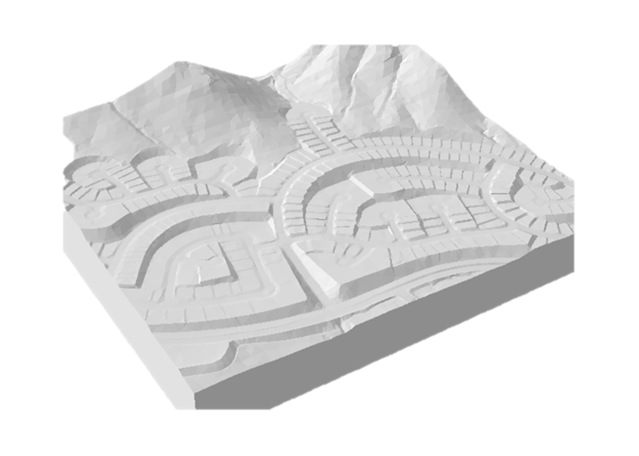
TIN To Multipatch
A new geoprocessing tool, TIN To Multipatch, makes it easier to convert triangulated irregular networks (TINs) into multipatch features. This supports workflows where surface-based models need to be visualized, edited, or shared as true 3D geometry whether for design review, visualization, or downstream 3D analysis.
Geoprocessing Tool Enhancements
Several existing tools have been enhanced to improve performance, output, and data fidelity:
- Stack Profile
Stack Profile now supports chart output, making it easier to visualize vertical distributions and profiles directly as part of analysis workflows.
- Extract LOD2 Buildings
Performance has been improved through parallel processing, significantly reducing processing time for large building datasets.
- Interpolate Shape
The tool now preserves M-values, ensuring measure-aware geometries maintain their linear referencing information through interpolation.
- Point File Information
When working with LAZ-based inputs, the tool now retrieves the spatial reference directly from the compressed files and uses it to set the default output spatial reference reducing manual setup and improving consistency.
Other 3D and Lidar Enhancements
Beyond geoprocessing, ArcGIS Pro 3.7 includes several quality-of-life and performance improvements for lidar and 3D workflows:
- Custom LAS Classification Labels and Colors
LAS custom classification codes can now be assigned labels and colors, improving interpretability and visualization of classified point clouds.
- Improved Performance with LAZ
Performance improvements leverage the lazx sidecar file, which stores statistics and spatial indexing, along with multi-threaded decompression to speed access and interaction with large compressed datasets.
- LAS Point Selection Visualization
Users can now specify a selection color when selecting LAS points, making interactive editing and review workflows clearer in dense point clouds.
SDK Enhancements
Developers building custom tools and workflows on top of 3D Analyst benefit from expanded SDK capabilities:
- Interpolation Methods for TIN and Terrain Datasets
New interpolation methods are now exposed, enabling more control when working with surfaces programmatically.
- arcpy.ListLasDatasetFiles()
A new ArcPy function makes it easier to enumerate files referenced by a LAS Dataset, supporting automation, validation, and management workflows.


Article Discussion: