Once upon a time, Hannah shared a blog about working with project favorites: ArcGIS Pro tips: This might just be your favorite tip ever. While Favorites have long been a simple but powerful way to quickly access the folders, databases, and servers you use most, with ArcGIS Pro 3.7 (May 2026), we’ve taken this concept much further, especially for GIS administrators who are responsible for setting up consistent, reliable access to organizational data.
A Quick Refresher on Favorites
Favorites in ArcGIS Pro allow users to bookmark frequently used items like folders, databases, servers, toolboxes, custom styles and more, so they’re always easy to find. These are saved in a favorites file, which acts as a reference to those items.
Historically, each user has managed their own favorites in ArcGIS Pro. This provides flexibility, but with each user curating their own list, access to key organizational data can vary from user to user. Administrators have had to rely on manual setup or homegrown documentation to provide a consistent set of project items to users across their organizations.
ArcGIS Pro 3.7 introduces two key improvements that make project favorites more powerful, both for individual end users as well as for administrators: 1. setting a custom favorites file, and 2. preparing administrator-managed system favorites.
What’s New with Favorites in ArcGIS Pro 3.7
Export Favorites
Users can now export their favorites collection as a JSON file. This simple addition opens up some new opportunities like allowing you to share curated sets of connections with colleagues. It also makes it easy to have multiple favorites files and switch the set of My Favorites when you start working on a different project.
More importantly, exporting favorites lays the foundation for the two key improvements I mentioned above—setting a custom favorites file and preparing administrator-managed system favorites.
Custom Favorites File
A new Favorites section has been added to the catalog browsing options. This is where you can choose a custom favorites file.
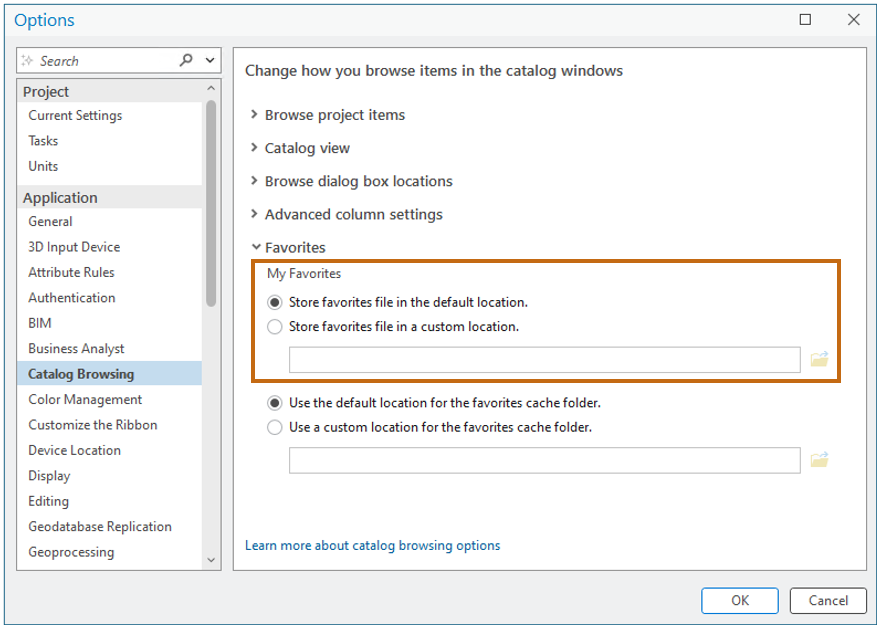
This increases flexibility for both users and administrators. A practical application for using this option is for organizations where roaming profiles are not supported on the network. You can store your Favorites.json file in a location accessible across the network, and access the same custom My Favorites list from any computer. When you update the favorites file, you can immediately see the changes on another machine by pressing F5 to refresh the My Favorites list.
System Favorites
The biggest enhancement to favorites in ArcGIS Pro 3.7 is the introduction of system favorites—a centrally managed set of favorites defined by a GIS administrator. GIS administrators can now create system favorites.
Why System Favorites Matter for GIS Administrators
The help provides step-by-step instructions for creating and distributing a collection of favorites so I won’t repeat those here. But I do want to highlight the importance of leveraging system favorites.
- Centralized access to authoritative data: Automatically deliver your organization’s resources to your end users. Every user sees the same authoritative data sources with no setup required. Investing the setup time upfront saves countless hours of searching and frustration for your users.
- Automatic deployment at first launch: System favorites can be deployed via silent install meaning they are available immediately when users first open ArcGIS Pro. This reduces onboarding friction and IT overhead.
- Maintainable over time: Administrators can update the system favorites file at any time without logging into users’ machines and there is no need to distribute connection files manually. Any changes are reflected when users refresh. Centralized GIS resource governance minimizes operational effort.
- Standardization without losing flexibility: System favorites don’t replace personal favorites—they complement them. Users still maintain their own My Favorites. It’s the best of both worlds.
Refresh Your Favorites Today!
ArcGIS Pro 3.7 represents an important evolution in how favorites work. Users benefit from improved portability and flexibility. Administrators now have an easier way to standardize and scale environments.
System favorites address a long-standing challenge—how do you ensure everyone in your organization has easy, consistent access to the right data without manual setup?
Now, the answer is simple: configure it once, deploy it centrally, and keep it up to date.
If you haven’t revisited favorites recently, now is a great time. What started as a personal productivity feature has become a key mechanism for enterprise configuration and data access in ArcGIS Pro. Consider exporting a curated “gold standard” set of connections from your own environment and using it as the starting point for your organization’s system favorites.
All Adobe Stock images are © 2026 Adobe Stock. All rights reserved.


Commenting is not enabled for this article.