ArcGIS Pro 3.7 is planned to be released in May and to make sure you are ready to roll as soon as it is available, we wanted to share this information about the move to .NET 10. If you aren’t into explanations and are just looking for the bottom-line up front, here you go: make sure you have Microsoft .NET Desktop Runtime 10.x.x (x64) installed on machines before installing ArcGIS Pro 3.7. Staying current with the latest Long Term Support version of .NET ensures the most up-to-date security and performance improvements. Other than that, there are no breaking changes, ArcGIS Pro 3.7 remains compatible with all other ArcGIS Pro 3.x versions, and existing 3.x SDK extensions should continue to work.
Background
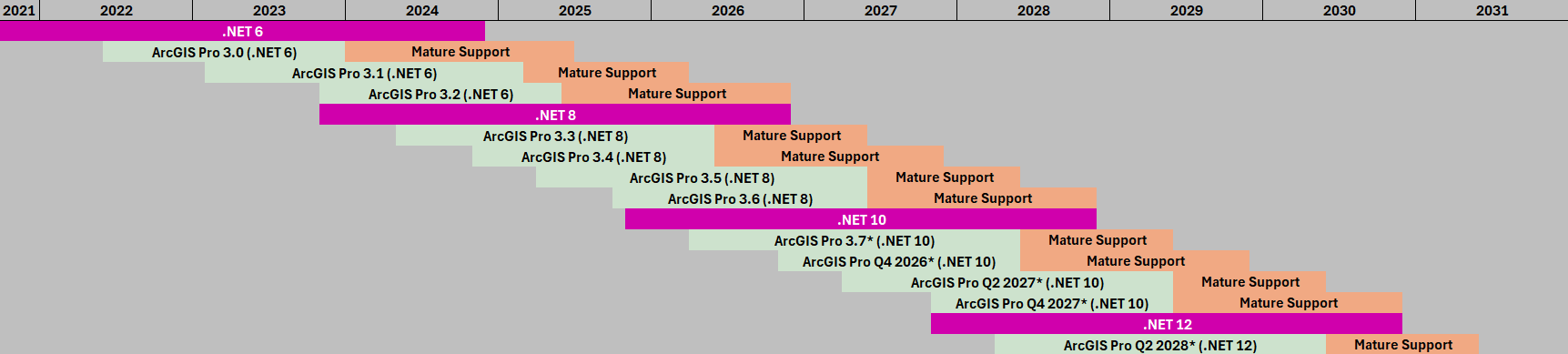
ArcGIS Pro and .NET Life Cycle Overlap and Release Cadence discusses the background of unifying .NET Framework with .NET Core and how ArcGIS Pro versions are related to .NET Long Term Support releases.
Major vs. minor releases
In June 2022 we released ArcGIS Pro 3.0, a major release that was driven by switching to the latest LTS release at the time of .NET 6. Because this was the first version of ArcGIS Pro to use the unified .NET, there were changes in the .NET code that would break compatibility with previous versions of ArcGIS Pro (which were built on .NET Framework). Since we were already committed to a major release, we made additional functional, performance and quality improvements that had not been possible without breaking changes, and refactored the ArcGIS Pro APIs for improved consistency, quality and ease of use.
The Releases and patches help page covers how the Major.minor.patch versions work with ArcGIS Pro.
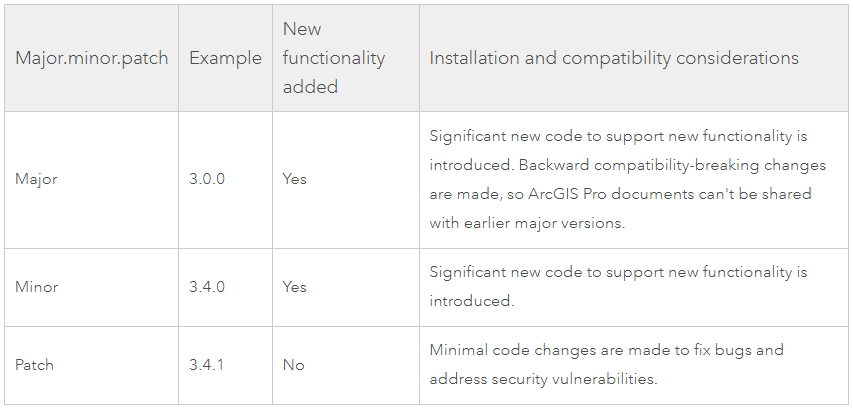
Because the ArcGIS Pro 3.0 major release was correlated with the .NET 6 update, one might assume that every update to a new version of .NET would require a major ArcGIS Pro release. However, that is not the case. ArcGIS Pro 3.3 (May 2024) was a minor release with great new functionality, but no breaking changes. And the same goes for ArcGIS Pro 3.7 (May 2026). It will contain new functionality, and documents saved in ArcGIS Pro 3.7 will continue to be compatible with all ArcGIS Pro 3.x versions and existing 3.x SDK extensions (add-ins, configurations, plug-in data sources, and CoreHost applications) should continue to work.
Install .NET 10 to be ready for ArcGIS Pro 3.7
You don’t need to wait until May to install .NET 10. If you have admin privileges on your machine, you can do this on your own. However, we understand that many users are not able to install anything on a work machine, so consider this a friendly heads up that you can include with a service desk request to install the new .NET.
If you can do it yourself, go here https://dotnet.microsoft.com/en-us/download/dotnet/10.0
The Download .NET 10.0 site can feel daunting at first, but don’t be afraid. You just need to find the .NET Desktop Runtime 10.x.x section and click the x64 option under Installers.
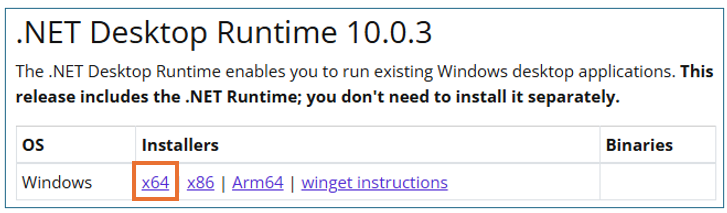
I clocked how long it took from the time I clicked x64 until I got the ‘Installation Successfully Completed’ message and it took less than 30 seconds (results may vary depending on internet speed).
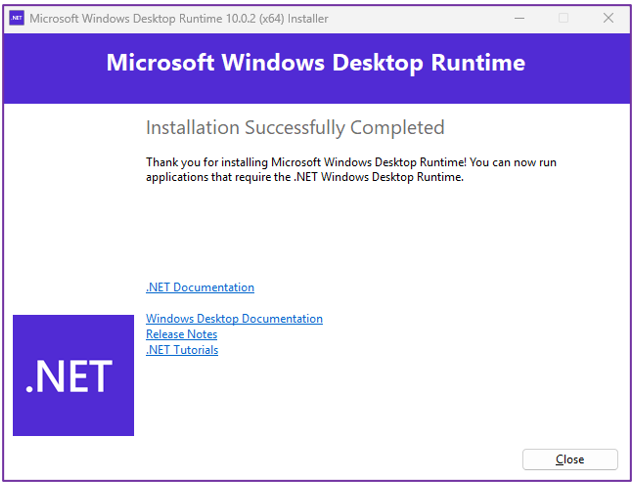
Once that is done, you’ll be ready to install ArcGIS Pro 3.7 when it becomes available.
For Developers
- Compatibility: 3.7 remains a minor release (3.x). Most existing add-ins should continue to function without requiring an immediate re-write. Read more here: Migrating to .NET 10 with ArcGIS Pro 3.7
- External Libraries: While the Pro SDK itself remains compatible, you should audit your third-party and external libraries for any breaking changes introduced in .NET 10. Dependencies involving cryptography, JSON serialization, or specific globalization APIs may require updates or recompilation to target the new runtime.
- Tooling Updates: Developing for 3.7 will require Visual Studio 2026 version 18.3.2 or later.
Summary
ArcGIS Pro 3.7 is a minor release, expected to be available in May 2026, with many new features and is compatible with all ArcGIS Pro 3.x versions. Microsoft .NET Desktop Runtime 10.x.x (x64) is a prerequisite to install ArcGIS Pro 3.7 so having it installed before attempting to install ArcGIS Pro 3.7 will ensure the best experience.
All Adobe Stock images are © 2026 Adobe Stock. All rights reserved.

Article Discussion: