Organizations across industries are modernizing how they deliver ArcGIS. As ArcGIS Pro continues to evolve, many teams are turning to Microsoft Azure to balance performance, scalability, and operational efficiency.
Running ArcGIS Pro in Azure enables GPU-accelerated performance while simplifying IT management—whether through virtual machines, pooled desktops, or fully managed Cloud PCs. The right deployment model can reduce costs, accelerate onboarding, and improve collaboration for distributed GIS teams.
Choosing the Right Azure Platform
Selecting the right Azure service for ArcGIS Pro depends on three core factors:
- Data governance: Where your geodatabases and imagery are stored.
- User concurrency: How many analysts need simultaneous access.
- Operational ownership: Who manages patching, scaling, and updates.
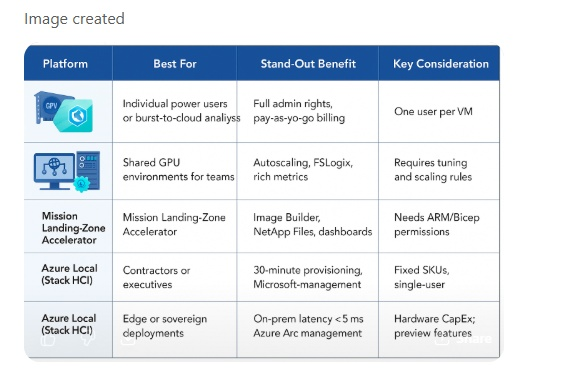
GPU-Enabled Azure VMs: Flexibility and Control
When GIS professionals need workstation-class performance without waiting for IT to deploy a full virtual desktop farm, GPU-enabled Azure VMs offer immediate power and control.
Users can install custom toolboxes, capture golden images, and pause billing when VMs are stopped—ideal for project-based analysis, development environments, or short-term sprints.
These VMs provide the most flexibility for ArcGIS Pro users who require full administrative access, beta testing environments, or custom configurations that aren’t practical in shared VDI pools. With local admin rights, teams can quickly stand up a known-good image, test add-ins or scripts, and snapshot their environment for reuse later.
Recommended SKUs: NVadsA10 v5 | NCasT4_v3 | NVv4
Single-Session Sizing (One Analyst per VM)
Best for dedicated performance, personal host pools, or standalone workstations.
| User Type | Recommended Sizes |
| Light (View-only) | NV4as_v4 → NV8as_v4 |
| Medium (Edit / 2D–3D) | NV16as_v4 → NV6ads_A10_v5 |
| Heavy (3D Analysis) | NV18ads_A10_v5 → NC16as_T4_v3 |
Multi-Session Sizing (Pooled or Shared Hosts)
For teams using Azure Virtual Desktop (AVD) multi-session hosts or RDSH-based environments, multiple users can share a single GPU VM.
While performance per user is lower than dedicated setups, this model significantly reduces cost per seat and simplifies management.
| User Type | Recommended VM Sizes | Max Users per VM |
| Light (Viewing) | NV18ads_A10_v5 | Up to 6 |
| Medium (Editing) | NC16as_T4_v3 | Up to 4 |
| Heavy (Visualizing / Analysis) | NV32as_v4 | Up to 3 |
Deployment Steps
- Create a VM in a region with available NV-series capacity and choose the ArcGIS Pro 3.x image.
- Select SKU: NVadsA10, NCasT4_v3, or NVv4, and pair with Azure NetApp Files for high-performance, low-latency storage that supports ArcGIS Pro projects, geodatabases, and user profiles.
- Enable Accelerated Networking and add the NVIDIA Driver extension.
- Configure Licensing (Named User, Single Use, or Concurrent).
- Benchmark with PAT (Performance Assessment Tool) to validate frame rate, latency, and GPU utilization.
Why You Need a GPU for ArcGIS Pro — and When to Choose GPU-Enabled Azure VMs
ArcGIS Pro is a modern, graphics-intensive application designed to fully leverage GPU acceleration. A dedicated GPU is not optional—it’s a core system requirement for smooth map rendering, 3D visualization, and responsive analysis workflows. Without a GPU, users will experience reduced performance, lag, or instability, especially in 3D scenes or large projects.
In Microsoft Azure, GPU-enabled virtual machines provide the compute power ArcGIS Pro needs to perform like a high-end workstation—while adding the flexibility of the cloud.
Choose GPU-enabled Azure VMs when:
- You need dedicated GPU resources to meet ArcGIS Pro’s minimum performance requirements.
- You want full administrative control to install add-ins, Python environments, or test non-standard configurations.
- You require on-demand scalability for high-intensity 2D or 3D workflows.
- You prefer pay-as-you-go billing, pausing costs when VMs are deallocated.
- You’re piloting ArcGIS Pro workloads before scaling into Azure Virtual Desktop or Windows 365.
GPU-enabled Azure VMs transform ArcGIS Pro from a desktop-bound application into a flexible, cloud-ready platform—delivering the performance professionals expect with the agility IT teams need.
Azure Virtual Desktop (AVD) with the Azure Mission Landing-Zone Accelerator
Following the VM sizing guidance above, Azure Virtual Desktop (AVD) provides a scalable and flexible way to deliver ArcGIS Pro through shared, GPU-enabled session hosts. Instead of assigning one GPU VM per analyst, AVD allows multiple users to securely share GPU capacity—reducing costs while maintaining high-performance rendering for 2D and 3D workflows.
To simplify setup, the Azure Mission Landing-Zone (MLZ) Accelerator provides a pre-built framework for deploying ArcGIS Pro environments directly in Azure. It includes templates, automation scripts, and monitoring tools that speed up deployment through infrastructure-as-code—turning a multi-day setup into an hour-long process.
Accelerating Deployment and Performance
The Azure Accelerator helps GIS and IT teams deploy consistent, secure, and high-performing ArcGIS Pro environments in the cloud. It brings automation, scalability, and visibility together so teams can focus on user experience rather than infrastructure maintenance.
Key benefits include:
- Rapid setup: Pre-configured templates and scripts accelerate provisioning and onboarding.
- Built-in integration: Works seamlessly with Azure Policy, Entra ID, and Azure Monitor.
- Cost optimization: Autoscaling and power management automatically adjust GPU usage.
- Consistent performance: Fractional GPU allocation delivers smooth 2D/3D experiences for multiple users.
- User continuity: FSLogix profiles with Azure Files or NetApp Files ensure settings and caches persist between sessions.
- Central visibility: Azure Monitor dashboards track latency, frame rate, and GPU utilization across the environment.
Deploying ArcGIS Pro on Azure: A Proven Framework
By combining AVD with the Mission Landing-Zone Accelerator, organizations gain a practical blueprint for running ArcGIS Pro on Azure at scale. This approach supports hybrid and remote work, simplifies IT operations, and ensures predictable performance across teams.
ArcGIS Pro on AVD delivers the responsiveness of a local workstation with the scalability of the cloud—empowering GIS professionals to work anywhere while maintaining the performance, security, and reliability expected of a modern GPU-accelerated environment.
Windows 365 GPU Cloud PC: Turnkey Simplicity
For users who need ArcGIS Pro without managing infrastructure, Windows 365 GPU Cloud PC provides a secure, Microsoft-managed desktop.
Licenses are assigned via Entra ID, and within 30 minutes users can sign in from any device and start ArcGIS Pro. This model is ideal for contractors, interns, or executives needing fast, consistent performance anywhere.
| SKU | vCPU / RAM / vRAM | Recommended Workload |
| Standard | 4 / 16 / 8 GB | Basic 2D mapping |
| Super | 8 / 56 / 12 GB | 2D/3D editing, terrain visualization |
| Max | 16 / 110 / 16 GB | Dense 3D scenes, LiDAR, deep learning |
Azure Local (Stack HCI): The Cloud at the Edge
When data or operations must stay on-premises, Azure Local extends Azure management and AVD experiences to local GPU clusters.
ArcGIS Pro runs directly next to file geodatabases, imagery, and LiDAR datasets—delivering workstation-level responsiveness even without a strong internet connection.
This design supports sovereign environments, field sites, and secure networks that can’t leverage public-cloud regions.
Performance and User Experience
ArcGIS Pro is sensitive to network latency and resource availability. To maintain a responsive experience:
- Keep round-trip latency ≤ 200 ms between users and session hosts.
- Plan for 32–64 GB RAM per session, depending on workflow.
- Use a GPU with ≥ 4 GB VRAM for smooth rendering.
- Pilot workflows with the Performance Assessment Tool (PAT) and Azure Virtual Desktop Experience Estimator to validate performance before scale-out.
Bringing It All Together
Whether you’re enabling a single GIS analyst or scaling a global desktop fleet, Azure provides multiple options to deliver ArcGIS Pro with performance, governance, and flexibility.
By combining GPU-enabled VMs, Azure Virtual Desktop, and the Azure Accelerator, organizations can deploy ArcGIS Pro faster, manage it more easily, and ensure consistent experiences across every environment—from the cloud to the edge.
Learn More

Article Discussion: