The ArcGIS Pro assistant (beta) continues to make it easier and faster to get things done in ArcGIS Pro through natural language. With the 3.7 version, we’re adding more actions, new settings that give you more control over how the assistant behaves and help that now reaches across the ArcGIS documentation stack. Here’s a look at what’s new and how to get involved.
Run actions, get answers, and generate code all in ArcGIS Pro
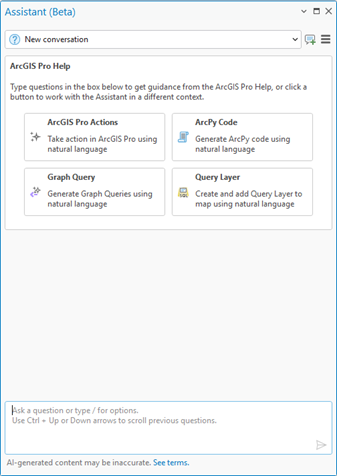
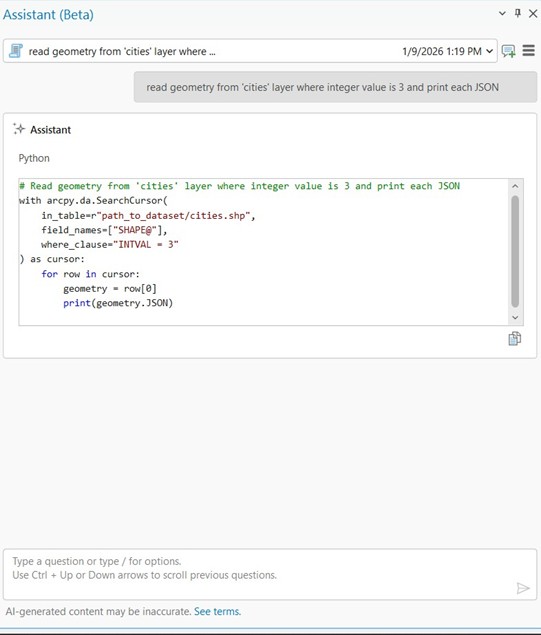
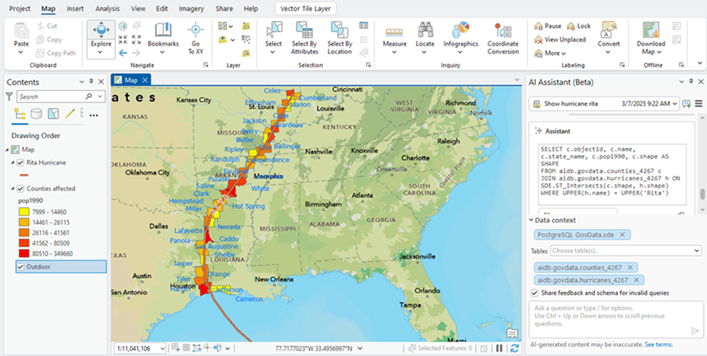
The ArcGIS Pro assistant is an AI-powered helper built into ArcGIS Pro that works alongside you in natural language. It can perform supported in-application actions, answer documentation questions, and generate code, including ArcPy scripts, SQL query layers, and OpenCypher queries for knowledge graphs. The goal is to reduce the friction between what you want to do and how you do it, while keeping you in control of your workflow.
What’s new in 3.7
Get more done across ArcGIS Pro with new and expanded assistant actions
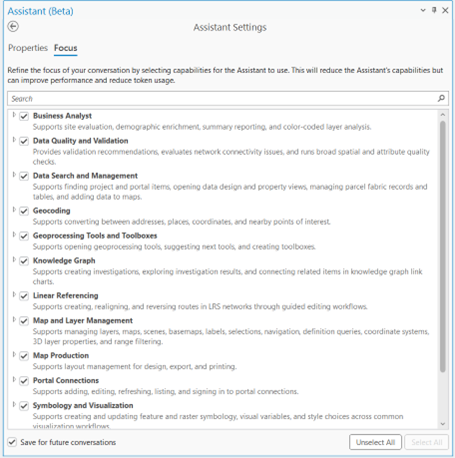
Actions are discrete tasks you can ask the assistant to perform–things like “zoom to the earthquakes layer,” “apply a definition query to the parcels layer,” or “open the buffer tool.” In 3.7, the set of available actions has grown across several areas of ArcGIS Pro:
| Category | What’s available |
| Business Analyst | Supports site evaluation, demographic enrichment, summary reporting, and color-coded layer analysis. |
| Data Quality and Validation | Enhance and automate data quality workflows by improving spatial and attribute accuracy of datasets. The actions assist in predicting checks, providing data insights and aid in configuring data quality checks. The prediction of data validation checks is currently limited to water and electric network datasets, with additional support for indoor solutions. |
| Data Search and Management | Supports finding project and portal items, opening data design and property views, managing parcel fabric records and tables, and adding data to maps. |
| Geocoding | Supports converting between addresses, places, coordinates, and nearby points of interest. |
| Geoprocessing Tools and Toolboxes | Supports opening geoprocessing tools, suggesting next tools, and creating custom toolboxes. |
| Knowledge Graph | Supports creating investigations, exploring results, and connecting related items in knowledge graph link charts. |
| Linear Referencing | Supports creating, reversing, and realigning routes in an LRS network through guided editing workflows. |
| Map and Layer Management | Supports managing layers, maps, scenes, basemaps, labels, selections, navigation, definition queries, coordinate systems, 3D layer properties, and range filtering. |
Customize how the ArcGIS Pro assistant works for you
Two new settings help you tailor how the assistant responds to your requests and fit your workflows:
Focus: While all supported Pro assistant actions are enabled by default, Focus lets you selectively turn off action groups or individual actions that aren’t relevant to your current work. A more focused assistant means faster, more accurate responses. Settings persist across conversations, and actions are searchable for quick access.
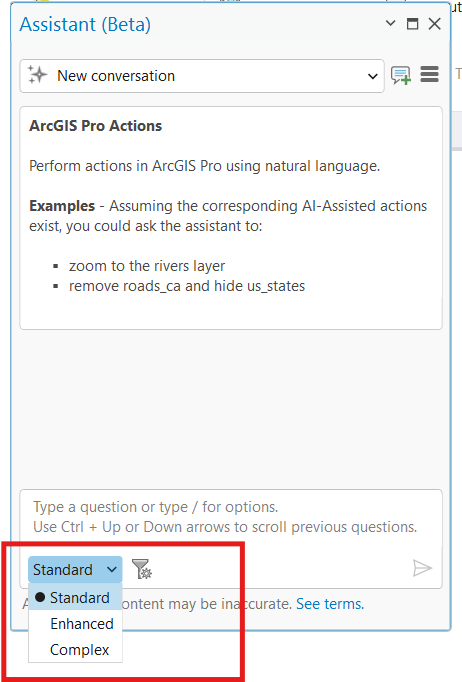
Processing Modes: Three modes let you match the assistant’s reasoning to your task: Standard (default, covers most requests), Enhanced (for multi-step or more constrained tasks), and Complex (for vague or pattern-heavy requests). Choosing the right mode helps improve response accuracy without unnecessary overhead. Modes reset at the start of each new conversation.
Curious about something beyond ArcGIS Pro? The assistant can help find answers across ArcGIS
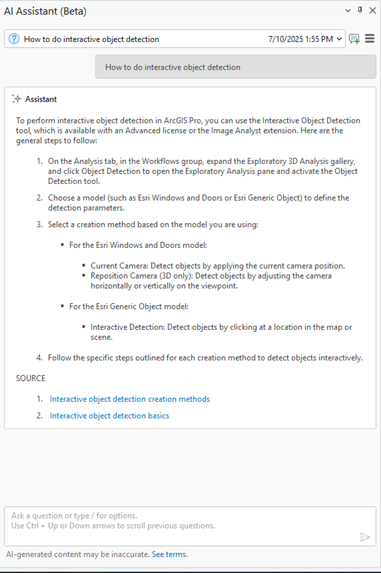
The Help capability, the assistant’s default mode, can now answer questions that span beyond documentation in ArcGIS Pro. Ask about related products and the assistant will pull from across Esri’s documentation, knowledge base, and other resources to surface the most relevant answer. It combines semantic understanding with keyword precision to identify which product or topic your question is about.
Generate ArcPy scripts, SQL, and graph queries in natural language
These capabilities continue from the 3.6 version of the assistant. ArcPy generates Python snippets for Notebooks, the Python Window, Script Editor, or your preferred IDE (note: arcpy.mp and arcpy.sharing support is limited in this beta). Query Layer turns a plain-language description into a SQL query, explains how it was built, and adds the result to a map. Graph Query generates OpenCypher queries for a schema and inserts them into an active investigation.
Extend the assistant with Custom Actions
Developers can further extend the assistant framework by creating custom extensions that house a set of specialized actions tailored specifically for their workflows. This modular approach allows developers to group related capabilities into a single extension, providing the assistant with a suite of new capabilities that can be triggered via natural language.
For example, you could develop an UrbanDevelopmentExtension that contains a specific CreateLayout function. When a user types:
“Generate the standard project layout titled ‘Urban Development Report’ with defined map elements and branding”
The assistant identifies the relevant extension, selects the correct Function within it, and passes the parsed parameters (such as the title and branding style) to your custom GIS logic. This structure ensures absolute consistency across organizations, eliminates complex manual workloads, and significantly boosts productivity.
Access to the Pro assistant Early Adopter Community (EAC) includes the SDK, complete with:
- Sample code demonstrating how to implement custom assistant extensions
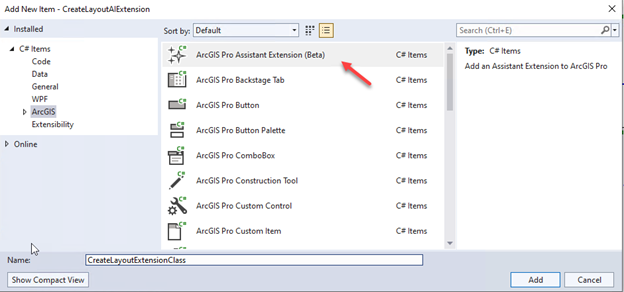
- Visual Studio Item Template for quickly scaffolding your own assistant extension
- An easy-to-use ProGuide document providing detailed step-by-step instructions to build and register custom assistant extension.
What to expect
The available actions represent what’s currently supported, more are in development, and your feedback helps determine what gets prioritized. Responses can vary as you refine how you phrase requests; this is expected behavior with generative AI. Complex, multi-step workflows, like building a 3D city scene, involve chaining multiple actions and aren’t yet supported as a single request.
Here are a few things users should anticipate with the beta:
- Limited Initial Actions: Currently, a limited set of actions are programmed into the assistant; however, more actions are under development. And if you are part of the Early Adopter Community (EAC) or considering joining, your feedback in testing this new feature will help determine what to prioritize next.
- Varied Responses: The assistant continuously learns and adapts, resulting in dynamic responses that can evolve as you refine your interactions. This variability is normal and expected.
How to get started
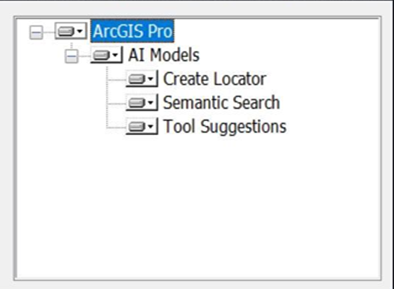
- Join the beta — Visit the site and follow the installation instructions. Ensure ArcGIS Pro is installed with Semantic Search and Tool Suggestions.
- Sign in — Launch ArcGIS Pro and sign in to an ArcGIS organization that allows beta features and has the Pro assistant enabled.
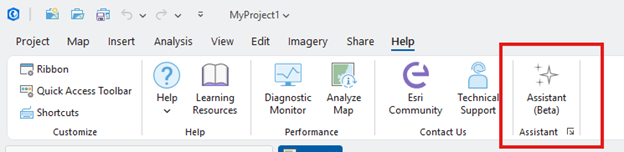
- Open the assistant — Navigate to Help tab → Assistant (Beta) and start exploring.
Starting with 3.7, the beta is open to all eligible ArcGIS Online named users – no invitation required.
We’re building the ArcGIS Pro assistant alongside our users, so feedback from real workflows directly shapes what comes next. Try it out, push it through your day-to-day tasks, and let us know what’s working and what isn’t. [Join the beta] today and help us keep building!

Article Discussion: