ArcGIS Bathymetry continues to expand its capabilities with added S-100 tools that support S-100 workflows. New additions include tools to generate S-111 regular grid products. We’ve also added tools that identify overlapping datasets and can keep superseded data out of workflows.
Work with Surface Current products
Two tools have been introduced to provide an S-111 HDF file generation workflow. S-111 is the International Hydrographic Organization’s Surface Current Product Specification. These new tools are provided in the S-100 toolbox added at this release.
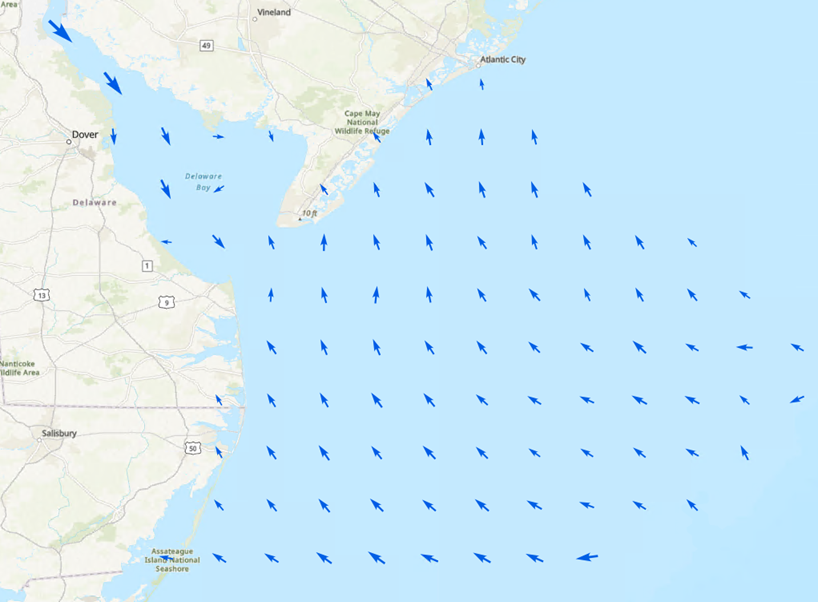
The Export To S-111 tool allows you to export S-111 HDF5 files from a geodatabase that has been populated with surface current data using the Add NetCDF To S-111 Workspace tool. Both of these tools are part of the S-100 Tools toolbox provided in the product files at 3.7. This toolbox also includes the S-102 tools released in ArcGIS Bathymetry 3.6. A provided S-111 XML schema file allows you to configure a workspace with the S-111 data model, enabling S-111 regular grid production.
To learn more about how to use S-111 tools, refer to the S-111 Toolset Guide in the ArcGIS Bathymetry product files.
Streamline bathymetric workflows
Several new supplemental tools to streamline bathymetric workflows are now available as part of the Supplemental Tools toolbox in the product files. These are the Add BIS_Dataset_Status Field, Deactivate Covered Data, and VR BAG To Mosaic Dataset tools. The previously released Replace Footprints tool is also part of the Supplemental Tools toolbox at 3.7. Here’s what the new tools can do:
- Add BIS_Dataset_Status Field—You can add this field to a BIS created before the release of 3.7 to help manage the lifecycle of your BIS datasets. When you include it in the BisCatalog schema, you can mark the status of the datasets as active (0), inactive (1), or locked (2). This field can be used to exclude outdated or archived data from outputs generated by the BIS To Mosaic Dataset tool by marking them as inactive. You can also use this field to designate datasets as locked. Locked datasets are ignored by the Deactivate Covered Data tool. You can use model files to include specific datasets in a model, regardless of their status in this field.
- Deactivate Covered Data—As noted above, this tool is a complement to the Add BIS_Dataset_Status Field tool. For datasets that have the BIS_Dataset_Status field added, you can use this tool to identify and deactivate any datasets that are completely covered by others and mark those covered datasets as inactive. The locked status can be used to make the tool ignore datasets that you want to keep active for mosaic exports, even if they are covered by other data. A rule file is used to determine the criteria for establishing what is covered and marking datasets as inactive. In combination, these two tools let you manage active and archived datasets within a single BIS, eliminating the need for creating multiple BIS workspaces or deleting outdated data that you might want to maintain for historical purposes.
- VR BAG To Mosaic Dataset—This tool converts a Variable Resolution (VR) Bathymetry Attributed Grid (BAG) to a mosaic dataset, so that you can visualize finer resolution supergrids within the VR BAG dataset. You can opt to fill gaps and use a domain mask to define the visual boundaries of the output when running this tool.
Better mosaic datasets
Last, but certainly not least, the workhorse BIS To Mosaic Dataset tool has some new features to show off. There are two new optional parameters: Area of Interest and Honor BIS_Dataset_Status Field. You can continue creating exports using all the datasets in your BIS workspace, or you can check the box to honor the dataset status to exclude inactive data from your output. You can also provide a polygon feature layer that defines an area of interest to more quickly generate a targeted mosaic dataset.
For more information, visit the ArcGIS Bathymetry page or the What’s new documentation and post your questions on the ArcGIS Bathymetry board in Esri Community.

Article Discussion: