Real-time object detection is a necessity for solving modern real-world problems because it enables systems to make immediate and informed decisions based on rapidly changing visual information. ArcGIS can not only perform feature extractions on aerial and satellite imagery, but also on terrestrial data, such as highly oblique and street level imagery. These applications are vital for facilitating data-driven decision-making across critical domains.
Using terrestrial data
Orthoimages, which are frequently employed for object detection, have certain drawbacks. A solution for this is to detect features in pixel space using oblique terrestrial data and then transform the detections into map space. Please refer to this blog for the workflow using mosaic datasets to perform feature extraction on terrestrial data.
A critical requirement within this workflow has been the need for users to perform object detection on imagery prior to geometric adjustment (i.e. georeferencing and rectification).

Real-time detections
Real-time detection is important for several reasons:
- Certain workflows demand real-time object detection during the initial image acquisition phase, where the georeferencing and rectification processes are deferred to a later stage.
- Users managing high-volume production workflows often perform feature extraction and geometric adjustment as two distinct, parallel pipelines. This separation allows one team to focus solely on object detection/feature extraction while a separate team is responsible for creating the rectified image collection.
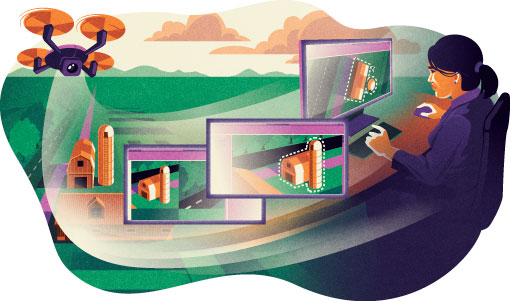
In both scenarios, there is a fundamental need to transform detections collected in pixel space into map space. Currently, the operational constraint requires users to either delay the detection process until the image collection is orthorectified or re-run the inference on the final orthorectified imagery, thereby nullifying the value of the initial real-time detections.
The Transformation Image Shapes tool
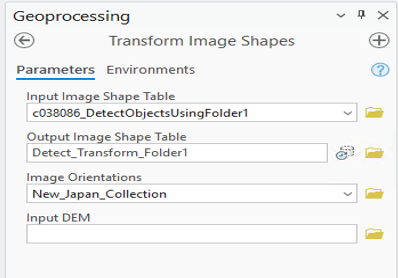
This is where the new Transform Image Shapes tool provides significant utility. The tool transforms the input pixel-space detections to map space using the geometric information contained within the image collection.
The tool accepts three key inputs:
- The feature class of detections defined in pixel space.
- The image collection that has been geometrically adjusted or ortho-ready.
- An optional digital elevation model (DEM) parameter, recommended for higher-resolution data to achieve greater spatial accuracy.
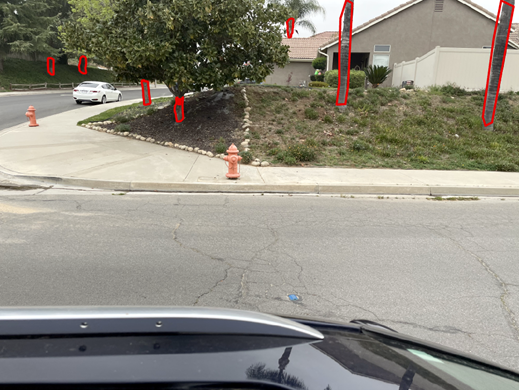
Consider an imagery collection captured from a street-level imaging system in Southern California, where the objective was to detect trees next to the sidewalk. This is often done for tree species identification.
We processed street-level images of a neighborhood in San Bernardino, captured by vehicle-mounted cameras. The initial step involved running the Detect Object Using Deep Learning tool on the folder containing 200 images. This provided raw tree detections in image space (pixel size coordinates).
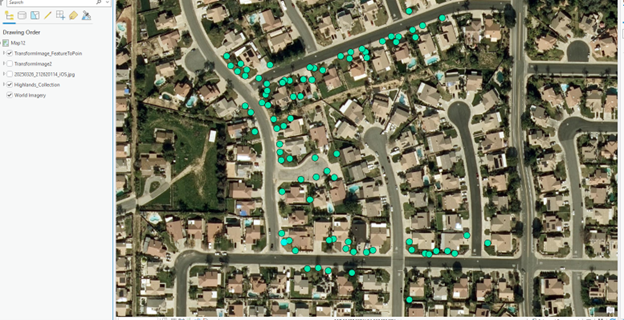
These image space detections are not very useful until they are accurately mapped to the ground. To achieve this, we created a rectified image collection for the area where the images were taken. The camera locations are visible within this reality-mapping-ready collection.
Once the image collection was prepared, we ran the new Transform Image Spaces tool to convert the detections. Since there is a lot of overlap between the images, you will see a lot of duplication of features. Following the transformation, the Non-Maximum Suppression tool is used to eliminate duplicate detections. Finally, the Feature to Point tool was run to better visualize the results, which are now accurately mapped to the ground.


Article Discussion: