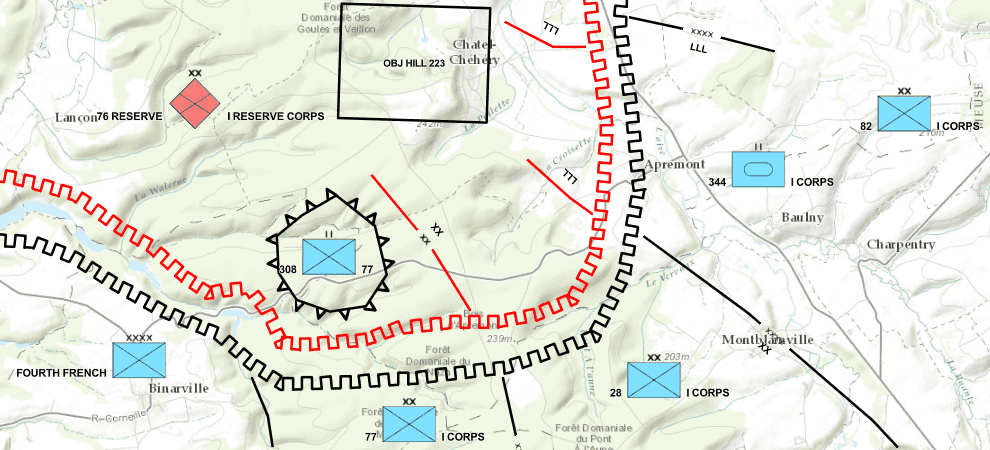
Military symbology specifications such as MIL-STD-2525 and NATO APP-6 are formal specifications that define how military units, equipment, and activities are visually represented on maps and charts. Esri supports these specifications with dictionary symbology…here’s what that means.
Esri releases and maintains dictionary styles for MIL-STD-2525 and NATO APP-6 symbol specifications. You can use the dictionary renderer to apply the dictionary style of your choice to your layers. The dictionary renderer is supported across the ArcGIS system, so whether you’re working in an app like ArcGIS Pro or ArcGIS AllSource, or building your own custom app with the ArcGIS Maps SDKs, you can symbolize your data with military symbols.
Say you want to symbolize data based on Symbol ID Codes (SIDC) in ArcGIS Pro. First, you select dictionary renderer as the symbology type. Then, choose the appropriate military symbol standard. Finally, map the SIDC field in your data to the SIDC field in the dictionary style… and voila! Military symbols!
Now let’s check out what’s new with our military symbology styles…
New styles for additional military symbol standards
Esri releases styles for MIL-STD-2525 and NATO APP-6 symbol specifications in ArcGIS Pro, ArcGIS Enterprise, and the Living Atlas of the World.
We’ve recently created styles for 3 additional standards:
- MIL-STD-2525D with Change 1
- MIL-STD-2525E
- APP(6)-E
In addition to releasing new dictionary styles, we made updates to all the military symbol styles released by Esri. “Where to find the latest styles?” you ask. That depends on where you’re looking for them!
- ArcGIS Online: You can find the latest military symbology styles in Living Atlas as well as the Dictionary Symbology Styles group in ArcGIS Online.
- ArcGIS Enterprise: Navigate to the “Groups” tab and find your organization’s Dictionary Symbology Styles group.¹ This group contains the latest military symbology styles installed with your Enterprise deployment.
- ArcGIS Pro: Symbolize your layer using a Dictionary Renderer and select the appropriate specification from the drop down.² If you want to share the data as a web layer, make sure to browse to the web styles in ArcGIS Online or Enterprise before you share.
New military symbology styles page
In addition to releasing dictionary styles for the MIL-STD-2525 and NATO APP-6 specifications we also maintain them, meaning we periodically update the styles to fix bugs and introduce enhancements. An update may only impact one specific symbol or it may be a broader update impacting many symbols, and it’s important to know how those updates may impact your maps and applications…that’s where the new Military Symbology Styles page comes in!
On this page you can find…
- An overview of military symbology styles,
- Links to the latest dictionary styles,
- Change logs for the latest styles for each symbol specification,
- Links to older versions of each style to be used in older ArcGIS clients, and
- Developer samples
Ready to use military symbols in your maps and applications? Check out Preparing Data for Use with Military Symbology in Web Applications, to learn more about preparing and sharing data with military symbols!
Additional resources
The Military Symbology Support in ArcGIS StoryMap is an up-to-date collection of resources about military symbol support in ArcGIS. Find the latest information on military symbol support in ArcGIS, explore sample applications, and access relevant documentation and helpful blogs.
Product specific documentation can be found at the links below:
- ArcGIS Pro: Dictionary Symbology
- ArcGIS AllSource: Military Overlay
- ArcGIS Earth: Dictionary Symbology
- ArcGIS Maps SDK for JavaScript: DictionaryRenderer
- ArcGIS Maps SDK for Native Apps: Military Symbols
If you have further questions, you can email MilitarySymbology@esri.com.
Footnotes
¹ Military dictionary symbol styles were first included in Enterprise 11.3 installations. If using an older version of Enterprise, styles must be shared from ArcGIS Pro.
² The Military Symbol Editor supports a subset of the specifications: MIL-STD-2525B with Change 2, MIL-STD-2525C, MIL-STD-2525D, APP(6)-B, and APP(6)-D.
Article Discussion: