Maybe it’s a bit of magic you seek this time of year. If that’s the case, CityEngine 2025.1 is here to deliver. In this latest release, the possibilities of what you can achieve with and without code are more exciting than ever! Now, you have more freedom to customize and reimagine complex building forms and the spaces in-between.
CGA: Geometry Modifications
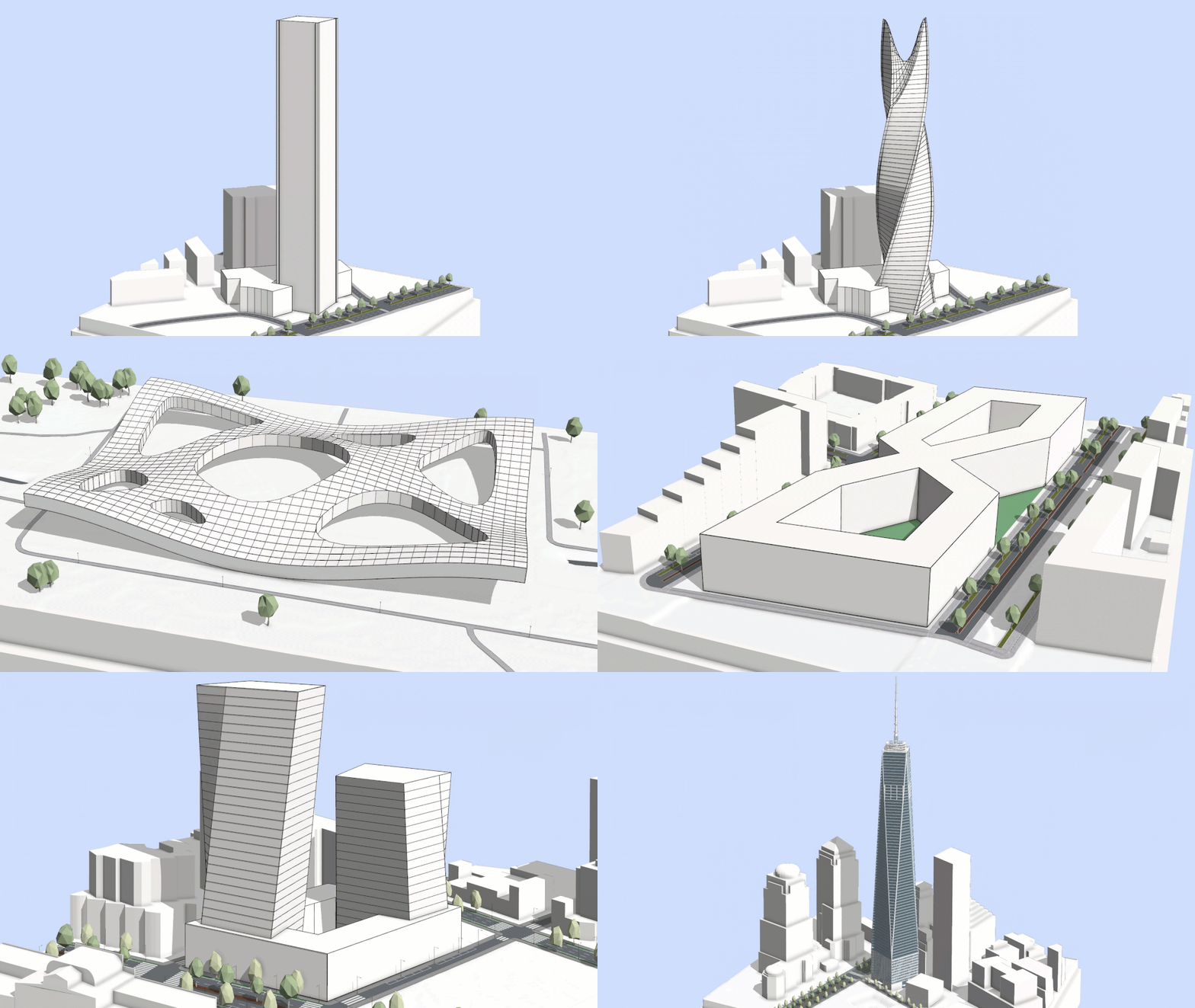
Prepare to redefine your approach to architectural design! Traditionally, CGA rules allowed you to construct and manipulate geometry only through built-in operations, often resulting in rigid, orthogonal forms. Now, we are entering a new era with novel geometry modification capabilities, enabling you to transform geometry components and recombine subdivided shapes directly within CGA. Create beautiful designs with intricate layouts, custom massing models, and complex roofs. With these improvements, procedural modeling continues to evolve in-step with the expressive needs of contemporary architecture.
New features:
- The new modify operation allows you to manipulate selected parts of the geometry, for example with transformations or splits, and then reconnects the edited parts with the original mesh topology.
- The new recompose strategy for inline can be used to directly reconnect subdivided shapes. For example, splitting a surface into a connected grid and then applying modify to move the new vertices into a parametric surface.
Example: Contemporary Architecture Park
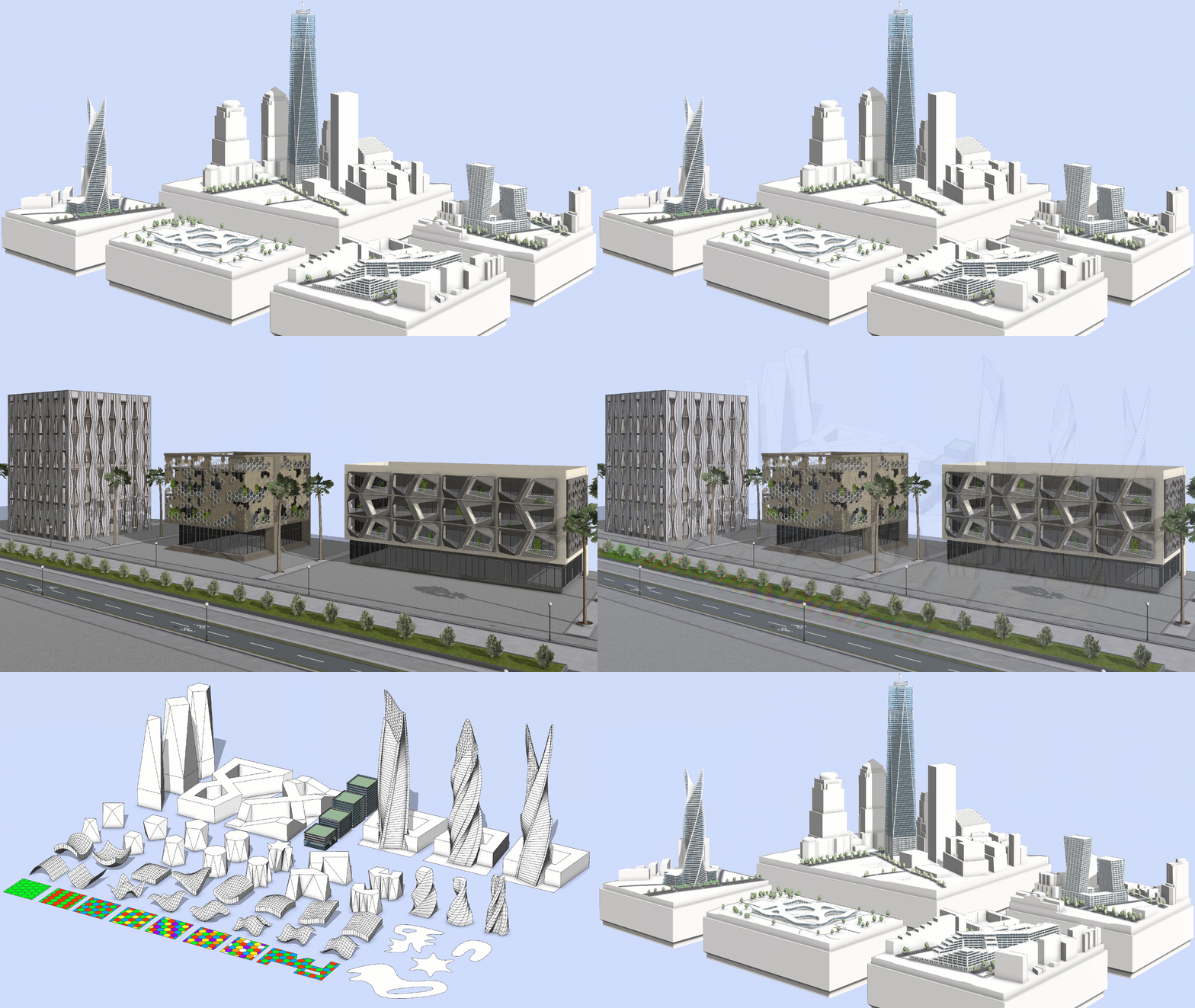
Don’t worry, you can get hands-on with these concepts right away by downloading the new CityEngine Example provided with this release. It demonstrates the latest CGA capabilities through a collection of buildings and facades inspired by contemporary architecture and provides novel out-of-the-box procedural content:
- Mass Models: Explore dynamic, sculptural building forms made possible using geometry modifications.
- Facades: Discover contemporary facade designs with hexagonal patterns, twists, and perforations.
- Components: Reuse the core building blocks that power the examples.
More details can be found online. The example is also available for download directly within CityEngine 2025.1 at Help > Download Tutorials and Examples in the main menu.
Visual CGA: No-code building facades

If instead you want to use components as visual building blocks, you can achieve a lot with Visual CGA. With the addition of facade components to ESRI.lib, you can now turn schematic massing studies into realistic visualizations. Whether you are a planner or designer, this visual programming approach is bolstered by an extensive and ever-growing component library so that you can create procedural models with rich facades without any coding required. Split massing volumes into floors, arrange facade patterns, and add out-of-the box architectural elements, such as windows or shading devices, to create a complete and realistic building design all with Visual CGA.
The Visual CGA Editor also now includes powerful new features that make it both more capable and convenient to use. With parameter connections, you can share information between components, such as floor numbers or window heights, unlocking greater variety and control in your procedural designs. Plus, to remove the guess work, the Visual CGA Editor now includes built-in documentation. Each component provides immediate access to a general description, and tooltips explain each attribute slot and extension point. Magical indeed!
Street Designer: More lane information

Street Designer was a hit in our 2025.0 release and it continues to improve! To enhance the distinction between the roadbed lanes and the sidewalk shapes, the sidewalk shapes are now displayed in a slightly darker shade. Additionally, the separator lines between the sidewalk shapes and roadbed lanes are highlighted when the Street Designer tools are active.
We refined the Street Designer pointer icons in the Viewport window to make it easier to understand the currently active tool. The minimum lane width is now 0.1 meters for both the Edit Lane tool and the Lane Parameters section in the Inspector window.
Enhanced Object Attributes
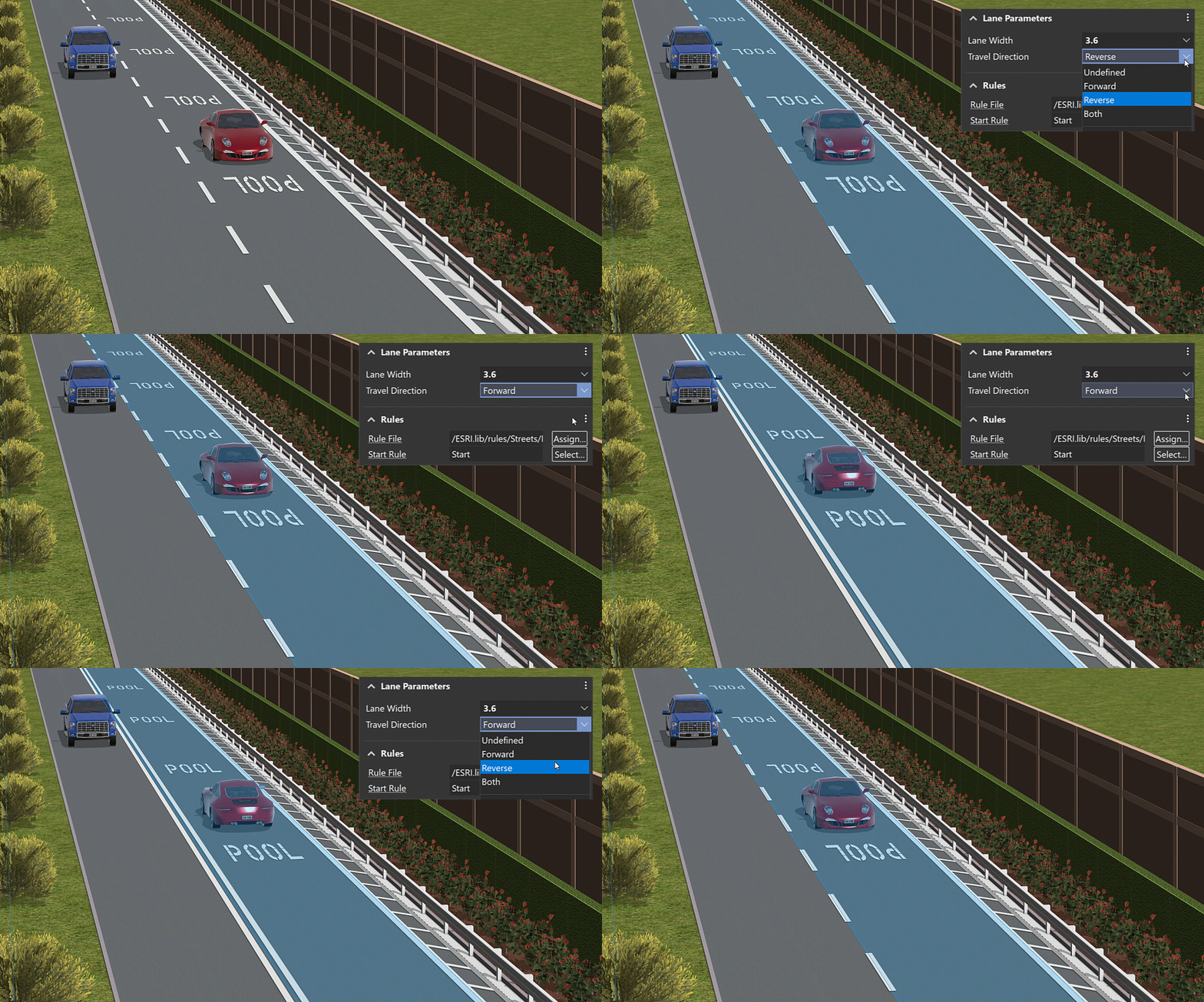
We know that designers also consider a lot more than the individual lane but, you’re interested in the lane type, direction, width, and how it relates to adjacent lanes within a shared segment to ensure that you’ve characterized it accurately. With this in mind, we’ve now added object attributes that display lane characteristics and their position relative to other lanes in the same segment. You can also determine whether a lane belongs to the roadbed or sidewalk group; these attributes automatically update as you edit or move lanes. This feature promotes a more informed and context-aware street design. Additionally, if you’re customizing your own CGA lane rules, now there are advanced detailing options for lane markings. From there, as introduced in CityEngine 2025.0, you can save the design as a new custom street configuration to reuse later.
Object Attributes have also been enhanced for lanes created using the Get Map Data OSM import. A new osm_derived_lane_category allows you to query lanes by usage types including Vehicle, Bus, Bike, and Pedestrian.
Explore how these new categories are applied in the new Generic_Lane_for_OSM_Import CGA rule available in the latest ESRI.lib release. This rule is assigned by default for OSM street imports. With this update, Get Map Data has never been closer to reality.
Sorting options for street configurations
We added sorting options for Street Configurations: Recently used, Recently added, or Highest width. Also, there is now a list view which stacks the configurations vertically, allowing for better readability of longer names. You can find it directly on the right side of the new sorting option.
Improved performance and street geometry
Several measures were taken to improve performance when working with streets and Street Designer, leading to much smoother editing. We also made the street geometry around intersections more robust by reducing the amount of small triangle shapes and by preventing tiny visual gaps at the border between intersections and lanes.
Introducing the Python 3 API (Beta)
Python 3 transforms our Python integration from a closed automation tool into an open platform for developers to build custom solutions and applications using the CityEngine API.
You can now integrate CityEngine with other Esri APIs such as ArcPy and the ArcGIS API for Python, as well as thousands of third-party libraries. This enables diverse use cases including street network analyses, AI-powered scene modifications, and custom UI data entry forms.
A new UI allows you to manage multiple Python interpreters and virtual environments. Projects and the interactive Python Console can each be configured to use specific interpreters or virtual environments. See Working with Python 3 for more information.
The Python 3 API and its supporting UI are available in beta. See the list of known limitations.
Tutorials and documentation

We updated our current tutorial series catalog with new content and improved visuals:
- Try ArcGIS CityEngine
- Learn about ArcGIS CityEngine integration
- Discover ArcGIS CityEngine in real-world scenarios
We expanded our catalog with two new tutorial series, each offering a sequence of tutorials with step-by-step guidance through essential CityEngine workflows:
- Learn procedural modeling with CGA
Learn how to write CGA rules to generate attribute-driven and adaptable 3D models in real time.
- Import data in ArcGIS CityEngine
Learn how to import, clean-up, calculate, format, and report data in your ArcGIS CityEngine projects.
And there’s more . . .
We refurbished the following tutorials by adding fresh workflows and updated visuals:
-
- Tutorial 10: Python scripting
Updated the scripts in the project and documentation to follow better coding practices and removed the Change Street Widths subsection due to incompatibility with Street Designer.
- Tutorial 14b: Modeling on terrain
Learn the essentials of modeling streets and shapes on terrain.
- Tutorial 21: CSV import
Learn how to import data from a .csv file and use it in CGA code arrays.
- Tutorial 10: Python scripting
Time to upgrade to 2025.1
Be sure to read the CityEngine 2025.1 release notes for all the details on new features, enhancements, and bug fixes. Visit My Esri to upgrade to CityEngine 2025.1.
Are you new to CityEngine? Try it out with a fully-functional free-trial version.
Also, check out the CityEngine 2025.1 video highlights.

Article Discussion: