The R‑ArcGIS Bridge continues to evolve as a powerful way to connect R developers with the ArcGIS ecosystem, and the past few months have been especially exciting. From presentations and collaboration at the 2026 Esri Developer & Technology Summit to new releases across the {arcgis} packages, we’re making it easier than ever to build full‑stack spatial workflows in R.
We’ll cover:
- Esri’s Dev & Tech Summit
- New features & package releases
- What we’re planning for User Conference this summer
Dev & Tech Summit 2026
At this year’s Esri Developer & Technology Summit, the R‑ArcGIS Bridge team presented at the plenary and hosted two a technical workshop and demo theater session focused on integration and full‑stack spatial development with R. These presentations emphasized a common theme:
bringing R closer to the ArcGIS system—not just for analysis, but for building production‑ready applications and services.
Plenary
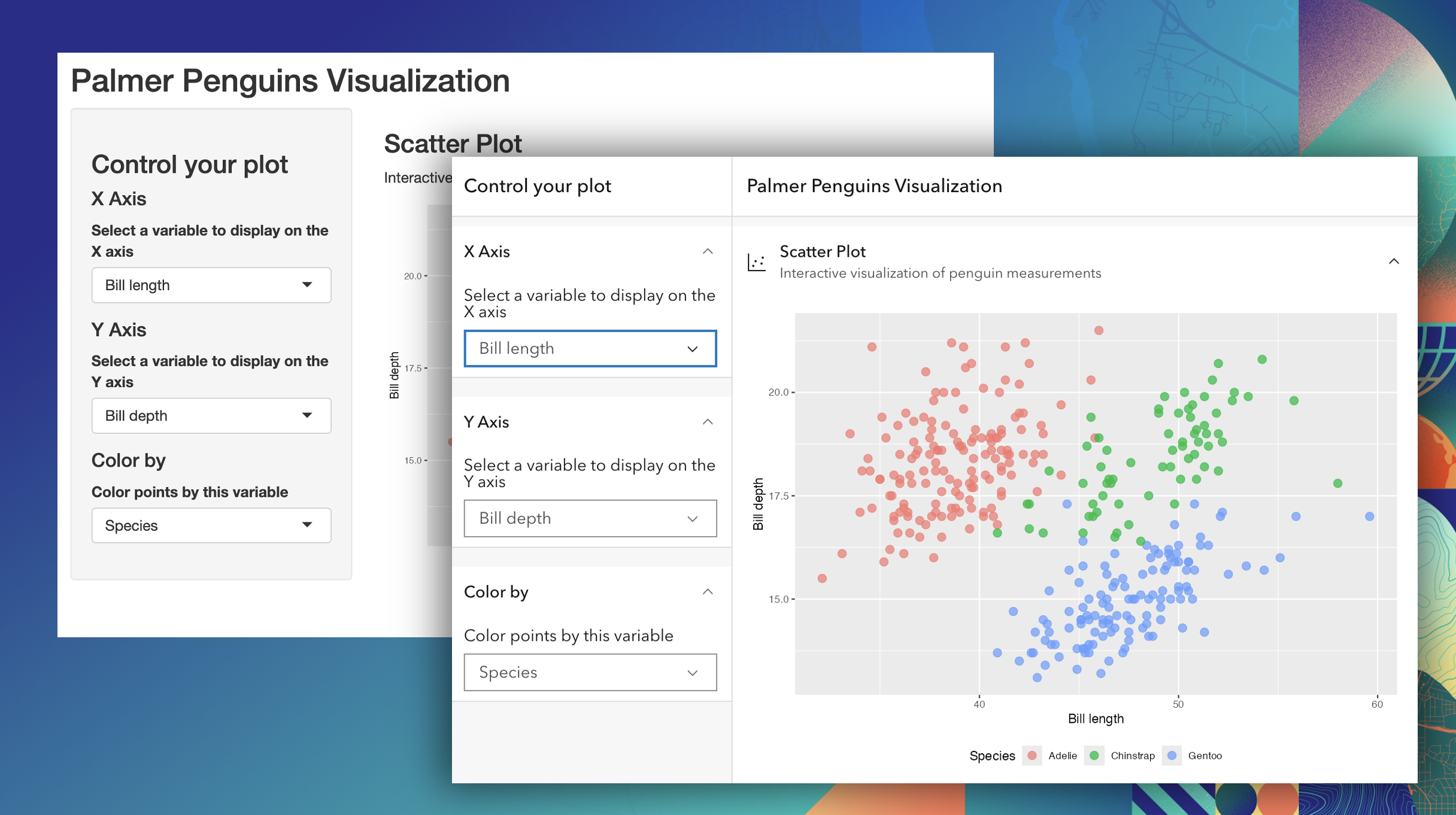
In the plenary demo, we showed how the R‑ArcGIS Bridge can create ArcGIS‑powered applications all from R. The demo focused on calling ArcGIS web tools directly from R, and using that tool inside a Shiny application. By combining new web tool support with integration of the Calcite Design System, the app demonstrated how R‑based tools can feel like a natural extension of the ArcGIS ecosystem.
If you’re interested in the code and examples from the plenary, they’re available on GitHub: Plenary Resources
Full‑Stack Spatial with R and ArcGIS
The technical session went deeper into the mechanics of building end‑to‑end spatial workflows using the R‑ArcGIS Bridge. This session walked through:
- Managing feature services from R
- Authenticating against ArcGIS Online or Enterprise
- Performing scalable geocoding
- Using R to build Shiny applications that integrate ArcGIS services and the Calcite Design System
The session culminated in a Shiny app that tied these pieces together, demonstrating how spatial data scientists can move from data access and analysis to interactive, shareable applications without leaving R.
All workshop materials, example scripts, and slides are available here: Full‑Stack Spatial Resources
Powering ArcGIS Apps with R
We also presented a Demo Theater session focused on practical automation workflows using the R‑ArcGIS Bridge. This session highlighted how the {arcgis} metapackage can be used to access, transform, and maintain the data that feed ArcGIS applications, with a particular emphasis on ArcGIS Dashboards. The demo covered
- reading from a feature service
- accessing and reverse geocoding a CSV portal item,
- adding new features to a feature service
- showing how R can serve as the “engine” behind automated updates to authoritative data sources.
The demo theater materials are available here: Powering ArcGIS Apps with R
If you weren’t able to attend Dev & Tech Summit – or just want to revisit the material – we encourage you to explore the full repository: 2026 Dev Summit resources
New features in the R packages
Alongside Dev & Tech Summit, we released a significant set of updates across the R‑ArcGIS Bridge packages. The 2026 Q1 release represents a major step forward in full‑stack spatial development with R, with improvements driven directly by community feedback.
Deeper Shiny Integration with {calcite}
A major focus of this release is making it easier to build polished, ArcGIS‑styled Shiny applications. The {calcite} package has been revamped with hand‑crafted R bindings for Calcite components, making the experience feel native to R and Shiny. With these updates, you can:
- Use Calcite UI components such as alerts, accordions, date pickers, sliders, and switches
- Build layouts with helpers like page_navbar() and page_sidebar()
- Access component state directly from Shiny inputs
- Explore over 20 interactive examples included with the package
These improvements are designed to help R developers build applications that look and feel consistent with the broader ArcGIS platform.
Calling Geoprocessing Services from R
Another major addition is native support for ArcGIS geoprocessing (GP) services in the {arcgisutils} package. You can now call hosted or custom GP services directly from R, with support for:
- Asynchronous job execution
- Job status tracking and result retrieval
- Type‑safe interfaces built on modern R object systems
This makes it possible to integrate ArcGIS analysis services and your own published web tools directly into R scripts and Shiny applications, without re‑implementing server‑side logic.
Simplified Content Access
Accessing ArcGIS content from R has also been streamlined. The arc_open() function now accepts both ArcGIS URLs and item IDs, reducing friction when working with hosted layers, services, and other content. This improvement makes it even easier to move between ArcGIS and R.
For full details on everything included in the 2026 Q1 release, including package‑specific changelogs, see: What’s New in R‑ArcGIS Bridge (2026 Q1)
We’ve updated the R-ArcGIS Bridge documentation site to reflect these new capabilities, including new sections covering portal functions, attachments, and more. Take a look at the refreshed documentation here: R‑ArcGIS Bridge documentation
What’s next
Looking ahead, there’s more on the horizon. We’re actively working on:
- Supporting routing services in a dedicated
{arcgisrouting}package
We’re excited about how these changes will further expand what’s possible with R and ArcGIS, and we’ll share more details as they take shape.
Thank you to everyone who joined us at Dev & Tech Summit, shared feedback, and continues to build with the R‑ArcGIS Bridge. We’re looking forward to continuing the conversation and seeing many of you in person at Esri UC later this year!


Hello, great article, I have a follow up question please. Can you please respond to it here https://community.esri.com/t5/r-arcgis-questions/r-shiny-compatibility-with-agol/td-p/1696259