
Developer Sessions at UC
Don’t miss the following developer track sessions offered at UC. To quickly add the following sessions to your agenda, you can add this curated list.
Tuesday, July 14
8:30am – 9:30am | ArcGIS Location Platform: What Is It and Who Is It For? | Room 10 | Technical Session
Is ArcGIS Location Platform for you? This geospatial platform as a service (PaaS) supports developers who need to integrate location capabilities into apps, business systems, and products, and it allows them to create apps and extend ArcGIS products using ArcGIS APIs and SDKs. Learn what’s new and what’s different between ArcGIS Location Platform and ArcGIS Online or ArcGIS Enterprise when developing apps—and how your organization can benefit.
8:30am – 9:30am | ArcGIS Pro SDK for .NET: Design Patterns for Add-ins and Managed Configurations | Room 33 B | Technical Session
The ArcGIS Pro SDK for .NET gives developers the tools to create solutions that feel native to ArcGIS Pro. Explore design patterns for building add-ins that align with the ArcGIS Pro interface and behaviors, ensuring that add-ins look and work like a natural part of the application. Speakers discuss design configurations that streamline ArcGIS Pro for users who need only a focused set of capabilities. Through code examples and best practices, discover how to deliver role-specific experiences that balance customization with usability.
10:00am – 11:00am | ArcGIS Experience Builder: Building Your First Widget | Room 8 | Technical Session
Join us to learn how ArcGIS Experience Builder allows you to build immersive web apps for your organization. Discover how to use TypeScript and React to build your first widget in Experience Builder, and get tips on how to debug your widget to improve your debugging experience.
10:00am – 11:00am | ArcGIS Pro SDK for .NET: Patterns of Extensibility | Room 9 | Technical Session
Learn fundamental approaches for extending ArcGIS Pro, covering specific ArcGIS Pro SDK for .NET and ArcGIS Pro API topic areas. Speakers discuss practical considerations for your ArcGIS Pro extensions and online resources for your work.
11:30am – 12:15pm | ArcGIS Experience Builder: Building Your First Theme | Demo Expo Theater 8 | Demo Theater Session
Customize the appearance and style of your applications with ArcGIS Experience Builder! Built on the powerful Jimu framework, themes provide a structured, flexible, and extensible approach to design—ensuring a consistent and unified look and feel across your entire experience. This presentation demonstrates the theme framework in Experience Builder, theming best practices, and the steps to create a brand-aligned custom theme.
1:00pm – 2:00pm | ArcGIS: Web Development Strategies | Room 30 B | Technical Session
New to developing web applications and services with ArcGIS? This presentation is for you. Speakers provide an overview of the platform architecture and discuss important technologies that you can use in your development. Learn how to build web apps using configurable apps and builders, and maximize productivity by building custom apps with ArcGIS Maps SDK for JavaScript. Gain a better understanding of the ArcGIS technologies and capabilities that are most useful for your work.
2:30pm – 3:30pm | From Raw Data to Custom App: Data Engineering, Mapping, and Web Development | Room 30 B | Technical Session
Join this dynamic technical session where speakers will build applications from the ground up. Starting with raw data, they will demonstrate how you can automate data ingestion into ArcGIS Online and then cover key techniques for creating and managing a service. Next, they will discuss authoring the web map, including cartography tips and tricks, and, finally, building a custom web app from scratch with the ArcGIS Maps SDK for JavaScript that uses the web map as the starting point to drive the visualization and experience around the data.
4:00pm – 5:00pm | ArcGIS Experience Builder: Getting Started with Developer Edition | Room 5 A | Technical Session
Quickly build web apps and web pages with no to low code. ArcGIS Experience Builder is highly configurable with flexible design, mobile optimization, smart widgets, and seamless ArcGIS integration. It is extensible, so you can add your own tools to deliver production-ready solutions fast. Learn the developer edition from installation, collaboration, and deployment to upgrade, including importing apps from ArcGIS Online, adding custom widgets, and integrating with ArcGIS Enterprise.
Wednesday, July 15
8:30am – 9:30am | ArcGIS Experience Builder: Building Your First Widget | Room 8 | Technical Session
Join us to learn how ArcGIS Experience Builder allows you to build immersive web apps for your organization. Discover how to use TypeScript and React to build your first widget in Experience Builder, and get tips on how to debug your widget to improve your debugging experience.
8:30am – 9:30am | ArcGIS Maps SDK for JavaScript – Building an App with Components | Room 14 B | Technical Session
Want to build a web app with ArcGIS Maps SDK for JavaScript? This presentation provides a step-by-step guide for building web apps using the web components available with ArcGIS Maps SDK for JavaScript and Calcite Design System. Starting from a web map, learn how to add mapping capabilities, charts, UI design elements, and more to make a responsive, cohesive, and informative experience. Find out how to combine Calcite and the SDK components and capabilities to create a compelling web mapping app with maximum productivity.
10:00am – 11:00am | ArcGIS API for Python: An Overview of the Modules | Room 10 | Technical Session
The ArcGIS API for Python provides a scripting and automation interface for your web GIS. Explore various modules and discover how the API allows you to administer your GIS organization, manage your GIS content, and perform spatial analysis and data science. Learn how to map and visualize your data, differentiate between modules, and work with web maps and apps.
10:00am – 11:00am | ArcGIS Maps SDK for JavaScript – Capabilities and Techniques | Room 14 B | Technical Session
Explore key capabilities of ArcGIS Maps SDK for JavaScript and learn the fundamentals of the SDK. Speakers share techniques and capabilities for importing data, basic layer styling, editing, 2D and 3D visualization, client-side analysis, shortcuts for building your UI, and more.
11:30am – 12:15am | ArcGIS Maps SDKs for Game Engines: An Overview and What’s New | Demo Expo Theater 13 | Demo Theater Session
Quickly build web apps and web pages with no or low code. ArcGIS Experience Builder is highly configurable with flexible design, mobile optimization, smart widgets, and integration. It is extensible so that you can add your own tools to deliver production-ready solutions fast. Learn the developer edition from installation, collaboration, and deployment to upgrade, including importing apps from ArcGIS Online and adding custom widgets to apps or ArcGIS Enterprise.
1:00pm – 2:00pm | ArcGIS API for Python: Content Management | Room 7 B | Technical Session
Moving content between organizations is a fundamental task confronted by web GIS managers. The ArcGIS API for Python provides various options for doing so, based on the specifics of your organization and your desired workflow. In this presentation, speakers establish some standard terms around cloning, migration, and promotion; explore how the clone_items() method works; and briefly discuss migrating group content. Also, learn best practices for working with specific item types and discover troubleshooting strategies for when items may not clone or migrate as expected.
2:30pm – 3:15pm | ArcGIS Maps SDK for JavaScript: Building Agentic Mapping Applications | Demo Expo Theater 2 | Demo Theater Session
Meet the new JavaScript Maps SDK assistant! Learn how to use the new Assistant web component in the SDK to build agentic mapping applications, including how to get started and how to extend it to use your own agents.
2:30pm – 3:15pm | ArcGIS API for Python: Administering ArcGIS Online | Demo Expo Theater 8 | Demo Theater Session
Want to automate common administration tasks? Join us to learn how to use ArcGIS API for Python to manage your organization with scripting. Discover common workflows for managing users and their credits and licenses, as well as managing groups and content. This presentation also provides some content migration strategies that you can implement.
Thursday, July 16
8:30am – 9:30am | ArcGIS API for Python: Automating Tools to Monitor Your Organization | Room 4 | Technical Session
Join us to learn how to automate your organizational monitoring with ArcGIS API for Python. Learn how Python API integrates with ArcGIS Enterprise to provide a complete overview of consumption and usage and to simplify tasks such as logging and reporting. Speakers will also explore some tools to monitor your organization in ArcGIS Online.
8:30am – 9:30am | ArcGIS Maps SDK for JavaScript – What’s New and the Road Ahead | Room 30 B | Technical Session
Learn about the most important advancements in ArcGIS Maps SDK for JavaScript that were introduced over the last year. Also, be inspired with new ideas for your web apps. This presentation includes a preview of several future capabilities, along with a short- and long-term road map.
10:00am – 10:45am | ArcGIS Maps SDKs for Native Apps: An Overview and What’s New | Demo Expo Theater 13 | Demo Theater Session
ArcGIS Maps SDKs for Native Apps enable you to build applications with .NET, Flutter, Qt, Swift, and Kotlin that work with the ArcGIS system and run directly on desktop and mobile devices—online or offline. Over the last year, several new features have been introduced, including support for on-device spatial analysis, local 3D scenes, shared templates to streamline feature editing, and new data sources like geospatial PDFs. Join us to learn more about these and other improvements and get a preview of what’s coming next.
11:30am – 12:15pm | ArcGIS Pro SDK for .NET: Working with Desktop Application Markup Language | Demo Expo Theater 13 | Demo Technical Session
In ArcGIS Pro and ArcGIS Pro add-ins, Desktop Application Markup Language (DAML) is used to define all UI elements. Join us to learn about both DAML basics and more advanced functionality.
4:00pm – 5:00pm | ArcGIS Maps SDK for JavaScript – Programming Patterns and Best Practices | Room 33 B | Technical Session
Want to quickly and easily find and fix problems in your web mapping applications? Join us to learn how to set up your development environment using plug-ins such as linters and beautifiers to write cleaner code. Discover how to use the power of browser-based debugging tools to debug, style, and optimize your apps. Speakers also share how to resolve common issues that you may run into when building apps with ArcGIS Maps SDK for JavaScript.
We hope you can join some of our sessions and remember that you can add these sessions to your customized agenda or add them all from this curated list of developer sessions.
Expo – Developer Technologies
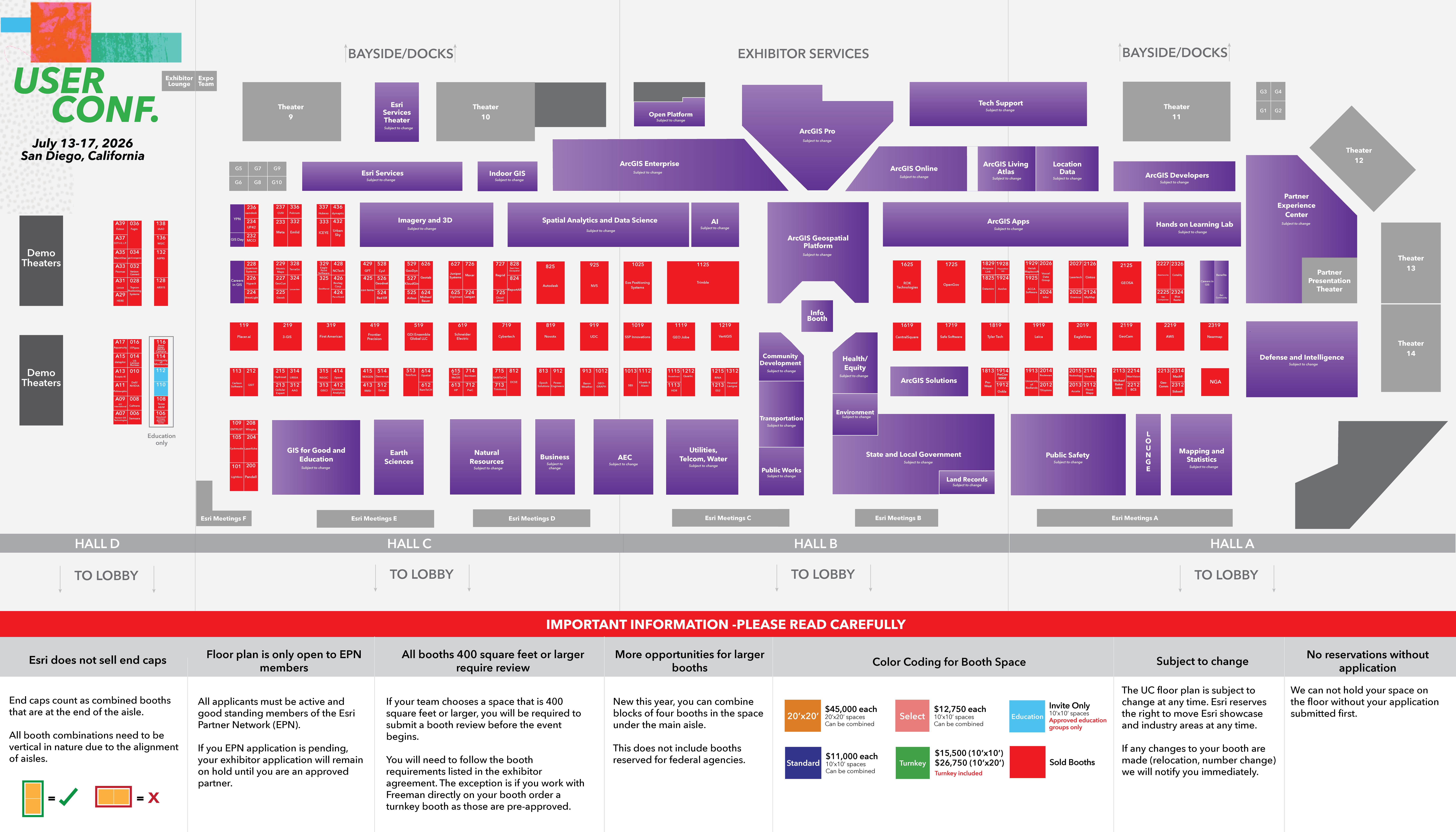
Finally, developers and engineers will be available to answer your questions within the Developer Technologies area of the Showcase towards the back of Hall A next to the Hands-on Learning Lab and Partner Experience Center. Here is a map of the Expo.
We will have the following areas for you to come visit:
ArcGIS Maps SDK for JavaScript – Build web mapping apps faster with stunning 2D/3D visualizations, interactive analytical and AI workflows, and user-friendly experiences.
ArcGIS Maps SDKs for Native Apps – Build interactive mapping and geospatial solutions for mobile, desktop, and embedded devices.
ArcGIS Maps SDKs for Game Engines – Build immersive 3D and XR experiences with your authoritative content.
ArcGIS API for Python – Python library to script your Web GIS.
ArcGIS Location Platform – Leverage sophisticated spatial capabilities and comprehensive data in your solutions and business systems. Learn about new location services available.
ArcGIS Location Services – Learn about our powerful spatial location services including geocoding, routing, demographics, spatial analysis, and more.
Open Source – Access ArcGIS capabilities with open source libraries: Leaflet, MapLibre, OpenLayers, Cesium, and ArcGIS REST JS.
Calcite Design System – Access a suite of design and development tools for building accessible, intuitive, and cohesive user experiences across web apps.
The Showcase will be open Tuesday and Wednesday from 9am – 5:30pm and on Thursday 9am – 4pm. See you there!
Stay in touch!
As you can see, we have so many ways for you to get some of your questions answered, inspired by the innovation of others, and/or simply learn more about our developer tools. We are so excited to see and meet you! Please reach out if you have any questions or would like to meet any of us who will be on-site at User Conference. Email us at developers@esri.com, follow us at @EsriDevs and @EsriDevEvents on X, join our Esri Developer Showcase page or Esri Developers user group on LinkedIn. You can also sign up for our Esri Developer Newsletter if you’re interested in furthering your knowledge and staying current with what’s happening with Esri technology.

Article Discussion: