The ArcGIS Field Maps 25.2.0 release is here, and it’s packed with powerful updates that will transform how you explore, capture, and share maps in the field. With new enhancements designed to boost productivity, improve data accuracy, and create smarter mobile workflows, this update pushes field operations to the next level. The 25.2.0 release is now available on the Apple App Store and Google Play.
Key updates include:
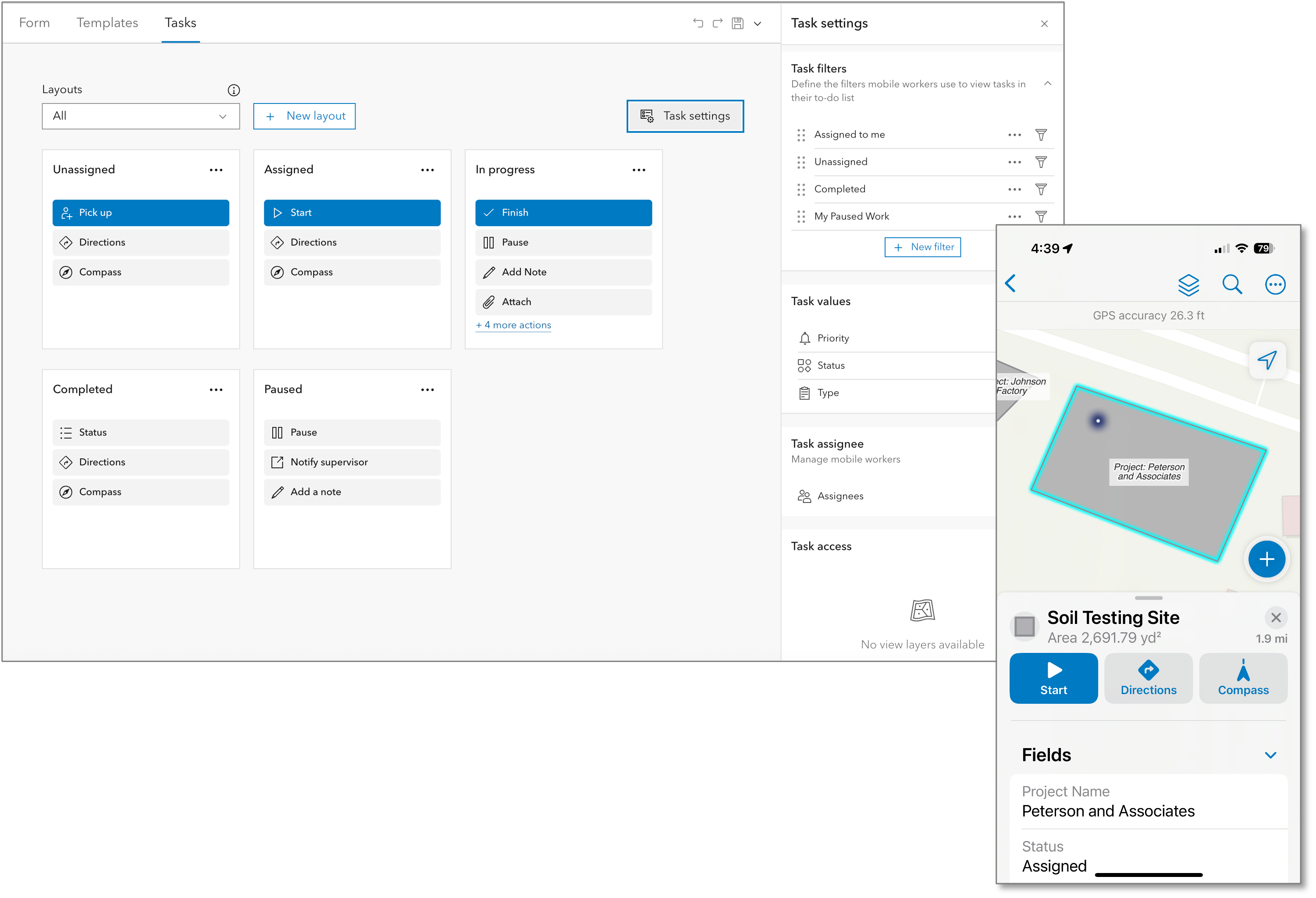
- An all-new Task coordination capability that improves the efficiency of field workflows by providing an easily configurable, dynamic, task-driven to-do list that guides mobile workers to get their work done.
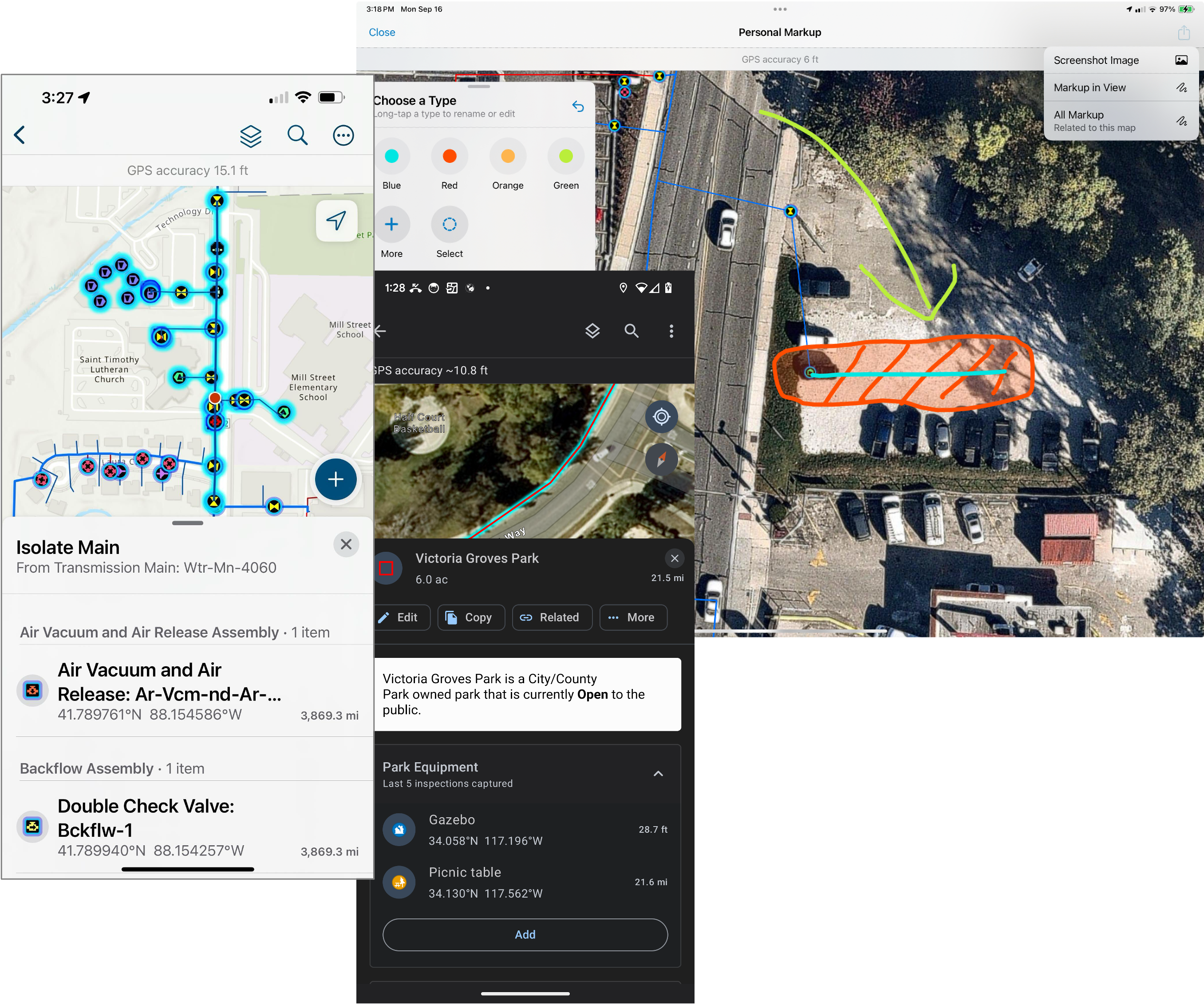
- Improvements in how your maps can improve situational awareness. This includes offline support for viewing and tracing utility networks, an all new personal markup experience, support for related record pop-up elements, and much more.
- Enhanced data capture and editing workflows with improvements to indoor and outdoor location capture, a streamlined experience when working with Trimble GNSS receivers, LADM support, Edit Multiple now includes forms support, offline support for attribute rules, and numerous arcade enhancements that support new workflows like stationing and offset capture and cut/fill measurements.
Task Coordination
Tasks are designed to coordinate and manage work that needs to be completed in the field. Tasks are features, when configured using Field Maps Designer, tasks are presented in dynamic to-do lists for mobile workers, organizing and providing the information needed to complete the job. The Tasks experience is highly configurable. Learn how to prepare and configure your maps with tasks. Consider how you can integrate tasks with your Enterprise Asset Management (EAM) system to enhance efficiency and provide real-time insights into your field operations.
Mobile workers can:
- Sort and filter assigned work.
- View and access task details.
- Navigate to the job site.
- Complete tasks with configurable, context-driven task actions.
- Create and pick-up unassigned work in the field.
- Work with tasks online, offline, indoors and outdoors.
Learn more about how mobile workers can work with tasks.
Situational Awareness
There are significant improvements that boost situational awareness in this release. Organizations can take utility networks offline, sketch and share map markup with a completely new experience, streamline working with related records, and much more.
Situational awareness improvements include:
- Support for v7 utility networks.
- View and trace utility networks offline.
- Simplified experience working with related records via support for related pop-up elements.
- Geofence location-alerts that update with edits to the underlying source features.
- New and improved personal markup experience.
- New collaboration experience for Apple devices.
- Snapping to features when using the Measure tool.
- Discover a dynamic scale bar when adjusting map scale.
- Numerous UX and accessibility improvements
Data capture and editing
Whether capturing new assets using high accuracy GNSS receivers, performing inspections or maintenance activities, or capturing observations with photos, there are many improvements to data capture workflows in this release.
Data capture improvements include:
- Forms support within the Edit Multiple tool.
- Connected branch versioning editing experience.
- An improved experience when using Trimble GNSS receivers.
- Editing support for subtype group layers.
- Offline support for constraint and calculation attribute rules.
- Support for LADM workflows on the Android platform.
- Enhancements to the Indoor editing experience.
- Numerous Arcade enhancements that unlock new data capture capabilities like stationing and offsets and cut/fill.
Present in the ArcGIS Enterprise 11.5 release and available now in ArcGIS Online, is the ability to set a specific branch version for layers in your map that are branch versioned. If present, when you open the online map, all edits will be stored in the branch version specified.
Biggest release ever
We’ve addressed more than 90 user-reported issues and enhancement requests. Some considerations with the update:
- Mobile users will be required to sign in with their ArcGIS account after the app updates. So consider letting them know. Ask them to start Field Maps before heading to a remote location. If prompted to sign in, make sure to have your credentials handy.
- We’ve updated iOS and Android version requirements. We now require devices update to iOS 18 and Android 10.
What’s coming next
For the remainder of 2025, we’re planning a small, bug fix update for both the Field Maps mobile apps and Field Maps Designer as we get started on exciting new capabilities for 2026!
Here are a few capabilities we’re working on for next year:
- Support for GeoPDF as an on device map and local basemap.
- A new Stakeout tool for transferring designs to ground.
- Several improvements when working with utility networks (support for pop-up association elements, display and editing of subtype group tables, additional branch versioning capabilities and enhancements to network tracing capabilities.
- New support for tilt compensation when using an external GNSS receiver as well as direct capture using line locators.
- AI-assisted data capture.
- Many new form improvements (attachments, multi-choice, and more).
Contact us
If you have questions about ArcGIS Field Maps, please check out our Esri Community page. If you would like to connect with and learn from your fellow users, please join our LinkedIn group.

Is there any documentation about the “improved experience” with Trimble receivers? There appear to be significant changes but I can’t find any documentation about it or how it impacts our field staff. I had people calling me today and I was as confused as they are.
I have the same issue – we have crews that are not able to see the realtime elevation
Hi Jason. Can you please contact Esri support or your Trimble dealer so that we can help you with this?
Hi Jamie. Here are the primary benefits/changes:
– For new users on iOS, setup no longer requires browsing to the TMM folder.
– Both TMM and Field Maps can be open and connected to the receiver at the same time.
– Changing configuration in TMM is reflected instantly in Field Maps.
– Multiple receivers are handled transparently with no changes in Field Maps.
– TMM is now the only place where you need to/can set antenna height. This prevents duplicate entry of height values.
This update seems to have broken our sign-in workflow, resulting in our users getting a generic “Sign In Error” after upgrading to this latest version. Just an FYI that Esri Support says they are aware of other customers experiencing this behavior. Hopefully a workaround can be offered soon since our users are now unable to collect field data after their phones upgraded Field Maps to this latest version.
Hi Zachary,
Are you on Enterprise? What version are you using? And what is your authentication mechanism? There are several sign-in errors that have come up with this release, have you opened a case with support? Sharing logs and any additional details via a support case will help narrow down the cause and if any of the workarounds we’ve identified might help.
Thanks, Chris. Thankfully we were able to resolve this issue with Support by removing a leading space from the analysis helper service url in our portal/sharing/rest configuration settings. Interestingly this also fixed the same error that we were encountering with the release of the Indoors 2.0 viewer mobile app.
Me and some others are having issues with submitting related records. It’ll throw an error after hitting submit. If the user cancels/discards edits, backs out of the map and reloads, the record shows up.
Hi David,
Thank you for posting and for contacting Esri support. Replying here in case other customers are facing a similar issue. The error “Unable to Submit ‘The operation couldn’t be completed.(ArcGIS.ArcGISError error 1.)'” may occur if duplicate Utility Network layers are present in the map. As a temporary workaround, until we can resolve BUG-000179924, please remove duplicate layers from your map.
Is there any documentation on the attribute rules implementation in ArcGIS Online?
We were on ArcGIS Server 10.6.1 and none of our Field Maps apps work anymore. We created a ticket, but 10.6.1 is not supported anymore so we have to rush to finish our move to 10.9.1
Multi-Choice support for forms will be a welcome update. Hoping this is an early update for 2026.
Looking to learn more about the Field Maps Task solution as well. Exciting features!
What’s the “New collaboration experience for Apple devices”?
Jeff – Why are you not storing location profile information in the metadata yet? This is the most ridiculous thing to ignore (yes, I submitted a request about this years ago). When we get updates, typically the location profile is blown out, and people are still collecting data. #1 – I have no way of fixing it after the fact, #2 – No way of verifying if settings are correct for each user after the update. This is an ESRI issue that needs fixed