A Smarter, Simpler Nearby Experience
The Nearby Instant App has been refreshed with a redesigned experience that makes it easier for users to find what matters, especially on mobile. This update focuses on a cleaner interface, improved mobile usability, and new configuration options that give you more control over how your app behaves and how users get started.
A Cleaner, More Intuitive Interface
The updated Nearby UI simplifies the experience and helps users stay focused on their task. A refined layout improves visual hierarchy, reduces clutter, and makes tools and results easier to access.
Expanded theming now extends beyond the core app to include the results panel and map tools, creating a more cohesive and polished look across the entire experience.
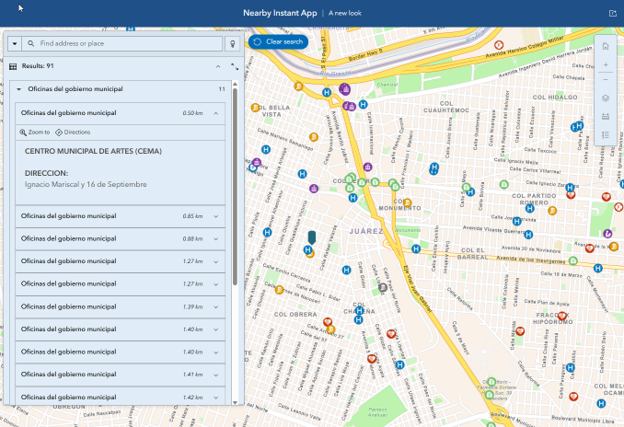
These enhancements create a smoother, more predictable workflow, whether users are exploring nearby locations or quickly identifying a specific result.
More Control with New Configuration Options
Along with the updated experience, new settings give you greater flexibility to tailor Nearby to your audience and use case.
Configure mobile-specific behavior
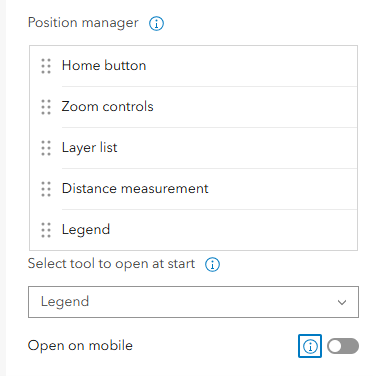
When choosing to open a tool at startup, now select whether you’d like it to open on mobile as well. By default, tools open at start are collapsed on mobile, but through the position manager you can change that setting for more control. These options are available in the Theme & Layout section > Position manager.
Additional options for results
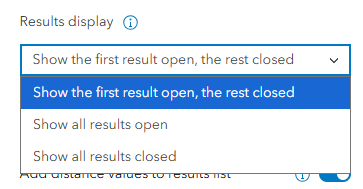
Customize how results are displayed and interacted with to better match your app’s purpose. A new option to open just the first result has been added for more fine-grained control. Find this new option in Nearby > Panel options.
Hide the search radius button
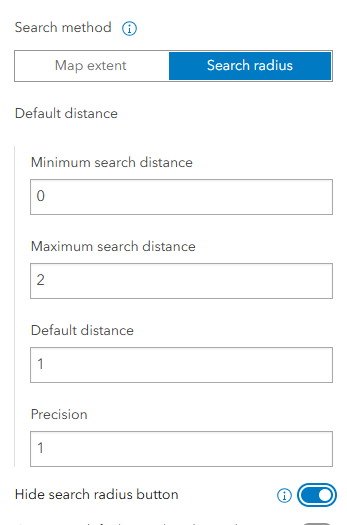
Simplify the interface by removing the search radius option when it isn’t needed, creating a more guided experience. Custom CSS was frequently used for this, now it’s an easy configuration option. Find it under Search Radius settings in the configuration.
More ways to guide users from the start
Provide a clearer introduction to your app with flexible onboarding options. In addition to the Information panel, you can now enable an introduction window, giving you multiple ways to present key information, instructions, or context.
Use a panel for persistent guidance, or a focused window to capture attention upfront and help users get started quickly. Find these options in the About section.
A More Focused Nearby Experience
These updates make Nearby more flexible, intuitive, and ready for both desktop and mobile use. Whether you’re guiding users through a specific workflow or providing quick access to location-based information, the improved interface and new configuration options help you create a more streamlined, user-friendly experience.
Try out the updated Nearby app to explore these enhancements and see how they can improve your next app.
For more information on changes made that may imapct existing apps visit Instant Apps Esri Community update.

Article Discussion: