Preview the new Nearby experience and tell us what you think
If you’ve used the Nearby Instant App before, you already know how powerful it is for helping people find places of interest near an address or location. Now, we’re excited to share a refreshed Nearby experience is coming soon (sample). It will include a modernized UI, improved layout, and a more map-focused design, and you can preview your app in this new design now.
This update is part of ongoing work to modernize Instant Apps, and we want your feedback to help shape what comes next.
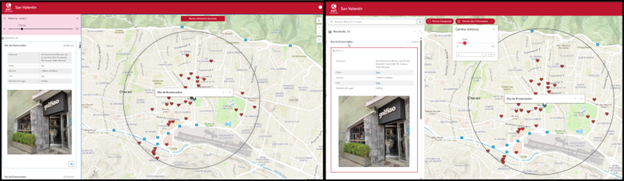
What has changed?
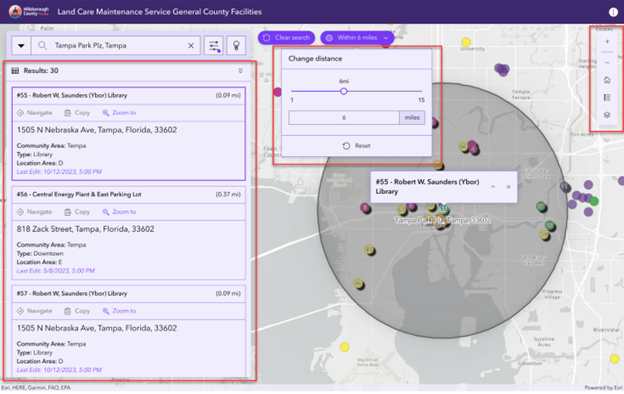
The new Nearby introduces a cleaner, more streamlined interface that puts the map front and center. We focused on making common actions easier to discover and use.
Here’s what’s new in the Nearby glow‑up:
- A more modern layout that feels lighter and more focused on exploration
- Improved use of screen space, removing large panels that previously competed with the map
- A compact action toolbar that keeps tools accessible without overwhelming the experience
- Refined result and filter interactions, taking up less space when not needed
- Extended theming, the theme now applies to the results and search buttons on the map.
Preview your app in the new design
Now, when you publish your Nearby app, you will be prompted to view the current app in the new design. Giving you an idea of how your app will look in the new layout. Test out your app and get a feel of how it will look when the update is released, all without configuring anything in your app.
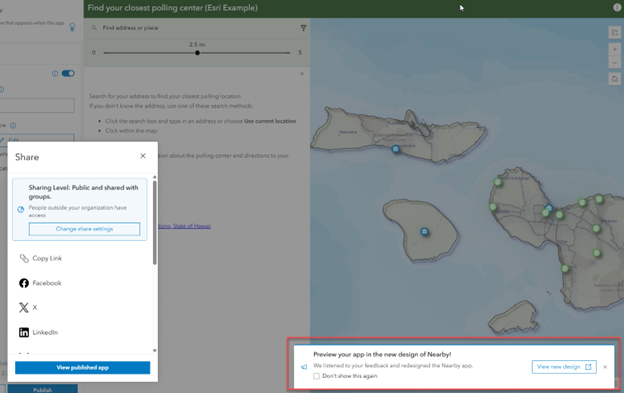
Note: This preview is intended for exploration only and should not be used as production level app.
Help shape what’s next: share your feedback
Because this Nearby redesign is in preview, your feedback really matters. We’re actively reviewing comments to fine-tune the UI, improve interactions, and address any rough edges before it moves beyond beta.
After previewing the new Nearby experience, we encourage you to:
- Try common workflows your users rely on
- Compare the beta and current designs
- Share what’s working well and what could be better
Take the feedback survey and let us know what you think. Your input directly influences how Nearby evolves from here. The survey can be accessed from the previewed app or here.

Article Discussion: