Have you ever been told you have to use full geometries for accurate spatial filtering in your GIS? Well lucky for you, that is a myth. And it could be costing you serious time and performance. As someone who has worked with plenty of messy data, weird geometry overlaps, and slow queries, I am here to tell you it is ok to break the rules when your data calls for it!
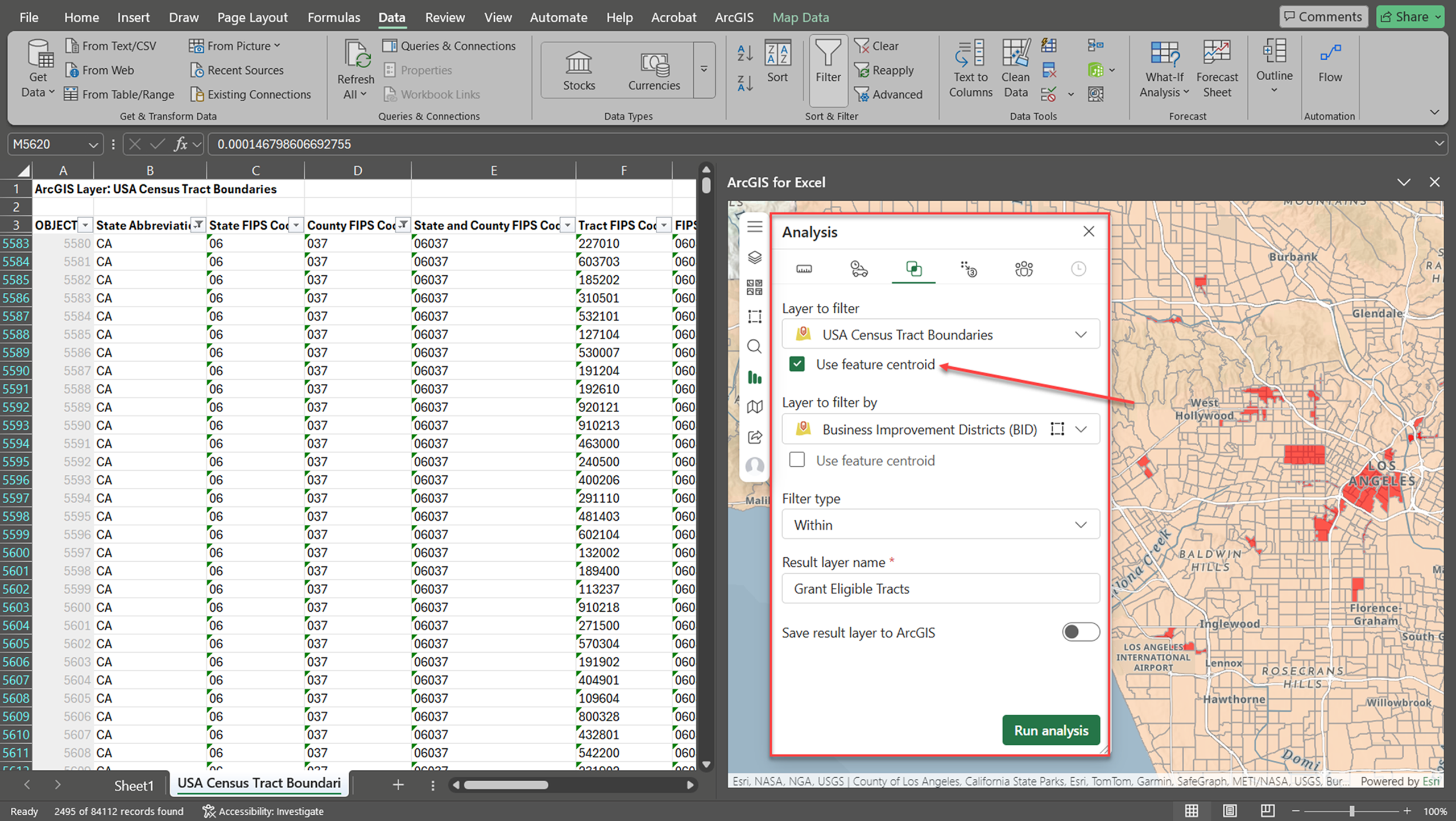
In this blog, we are breaking down 4 common myths about spatial filtering. We’ll show you how our new Use feature centroid operator within the ArcGIS for Excel’s Spatial filter tool offers a faster, simple way that still gets the job done.
So…What Is a Centroid?
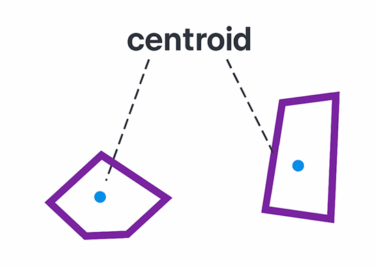
A centroid is the geometric center or average location, inside a shape, in GIS this could look like a polygon or line. It’s the point where the shape would balance if it were a solid object. Using the centroid means working with just one central point instead of the whole shape which in many cases simplifies calculations and filtering without losing important spatial context.
Myth #1: You have to use the full geometry
Truth: Full geometries can introduce edge-case woes, like shared borders, slivers, and multipart features. Using centroids avoids those ambiguities by anchoring each feature to a single point making filtering more consistent and easier to validate.
Myth #2: Centroids sacrifice precision for speed
Truth: Our smart centroid calculation gives you the best of both worlds by ensuring every point is a perfectly reliable representation of its shape. Instead of a basic geometric average, the tool uses an intelligent calculation that guarantees the point always stays “inside the lines” and within the actual area of your feature. This means you can trust that your data is exactly where it should be while enjoying the performance boost that comes with point based filtering.
Myth #3: You need to clean data before filtering
Truth: It’s often taught that our data must be perfectly cleaned, removing any gaps, overlaps, and errors before analysis or exploration. But the reality is that real world data is messy! Centroids ignore small flaws by focusing only on the central point, letting you save time and spend less effort on your typical data cleanup or simplification. This can make centroids perfect for quick scalable filtering on large imperfect datasets.
Myth #4: Centroid filtering isn’t reliable for spatial joins or overlays
Truth: For many spatial joins, especially point in polygon operations, centroids are not only reliable, they are often preferred! They provide an explicit, singular representation of a location for assigning attributes, Think zoning, flood zones, or police jurisdictions. You can use centroids in these types of use cases to help avoid overlapping results or duplicate joins.
When Not to Use a Centroid
Centroids are great for speed and simplicity but aren’t the tool you need to pull out of your toolbox for every job. If your tasks depend on an exact shape, boundary or feature area, like a detailed proximity calculator or overlay analysis, you’ll want to use the full geometry instead.
Here is a quick comparison to help you decide which approach fits your workflow best:
| Task | Use Centroid? | Use Full Geometry? |
| Filter office locations inside service areas | Yes | Optional |
| Assign parcels to a zoning district | Yes | Optional |
| Identify parcels intersecting a flood zone | Sometimes | Yes |
| Check if a building footprint is located fully within a service area | No | Yes |
| Compare overlaps between network coverage areas | No | Yes |
Conclusion
Centroids can be a powerful yet often overlooked tool to make your spatial filtering simple and easier to scale, without sacrificing accuracy (in many cases). Full geometries still have their place when precision is of the utmost essence, but thanks to new enhancements in our Spatial filter tool, centroids are now easier to use than ever.
Have you tried centroids yet? Give it a shot! Check out this documentation page for more details on how to start using them. And if you are already a fan, we would love to hear more about how you are keeping your spatial analysis on point with centroids. Let us know how it goes on our community page.

Article Discussion: