A network analysis layer‘s input and output data are contained in the group layer’s sublayers, which reference data stored on disk in file geodatabase feature classes and tables.
Previously, you could only control the analysis data source location using geoprocessing environments. Starting in ArcGIS Pro 3.7, you can instead use convenient new geoprocessing tool parameters.
The geoprocessing tools used to create network analysis layers (Make Route Analysis Layer, etc.) have two new parameters:
- Analysis Geodatabase – The existing file geodatabase workspace where the new network analysis layer’s sublayer data will be stored.
- Analysis Feature Dataset Name – The name to use for the new feature dataset that the tool will create in the analysis geodatabase to store the network analysis layer’s sublayer data.
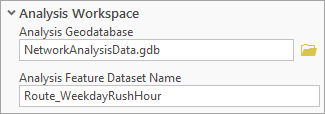
Refer to the tools’ documentation for more details about how these parameters behave.
This enhancement gives you more flexibility and control in your Network Analyst workflows. It was implemented following suggestions from users via ArcGIS Ideas.
The new tool parameters are particularly valuable for Model Builder workflows. Previously, models with stored environment settings could inadvertently write to old project geodatabases. Refer to the updated Network Analyst Model Builder tutorial for best practices using network analysis layers in models.

Article Discussion: