Known Issue: Signing in with the default ArcGIS Online URL with Survey123 Mobile and Studio
We've identified an issue that affects some users of Survey123 Mobile and Survey123 Studio when signing in through the default ArcGIS Online URL (www.arcgis.com). It results from a compatibility issue with the November release of ArcGIS Online. We apologize for the inconvenience. There is a straightforward workaround: after clicking the “Sign In” button choose “ArcGIS Enterprise” and then enter your organization-specific URL (for example, https://yourorganization.maps.arcgis.com) instead of the default URL. We are working on a hotfix for both Survey123 Mobile and Survey123 Studio that will resolve this issue, and we expect to release it soon. We'll share an update as soon as it's available.
The November 2026 release of ArcGIS Survey123 introduces new ways to automate data capture, greater flexibility when designing and maintaining surveys, and significant enhancements to Survey123 Mobile and Survey123 Studio (version 26.2) and the Survey123 website.
This update makes AI-powered image and text analysis generally available, allows survey authors to move between Survey123 Studio or Connect and the web designer, adds autosend for field workflows, and expands the tabular experience for repeat records. The release also makes significant progress toward functional equivalency with the current 3.x Survey123 apps, bringing more of the capabilities organizations depend on today to Survey123 Mobile and Survey123 Studio.
Here are some of the highlights:
- AI-powered image and text analysis in Survey123 Mobile and on the web
- Edit Survey123 Studio and Connect surveys in the web designer
- Automatically send records when connectivity returns
- Enhanced tabular repeats and a more efficient form experience in Survey123 Mobile
- Updates and enhancements to Survey123 Studio
- Progress toward functional equivalency in Survey123 Mobile and Studio
- Guidance and resources to help your plan transition to the next-generation apps
Want to see these updates in action? Watch this short video for a quick look at what’s new in the November 2026 release.
AI-powered data capture in Survey123
AI can help turn the information captured in a survey into useful data while the form is being completed. With AI-powered analysis calculations, a survey can analyze an image or text response and use the results to populate other questions in the form.
Previously available as beta capabilities on the web, image and text analysis are now generally available and supported in both the Survey123 web app and native Survey123 Mobile.
Image and text analysis use ArcGIS premium AI capabilities and consume ArcGIS Online credits. Organizations should review their AI configuration, user privileges, and expected credit consumption before deploying these workflows broadly, specifically administrators must enable both of the following settings to use Survey123 AI-powered capabilities:
- Allow use of AI features in ArcGIS
- Allow access to AI premium services
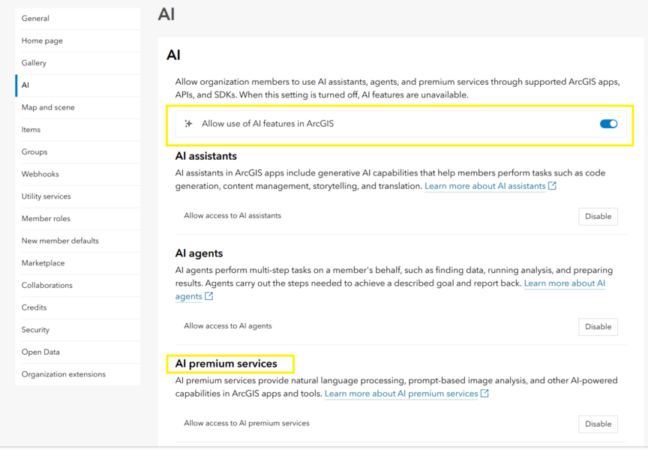
Image analysis
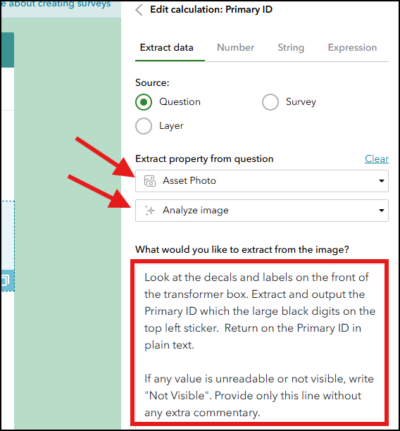
Image analysis allows a survey to extract information from a photo using a prompt defined by the survey author. For example, a survey could:
- Generate a description of damage shown in a photo
- Identify an asset or object
- Read visible text, such as an identification number
- Classify an issue into a predefined category
- Use information in a photo to populate additional questions
This can reduce the amount of information mobile workers need to enter manually while helping organizations collect more consistent data.
AI-powered analysis currently requires a network connection while a survey is being completed. As these capabilities evolve, we plan to extend support for offline workflows, including the ability to complete AI-generated values after records have been synced with the server.

Text analysis
Text analysis can interpret or extract information from an existing text response. It can be used to identify important details in a longer description, summarize information, extract a location or other relevant value, or translate text into another language.
Author AI prompts in native apps and web designer
Survey authors can configure these capabilities in the web designer or use the pulldata(“@ai”) function when authoring an XLSForm in Survey123 Studio or Survey123 Connect.

Design your way: one survey, multiple authoring experiences
Survey authors often choose an authoring experience based on the needs of a particular form. Advanced logic and schema design may be easier to manage as an XLSForm in Survey123 Studio or Survey123 Connect, while visual layout and appearance changes may be faster in the web designer.
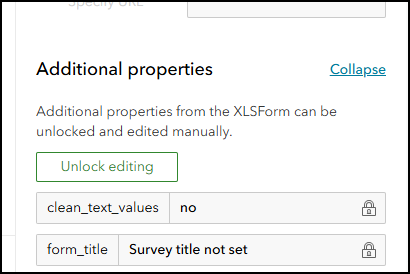
One of the most requested improvements to Survey123 authoring has been greater flexibility to move between these experiences. With this release, surveys published from Survey123 Studio or Survey123 Connect can be opened, edited, and republished in the Survey123 web designer. You can then return to Studio or Connect and continue working with the same survey.
This makes it easier to use different authoring experiences at different stages of the survey design process rather than committing to just one. For example, you could create the survey schema and logic in Survey123 Studio, open the survey in the web designer to refine its visual design, and later return to Studio to continue working with the XLSForm.

In the web designer, you could:
- Arrange questions using a visual grid layout
- Adjust question widths and position questions side by side
- Modify the theme, colors, and appearance
- Make straightforward design changes through a drag-and-drop experience
We think this new flexibility will make a real difference for survey authors, particularly teams that want the power of XLSForm authoring combined with the productivity and visual design experience of the web designer.
Automatically send completed records
Mobile workers do not always have a reliable network connection. They may complete a survey while offline, place it in the Outbox, and reconnect later.
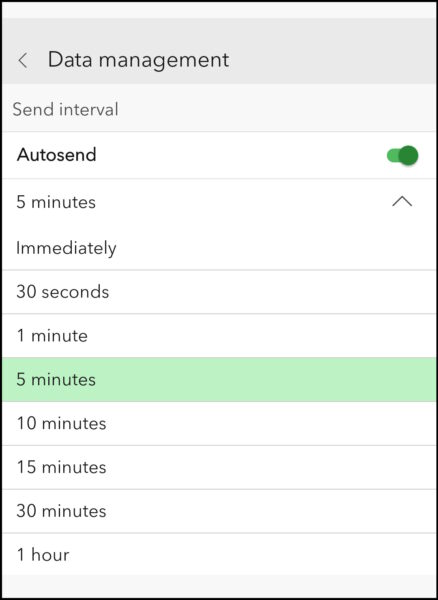
Survey123 Mobile now includes autosend settings for both surveys and QuickCapture projects. When autosend is enabled, records waiting in the outbox can be submitted automatically when the device regains connectivity.
Autosend has been a frequently requested capability, and we are excited to bring it to Survey123 Mobile. It removes another step from the field workflow by reducing the need for workers to monitor the Outbox and manually send completed records once they reconnect. For organizations with crews regularly moving in and out of connectivity, that can mean less time managing submissions and faster delivery of field data.
More powerful tabular repeats
Tabular repeats were introduced with the first release of Survey123 Mobile in July 2026, providing a spreadsheet-like experience for viewing and editing related records. It quickly became one of the new app capabilities that generated the most enthusiasm from customers, particularly for workflows that involve collecting many similar records.
With the November release, we are making that experience even better.
Users can now edit more types of questions directly in the table, including choice lists without having to open the complete form for each repeat record. This makes working with larger sets of related records faster and more efficient.
Survey authors can also:
- Use a grid layout to design the form view associated with the tabular repeat
- Use relevant and dynamic read-only expressions for questions in the tabular view
- Use the includeInCopy parameter to control which values are copied or not copied into a new repeat record when using “Copy to new record”
For example, an inspector could copy an existing asset record while excluding its location, allowing the remaining details to be reused while a new location is captured for the copied record.
These enhancements continue to build on one of the most distinctive data-entry experiences in Survey123 Mobile.

A cleaner, more compact form experience
Screen space is at a premium in the field, especially on smaller phones, where every line of a form counts. Forms in Survey123 Mobile now use more consistent spacing and reduced padding, making better use of screen space and providing a cleaner, more streamlined experience. The form header is collapsed by default (tap the survey title to expand it), and the read-only chip now appears inline with the question label instead of on its own line. Together, these changes let users see more of their form at once and scroll less, whether they are working on a compact phone or a larger tablet.
More capabilities in Survey123 Studio
The November release is an important step forward for Survey123 Studio. In addition to adding more XLSForm authoring capabilities, Studio can now play a much bigger role in maintaining existing surveys.
Survey authors can browse and download surveys previously published from Survey123 Studio, the web designer, or Survey123 Connect. More importantly, you can make changes to those existing surveys in Studio, save your work, and republish them while retaining the existing survey item, links, identifiers, and associated feature layers.
This means Studio is no longer just an environment for creating and testing new surveys. It can increasingly be used to work with the surveys your organization already has.
As you begin evaluating existing surveys with the next-generation apps, we recommend first making a copy of important production surveys and using the copy for testing. This gives you a safe way to evaluate how an existing XLSForm behaves in Survey123 Studio and Survey123 Mobile before making changes to a production workflow.
As we bring Survey123 Studio closer to functional equivalency with Survey123 Connect, this release adds more of the authoring capabilities that survey designers need to build and maintain the surveys they rely on today. New capabilities include:
- Link CSV files to a survey to provide choices for select questions
- Use aggregate functions, including COUNT, SUM, MIN, and MAX, across repeat records
- Use indexed-repeat to return a value from a particular repeat record
- Preview a form using Fit on screen, Smartphone, Tablet, and Monitor modes
- Specify when calculations are evaluated using calculation modes
- Apply field alias and domain changes when republishing layers created through Survey123
- Allow editing of records in the Sent folder or turn off the Sent folder

Survey123 Studio now creates the results (_results) hosted feature layer view when a survey is first published. The view provides a controlled way to share and access survey results for reporting and other downstream workflows without creating another copy of the survey data. It also provides a consistent feature layer endpoint for integrations such as ArcGIS feature layer webhooks.
More of the workflows you rely on, now in Survey123 Mobile
With each release, Survey123 Mobile is getting closer to supporting the workflows organizations rely on in the current Survey123 field app. The November release closes several more important functional gaps, making it possible for more organizations to begin evaluating their existing workflows with the next-generation app.
- Autosave and recovery: Survey123 Mobile can automatically save responses as they are entered. If the app is interrupted or unexpectedly closes, users can recover their work and continue without starting the survey again.
- Geocode questions and geosearch: Text questions using the geocode appearance can provide an interactive address-search experience. Users can also search for addresses, coordinates, and other locations directly from a map using geosearch.
- Edit and resend submitted records: When editing is enabled for the Sent folder, users can open previously submitted data, make changes, and resend the record. This is important for workflows where field information needs to be corrected or updated after its initial submission.
- QuickCapture enhancements: QuickCapture projects in Survey123 Mobile can populate fields using additional location and travel variables from the device. The location stored in a photo can also be used to place a captured point.
- App-link parameters: Survey123 Mobile now supports folder, filter, and action URL parameters in links that open surveys, providing greater control over how a user enters a workflow.
Together, these enhancements represent significant progress toward functional equivalency with the current Survey123 field app. For complete details about what is available, in development, planned, or not planned, review the Survey123 functionality matrix.
Planning your transition to the next generation
Survey123 Mobile and Survey123 Studio were introduced in July 2026 as the successors to the current-generation Survey123 field app and Survey123 Connect. They represent the future of Survey123 field data collection and authoring, and with every quarterly release they will become capable of supporting more of the workflows our customers rely on today.
A recent announcement marks an important milestone: the current-generation Survey123 3.x field app and Survey123 Connect are planned for retirement on January 1, 2028. That may feel like a long way off, but the best time to begin planning is now. Starting early gives you the time to evaluate your workflows, try out the next-generation apps, and move to Survey123 Mobile and Survey123 Studio with confidence, and we are here to help you every step of the way.
We also recognize that some important capabilities are not yet available in the next-generation apps. This includes support for workflows that depend on the Inbox, offline CSV files, and offline maps. These are significant capabilities for many customers, and they are scheduled to be addressed in the first release of 2027.
For that reason, the goal is not to move every production survey today. The current and next-generation apps can run side by side while you evaluate your workflows, identify requirements, and move surveys when the capabilities they depend on are ready.
We recommend starting your transition with these steps:
- Review the Survey123 functionality matrix to understand what is available today and what is planned.
- Identify the capabilities, integrations, devices, offline requirements, and deployment patterns used by your existing workflows.
- Make copies of representative production surveys and evaluate them in Survey123 Studio.
- Test those surveys in Survey123 Mobile
- Continue using the supported current-generation apps for production workflows that depend on capabilities not yet available.
- Revisit your transition plan when as additional capabilities become available.
Becoming familiar with Survey123 Mobile and Survey123 Studio today will make it easier to take advantage of new capabilities as they arrive and ultimately move your production workflows with confidence.
We will be sharing much more guidance to help you along the way. Watch the ArcGIS Survey123: The Next Generation of Field Operations webinar and join the ArcGIS Survey123: Meet the Modern Apps live training seminar on November 19, 2026. In addition to introducing the latest apps and workflows, these resources provide more detailed information about the transition roadmap, what is coming next, and how to begin preparing your existing surveys.

We especially encourage you to join the Survey123 Early Access Community as we work toward the first release of 2027. The EAC provides an opportunity to test upcoming capabilities, including important functionality needed by existing workflows, before general release. Your testing and feedback help us understand real-world requirements, improve the new capabilities, and give your organization an opportunity to prepare for them before they become generally available.
Moving from mature, trusted applications to a new generation of apps is a journey, and we will be with you every step of the way. The result will be a more modern Survey123 experience that preserves the workflows you depend on and creates a foundation for capabilities that were not possible before.
We want to hear from you. Your feedback helps shape what comes next for Survey123. If you have not already done so, please complete the Help Shape the Future of Survey123 survey and tell us what matters most to your organization.
The November release is another important step forward, delivering capabilities that improve productivity today and giving you more reasons to explore what comes next for ArcGIS Survey123.

Article Discussion: