This release of ArcGIS Maps SDK for Unity adds high performance display of 3D point feature data, and helps you create more interactive, more efficient 3D geospatial experiences. You can now render large volumes of 3D point feature data more efficiently, with support for data‑driven styling to visualize attributes with a range of renderer types and 3D models. Feature identification has also been improved for building scene layers, making it easier to interact with complex 3D architectural content. And we’ve reduced the footprint of the SDK, helping you build leaner Unity projects, without sacrificing functionality.
3D Point Scene Layers
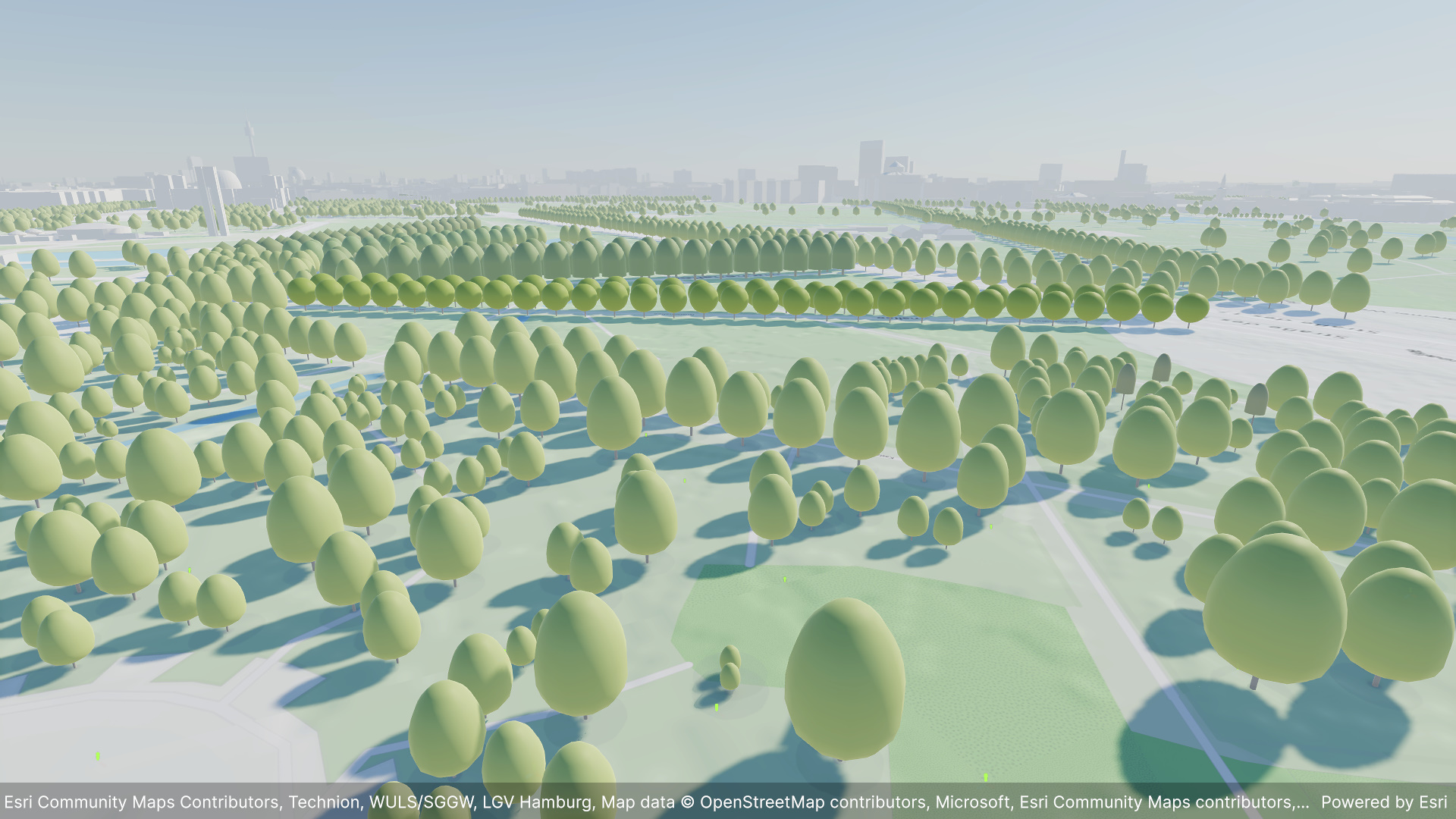
3D point scene layers efficiently handle high numbers of real-world objects where each object is best displayed in a 3D scene as a single point symbol, such as trees, street furniture, sensor locations, or infrastructure assets. You can display point scene layers with attribute-driven rendering that defines the rules and symbols used to categorize and display the data. This release includes support for simple renderers that style all features with the same symbol, value renderers that style features based on their unique values, and class break renderers that style features based on ranges of values in numeric data fields. Whether using the simple, value, or class breaks renderer, with this release, points can be styled with 3D model-based symbols. Future releases will add support for additional symbol types.
3D point scene layers use a Hierarchical Level of Detail (HLOD) structure, which displays more points the closer the user is to the data. The automatic thinning of data depending on zoom scale enhances visual clarity and enables extremely fast transmission and display. Like all 3D scene layers supported by the ArcGIS Maps SDK for Unity, point scene layers can stream from services for connected apps or be read from on-device packages for offline use, maximum performance, and greater resiliency.
Point scene layers play a crucial role in 3D scenes by providing high performance visualization of massive point datasets. For example, the global Open 3D Trees layer is a point scene layer. Processed and hosted by Esri using data from the Overture Maps Foundation (OMF), the Open 3D Trees layer is updated monthly with the latest Overture data, incorporating contributions from OpenStreetMap, Esri Community Maps, and other sources.
Identify includes Building Scene Layers
The identify methods on the ArcGISView class introduced at the previous release have been enhanced to get attribute information for features in building scene layers. Attribute information usually forms the foundation of larger workflows where the user needs to navigate to identified items, view attributes, and/or visually highlight an identified feature. You can implement a highlight effect for easy visual indication of the returned feature by changing the shader for the feature returned from an identify operation, demonstrated in the identify sample in the Unity Maps SDK Samples GitHub repo. Other common developer workflows include comparing attributes between one or more features or querying other business systems for related information to be displayed to the user.
The ArcGISView.IdentifyLayerAsync operation makes an asynchronous identify call for the layer specified, while the ArcGISView.IdentifyLayersAsync operation makes an asynchronous identify call on all 3D object scene layers, and now all building scene layers, in the map. These methods make it easier to implement end-user workflows that involve capturing user interaction with the scene to get the feature attributes at a location. The input parameters for both methods include a start or origin point and an end or target point, usually the user camera location and the point they tap on the scene. These new APIs streamline development, avoiding the need for more complex raycast operations, and help you build better end-user experiences for data exploration, and richer more interactive apps. Note the new 3D Point Scene Layer type does not yet support returning results in the identify operation, but it’s on the roadmap for a future release.
Smaller app footprints
With the Unity Maps SDK, even though you build your app in Unity using the Editor or in Visual Studio using C#, we’ve implemented all the underlying GIS capabilities such as data access and geometry processing in C++, which is compiled into a native component for maximum performance and cross-platform portability. This native component is now 25% smaller, resulting in smaller app deployments and faster app start up times.
Additionally, because the Unity Maps SDK enables you to target Android, iOS, Linux, macOS, and Windows, the SDK includes native components specific to each supported platform and/or architecture. For example, for Android the native component is provided as a .so file, while for Windows it is provided as a .dll file. Because this native component is now 25% smaller across all supported platforms and architectures, it results in a much smaller SDK for you to download initially, speeding up your time to get started, and takes up less space on disk overall, especially when used in many projects, maximizing space on your dev machines to create more streamlined real-world geospatial Unity projects!
Download and get started
Get the latest version from the Unity Asset Store or to learn more about ArcGIS Maps SDK for Unity visit the Esri Developer website. For more details about the enhancements, deprecations, resolved issues, and known issues in this release, refer to the Release Notes. If you’re new to developing with our SDK, the Get started page provides helpful resources to kick-start your journey.



Article Discussion: