Planning is never a blank-slate exercise. It begins with understanding and analyzing what’s already there, providing the foundation for smart and well-informed decisions. In this new release of Urban in ArcGIS Online, we are introducing zoning information in projects, parcel parameters, and an enhanced suitability analysis — three powerful tools that help planners analyze existing conditions and make smarter, data-driven decisions. These features introduce a new level of context-awareness to ArcGIS Urban, allowing planners to assess development potential with greater confidence.
Evaluate projects against zoning
Whether you are reviewing a proposed development or actively designing a new scenario, it’s essential to quickly assess whether proposed buildings align with existing regulations. Urban’s November 2025 release makes this process more intuitive by bringing envelopes to projects as well. Envelopes represent the maximum buildable volume on a given parcel in 3D. Their shape is determined by zoning constraints such as height limits, setbacks, and skyplane rules. By visualizing the envelopes in your project’s study area, you’ll get an immediate sense of where development is possible and if a proposed development is compliant with the applicable zoning regulations.
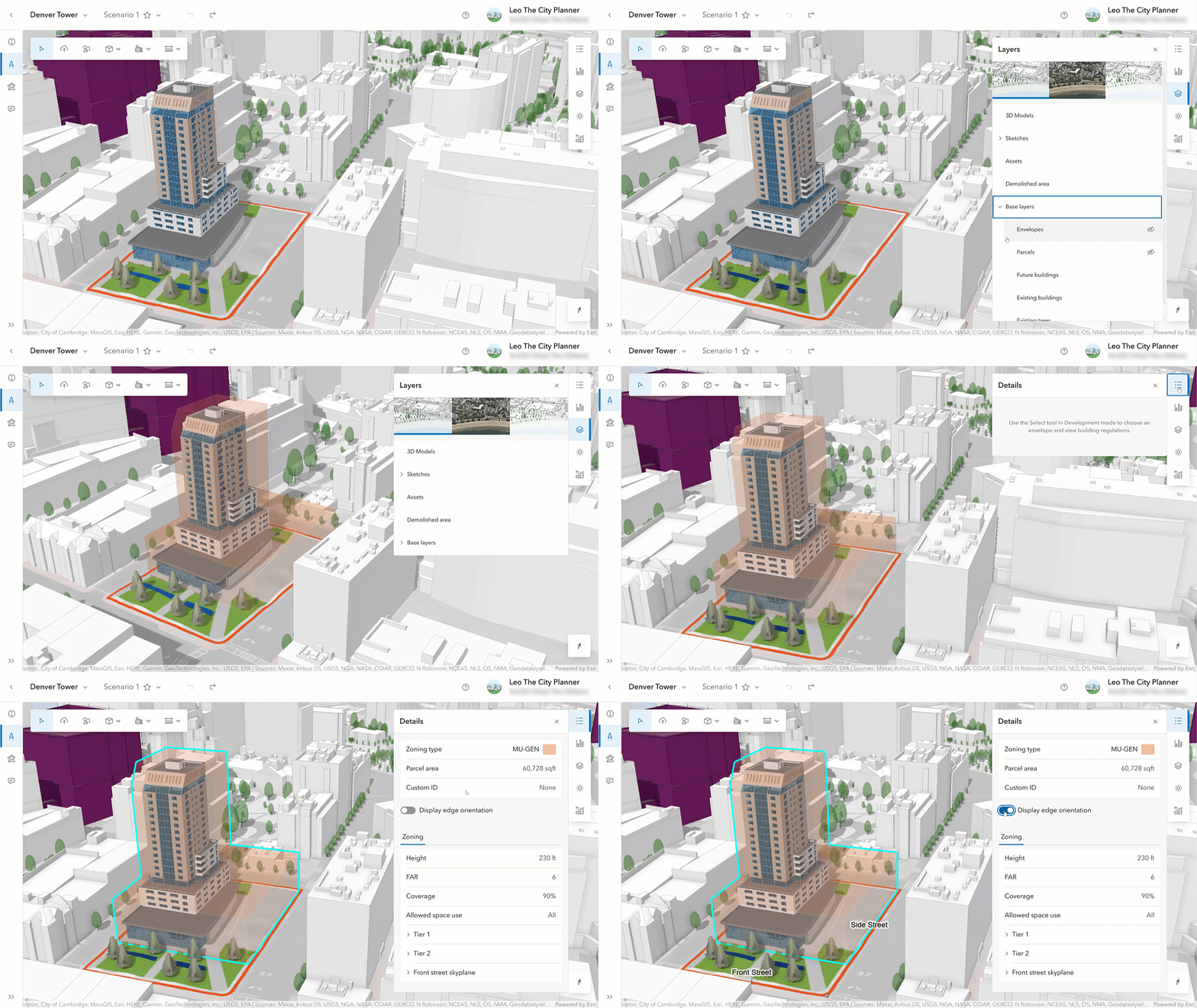
Additionally, you can select an envelope and find detailed information about the parcel and the zoning regulations that apply to it in the new Details side panel.
Bring parcel-level data into your metrics
Metrics in ArcGIS Urban help planners to quantify the impact of proposed developments. This release introduces the new “Parcel parameters” metric type. It allows planners to import parcel-specific data, such as land value, population, or public transit accessibility scores, and use it in their metric calculations. This opens the door to more nuanced, data-driven analysis of existing conditions and development impacts.
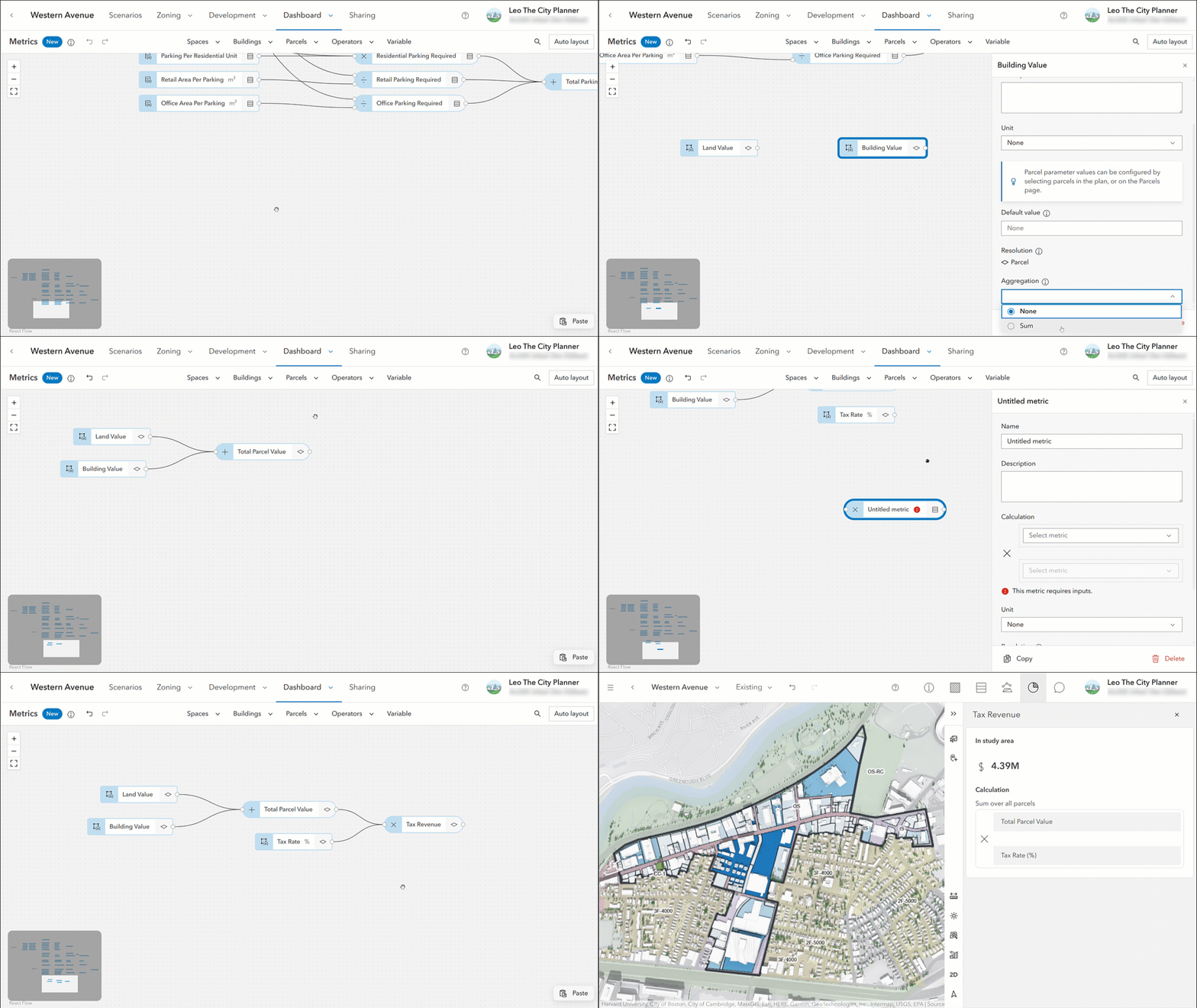
For example, you can now use metrics and the new parcel parameters to calculate the tax revenue for the existing conditions directly in Urban. Firstly, define two parcel parameters: one for land value and one for building value. Then, sum the land value and the building value to get the parcel value. Lastly, multiply the parcel value by the tax rate.

Together with the parcel parameter metric type, we’re additionally introducing the new default value setting for parcel parameters as well as for space-use type parameters. The default value is used in the metric calculation whenever there is no parcel-specific or space-use type-specific value. In the tax revenue calculation example from above, we are using a default value for the tax rate metric. This allows us to calculate the tax revenue using a standard rate and still be able to configure a different rate for selected parcels if required.
Analyze parcel suitability
Suitability analysis is a crucial step in gaining a deeper understanding of existing conditions and identifying the parcels most suitable for new developments. The November 2025 release of Urban in ArcGIS Online introduces a redesigned suitability analysis experience, integrated into the plan editor’s analysis mode. Creating, editing, managing, and running suitability models is now more intuitive. Full undo & redo support lets you experiment with suitability model configurations without the fear of losing progress.

With the new and improved suitability analysis functionality, even extensive models no longer interrupt your work, as the calculations now run in the background and do not block the user interface. You can even trigger multiple suitability analyses simultaneously and continue designing and editing your plan while Urban calculates the suitability scores.
What else is new
For the elevation profile analysis, you can now persist the setting of whether the elevation profile line should only evaluate the ground, everything that is visible in the scene, or both. Saving this setting helps you maintain a consistent analysis setup across different sessions.
Additionally, users without editing permissions can now also access the analysis mode in plans and projects. While changes aren’t saved, the new read-only mode empowers more users to tweak configurations and better understand the planning context without needing full editing rights.
For the full list of new features and enhancements in ArcGIS Urban, check out the release notes.
Additional news and updates
ArcGIS Urban API
With this release, the Urban API adds support for creating and interacting with suitability models in the analysis mode. In addition, when working with elevation profile analysis, a new field allows you to persist whether the elevation profile line should show the ground profile, scene profile, or both. And finally, the ParcelAttributes type has been extended to allow for the storage of parcel parameter data.
You can read the release notes for the Urban API here.
ArcGIS Urban in Enterprise 12.0
The Urban in Enterprise 12.0 release introduces a new and improved project editing experience. All previous functionality of the old project editor has been integrated into the new project editor experience, which also features enhanced navigation and a more streamlined user interface.
Additionally, the new analysis mode allows you to better understand the impact of a project. In this mode, you can utilize the already familiar analysis tools: shadow cast, elevation profile, line of sight, and viewshed. Save your analyses and retrieve them later from the list of previously conducted analyses.
Another highlight of Urban in Enterprise 12.0 is the image upload in plans. With this release, you can upload images such as blueprints directly into your plan, georeference them, and store them as media layers on a scenario.
Please note that the updates mentioned in the sections above are not yet included in Urban in Enterprise 12.0. Read the release notes for a comprehensive overview of the new features shipped with the Urban in Enterprise 12.0 release and see the “What’s New in ArcGIS Enterprise 12.0” blog for a full overview of all Enterprise updates.
Watch the video
Check out this short 2-minute video to see the new release of ArcGIS Urban in ArcGIS Online in action.
As always, let us know if you have any feedback or questions by connecting with us on the ArcGIS Urban Esri Community page.


Commenting is not enabled for this article.