ArcGIS Enterprise 12.0 for Windows and Linux is here, bringing a host of exciting updates and enhancements designed to improve the way you manage, analyze, and visualize your data. This version is packed with features that benefit a wide range of users, including GIS administrators managing user access, IT professionals ensuring system security, GIS analysts conducting spatial analysis, and developers building custom applications. From improved security posture and enhanced observability to powerful tools for 3D visualization and data integration, this release has something for everyone. In this blog, we’ll guide you through the updates and enhancements tailored to your role, exploring how they can make your GIS work more efficient.
Key features of ArcGIS Enterprise 12.0 :
- The ability to create custom sign-in experiences for your organization and custom categories for registered apps allow for improved organization and more control of sign-in options.
- The default security posture is now strengthened with the allowedProxyHosts property being enabled by default, ensuring that only explicitly approved external domains can be accessed via the ArcGIS Enterprise portal proxy capability.
- Administrators can now store server directories configured with ArcGIS Server in object storage from a cloud service, providing an alternative to traditional file share storage.
- Observability is improved with support for using Prometheus to capture ArcGIS Server metrics, a beta feature that gives administrators insights into system health, service usage, and user engagement.
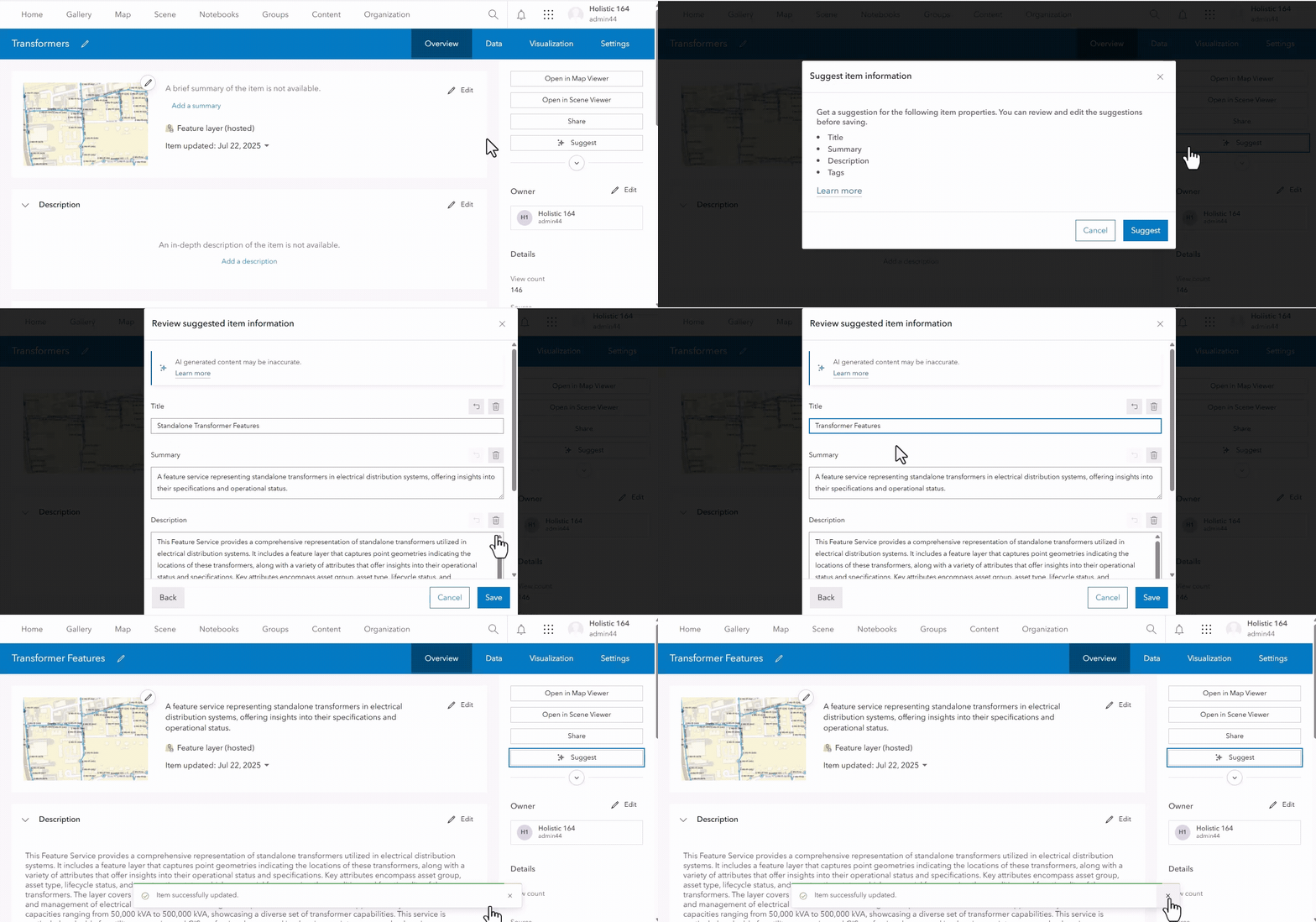
- The new Item Details assistant (beta) allows administrators to easily populate item details with support from generative-AI.
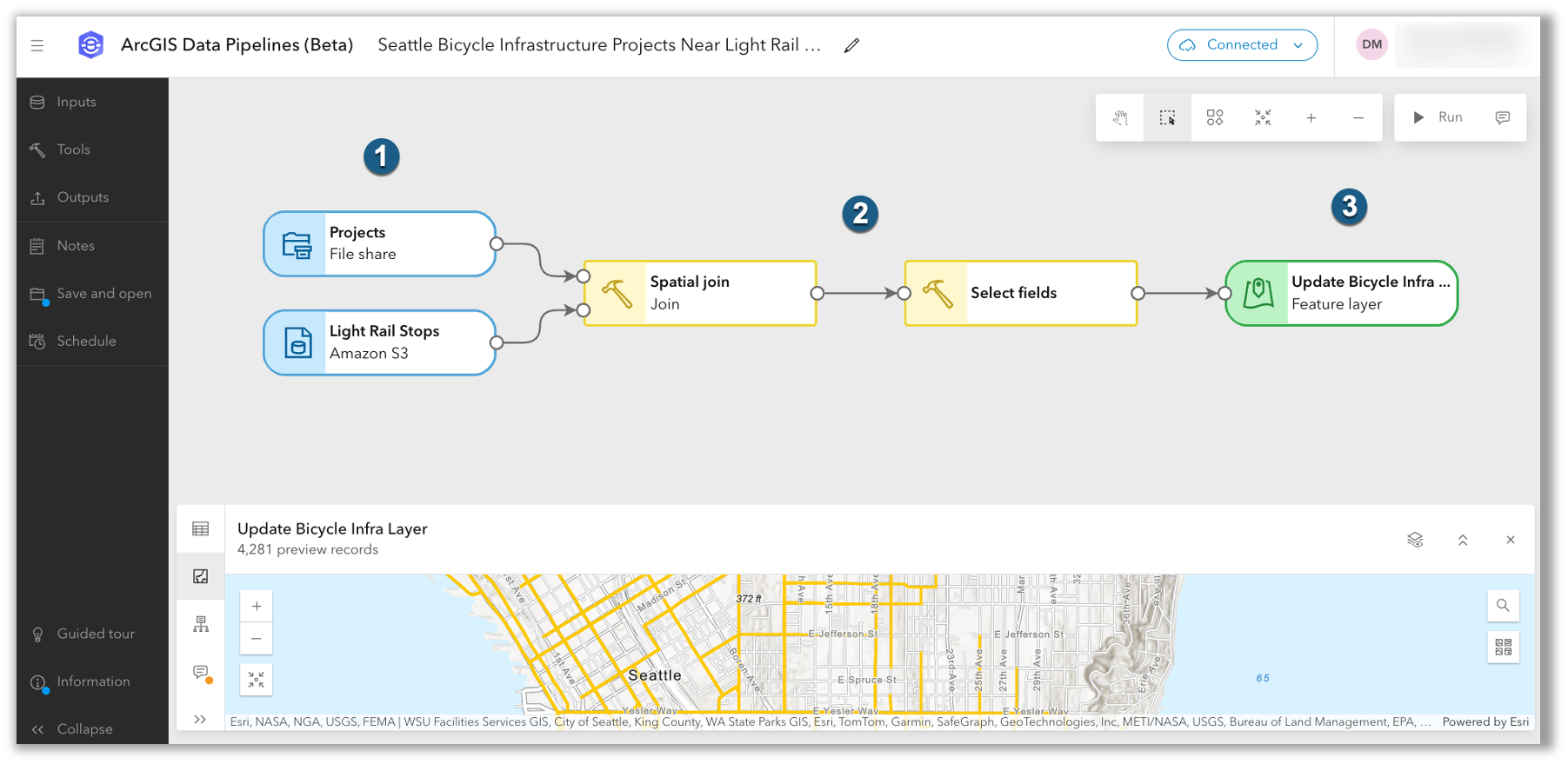
- ArcGIS Data Pipelines, a no-code, visual data engineering capability is introduced as a beta feature.
- The introduction of service interceptors enables the interception of requests and responses for all REST-based GIS services, providing a tool for managing and customizing GIS services without altering their underlying definitions.
Quick Links
Jump to a section in this blog to start exploring.
GIS Administrators
ArcGIS Enterprise 12.0 empowers GIS administrators to manage their organizations with greater confidence and efficiency. This release introduces, additional insight into system updates and more granular controls over user experiences and application access. With improved tools for content and data management, administrators can ensure data integrity, simplify governance, and provide a seamless experience for users across the organization.
Key features
ArcGIS Enterprise 12.0 introduces new features and enhancements that give administrators more fine-grained control over user experiences, helping members work more efficiently. With the ability to configure custom sign-in experiences for different member categories, administrators can tailor what users see when they log in, streamlining the process across the organization. Custom categories for registered apps also allow administrators to better organize and control sign-in options for app users and organization members.
Organization administration
To enhance the organization administration experience, improvements to app blocking now allow administrators to restrict access to ArcGIS Pro through the ArcGIS Enterprise portal even if it is granted by default with a member’s user type. These enhanced controls for managing application access are complemented by updates to user types, which further expand the capabilities available to your teams and simplify administration.
User types empower GIS Administrators to deliver more capabilities to their teams, ensuring users have access to the right tools for their roles and streamlining organizational workflows. Upon upgrading to ArcGIS Enterprise 12.0, the following additional products are included in user types: ArcGIS Business Analyst Web App Standard is now included with the Creator user type and above, ArcGIS CityEngine is included with the Professional user type, ArcGIS Navigator is included with Mobile Worker and above, and ArcGIS Urban is included with Professional Plus. These updates help organizations maximize the value of their ArcGIS investment by making advanced applications more widely available and simplifying license management for administrators. Learn more about user types on the overview webpage.
Additionally, organization administrators should be aware that the ability to provide a Bing Maps key to configure Bing Maps basemaps will no longer be available at ArcGIS Enterprise 12.0. If a Bing Map was configured prior to upgrading to ArcGIS Enterprise 12.0 and a basemap was added to a web map in Map Viewer Classic, that web map will work with the Bing Maps basemap until the Bing Maps key expires. Read the Deprecation Notice to learn more.
Content management
In the realm of content management, GIS administrators play a crucial role in maintaining the integrity and usability of data, ensuring that it’s always up-to-date and accessible. One of the most significant challenges in this role is managing the vast array of data sources, both internal and external, that users rely on for their GIS projects. With the introduction of new Organization Settings, GIS administrators now have new organizational settings to curate users’ access to localized and external Esri content in the ArcGIS Enterprise portal, streamlining the user experience and enhancing data governance.
Data management
GIS administrators play a vital role as custodians of the data that powers maps and applications, ensuring accuracy, consistency, and accessibility. With ArcGIS Enterprise 12.0, several improvements have been made to support their work. Notably, the item details pages have been updated to match the style seen across the ArcGIS Enterprise portal. This consistent design allows administrators to locate information quickly, reduces the time needed to train new users, and helps minimize errors during data management. As a result, these changes not only enhance the overall user experience but also streamline daily workflows for GIS administrators.
IT Administrators
Whether you’re looking to enhance your security posture, optimize your cloud deployments, or gain better visibility into your server performance, this release has something for every IT administrator.
Key features
ArcGIS Enterprise 12.0 brings features that enable administrators to improve sign-in security. As an administrator tasked with managing data access and security, you can now enforce multifactor authentication (MFA) for users. Enforcing MFA helps users protect their accounts by requiring an additional verification step, making it much harder for unauthorized individuals to gain access, even if a password is compromised. Additionally, the allowedProxyHosts property—previously an advanced setting—has become a basic security requirement. This change ensures that only explicitly approved external domains can be accessed via the portal’s proxy capability, mitigating risks such as Server-Side Request Forgery (SSRF) and Denial of Service (DoS) attacks.
Building on these security improvements, ArcGIS Enterprise now offers greater flexibility for cloud deployments. IT administrators can configure ArcGIS Server directories to reside in highly durable cloud storage services like Amazon S3 or Azure Blob Storage. This update eliminates the need for dedicated file servers, reducing infrastructure complexity and cost, while improving resiliency and scalability in high-availability environments.
In addition, ArcGIS Enterprise 12.0 delivers improved observability with support for using Prometheus to capture ArcGIS Server metrics (beta). This feature provides deeper insights into system health and performance by exposing key information such as transaction times, user account activity, and hardware details. Together, these enhancements empower IT teams to manage their environments with greater confidence and efficiency.
System management
ArcGIS Enterprise 12.0 introduces several updates that make system management more efficient and proactive for IT administrators. To begin, you can now use the ‘About’ page to quickly view details about your organization’s recent backups and installed patches, helping you stay informed about system status and maintenance. Expanding these improvements, the release makes it easier to manage security-related tasks. For example, you can configure email settings so that administrative contacts automatically receive notifications when the SSL certificate used on port 7443 is nearing expiration. This ensures timely action and helps prevent service interruptions. Together, these enhancements streamline routine monitoring and alerting, allowing IT teams to maintain a secure and reliable ArcGIS Enterprise environment.
ArcGIS Data Store
Continuing the theme of streamlined system management, ArcGIS Enterprise 12.0 also brings notable improvements to the ArcGIS Data Store experience. The browser-based interface used to configure or upgrade ArcGIS Data Store deployments has been improved to correct errors, streamline links, and match the style of other interfaces in ArcGIS.
GIS Analysts
ArcGIS Enterprise 12.0 delivers powerful new tools and enhancements for GIS Analysts, streamlining workflows and boosting productivity across mapping, data management, and analysis. With updates to Map Viewer, Scene Viewer, and core analysis capabilities, this release makes it easier to discover, visualize, and manage geospatial data.
Key features
These two key features are both in beta in this release and are delivered as two key enhancements that will help to streamline data management workflows.
Item Details Assistant (beta)
Metadata plays a critical role in enabling search, content discovery, data reuse, and governance—especially within ArcGIS Online and ArcGIS Enterprise, which host millions of items. With the rise of AI, metadata has become even more essential. One highlight of this release that will impact GIS analyst workflows is the ability to generate item details more easily with the Item Details assistant (beta). To help jumpstart and enhance metadata creation, the Item Details assistant uses generative AI to enrich information about your items by suggesting improvements to titles, summaries, descriptions, tags, and attribute field details. Learn more about how this assistant can make your data easier to find, understand, and reuse in this blog, and join the beta in the Early Adopters Community.
ArcGIS Data Pipelines (beta)
Another key highlight with ArcGIS Enterprise 12.0 is the introduction of ArcGIS Data Pipelines (beta). This new server role enables ArcGIS Data Pipelines, a no-code, visual data engineering capability that makes it easy to prepare and integrate data for mapping and analytics. With ArcGIS Data Pipelines, organizations can connect to datasets from a variety of sources and use common data engineering tools to clean, format, and combine them. The resulting datasets are saved and managed as hosted feature layers. Users can author and run data pipelines, as well as schedule them to automate data updates. ArcGIS Data Pipelines is now in beta for Windows and Linux and available to all ArcGIS Enterprise Advanced customers. To get started, check out this blog and join the ArcGIS Enterprise 12.0 Beta Features Early Adopters Community.
Map Viewer
For GIS analysts, the Map Viewer is more than just a tool—it’s the gateway to creating detailed and interactive maps that can inform and inspire. New Map Viewer features and enhancements transform workflows to make data visualization faster and more intuitive. The drag-and-drop feature lets users add files directly to maps, streamlining project setup, and reducing manual steps. Smart Mapping’s spike maps enable quick identification of trends and outliers using proportional symbols, while the ability to generate styles by dataset or map extent gives users precise control over how information is presented—ideal for tailoring maps to specific audiences and uncovering local patterns.
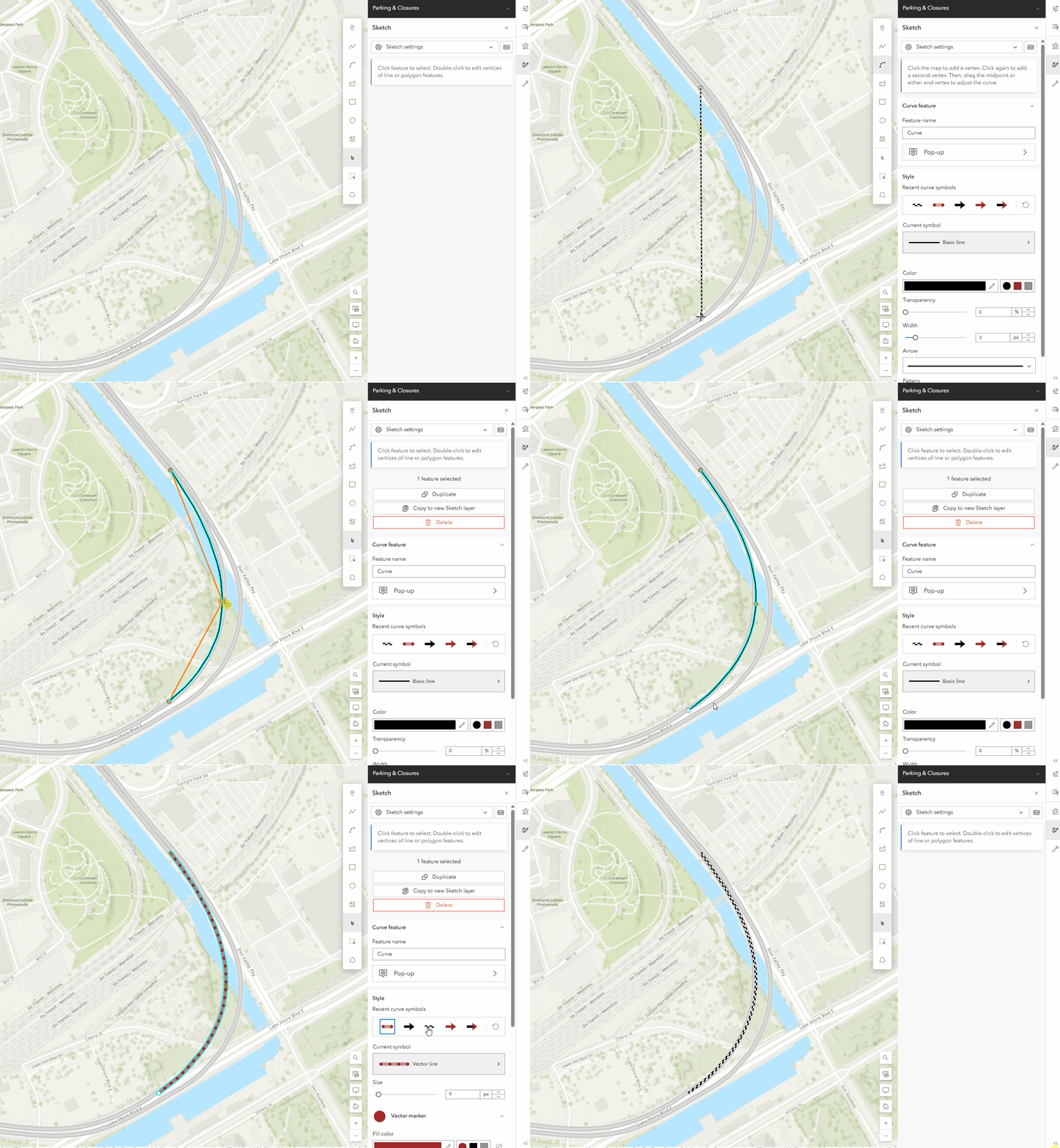
Additional enhancements further empower users to tell dynamic data stories and maintain data integrity. Expanded time series support with low-code options allows users to animate changes over time—even without time-enabled layers—making trend analysis accessible to all skill levels. The new Sketch tool supports curved paths for more realistic route and migration mapping. Administrators and editors benefit from granular editing controls on hosted feature layers, reducing errors, and supporting better governance. Finally, video layer support brings spatial and temporal data together, enabling richer insights by visualizing events like vehicle routes or surveillance footage alongside traditional map data.

As a reminder, the legacy Map Viewer Classic is retired and has been officially removed with ArcGIS Enterprise 12.0, marking a full transition to the modern Map Viewer experience. Please note, any maps created in Map Viewer Classic will automatically work in Map Viewer, with no migration required.
Scene Viewer
The latest Scene Viewer updates empower users to create more impactful 3D presentations and streamline collaboration. Features like Focus Areas allow users to highlight specific project regions, guiding audience attention and making presentations more effective. The ability to capture slides with pop-ups and 3D slices enables users to reveal critical information within scenes, while Presentation Mode offers a distraction-free viewing experience accessible on any device or embedded in websites—making it easier to share spatial ideas and facilitate stakeholder engagement.
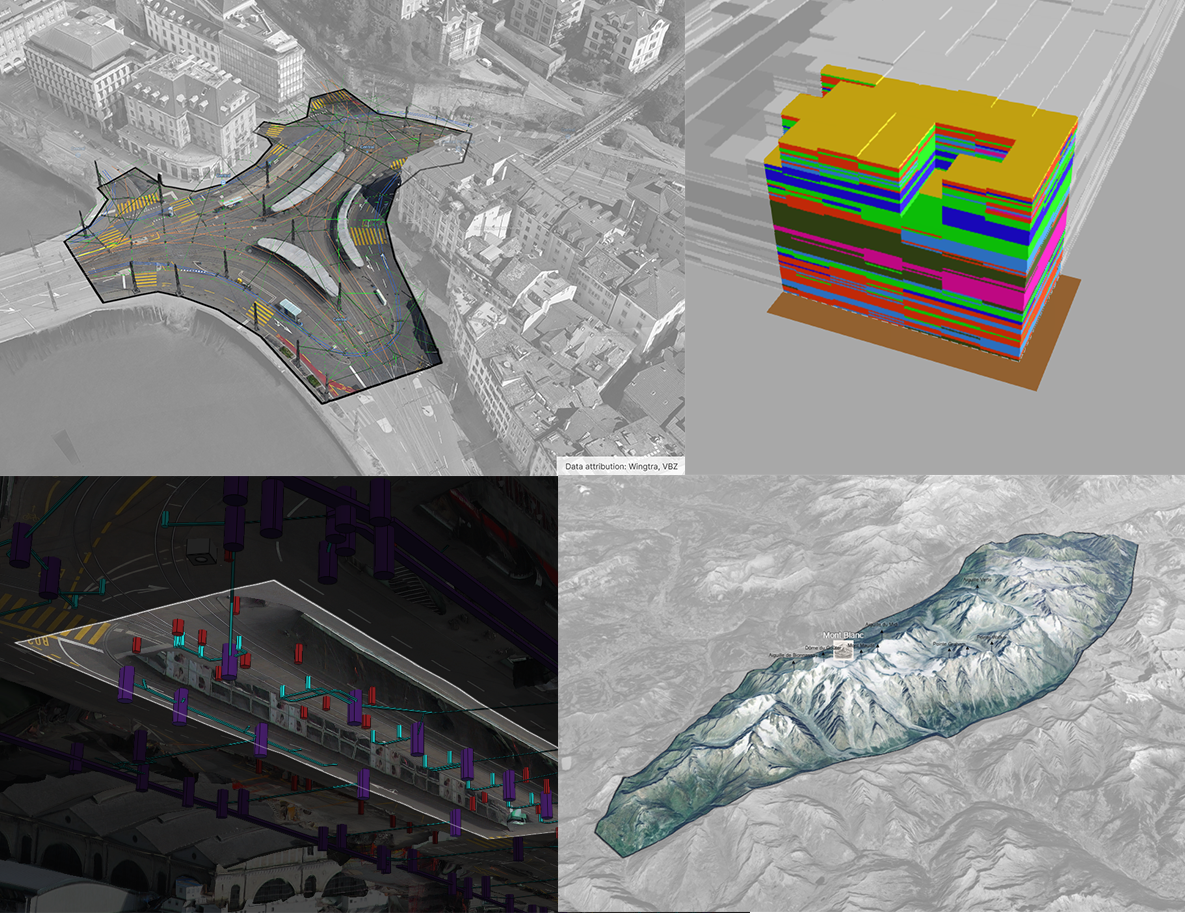
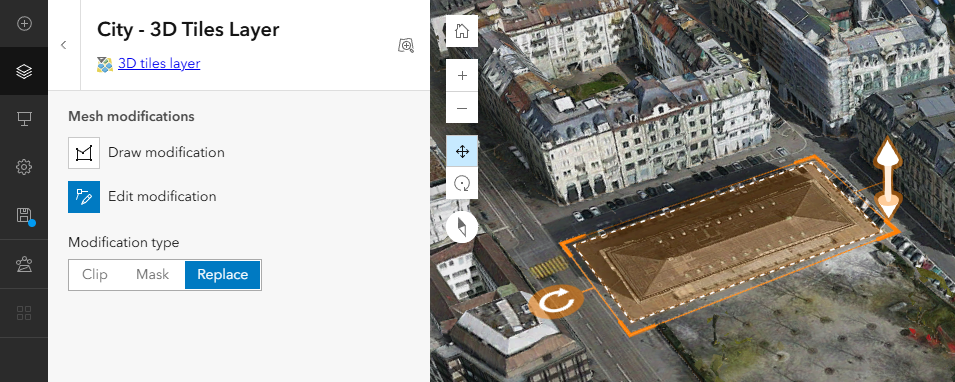
Workflow efficiency is further enhanced by the option to add 3D Tiles via URL, eliminating the need for manual uploads and saving time for analysts and developers. Integrated mesh modification lets users adjust 3D city models—such as cutting holes or changing heights—to reflect real-world changes or proposed designs. These capabilities simplify data integration and editing, supporting more agile project updates and enabling users to deliver accurate, customized visualizations for diverse applications. Check out more details in the blog.
Analysis
ArcGIS Enterprise 12.0 brings a suite of analysis enhancements that empower GIS analysts to work smarter, faster, and with greater precision. This release focuses on streamlining complex workflows, improving performance, and providing more flexibility in how spatial data is explored and interpreted.
Smarter Data Discovery and Enrichment
The data browser used by Enrich Layer has been improved, making it easier for analysts to find and reuse the variables they need most. With the ability to add variables to a Favorites list, frequently used data is now just a click away, reducing repetitive searching and accelerating project setup. Enhanced search functionality means analysts can quickly locate the right variables, even in large and complex datasets. Additionally, many numerical variables now support the selection of different statistics—such as count, percentage, or index—within enrichment areas. This flexibility allows analysts to tailor their data enrichment to specific project requirements, ensuring more accurate and relevant results.
Greater Accuracy and Efficiency in Zonal Statistics
The Zonal Statistics tool and its raster function, along with the Zonal Statistics as Table tool, have been updated to deliver more precise and reliable results. By default, these tools now use the cell size of the value raster as the analysis cell size for both raster and feature zone inputs. This change aligns with best practices, as the value raster is often the primary influencer of the output results. For analysts who require more control, the Cell Size environment can still be customized by specifying a number or selecting a raster dataset. These updates not only improve the precision of spatial analysis but also ensure consistency and reliability across different types of data.
Optimized Performance for Large Datasets
ArcGIS Enterprise 12.0 is designed to handle the demands of modern spatial analysis. By default, the Zonal Statistics tools now take advantage of up to 80% of available processors, enabling faster processing even when working with extensive data layers and a large number of zones. Memory usage issues have also been addressed, ensuring that analysts can perform complex analyses with confidence, without being hindered by hardware limitations. Tools and raster functions that honor the Cell Size environment now support an empty option, providing even more flexibility for advanced workflows.
Data Management
This release introduces a host of enhancements designed to make GIS analysts’ work more efficient, flexible, and impactful. This release focuses on streamlining data management, expanding integration options, and modernizing metadata workflows—empowering analysts to spend less time on routine tasks and more time on meaningful analysis.
Seamless Data Integration and Sharing
One of the standout improvements is the ability to share map image layers and feature layers by reference directly from Elasticsearch and OpenSearch databases. This means analysts can leverage powerful search and analytics engines without duplicating data, maintaining data integrity and reducing storage overhead. Publishing data from Apache Parquet files has also been simplified with support for sharing as a copy to ArcGIS Enterprise, creating hosted feature layers, vector tile layers, scene layers, and tables directly from these files. These enhancements make it easier to integrate big data into your GIS workflows and ensure your organization’s spatial data is always accessible and up to date.
Greater Flexibility and Control
ArcGIS Enterprise 12.0 now allows dynamic workspaces to be added directly from a map image layer’s item page, providing analysts with more flexibility and control over the data sources used in their projects. The update also increases username and database name length limits for relational databases and cloud data warehouses, supporting more complex enterprise environments and making it easier to manage large, distributed datasets.
Modernized Metadata and Data Management
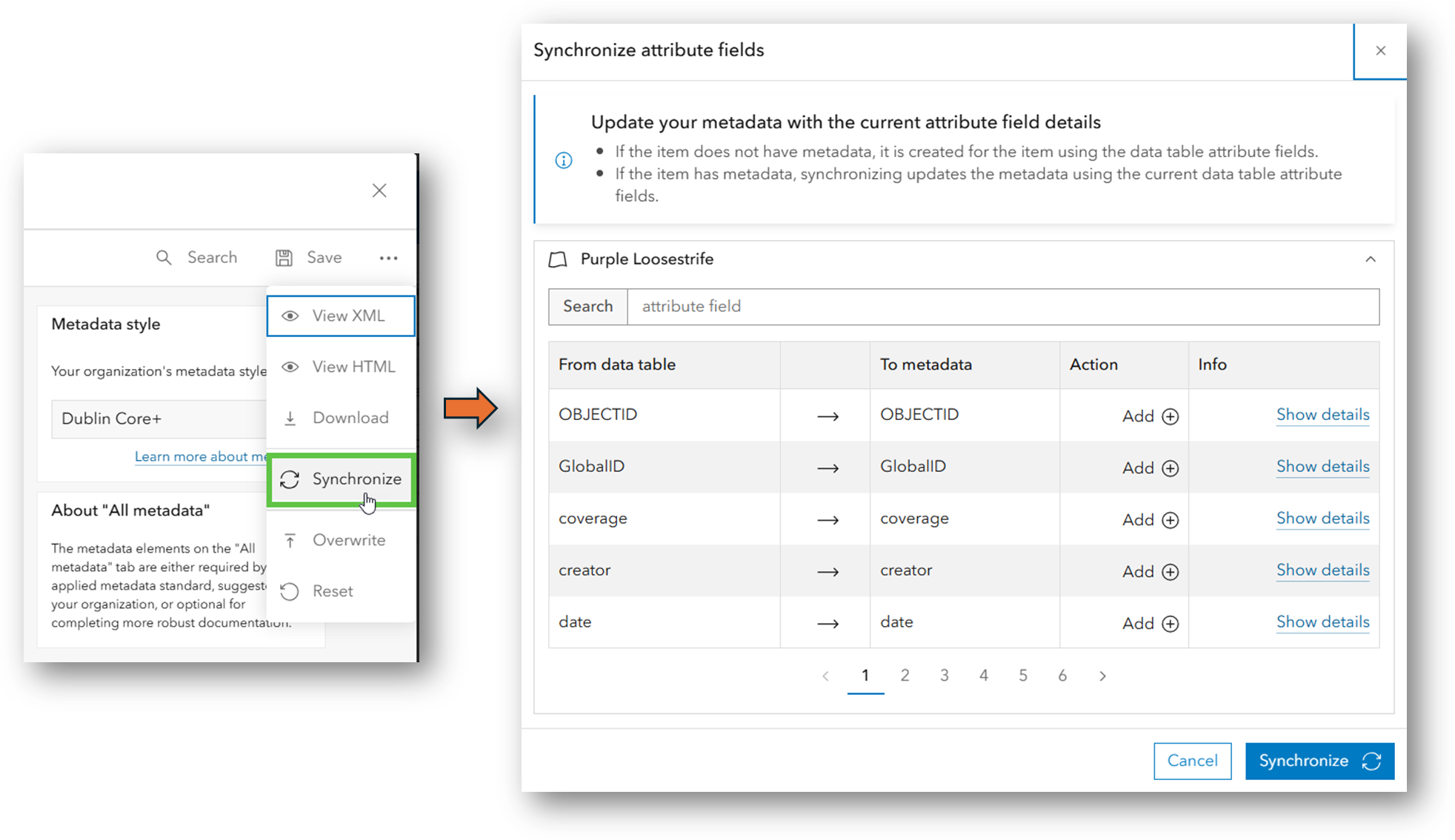
Metadata management receives a significant upgrade in this release. The new Dublin Core+ metadata style is now supported, aligning your organization with widely accepted standards and improving data discoverability. Standards-based metadata is now automatically populated using existing item information, eliminating the need for manual entry and ensuring metadata remains current and relevant. The metadata editor is enabled by default for new organizations, and attribute fields can now be synchronized from your data tables to your standards-based metadata—helping you maintain consistency and accuracy across your content. With the retirement of Metadata Editor Classic in ArcGIS Enterprise 12.0, the new editor becomes the primary tool for managing and maintaining metadata within ArcGIS Enterprise.
Streamlined Data Tab Experience
The Data tab has been enhanced to simplify common tasks. Analysts can now add or update data using the new Update data button, define calculation expressions from multiple locations within the Tables and Fields views, and preview changes before applying them. These improvements reduce the risk of errors and make it easier to transform and manage data directly within the platform.
Lastly, it is important to note that starting at ArcGIS Enterprise 12.0, the ArcGIS Advanced Editing user type extension will no longer be required to create and edit branch versions. This licensing change originally introduced with the ArcGIS Enterprise 11.3 release can now be reversed through a patch applicable to ArcGIS Enterprise versions 11.3, 11.4, and 11.5, or by upgrading to ArcGIS Enterprise 12.0. This reversal will restore the licensing model to its state in the ArcGIS Enterprise 11.2 release, allowing users with Contributor and above user types to create and edit branch versions without the need for the Advanced Editing UTE. For more details, visit the knowledge base article.
GIS Developers
With ArcGIS Enterprise 12.0, developers can expect significant updates that impact how they interact with and extend the platform. This major release introduces new features, modifies existing ones, and retires outdated components. Let’s dive into the key changes and their implications for developers.
Key Features
One of the most significant additions in ArcGIS Enterprise 12.0 is the introduction of service interceptors. This new extensibility pattern allows developers to inspect and modify service requests and responses at runtime. Prior to 12.0, REST-based requests to map and image services could only be intercepted with server object interceptors (SOIs). With the introduction of service interceptors, requests to any GIS service published to ArcGIS Enterprise can be intercepted. This ensures more flexible and custom service management by enabling developers to inject custom logic into REST-based GIS services, automating tasks without altering the underlying service definition and providing administrators with full visibility into affected services. Check out the New in ArcGIS Enterprise 12.0: service interceptors blog for more information.
ArcGIS API for JavaScript 3.x and ArcGIS Maps SDK for JavaScript
For developers working with ArcGIS API for JavaScript, it’s crucial to be aware that version 3.x, which was retired on July 1, 2024, will not be included in ArcGIS Enterprise 12.0. As a result, custom applications referencing this version within ArcGIS Enterprise will cease to function after the upgrade. To maintain compatibility and leverage the latest features, developers must migrate their applications to ArcGIS Maps SDK for JavaScript. This migration not only ensures continued support but also provides access to the latest enhancements and capabilities across the ArcGIS system. Read the blog to learn more.
Apps & Extensions
The ArcGIS Enterprise 12.0 release brings a wave of exciting updates across various ArcGIS applications and extensions, each with its own set of innovative features and enhancements. Here’s a look at some of the key highlights from across the ArcGIS platform, introducing new capabilities, improved workflows, and advanced functionality designed to boost productivity and user experience.
ArcGIS Instant Apps
ArcGIS Configurable Apps are retired in this release. Prior to upgrading to ArcGIS Enterprise 12.0, replace your retired apps with Instant Apps and read this article for more information. With ArcGIS Instant Apps 12.0, users can leverage the merged Basic and Media Map templates, now called Basic (Media Map). Existing Media Map apps can still be configured on their current templates, but new apps should use the new template. Other updates include new swipe and sketch tools, bulk attribute editing in both Manager and Sidebar templates, and that sketch tools can now be enabled in the new and existing Sidebar app.
ArcGIS Experience Builder
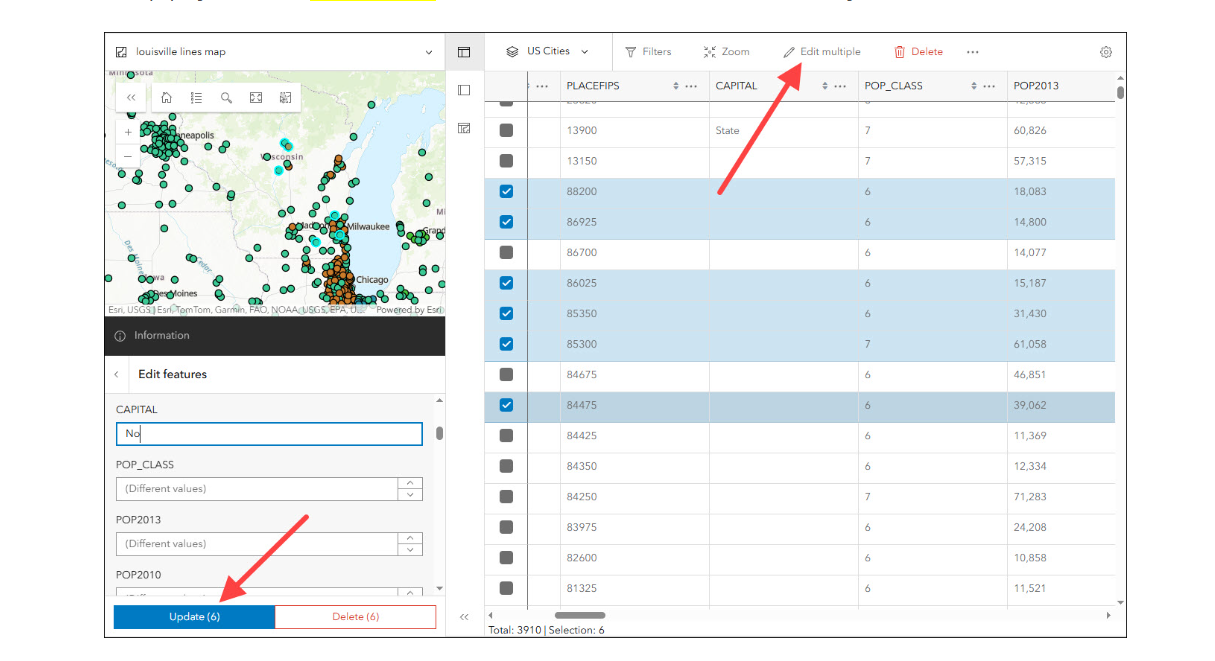
ArcGIS Experience Builder 12.0 now supports Arcade expressions, enabling users to add data and display advanced dynamic content and styling. Additionally, a batch editing option is now available in the Edit widget under Enhancements. Commonly used for asset management, Batch editing allows users to perform bulk updates of attributes by selecting multiple features from a layer on the map.

ArcGIS Reality Server (Beta)
Now available as a public beta: ArcGIS Reality Server, a scalable, self-hosted capability server for ArcGIS Enterprise that empowers organizations to generate high-accuracy, photo-realistic 2D and 3D content from drone, aerial, and satellite imagery. From small private firms to national agencies, Reality Server enables users to create the foundational content they need to build digital twins, extract insights, and better understand the world—securely and at scale. Organizations using ArcGIS Enterprise can participate in the beta via the Early Adopter Community. ArcGIS Enterprise 12.0 is required to use ArcGIS Reality Server.
Join from the Early Adopter Community

ArcGIS Velocity (Beta)
ArcGIS Velocity is Esri’s real-time processing and analysis capability, enabling users to ingest, visualize, and analyze spatial data to gain new insights and inform decisions. Previously only available as an organizational extension to ArcGIS Online, Velocity will now be available (in beta) for ArcGIS Enterprise on Windows and Linux.
Join from the Early Adopter Community
New ArcGIS Enterprise Imagery Capabilities
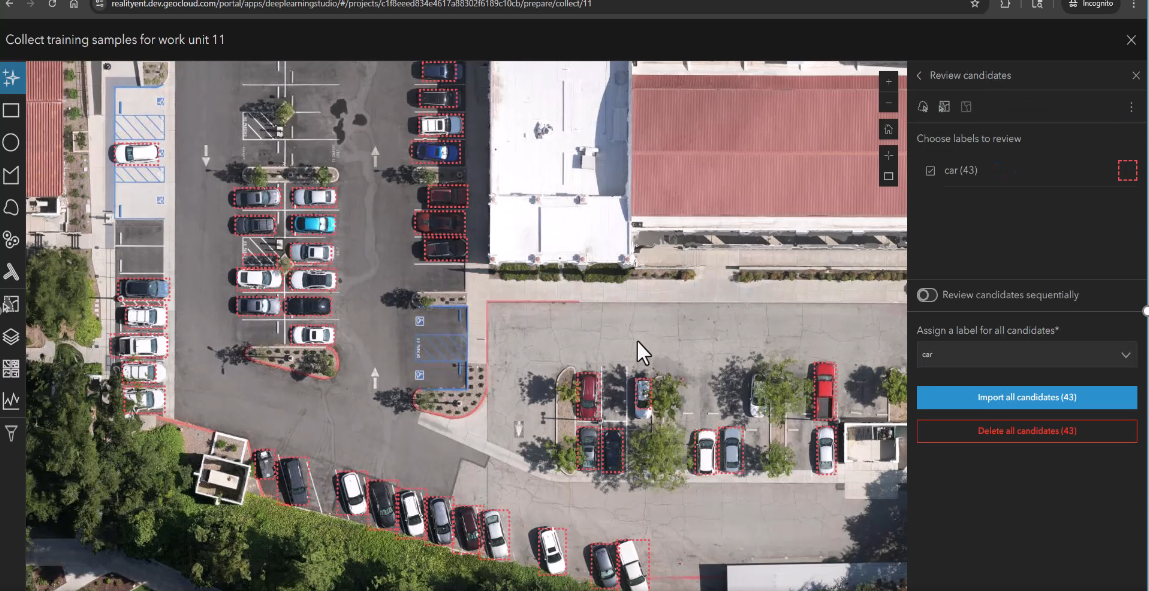
The latest release of ArcGIS Enterprise Includes significant enhancements to imagery and video analysis, deep learning workflows, and cloud integration. Key improvements include expanded raster and product type support in ArcGIS Excalibur, AI-assisted labeling in Deep Learning Studio, cloud environment support in ArcGIS Video Server, and multi-GPU support for deep learning on ArcGIS Enterprise for Windows and Linux, collectively enabling users to derive insights more efficiently and effectively.
ArcGIS Excalibur
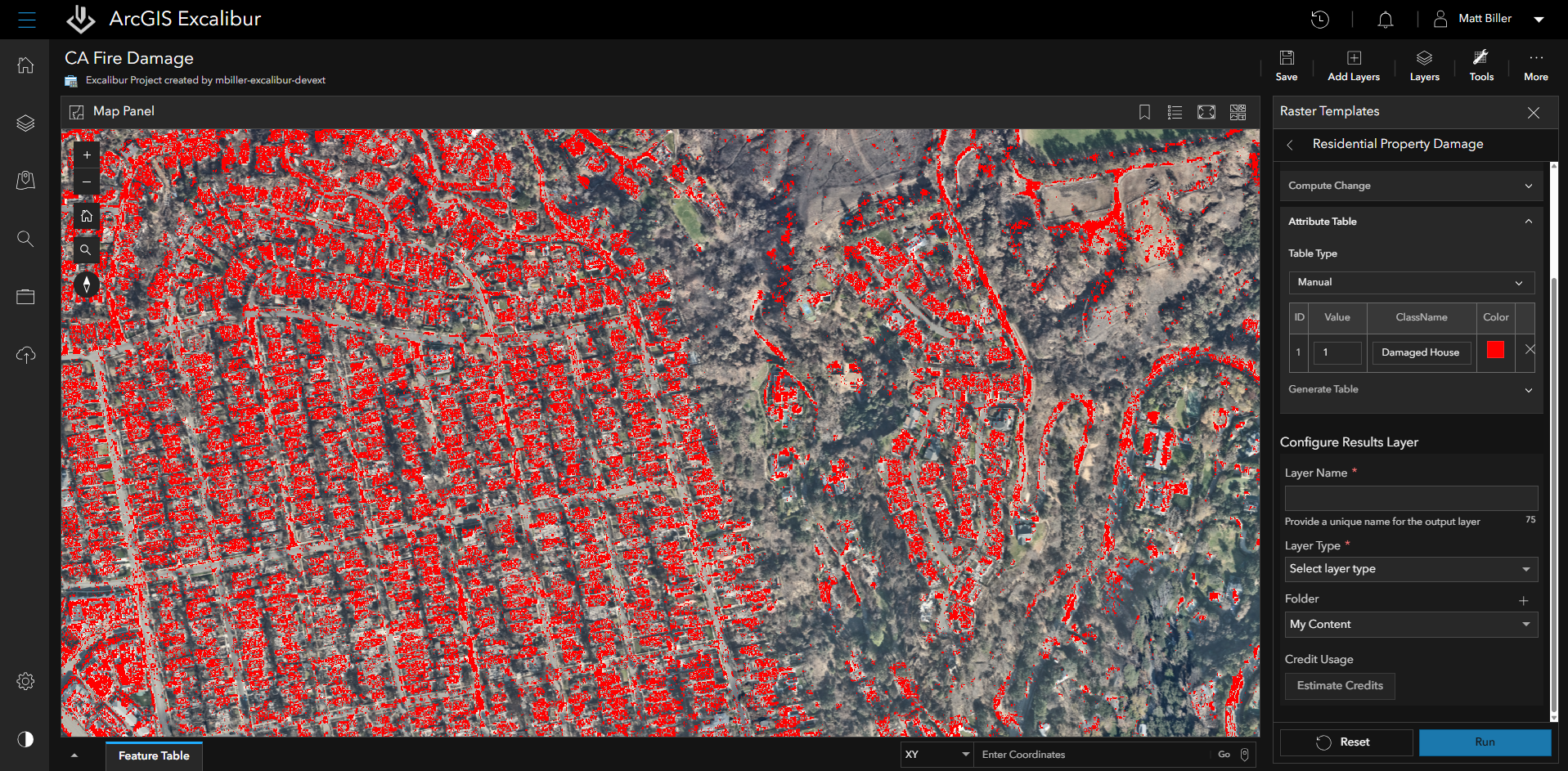
In the ArcGIS Enterprise 12.0 release, ArcGIS Excalibur, an image and video analysis web app, is adding two new significant features. Users can now browse, add, and run Raster Function Templates in ArcGIS Excalibur, enabling consistent, repeatable workflows across raster layers and projects. Templates can be shared within the organization, streamlining analysis and saving time by reusing proven processes. Additionally, ArcGIS Excalibur now supports additional raster and product types, plus new options for configuring imagery and processing data. This update provides a more tailored and flexible workflow, making it easier to work with raster data and achieve more accurate analysis results.
ArcGIS Enterprise Sites
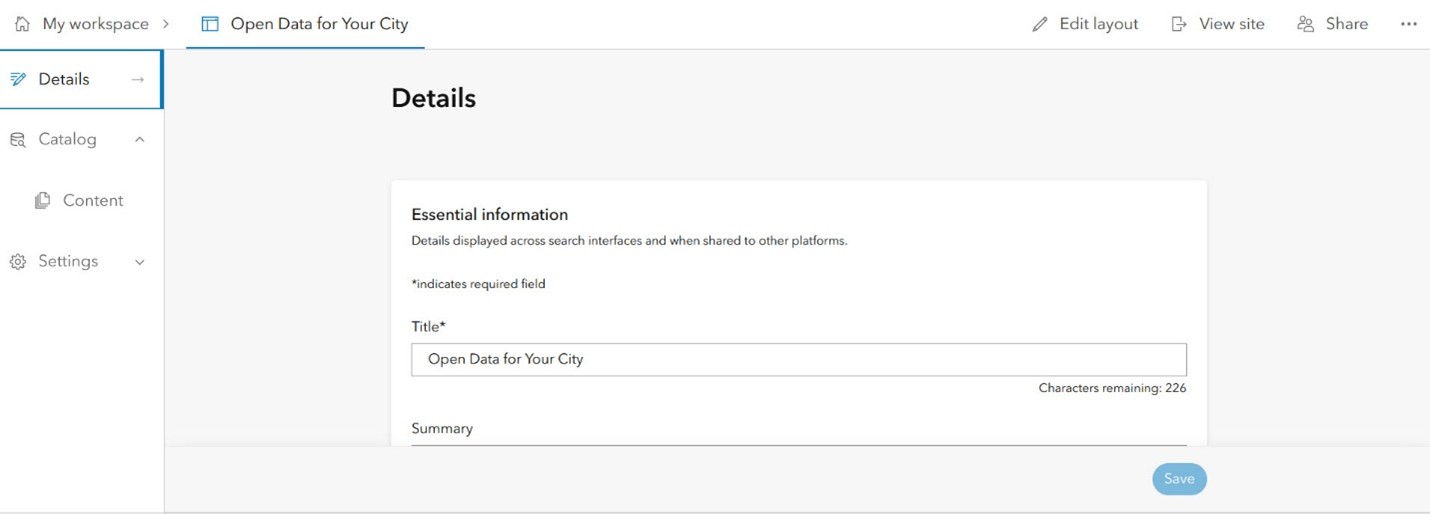
Workspaces, the new default site management experience for ArcGIS Enterprise Sites, has arrived. Enterprise Sites allows for tailored website creation, enabling you to share authoritative GIS data across your departments and organization. Explore the benefits of workspaces to maximize content sharing with your stakeholders.
ArcGIS GeoBIM
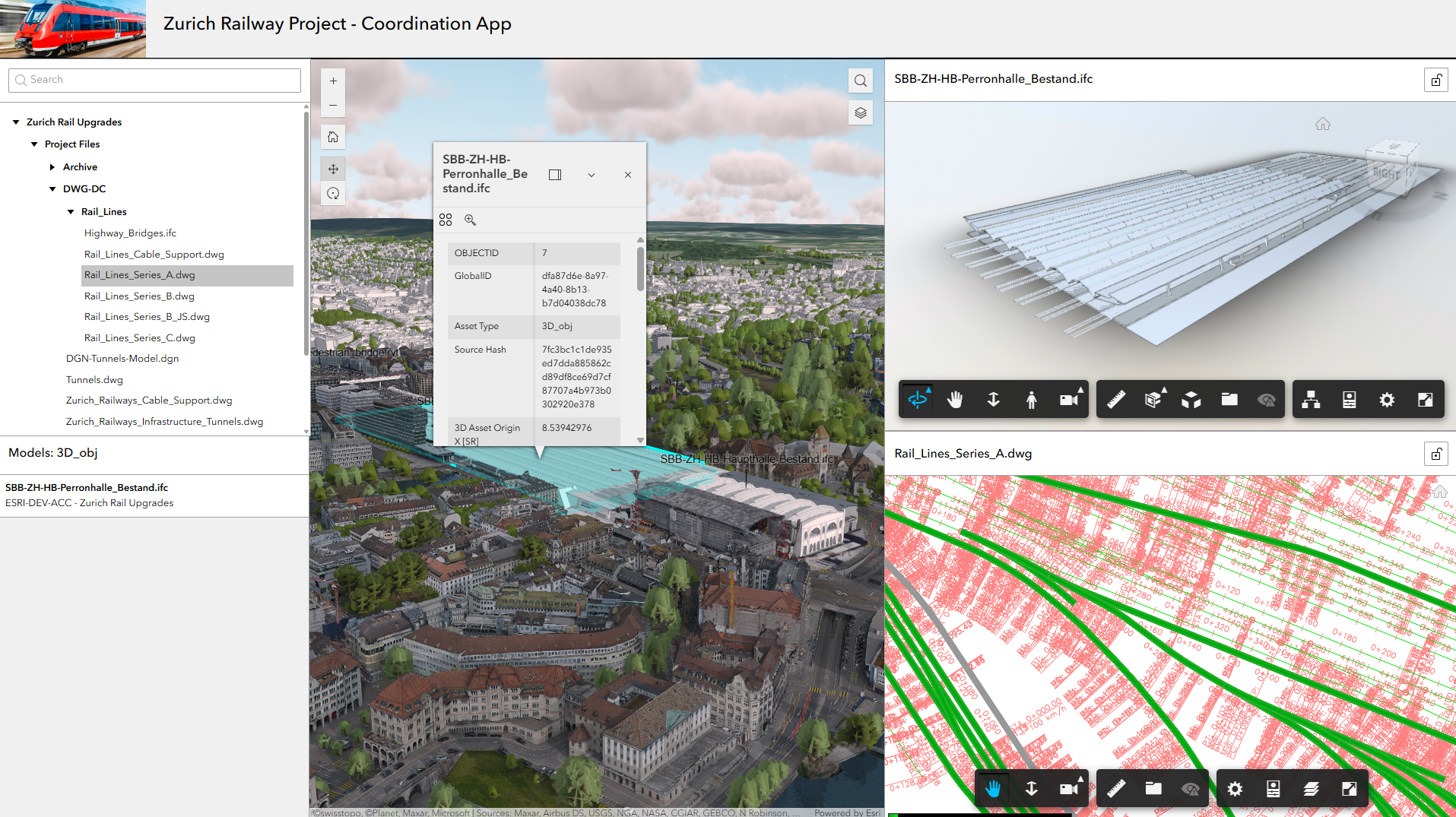
Integrate Enterprise GIS and BIM with Autodesk. In this release, ArcGIS GeoBIM streamlines GIS and BIM integration with simplified 3D models, new widgets for building custom apps, and expanded file support—giving teams faster access to design data in geospatial context.
ArcGIS Urban
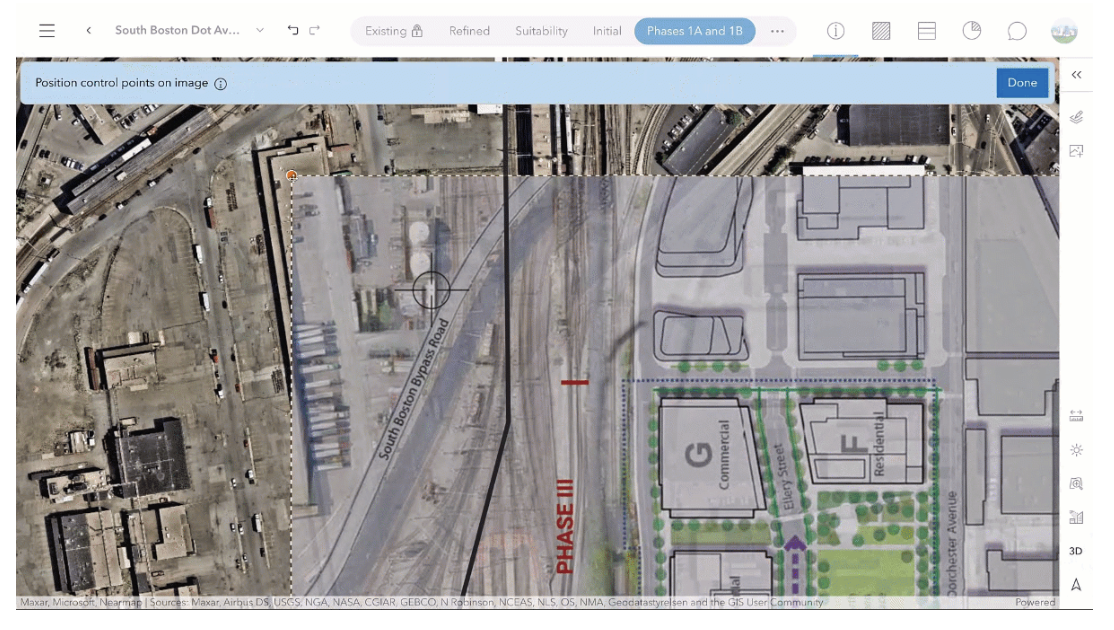
Explore development like never before with intuitive 3D analysis tools. With elevation profiles, shadow casting, and viewshed analysis, it’s easier to reveal what’s often overlooked. New editing tools let you sketch buildings, test ideas, and adjust designs to find the right balance. You can also upload 2D plans, add context with objects, and quickly share your work with downloadable screenshots.
ArcGIS StoryMaps
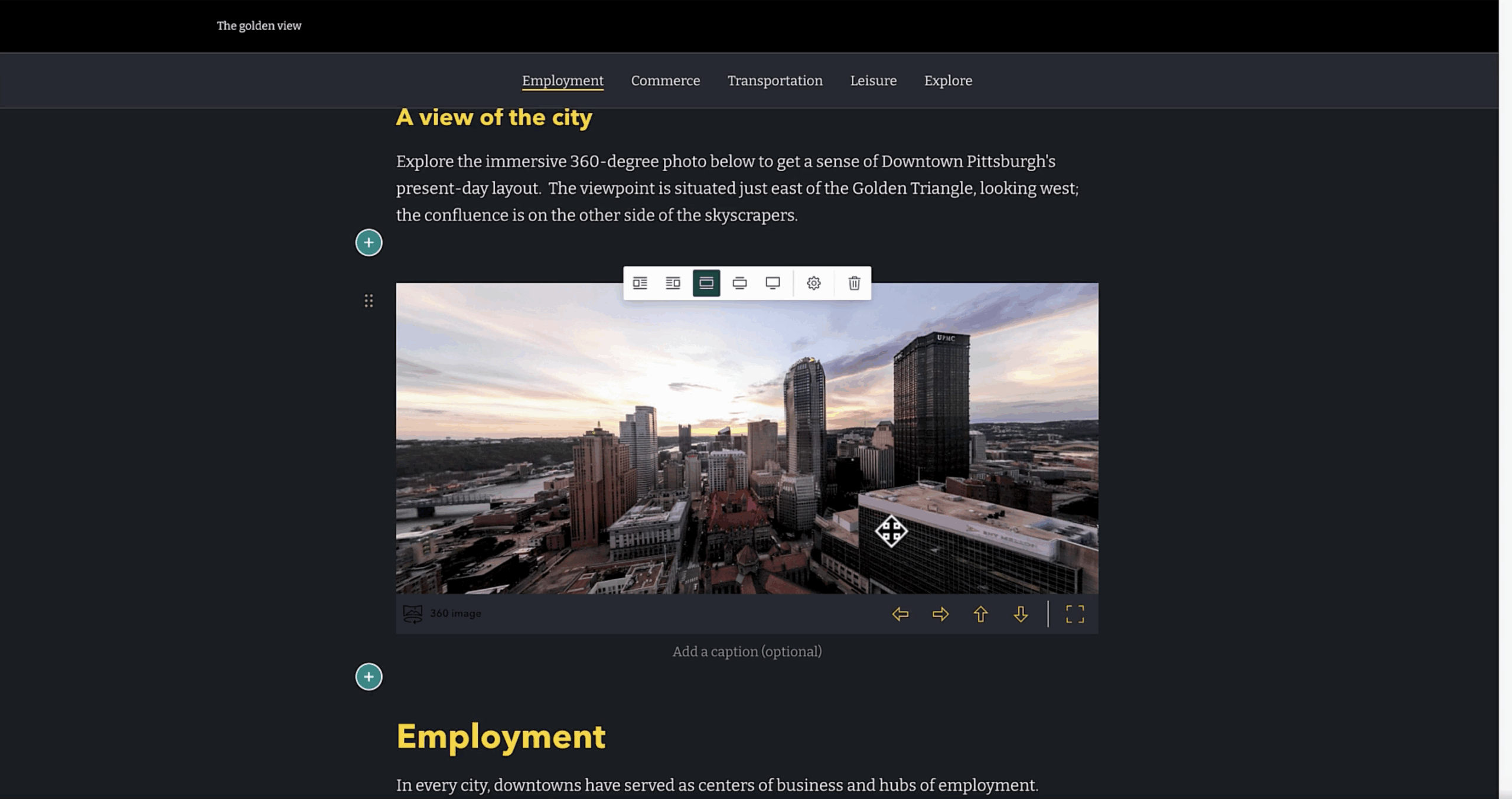
StoryMaps now supports infographics and 360° images, enabling authors to craft even more immersive and data-rich visual stories. These new media types allow users to convey complex information in a compelling and accessible manner, making them ideal for educators, communicators, and organizations. Additionally, ArcGIS Enterprise 12.0 introduces linked story translations (beta) for multilingual publishing, enhancing the platform’s global reach. It also includes transcripts for video and audio, improving accessibility for all users. Finally, flexible slide layouts in StoryMap Briefings provide presenters with greater creative control over their presentations. These updates collectively strengthen StoryMaps as a platform for creating, managing, and presenting impactful narratives across various languages and formats.
ArcGIS Data Reviewer
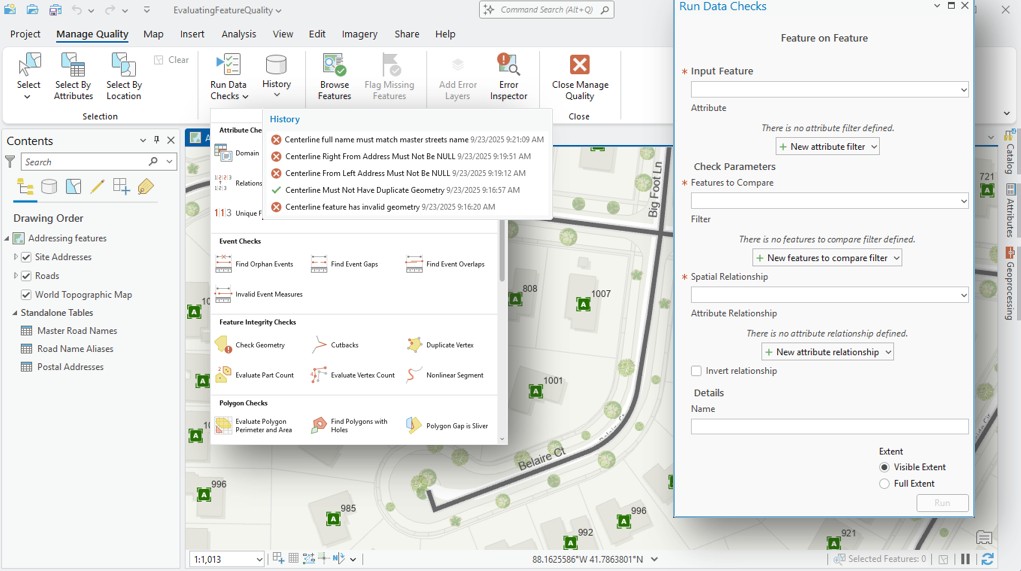
ArcGIS Data Reviewer introduces enhancements to automated data quality review, updates to error management and improved support for visual reviews of workflows. ArcGIS Enterprise 12.0 is also the final release to support workflows reliant on Data Reviewer’s Reviewer Workspace error management capability.
ArcGIS Monitor
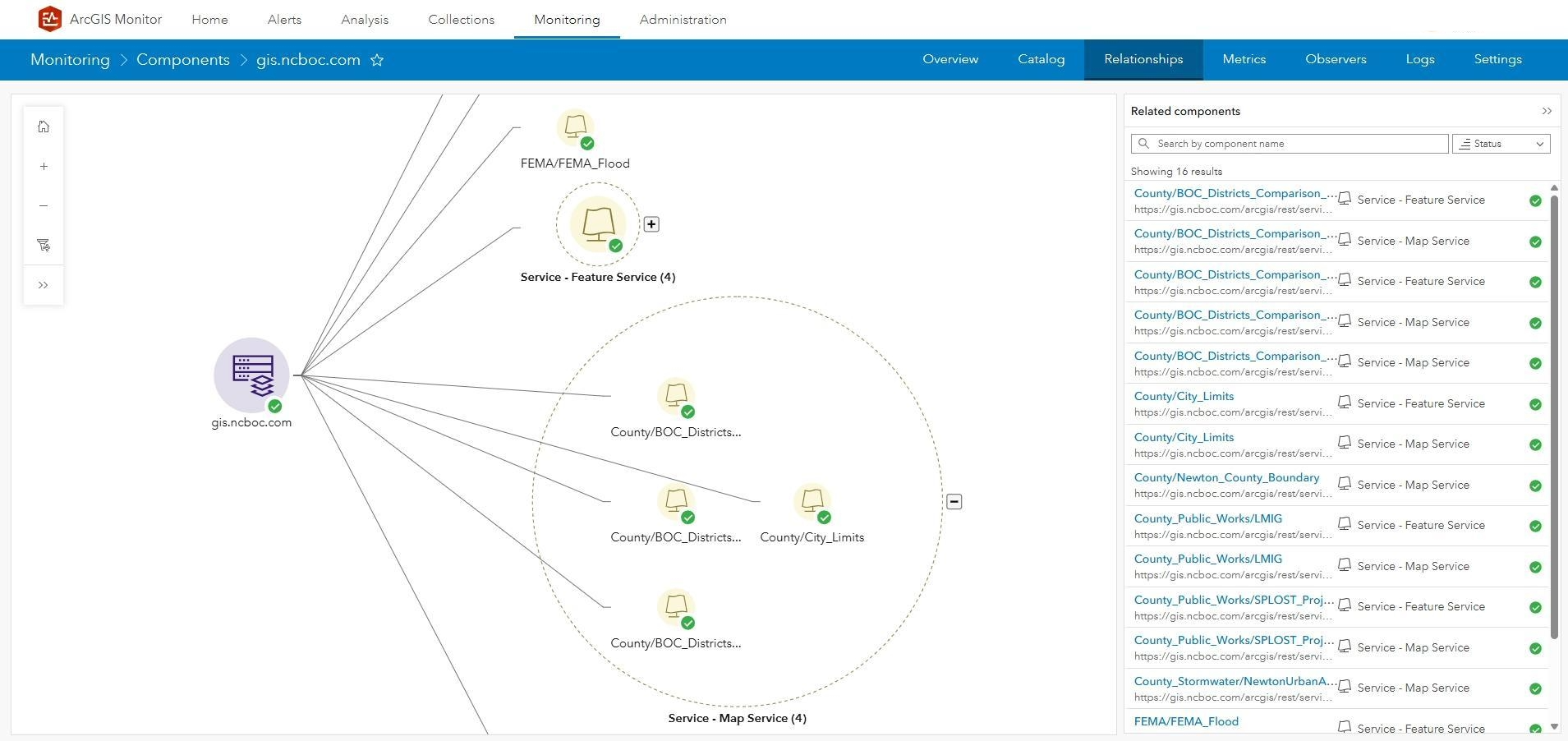
New component relationship graphs in ArcGIS Monitor 2025.1 include the ability to show how different components are related to each other, and their dependencies. These graphs allow IT and GIS administrators to easily visualize how hardware and software components are interconnected, ensuring smoother operations and more efficient troubleshooting.
Learn more
As you explore the new capabilities in ArcGIS Enterprise 12.0, be sure to take advantage of the wealth of resources available to help you get the most from this release. Dive deeper into documentation, best practices, and real-world workflows, and discover guidance on system architecture to support your organization’s goals. Stay informed by following ArcGIS Enterprise on social media and subscribing to the newsletter for timely updates and insights.
We invite you to join the conversation in the Esri Community, where your feedback and questions help shape the future of ArcGIS Enterprise. Keep an eye out for upcoming content, including exciting enhancements for ArcGIS Enterprise 12.0 on Kubernetes, and be the first to know about new features as they roll out. Your engagement ensures you stay ahead in the evolving GIS landscape.



Commenting is no longer enabled for this article