ArcGIS Pro 3.7 and ArcGIS Enterprise 12.1 introduce new and expanded functionality designed to elevate your experience with the ArcGIS Utility Network across your organization while enhancing performance and stability for your current workflows.
This article showcases some of the most important utility network features released since the last network management release in 2025. You can also learn more about the network management release plan by reading the 2026 network management release plan announcement.
New Functionality
Find Subnetworks Pane
ArcGIS Pro 3.7 redesigns the Find Subnetworks pane with a focus on streamlining important workflows and providing more control over how you find and work with subnetworks in your utility network.
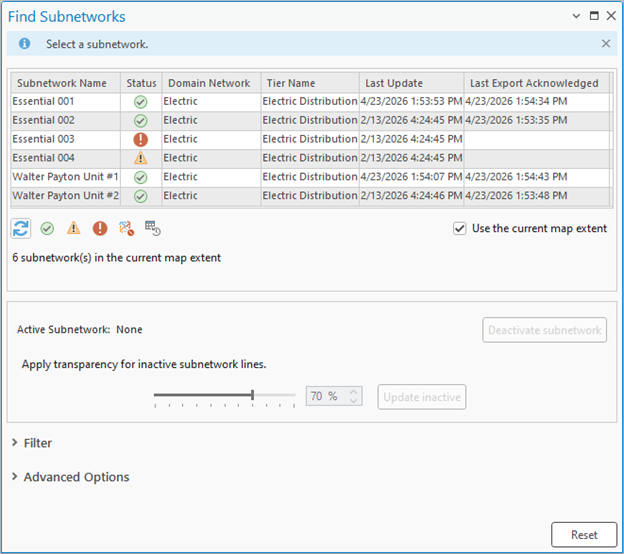
The first major change you’ll notice is the addition of buttons below the pane that allow you to easily find subnetworks in a particular state. These quick filter icons allow you to quickly return subnetworks with different statuses or characteristics:
- Clean subnetworks – These are subnetworks with a status of Clean.
- Dirty subnetworks – These are subnetworks with a status of Dirty.
- Invalid subnetworks – These are subnetworks with a status of Invalid.
- Deleted subnetworks – These are subnetworks that have one or more subnetwork controllers that have been logically deleted.
- New subnetworks – These are subnetworks that have never been updated.
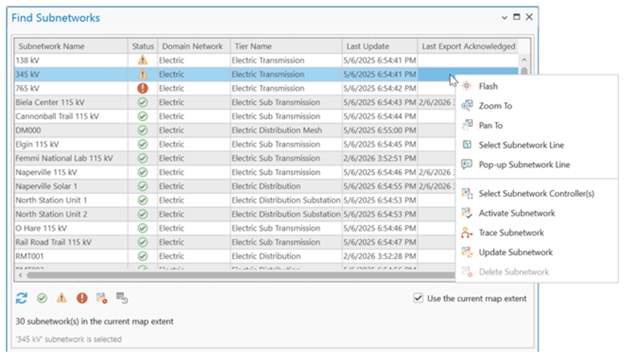
The updated context menu gives you more control over how you work with subnetworks. You can:
- Select subnetwork controllers without running a trace.
- Activate a subnetwork to apply transparency.
- Delete subnetworks that have no active controllers.
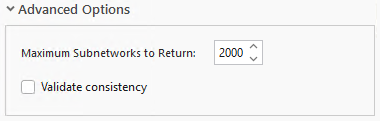
Advanced options allow you to control the maximum number of subnetworks to return in the pane, and whether traces run from the Find Subnetworks pane should validate consistency.
Path Trace
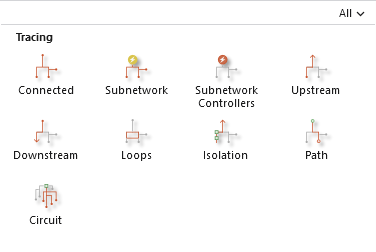
This release includes a new trace type: the Path trace. This trace allows you to find the possible paths between two or more locations in your network. Because the Path trace has a superset of all the capabilities of the shortest path trace, we recommend that users migrate current workflows using the shortest path trace type to this new trace type.
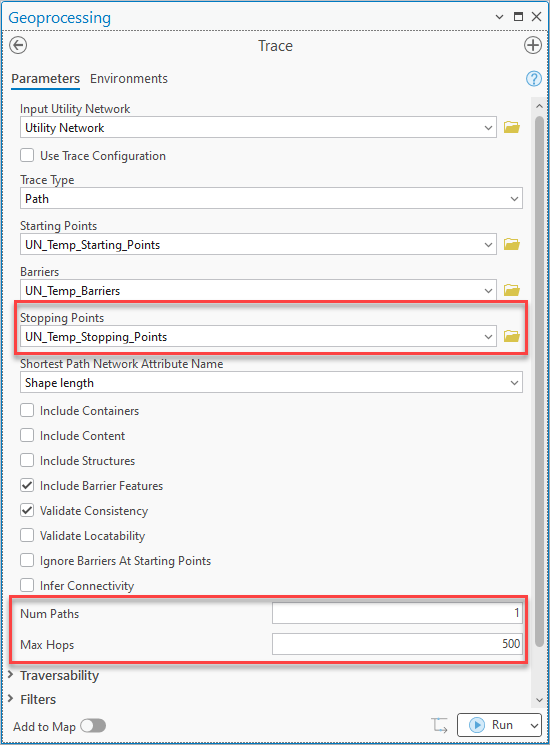
To support this new trace type the Trace tool has several new parameters:
- Stopping Points – Specify the features serving as stop locations for a path.
- Num Paths – Allow you to specify the maximum number of paths to return between the start and stop locations defined for the path trace.
- Max Hops – Specifies the maximum number of hops between edges allowed in a path result.
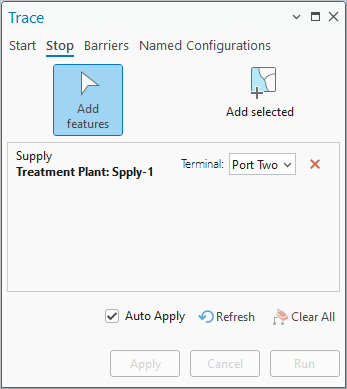
You will also find a Stop tab on the Trace pane that allows you to interactively define the stopping points for the Path trace.
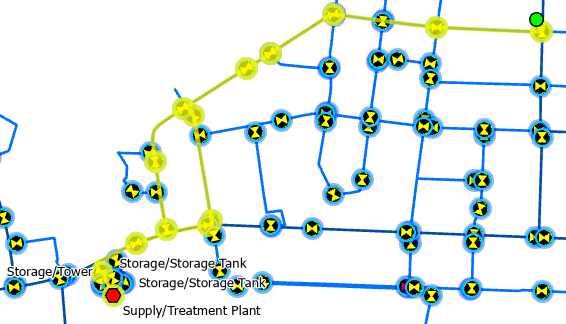
When you run the trace, it finds the available paths between the starting point and stopping points provided. When used with a Num Paths parameter value of 1, this provides functionality equivalent to the Shortest Path trace. In the example below, the Path trace finds 2 paths from a customer’s meter to the water treatment plant that supplies them with water.
New Trace Result Options
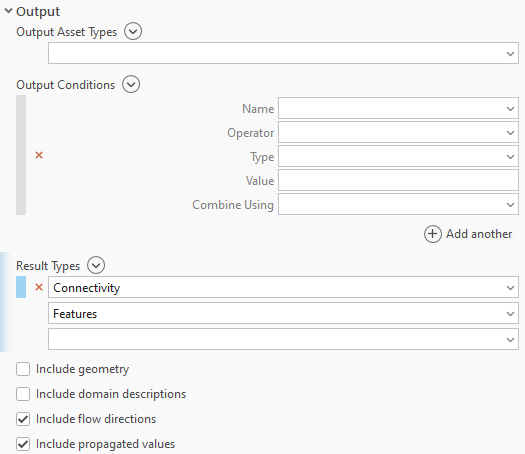
The Trace and Export Subnetwork tools provide options to include subnetwork-based flow direction and propagated values in the output JSON when running a trace or exporting a subnetwork. This information is designed to support integrating the network model with external systems, but some users may also want to use this to create their own add-ins for visualizing flow in the network.
You can find an example of how to use these parameters in the ArcGIS Pro SDK Community Sample for Show Flow Arrows.
Alias the function results of a trace
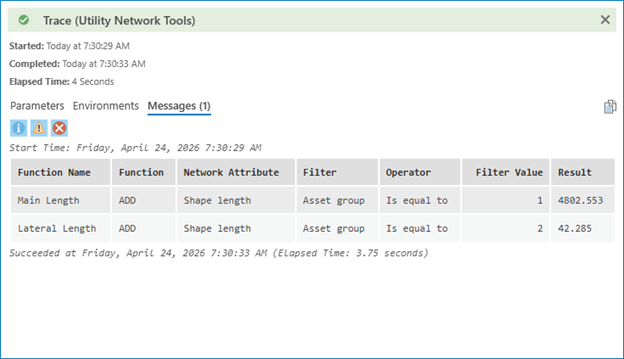
The Functions parameter in a trace configuration includes an optional property called Function Name. When you populate the Function Name, it appears in the trace results to describe the results of the function. This provides context for the trace results, allowing a better understanding of what each function represents.
Utility Network Version 8
This network management release includes a newer version of the utility network schema. You can read more about the upgrade process and the new features in the utility network upgrade history topic.
One of the biggest drivers for the version 8 utility network is the introduction of a new type of domain network called the telecom domain network. The telecom domain network is a configuration option for the utility network designed for organizations that manage telecommunications infrastructure. Unlike traditional domain networks, a telecom domain network introduces a distinct schema built around circuit management, with an extended information model that supports grouping of junction objects, edge objects, and associations.
In addition to this feature, the newer schema also introduces the Propagation Resetter network category for customers who use attribute propagation to designate features in the network that reset the propagated attribute value when discovered as part of a trace.
Administration Improvements
Rename Asset Groups and Asset Types
The administrative tools for the utility network now support the ability to rename asset groups and asset types, as well as the ability to make certain schema changes without disabling the network topology. This is an area of continued focus over the next few releases. The Utility network management tasks topic has been updated to reflect these changes.
In addition to the new features introduced in this release, performance has been improved for subnetworks that use propagation and when updating a subnetwork for the first time after enabling the network topology.
Schema Management
Customers who manage utility networks often oversee many additional datasets and are always looking for more effective ways of understanding and managing these datasets. In ArcGIS Pro 3.6, the Compare Schema tool was added to provide the ability to compare schema reports or geodatabase schemas and identify all schema changes between two files. These files could be from two different points in time in the same environment, or between two completely different environments.
The Generate Schema Report tool also introduced a new dynamic HTML output format for the report that provides a more user-friendly experience for reviewing schema information. This allows you to produce HTML reports of your data model, and utility network configuration, that non-administrators can review.
License changes
With the shift to using named user licensing in ArcGIS Pro at 3.7, you can do more with the Creator user type and ArcGIS Pro basic licenses.
The Creator user type allows access to ArcGIS Pro Basic and enables the ability to:
- View and query features and associations
- View existing diagrams
- Trace
When using the Creator user type with the Advanced Editing User Type Extension, the following additional non-administrative functionality is available:
- Validate the network topology
- Edit features and associations
- Modify terminal paths and terminal connections
- Edit, save, and generate, diagrams
- Use the Error Inspector to review errors
The Professional user type provides access to ArcGIS Pro Standard and is required to create or modify schema and publish a utility network.
Deprecations
Utility Network version 3
ArcGIS Utility Network version 3 is being deprecated with this release. Any customers still using this version of the utility network should upgrade their utility network dataset to version 5 or later using the Upgrade Dataset tool. The Upgrade Dataset tool now provides the ability to target specific utility network versions for upgrade.
Learn more by reading the ArcGIS Utility Network Version 3 deprecation notice.
Shortest Path trace
With the introduction of the Path trace type, we have deprecated the Shortest Path trace type. This does not mean that you cannot continue to use the Shortest Path trace, nor that existing workflows which depend on this trace type will cease to function. The Path trace is not currently supported across all platforms. Some clients, APIs, and SDKs will adopt support for the path trace in future releases. As a result of this, the Shortest Path trace will continue to function and be an option until the next major release.
Customers are encouraged to begin migrating workflows and processes to make use of the Path trace. The Path trace provides the same functionality to return a shortest path result while offering additional capabilities to find paths in your network
Learn more by reading the ArcGIS Utility Network shortest path trace deprecation notice.
2026 Network Management Release
The ArcGIS Pro 3.7 and ArcGIS Enterprise 12.1 releases serve as the 2026 network management release. Esri designates certain ArcGIS Enterprise and ArcGIS Pro releases as network management releases for customers who have implemented or are planning to implement ArcGIS Utility Network in an enterprise environment. Our goal is to provide a stable platform on a long-term support release that will allow users to land on the versions that are best suited for utility network solutions with confidence and provide a predictable schedule for planning upgrades.
For more information, review the Announcing the 2026 Network Management Release Plan article.





Commenting is not enabled for this article.