If your iOS tests touch the network, you’ve probably felt the pain: they get slow, they get flaky, and they sometimes fail for reasons that have nothing to do with your code. We built Dejavu to make those tests boring—in the best possible way.
Dejavu is Esri’s open‑source, Swift‑native library that records real HTTP requests and replays them later, so your test suite runs fast and predictably. It plugs into URLSession via URLProtocol, stores request/response pairs in a SQLite cache, and plays them back on demand—all while fitting neatly into XCTest.
- Project page: github.com/Esri/Dejavu
- Package details: Swift Package Index
Why we built it
Around 2017, across our ArcGIS Maps SDK for Swift development, we ran thousands of tests that exercised geospatial services and large, nested payloads—think routing, analysis, tiles, search, and cloud APIs. Then as the scale and variety of our tests grew (today we are over 200,000 tests across our Native Maps SDKs), the typical network hazards (latency spikes, rate limits, service downtime) crept into CI and increasingly slowed teams down. When we looked for network mocking tools, no tool did everything we wanted. We decided to build a tool so that we could have tests that were:
- Deterministic: same inputs, same outputs, every run.
- Swift‑native: nothing that fights modern concurrency or XCTest.
- Scalable: able to handle big payloads and lots of concurrent requests.
Dejavu is the tool we wished existed—so we open‑sourced it.
(ArcGIS Maps SDK for Swift samples show the breadth of workflows we exercise: arcgis-maps-sdk-swift-samples).
What Dejavu is (in one paragraph)
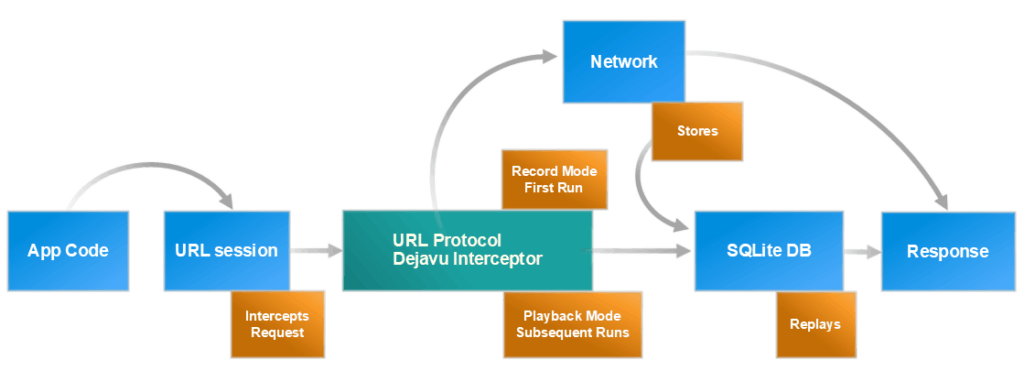
Dejavu intercepts URLSession requests during a recording run and writes each request and its server response to a local SQLite database. In playback runs, the same requests are intercepted and matched to the recorded entries; the exact responses are returned instantly, without hitting the network. The result: tests that are fast, repeatable, and resilient (with modes you can toggle per run).
- See modes and usage overview in the README: GitHub → Esri/Dejavu
- SPI overview: swiftpackageindex.com/Esri/Dejavu
What you get (day one)
- Speed: No real network calls during playback—tests finish faster.
- Reliability: Eliminate flakiness caused by external services.
- Isolation: Run end‑to‑end flows without credentials or live endpoints.
- Native fit: Built around
URLProtocoland XCTest patterns—no awkward harnesses.
(Architecture and defaults described in the GitHub README: Esri/Dejavu)
How it works (high level, no code)
- Intercept: Register Dejavu’s
URLProtocolfor theURLSessionyour tests use. - Record: In a recording mode, write the full request/response pair to a SQLite file. We use
Recordonly as needed. For example, we create a fresh recording when tests change, requests change (params, headers, etc.), or when we need to resync with services. - Match: On future runs, match outgoing requests to recorded ones.
- Replay: Return the exact recorded response locally—no live I/O.
(Usage overview and modes documented in the package: GitHub, SPI)
Modes
Dejavu ships with multiple modes you can switch via configuration or env vars (for example, playback on PRs): .cleanRecord, .supplementalRecord, and .playback.
- First time (or you want a clean slate): use
.cleanRecord
Think “fresh record.” It wipes the DB and records everything again—perfect when you’re setting up Dejavu the first time or the API payloads changed. - Adding new tests/endpoints: use
.supplementalRecord
Keeps what you already recorded and adds any missing calls. Great for growing coverage without nuking your existing cache..supplementalRecordis configurable to be.supplementalRecord(.updateExisting)(default) or.supplementalRecord(.insertNew). - Day‑to‑day mock testing (fast + deterministic): use
.playback
Runs your tests against the local recordings with zero live network, so CI and PRs stay quick and stable. - Real network debugging: use
.disabled
Turns Dejavu off so requests hit the real services—handy when you’re chasing a live issue.
Mode definitions: Swift Package Registry, README
A quick look at performance
To illustrate the idea, we pointed a sample test at JSONPlaceholder—a popular, free fake REST API (jsonplaceholder.typicode.com)—and measured the same test with and without playback:
- Recording (
.cleanRecord): 1 test in 0.068s - Playback (
.playback): 1 test in 0.005s
It’s a simple example, but it demonstrates the core benefit: once recorded, playback avoids network overhead and variability. Your numbers will vary based on payload size and the number of requests per test, but the pattern is consistent.
- About JSONPlaceholder: jsonplaceholder.typicode.com
Where we use it at Esri
ArcGIS Maps SDK for Swift and its toolkit
We rely on Dejavu to stabilize and speed up tests for the ArcGIS Maps SDK for Swift and its toolkit, both of which exercise complex geospatial workflows and large datasets. By removing network variability from the critical path, our test runs are faster and CI gets more predictable.
- ArcGIS Swift ecosystem: Samples repo and Developer site.
ArcGIS Field Maps
The ArcGIS Field Maps development team uses Dejavu extensively for testing its app for iOS devices.
Operational tips for teams (so you can drop it into CI)
- Cache strategy: Store SQLite recordings per test; cache across CI runs to avoid re‑recording.
- Usage: Treat recordings as test data—version them alongside code and refresh when APIs evolve.
All of the wiring details, including URLProtocol registration/unregistration and examples, live in the repo’s README and example projects.
(Start here: github.com/Esri/Dejavu)
Security and privacy (important in real projects)
Recordings can contain sensitive data (headers, bodies, query params). We recommend:
- Redacting credentials and personal data in the recording phase.
- Scoping access to caches in CI (avoid committing secrets to VCS).
- Pinning environment variables (locale, time zone) to maximize determinism.
The package surfaces configuration points and guidance to help you do this right.
- Configuration overview: GitHub README.
Redacting credentials and personal data in the recording phase
The following snippet shows how you can replace credentials and personal information with dummy values to ensure sensitive data remains safe.
let configuration = DejavuSessionConfiguration(...)
 configuration.queryParameterReplacements = [
 "apikey": "dummyAPIKey",
 "client_id": "dummyClientID",
 "client_secret": "dummyClientSecret",
 "token": "dummyToken",
 "username": "dummyUsername",
 "password": "dummyPassword"
 ]
 configuration.jsonResponseKeyValueReplacements = [
 "access_token": "dummyToken",
 "token": "dummyToken",
 "expires": Date.distantFuture.timeIntervalSince1970 * 1_000,
 "expires-in": Date.distantFuture.timeIntervalSince1970 * 1_000
 ]
 configuration.authenticationTokenParameterKeys = ["token"]
 configuration.authenticationHeaderParameterKeys = [
 "Authorization"
 ]

 try Dejavu.startSession(configuration: configuration)
Limitations (and when not to use Dejavu)
Dejavu is ideal for HTTP request/response flows. It isn’t a drop‑in for real‑time streaming or custom socket protocols where timing semantics matter more than payload determinism. Some chaos scenarios (e.g., partial reads, mid‑stream disconnects) may need purpose‑built harnesses rather than pure playback.
- Community discussion touches on timing nuances with
URLProtocol: Swift Forums introduction thread).
License, community, and where to learn more
- License: Apache 2.0
- Source & docs: github.com/Esri/Dejavu
- Swift Package Index: swiftpackageindex.com/Esri/Dejavu
We welcome issues and pull requests on GitHub. If you’re curious about how we use Dejavu across Esri apps, browse our sample code and developer site for the ArcGIS Maps SDK for Swift.
- Ecosystem links: Samples, Developers site
Ready to give it a try?
If your network‑dependent tests are slowing you down or failing for all the wrong reasons, record them once and let Dejavu do the rest. Flip your CI into playback mode and enjoy faster, quieter test runs—so you can focus on shipping features.
- Project page → github.com/Esri/Dejavu
- Package details → Swift Package Index
- Install & Quickstart → See the README, installation guide, and the location configuring page in the repo
- Examples → Explore sample projects in
/Examples