Testing is central to building reliable developer tools—especially when those tools span multiple platforms and rendering architectures. When I began my journey within the ArcGIS Maps SDKs for Native Apps group, I was excited to see the test frameworks across the breadth and the depth of the SDKs. Over the years, we’ve built on those early foundations and we now run over 200,000 tests for Maps SDKs every day.
In this post, we’ll take you behind the scenes and show how we plan, implement, and execute tests across the entire stack of Native Maps SDKs. You’ll see the principles that guide our test design, the types of tests we rely on (including image‑based rendering checks), and how we address realities like flaky tests, long‑running suites, and platform‑specific failures—without compromising end‑user quality.
Table of contents
- Native Maps SDKs Architecture
- What Makes Testing Complex?
- Planning for Quality: How We Design Test Plans
- Types of Tests We Use
- Test Data: Practical Considerations
- Executing Tests Across the Stack
- Challenges and Continuous Improvement
- Conclusion
The ArcGIS Maps SDKs for Native Apps share a common core library called runtimecore, which unifies behavior across Software Development Kits (SDKs) and devices. That shared core lets us deliver consistent capabilities, but it also brings distinct testing challenges: ensuring rendering accuracy across GPUs and graphics APIs, validating workflows on diverse devices and DPIs, and catching regressions early in a stack that isn’t itself a user‑facing app.
Native Maps SDKs Architecture
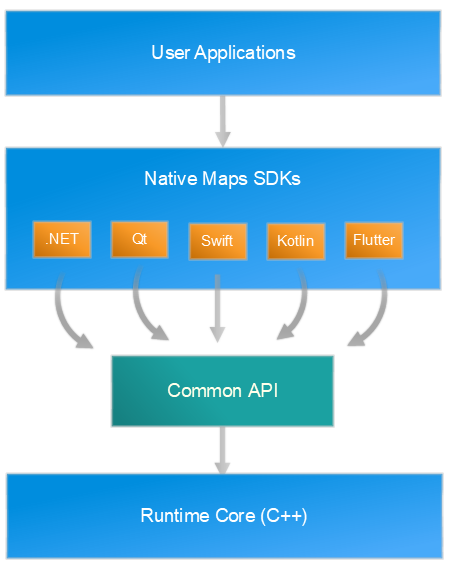
Each Native Maps SDK exposes platform‑specific APIs, UI controls, and idioms, but they all call into runtimecore, a shared C++ engine that implements core GIS functionality and rendering. This design helps us test behavior one time at the core instead of multiple times for each SDK. Then we verify integration at each SDK layer.
Further reading: For a deeper architectural background, see our CTO, Euan Cameron’s Quartz Architecture Deep Dive.
The other key aspect of the various SDKs is that each SDK supports one or many platforms and the rendering architecture on that platform. The table below highlights what platform and rendering architecture each SDK supports.
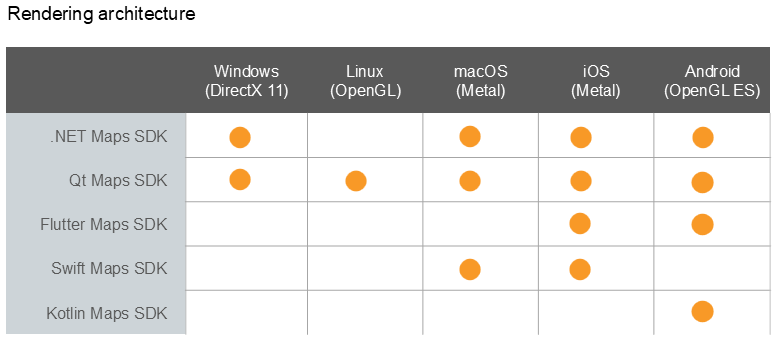
So, to summarize:
- SDKs target desktop (Windows, macOS, Linux) and mobile (iOS, Android).
- Rendering uses the native graphics stack of the platform (e.g., DirectX on Windows, Metal on Apple platforms, OpenGL/ES on some devices).
What Makes Testing Complex?
Testing the Native Maps SDKs is about consistency across diversity:
- Platform diversity: Desktop vs. mobile, differing OS releases and drivers.
- Rendering architectures: DirectX vs. Metal vs. OpenGL/ES and shader nuances.
- Device characteristics: DPI and pixel density affect features like symbol sizing and color.
Example:
A symbol size that appears correct on a high‑DPI iPhone must also be correct on a low‑DPI Android device and in a Windows desktop app. We plan tests to assert size and color fidelity across devices, not just correctness on one platform.
Where to test (runtimecore vs. SDK):
- Core‑level tests validate algorithms and rendering logic independent of SDK wrappers.
- SDK‑level tests verify platform integrations (e.g., view lifecycle, touch handling) and repeat core rendering checks when device variance matters (e.g., shader changes, DPI‑sensitive visuals).
Planning for Quality: How We Design Test Plans
Our test plans are living documents in the development repos. Feature teams draft, iterate, and review them with peers across functional groups.
Principles we follow:
- Test early: Introduce tests with feature development to catch issues sooner.
- Focus on real workflows: Base cases on what users actually do (identify, edit, navigate, render).
- Keep tests simple & targeted: Small, deterministic steps are easier to maintain and diagnose.
- Use realistic data: Small, representative datasets for fast runs; large datasets reserved for performance and holistic checks.
- Design for cross‑platform: Add cases that confirm behavior under differing DPIs/devices when it matters.
Review & feedback loops:
Feature leads, SDK leads, and quality engineers review test plans. Feedback is captured in repo discussions and pull requests, and prioritized by risk (e.g., shader changes, new projection math) and user impact.
Types of Tests We Use
We do different types of tests:
- Unit Testing (Core & SDK)
- Functional (Integration) Testing
- Performance Testing
- Ad‑hoc & Holistic Testing
1. Unit Testing (Core & SDK)
- Core (runtimecore): Validates algorithms and internal components (e.g., projection math, geometry operations, renderer configuration).
- SDK wrapping: Ensures SDK APIs correctly map to core functionality and return expected results and errors.
GIS example:
Verifying that a FeatureLayer created via an SDK wrapper yields the same feature count and attributes as a direct core query for a known dataset.
2. Functional (Integration) Testing

We use image‑based comparisons when rendering is the outcome. A baseline image is captured per platform, then each test renders the same data and compares it against the baseline within a small tolerance.
- When image comparison is NOT needed:
TestingidentifyLayer(…) → featuredoesn’t require a visual diff; success is a correctly returned feature with known attributes. - When image comparison IS needed:
After identifying a feature, testing selection rendering (color, thickness, size) should use image comparison to assert visual correctness.
Rendering example (3D reprojection hero case):
To confirm reprojection of 3D objects, we render a white cylinder with graphics as control points placed at known geographic locations. If the cylinder (3DObject) shape or position deviates beyond tolerance, the test fails. Graphics themselves are validated elsewhere, so they serve as reliable controls here. There are three components in the image shown. The white cylinder is the subject under test, and the blue diamond, and the red circle serve as the control points. The bottom tip of the blue diamond and the red circle serve as checks for height for the cylinder, while the red circle serves as a check for width. The locations of both the graphics serve as the control point for location of the cylinder.
For more about image-based testing, see the video Testing with Pictures by Mark Baird. Although we no longer support ArcGIS Runtime SDK for Java anymore, the concepts still apply.
3. Performance Testing
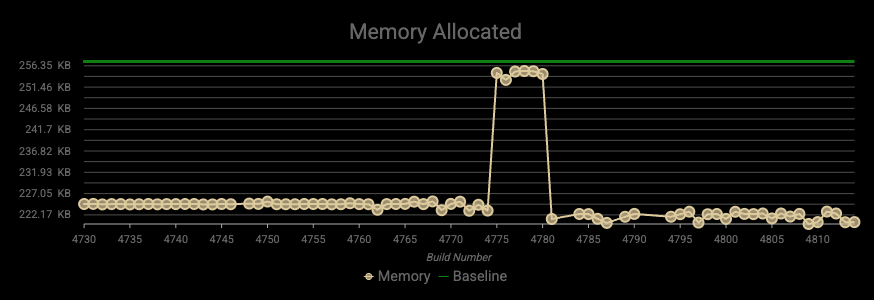
Benchmarks run both at core and SDK layers in controlled environments. We measure:
- Frame time / rendering throughput
- Query and selection latency
- Memory and resource usage under load
Performance suites use larger datasets or stress scenarios to validate responsiveness and stability.
4. Ad‑hoc & Holistic Testing
Beyond automated suites, we exercise end‑to‑end workflows (e.g., navigate → identify → select → edit → persist) on representative devices. Stakeholder personas (mobile field user, desktop analyst) help us spotlight usability and integration issues. Findings feed back into test plans as new automated cases or refinements.
For adhoc testing, we use internally built applications as well as reuse our open-sourced code samples for our users (developers), via a viewer application for each SDK. We have gone from a few samples in my early days, to almost 180 samples for each SDK.
- Samples help identify issues like rendering, and user experience.
- Tested source code from sample apps gets reused as app samples and code snippets within our API reference and guide documents ensuring accurate examples.
Test Data: Practical Considerations
- Keep it lightweight for routine runs to minimize network and device overhead.
- Prefer offline packages (e.g., mobile map package, mobile scene package) to reduce external dependencies.
- Mock online services to avoid instability from live changes.
For Swift users, we maintain DejaVu, an open‑source network‑request mocking framework you can use in your own tests. Dejavu (Swift) on GitHub - Formats we exercise: Esri specific datasets, and relevant open‑standard types (e.g., OGC). Large datasets that are created via scripts or other data creation tools like ArcGIS Pro, are used for performance and holistic scenarios.
Executing Tests Across the Stack
We gate changes with multi‑level automation:
- Pre‑merge checks on the feature branch (unit and functional tests) prevent regressions entering the main branch of runtimecore or an SDK repo.
- Daily builds (core and SDKs) run broader suites—unit, functional/image comparisons, and performance—across multiple platforms/devices.
- Results are categorized pass / fail / skip.
- Image comparison failures are prioritized because they surface rendering differences (e.g., missing contour lines, color shifts).
Example image comparison failures:
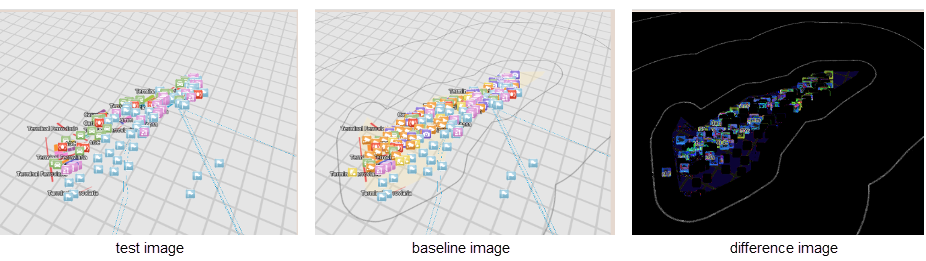
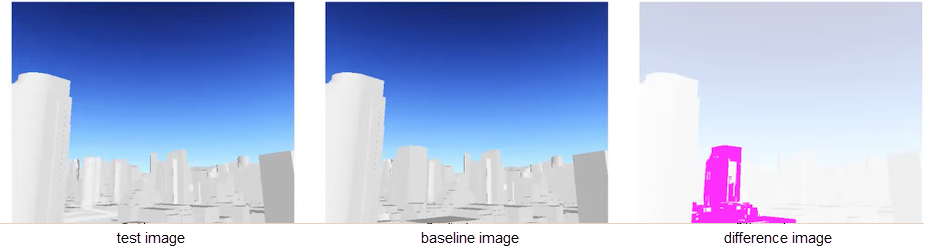
The infrastructure for our end to end testing is handled by creating and maintaining extensive DevOps pipelines which orchestrate these workflows. This allows us to be agile in testing the entire stack.
Challenges and Continuous Improvement
Next, we’ll explain the most common challenges we face in our test infrastructure, along with the techniques we use to mitigate them and keep the system moving forward.
1. Flaky Tests
Symptoms: Non‑deterministic passes/fails due to timing, race conditions, or environment variability.
Mitigations:
- Stabilize by removing non‑determinism (explicit waits, seeded randomness).
- Quarantine known flaky tests while fixes land; track and burn down between releases.
- Add diagnostic logging and stricter tolerances where appropriate.
Further viewing: Qt World Summit talk by Lucas Danzinger and James Ballard to deal with flaky tests in the Qt SDK
2. Changing Data
Risk: External services and datasets evolve, breaking assumptions.
Mitigations:
- Versioned test datasets and mocked services to lock behavior.
- Scheduled refreshes with validation checks before re‑adopting updated data.
3. Long-Running Suites
Risk: Slow feedback loops.
Mitigations:
- Parallelization, where we run multiple independent tests at the same time in separate threads, and selective execution (run impacted tests based on functional area changes).
4. Platform-Specific Failures
Risk: Issues that reproduce only on certain OS/hardware stacks.
Mitigations:
- Reproduce with specific device and graphics API variants.
- Instrument rendering pathways and compare shader outputs across platforms.
Conclusion
Delivering consistent, high‑quality Native Maps SDKs across platforms requires early, focused tests at runtimecore, integration checks at each SDK, image‑based rendering verification, and performance and holistic evaluations.
Our processes evolve continuously—quarantining and stabilizing flaky tests, mocking volatile inputs, and optimizing long runs—so developers can depend on predictable behavior and visual fidelity.
If you’ve encountered similar testing challenges—or have ideas we should explore—we’d love to hear from you.
Interested in building tools like these? Check out our careers page.