Replace disconnected or paper-based tools
Digitally transform field operations with a single app that supports data capture, situational awareness, and collaboration.

An all-in-one mobile app for field operations
Map assets, manage tasks, and collect field data—all in one place.
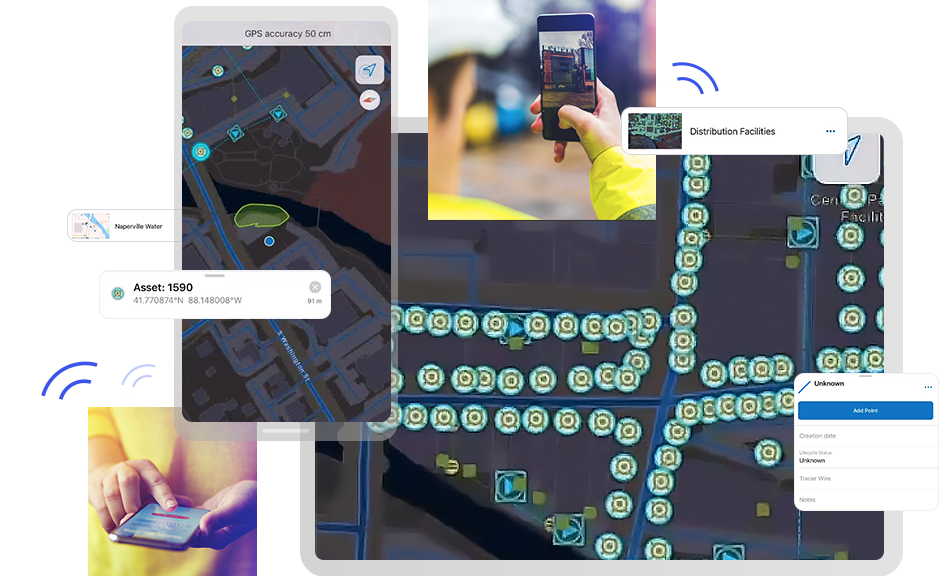
Simplify complex workflows and reduce costs with mobile field management software.
ArcGIS Field Maps supports every stage of a field operations workflow, from creating maps to assigning tasks and capturing data.
Assign, prioritize, and assess work directly in ArcGIS.
Tasks can be filtered, sorted, and completed offline, ensuring your mobile workforce stays productive even in remote areas. This integration eliminates the need for separate field collection apps, speeding operations and improving accountability.

Use form builders to create smart, intuitive forms that help you capture high-quality data quickly, reducing QA efforts and making information immediately actionable across your organization.
By digitally modeling your workflows, you can ensure that the right data is collected and synced to your system of record. This makes processes more efficient, lowers costs, and provides accurate data for more reliable decision-making.

ArcGIS Field Maps offers full offline capabilities—including maps, tasks, data capture, and utility network tracing—so crews can operate confidently in remote locations.
Enhanced editing tools and floor-aware maps help mobile workers locate and update assets inside buildings. These features keep projects moving regardless of connectivity or environment.

ArcGIS Field Maps lets supervisors schedule and dispatch crews. Mobile workers can receive location-based alerts, share personal markup, and see where colleagues are working.
Supervisors can assess field activity and respond quickly to changing conditions, improving customer satisfaction and supporting efficient mobile workforce management.

ArcGIS Field Maps flexibly integrates across the ArcGIS platform and with complementary software—such as ArcGIS Survey123—as well as third-party systems like Cityworks and Salesforce to support field workflows.
In the field, connect with devices that support high-accuracy mobile data collection and link to other ArcGIS apps to accomplish simple to complex workflows. By integrating with third-party field-focused enterprise systems, you can achieve a more unified technology stack to support field operations.

Discover how utilities, governments, and research teams use ArcGIS Field Maps to boost efficiency, safety, and decision-making.

A new approach to leak management

Transforming marine research

Modernizing Scotland’s electrical grid

Enhancing city services in Wyoming

Digitizing water resource management

Gaining real-time precision with maps
ArcGIS Field Maps is a location-aware, map-based mobile app built for field operations and designed for both connected or offline use, allowing teams to work seamlessly regardless of network availability. With Field Maps, you can
A flexible, streamlined deployment environment ensures workflows can be easily iterated.
As part of the ArcGIS platform, Field Maps offers several advantages for mobile workflows:
ArcGIS is a trusted, reliable geospatial enterprise system that connects with other essential business platforms.
ArcGIS Field Maps consists of two main components:
Field Maps is enabled through user type licenses administered in your ArcGIS Online or ArcGIS Enterprise organization. It delivers flexibility to create digital field workflows tailored to your organization’s specific needs and requirements. Built on the ArcGIS platform, it integrates with third-party enterprise systems such as work order management and enterprise resource planning.
For guidance on mobile operations, visit the ArcGIS Architecture Center.
Yes. Field teams can collect data using ArcGIS Field Maps whether they are connected to the internet or working offline, as well as in outdoor or indoor environments. By supporting offline map creation, the app allows mobile workers to be productive and efficient wherever work takes them. Mapmakers can easily define the area and level of detail appropriate for each job to ensure that mobile workers have the most reliable information, even when they’re disconnected from a network.
Yes. ArcGIS Field Maps is part of the ArcGIS platform that powers ArcGIS Online and ArcGIS Enterprise. Field Maps easily connects to other ArcGIS apps to support unique and diverse workflows. Integration options include:
Digital workflows eliminate the need to carry paper maps, data collection forms, driving directions, asset reference information, or other critical information. Busy mobile workers avoid common errors associated with handwritten and disjointed pieces of paper that carry inherent risk of damage, loss, and interpretation.
With Field Maps, teams can collect data digitally using interactive maps, smart forms, and sensor integrations that allow for quick data capture that is highly accurate, ensuring that the information gathered is reliable and precise, all without risk of loss or damage. This capability reduces the time it takes to capture data in the field and minimizes post-processing quality assurance, ultimately lowering the cost of work. Additionally, capturing highly accurate data supports regulatory compliance reporting.
ArcGIS Field Maps enables field crews to
These workflows ensure accurate data collection and operational awareness for utilities managing complex networks, such as electric, gas, and water.