Professionals need to continually learn new technology and update their skills, whether working in the geospatial technology industry, engaging in scientific research, or teaching students to prepare for careers in GIS. Society and the environment constantly evolve, new data and technologies emerge, and analytical methods get more sophisticated.
But it is hard to keep up—especially for scientists and university professors who not only have teaching responsibilities but also engage in research and academic service. As scientists and university professors, the three of us have, at times, felt a gnawing panic that we might be holding students back by not teaching them the very latest in modern GIS technology and associated scientific principles. So much work goes into updating courses and labs, let alone enhancing GIS curricula.
Continuous change, however, does present opportunity. If educators can anticipate where the geospatial technology industry is heading, they can prepare students for tomorrow’s innovations. The Guide to the Geographic Approach helps educators seize this opportunity.
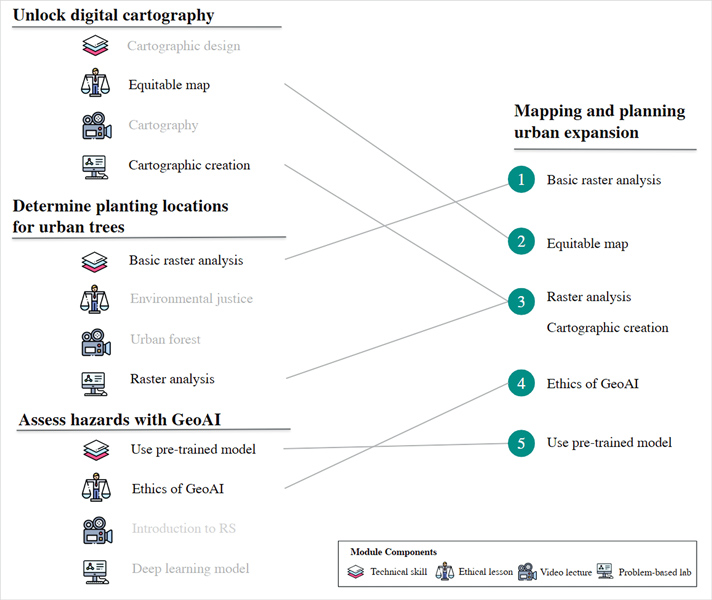
Developed collaboratively by educators and the broader GIS community, the guide is a collection of ready-to-use teaching models that bring modern GIS techniques and spatial data science into the classroom. Contemporary case studies equip learners to address real-world problems by applying spatial thinking and the latest geospatial technologies. Modules are delivered as editable ArcGIS StoryMaps stories that contain short, conceptual video lectures, technical skills training, class and lab exercises, and ethical lessons. It all aligns with the topics, skill areas, and learning outcomes emphasized in the GIS&T Body of Knowledge (a comprehensive catalog of the GIS and technology field) and the geographic information system professional (GISP) certification.
Faculty instructors and teaching assistants will gain the following four benefits, if not more, from using the modules in the guide:
- They will save valuable preparation and class time by having ready-to-use courseware, complete with data, that can fit into existing courses and curriculum.
- They can trust the modules—which are prepared by experienced academics—to cover the latest GIS concepts and techniques, including web mapping, geospatial artificial intelligence, enterprise GIS, big data, and ethics.
- The modules are easy to customize using provided templates, and they can be used in their entirety or deconstructed into component parts.
- The modules are openly and freely available, continually updated by a network of universities in collaboration with Esri, and open for additional participants and contributions.
The guide is meant to be used in at least three distinct ways. First, instructors can insert modules into their existing GIS courses as complete lessons. For example, if a professor wants to update their cartography lessons to emphasize interactive web mapping, they could use the Unlock Digital Cartography module to complement existing materials. If they want to add lessons on recent developments in mobile mapping, GeoAI, and the use of computational notebooks, they can slot modules on each of these topics into their GIS courses.
Second, modules can be used to complement and enrich thematic courses across the university curriculum. Because the modules do not require extensive prior knowledge of GIS, instructors can quickly introduce students to key concepts and skills using the supplemental materials that accompany each module. For example, a business professor interested in introducing students to market analysis and site selection could use the Expand a Business Using Location Analytics module to teach students different market screening and segmentation techniques while also emphasizing nondiscrimination in business decision-making. A professor of environmental and conservation science might use the Support Conservation Decisions with GIS module to train students to identify sites suitable for conservation and then expand those skills by using the Forecast Future Habitat Suitability Under Climate Change module to imagine how those sites might change over time.
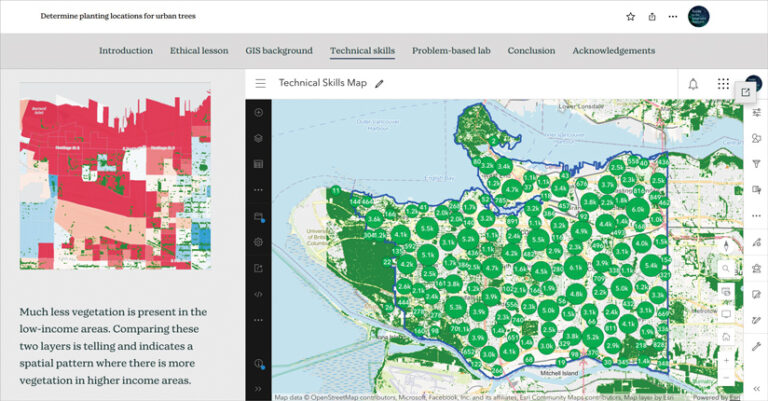
Third, instructors can break up modules into their component parts and use them to create or remix course content. For example, an urban planning professor who wants to create a lesson on mapping and planning urban expansion could augment their existing course materials by combining web mapping training exercises and the ethical lessons and lab from the Unlock Digital Cartography module, the raster analysis technical lessons and lab from the Determine Planting Locations for Urban Trees module, and the GeoAI technical training and ethical lesson from the Assess Hazards with GeoAI module. Combined into a new lesson, the professor could use these materials to teach students how to acquire and analyze Earth observation data using GeoAI tools while considering the ethical implications of their urban planning decisions.
If you’re a university-level instructor—whether you teach GIS courses directly or incorporate geospatial thinking into other disciplines—explore the guide. See the available modules, experiment with integrating them into your courses, and share your experiences with colleagues.
The guide is a collaborative effort, and its continued growth depends on input and feedback from educators. Visit GuidetotheGeographicApproach.com to view the introductory community webinars, browse the module library, and contribute your own ideas or case studies. New materials on using GeoAI and working with AI assistants to solve real-world problems are currently in development, so stay tuned for those updates.