
Join the ArcGIS Pro Assistant Early Adopter Community
Esri is building the future of GIS workflows in ArcGIS Pro—and things are getting conversational. With the ArcGIS Pro assistant (currently in beta), Esri is beginning an exciting journey to transform how users interact with spatial data, tools, and documentation.
With continued development and user feedback, Esri aims to create a tool that simplifies workflows and empowers users to solve problems more intuitively. Read on to see what the ArcGIS Pro assistant can do today and how to get started with the Early Adopter Community (EAC).
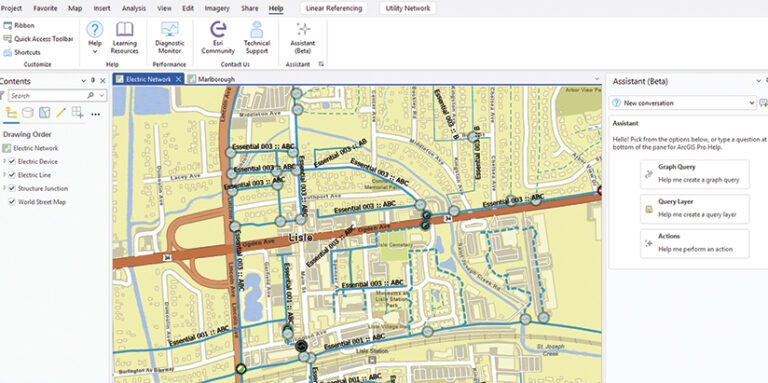
What the Assistant Can Do Now
The ArcGIS Pro assistant, powered by generative AI, includes the following options:
- Help: It answers ArcGIS Pro help documentation questions in a conversational manner.
- Graph query: It generates openCypher queries based on a specified knowledge graph schema. These queries can then be used in knowledge graph workflows.
- Query layer: The assistant creates query layers by generating SQL queries for a specified database connection and table schemas.
- Perform actions: If corresponding AI-assisted actions are available, the assistant performs the actions on request.
What to Expect with the Beta
An endeavor as important as building an assistant doesn’t happen overnight. It takes continual testing and iteration to get things just right so users can successfully integrate it in their workflows.
Here are a few things that members of the EAC should anticipate with the beta version:
- Limited initial interactions: Currently, only a limited set of actions is programmed into the assistant, with more in development. For anyone who joins the EAC, their feedback in testing new features will help determine what to prioritize in the development process.
- Varied responses: The assistant continually learns and adapts, generating dynamic responses that evolve as users refine their interactions. This variability is normal and expected.
How to Get Started
Developing this assistant depends heavily on the ArcGIS Pro user community joining the EAC and trying out the assistant.
EAC members gain early access to innovative features in ArcGIS Pro, including the new assistant. Users who participate in the EAC get to test new features and provide feedback that directly shapes ongoing enhancements made to ArcGIS Pro.
To participate in the ArcGIS Pro assistant EAC, users should follow these steps:
- Apply for access by filling out the survey.
- Once accepted into the EAC, install ArcGIS Pro (if needed) and enable semantic search and tool suggestions.
- Download the ArcGIS Pro assistant (beta) from the EAC website.
- Launch the assistant by going to Help and selecting it.
- Now begin exploring!
Exclusive early access is available only to those with Named User licenses in ArcGIS Online and ArcGIS Enterprise, within organizations that allow beta functionality and have the assistant enabled.
The ArcGIS Pro assistant has the potential to transform GIS work for the better. Join Esri in shaping the future of conversational GIS in ArcGIS Pro by signing up for the EAC today. See what the ArcGIS Pro assistant can do by reading reading documentation.