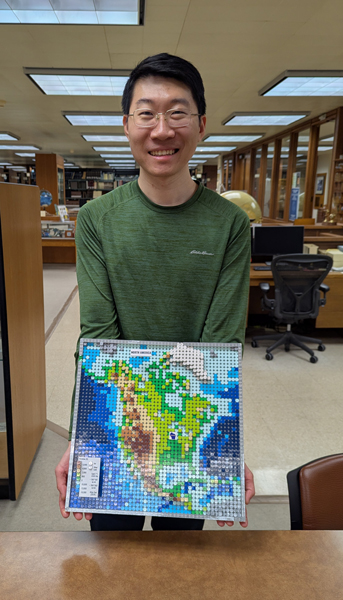
Atlas Guo, a PhD student at the University of Wisconsin-Madison, is combining the digital and physical worlds in a way that is not only unique and beautiful but also practical for geographic education. While his research focuses on applied geospatial AI and geospatial data mining for natural disaster management, Guo’s love for maps led him to this surprising way to explore cartography: designing maps in a LEGO brick style.
In this interview, Guo explores how he uses ArcGIS Pro to make LEGO maps that are accurate on the ground and can be used to build physical or virtual models, as well as how he hopes these maps can inspire educators and future mapmakers.
Q: I’d love to learn more about how you got into cartography and mapping. I know you’re academically pursuing it, but it would be great to better understand the road here and where you want to go next.
A: I got my bachelor’s degree in GIS from Sun-Yat-sen University in Guangzhou, China. Then, I moved to the United States and got my master’s degree in geography (GIS) from the University of Georgia. Now I’m working on my PhD at the University of Wisconsin-Madison, so I’ve been using Esri software for over 10 years. Basically, all my research has been on the GIS side—doing things like spatial computing, data mining, [geospatial] AI, mostly writing code and making maps—but not really from the cartographic perspective.
An important experience in my geography PhD program at UW-Madison is working as a teaching assistant and instructor for cartography courses. It was during this time that I learned a lot about cartography, especially having the chance to systematically appreciate the cartographic design of many great maps. Then when the pandemic occurred, everything paused, giving me time to explore cartography more. One practical example is building up a local COVID dashboard using ArcGIS Dashboards. That was an important moment for me, to realize how I could make maps to benefit the local communities, my family and friends, and even myself. In one sentence: My research is in GIS, but my passion and future are in cartography.
Q: It’s inspirational how you pivoted and found power in making maps that can serve as a great communication tool. It looks like you also discovered mapmaking can be fun. This LEGO brick project started off as a happy accident. How did that come about?
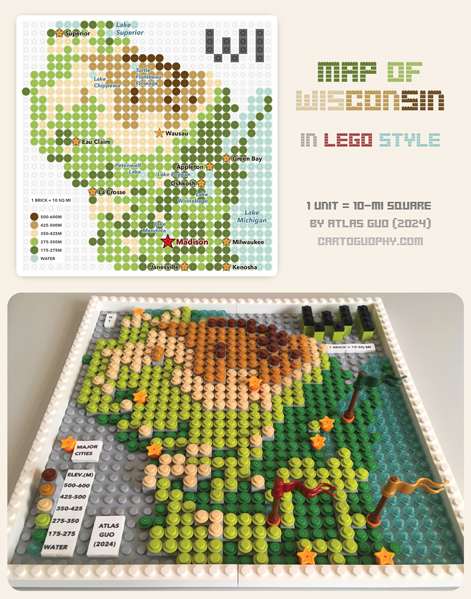
A: My experiment with LEGO mapping started by coincidence. I wasn’t a LEGO fan before 2024, but I just love trying new ways to make maps, especially through crafts. So, my journey began with a LEGO topographic map of Wisconsin. I thought LEGO could be a good way to combine crafts and maps. Instead of just randomly making a map-shaped LEGO [model], I decided to make it more accurate. That’s why I started using ArcGIS Pro to design it. After that, I could either make a physical LEGO model or a virtual one using LEGO’s Studio software.
Q: With any map, there are a lot of design choices you make and a lot of tinkering to get things right to represent like the terrain, the water, creating the landforms and the contours. Could you talk more about this process of using ArcGIS Pro for LEGO maps?
A: There are so many things to share, but maybe starting with a common topic in cartography would be helpful. The planning part is hard because I need to choose a projection and extent that make the LEGO map easy to recognize while still allowing for measurement. So I needed to compromise between keeping the shape accurate and recognizable while making each LEGO unit represent a rounded value. For example, in my first LEGO map (Wisconsin), I chose a scale where one LEGO unit—in this case, a round plate—represents a 10-mile-by-10-mile area. Another factor to consider is that if I make a physical LEGO map, it usually needs to fit a single LEGO baseplate, which may be a 32-by-32 or 48-by-48 unit. This part is very challenging but also really fun to play with, as it ties in with other aspects of cartographic design.
After figuring out the projection and scale, my data solution was to create a fishnet of rectangular cells in ArcGIS Pro and use it as sampling points. I extract the value of each cell in the fishnet from the elevation and sometimes bathymetry layers. The source for these is always a layer from ArcGIS Living Atlas of the World. That saved me a lot of time. I don’t need to worry about the digital elevation model (DEM) at all because [ArcGIS] Living Atlas has everything.
Then I move on to the design and styling part. This is a process with a lot of joy and freedom to explore and experiment. For every LEGO map I’ve made, I’ve tried to make something different. However, I prefer to keep my LEGO-style symbols relatively simple, in more minimalist rather than realistic style.
For the color choice of topography, I have my own habits. The basic version uses five colors: dark green, light green, beige, light brown, and dark brown, representing low to high elevations. I try to keep the color scheme the same across my work, which works better for geographic education. This way, people who don’t know much about topographic maps can still recognize the patterns. This makes the LEGO maps a learning tool to help others better understand real maps.
Q: As you’ve gone through this process, what are some things you’ve learned that you’re going to take into the future with LEGO map building? Are you planning to do more?
A: Of course, I will do more, and I have lots of plans, though I don’t have enough time to turn these creations into LEGO models. One thing I’m exploring is creating a complete workflow, from buying new LEGO elements to building a real, physical LEGO map. LEGO is a global company, and its bricks are highly standardized. If people have step-by-step instructions, they can get the materials anywhere and build their own LEGO models.
I hope my work can inspire educators and mapmakers to create more LEGO maps of the areas they’re interested in. I think this will really help children learn about geography in a joyful way because LEGO is a language they understand much better. This work can help them study what the terrain patterns are, what map colors represent, and what elevation means—things like that.
A great thing about LEGO mapping is that it can be customized in many ways. For example, you can use a topographic map as a basemap. At a Star Wars-themed LEGO showcase event this year, I used my North America map as a basemap with the filming locations added on top. Now it’s not only a topographic map; it serves as a thematic map. That’s actually the next thing I want to explore: building more thematic maps with LEGO models that can inspire creativity and serve as a meaningful tool for education and more.
About the author