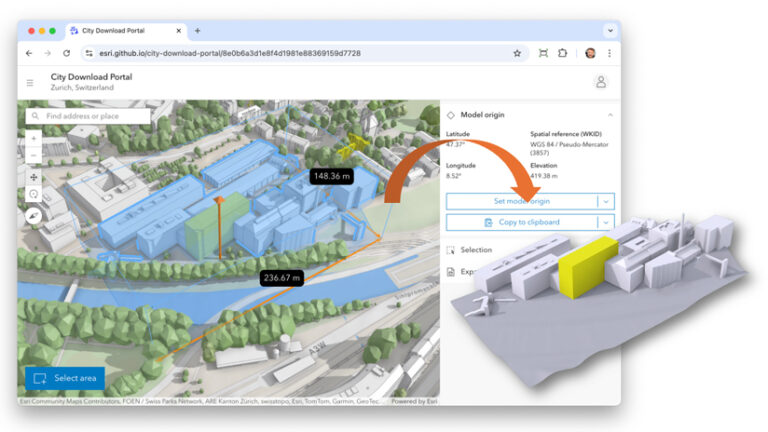
Architects, urban planners, and civil engineers often require accurate and accessible 3D context to visualize and design new projects within existing urban environments. A new open-source showcase app built with ArcGIS Maps SDK for JavaScript, called the City Download Portal, enables you to do exactly that. By drawing an extent, you can download selected buildings and terrain as one single 3D model. Open the file to import GIS context into your favorite modeling software, whether it be Blender, Rhino, or SketchUp.
The 3D Object Layer
Uploading and manipulating 3D models on the web is enabled by a layer type called 3D object layer. It can be created through ArcGIS Pro or directly in ArcGIS Online and ArcGIS Enterprise.
A 3D object layer consists of a 3D object scene layer and a 3D object feature layer. The scene layer facilitates efficient display and loading, while the associated feature layer stores the data for editing and querying. This 3D functionality is integrated within the SceneLayer class, allowing you to use SceneLayer.queryFeatures() to retrieve results directly from the associated feature layer. This means you can run spatial or attribute-based queries that return the 3D geometry, the same way you can with point, line, and polygon features.
Manipulating 3D models such as buildings directly in the browser requires having the 3D geometry in an interoperable format. For web applications, the common format is GLB, also known as binary glTF.
The team at Esri R&D Center Zurich has made 3D data manipulation and access available as a public API. This means you can use JavaScript Maps SDK to implement custom workflows and applications using your 3D data, ultimately empowering authoritative data providers to increase interoperability and accessibility of their 3D system of record.
3D Geometry Workflow
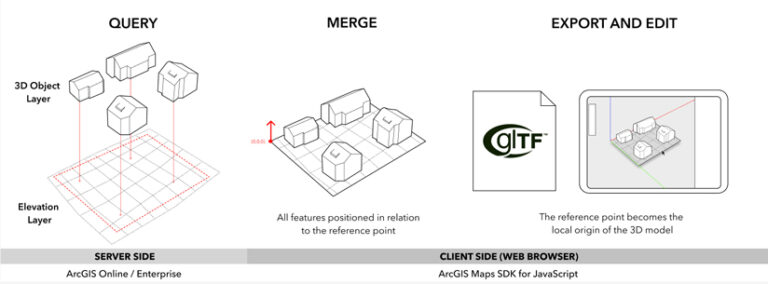
In the City Download Portal, you can leverage these new possibilities in the following way:
- Query 3D building features: Use the SceneLayer.queryFeatures method to select and retrieve mesh geometries for specific buildings.
- Create terrain geometry: Generate a detailed mesh geometry for the terrain from elevation data using meshUtils.createFromElevation.
- Merge features into a single mesh: Create a single 3D model using meshUtils.merge.
- Convert to Cartesian coordinates: Establish a real-world reference point as the local model origin using meshUtils.convertVertexSpace.
- Export and download: Convert the mesh geometry to binary glTF (GLB) with Mesh.toBinaryGLTF for download.
In this workflow, the mesh geometry class represents GLB models in JavaScript Maps SDK and provides conversion methods between the two. Queries are based on extents defined by the user and performed directly on the SceneLayer class. While textures are ignored in this example, individual features or parts of the exported model can be colored to enhance visualization.
Generally, this client-side approach allows for the integration of additional layers such as vegetation, street furniture, or infrastructure into your 3D models. The possibilities are as vast as your imagination—or the web browser’s memory, eventually.
Interoperability and Georeferencing
When moving 3D data between a GIS and 3D modeling software, maintaining consistency in coordinate systems and origins across tools is crucial. By keeping a fixed reference point and orientation, newly modeled 3D data will align perfectly when reimported into ArcGIS. While this is outside the scope of the City Download Portal showcase, it can be achieved with a 3D object layer in Scene Viewer or any other editing app powered by JavaScript Maps SDK.
While some 3D formats store georeferencing metadata directly, others—like glTF—require manual referencing. JavaScript Maps SDK provides tool tips with exact coordinate data, ensuring accuracy during manual input. Support for file-based georeferencing is on the horizon in upcoming JavaScript Maps SDK releases, further simplifying the integration process across different platforms.
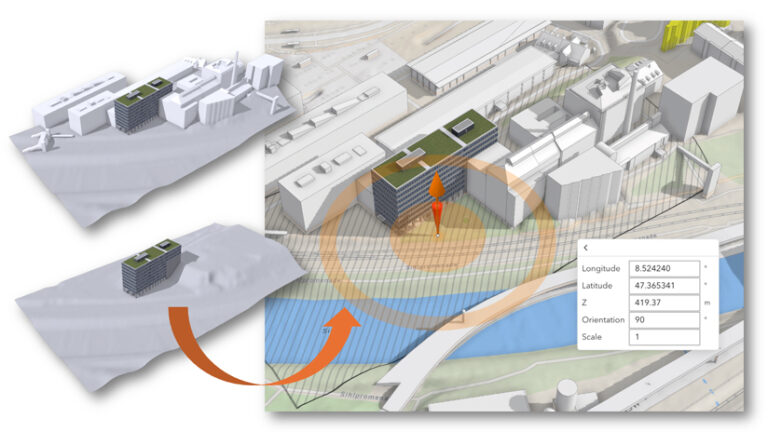
Accessing your 3D data in the browser opens up a whole range of opportunities to build custom workflows. The City Download Portal is one example showing what’s possible. You can fork and redeploy a version in your own GitHub organization, or simply replace the web scene ID in the URL to use it with your own data. The app will use any 3D object layer you have in your scene.
While client-side processing offers flexibility, it’s essential to monitor memory usage. For larger datasets, consider shifting the 3D data manipulation to a server-side implementation.
The City Download Portal is open source and publicly available. (Credit to the cities of St. Gallen, Switzerland, and Vigo, Spain, for providing their 3D buildings as open data for the demo application.) Access the live showcase app and the source code.
About the author