Designing infrastructure—whether highways, railways, or airport runways—demands precision; speed; and tight collaboration between surveyors, civil engineers, and GIS professionals. With multiple teams collecting and editing project information, maintaining data integrity and tracking changes is critical to prevent costly errors.
ArcGIS for AutoCAD, combined with multiuser editing capabilities in ArcGIS Enterprise, empowers civil engineering teams to work concurrently on designs in Autodesk Civil 3D without the risk of overwriting each other’s work or losing track of design decisions.
Within this workflow, civil engineers and GIS professionals can improve collaboration between Civil 3D and ArcGIS using branch versioning. Authoritative GIS data and branch versioning help eliminate errors and guesswork when designing infrastructure, including the creation of surface models from survey points.
Laying the Groundwork
As an example, consider a project scenario for a proposed airport runway extension. This project, like many infrastructure projects, involves multiple teams working in parallel—surveyors capturing existing ground conditions, civil engineers developing design options, and GIS team members ensuring data governance and quality.
The teams on this project will start by gathering existing conditions. Historical topographic survey points previously collected by a surveying team allow civil engineers to generate a triangulated irregular network (TIN) surface of the existing ground in Civil 3D. However, with data arriving from multiple surveyors in the field, the risk of civil designers working from potentially incomplete or outdated information grows.
Without a way to accurately track and version changes as they happen, merging updates to authoritative project information can be risky, leading to costly rework and delays.
GIS Aids Collaboration on Project Designs
Say the project team for the runway extension is using ArcGIS as the system of record for project information. The team is also using ArcGIS for AutoCAD to keep CAD and GIS data between Civil 3D and ArcGIS in sync.
With survey points stored in ArcGIS Enterprise, a civil engineer can use ArcGIS for AutoCAD to add previously collected survey points as coordinate geometry (COGO) points into a Civil 3D design. Initially, the z-coordinates for the points appear as zero. After identifying an elevation field among the GIS attributes, the engineer corrects the vertical positioning.
Using the support for branch-versioned layers in ArcGIS for AutoCAD, a named version is created for the engineer to propose changes to the survey point elevations. The engineer then submits these changes for review by teammates and the GIS team, ensuring that they can be incorporated into the authoritative dataset.
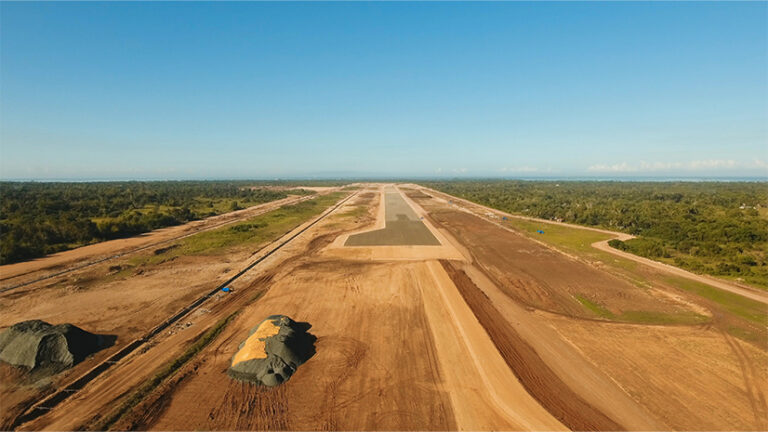
Before synchronizing the proposed changes to ArcGIS, the engineer uses standard Civil 3D commands to form an initial surface—an essential first step in characterizing the existing ground for the runway extension. The synchronization process ensures that these updates are available for review and, ultimately, for potential use by other project contributors who rely on accurate data for their work downstream.
Multiuser Editing Across Teams and Platforms
With branch versioning, civil designers and surveyors with a Professional user type license can create and manage their own branch versions directly within Civil 3D using ArcGIS for AutoCAD.
This means that each designer can add GIS web feature layers to their CAD drawings without the risk of overwriting authoritative data. With the default version locked, only changes that the GIS team has reviewed and approved can be added to the main project data.
Using branch versioning in Autodesk Civil 3D and AutoCAD, multiple project team members can work with the same project data at the same time.
As the project progresses, new survey points fill gaps identified in the initial surface in the northeast corner of the site. One of the surveyors creates a named branch and uploads the latest field data.
Meanwhile, a civil designer working on a proposed taxiway alignment creates a separate branch to test design options without interfering with the main dataset. Team members synchronize their edits to ArcGIS Enterprise, and the GIS manager can see who made each change and when.
Updating Design Data
The project team incorporates new data and refines design options. Supplementary topographic survey data can be incorporated into a named version using ArcGIS for AutoCAD.
The engineer adds these new points, rebuilds the surface, and synchronizes the changes from Civil 3D. The result is a richer, more accurate TIN surface that better characterizes the existing ground where the runway extension is proposed.
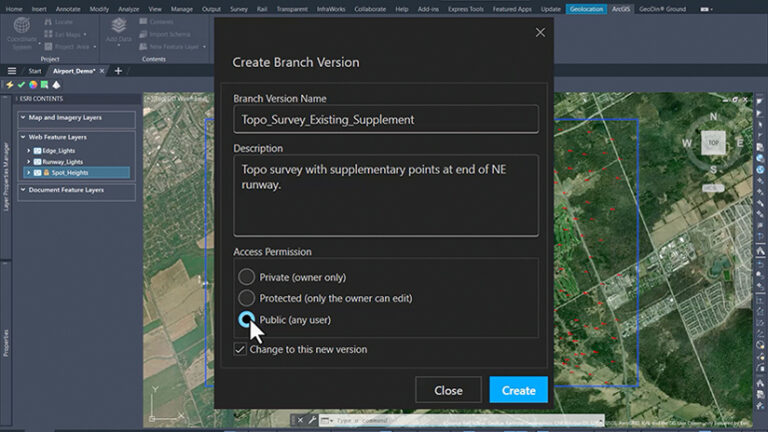
Synchronizing these changes makes them available for review by the lead civil engineer and the GIS team so that the updated information can be brought into the authoritative dataset when ready. This ensures that all team members—from designers to project managers—are working from the latest, most reliable information.
Once the design option is chosen, the GIS manager reconciles the preferred branch with the default version from ArcGIS Pro. After a final round of QA/QC, the updated surface can be published for stakeholders.
Outdated layers on named branches will be archived or deleted as needed, keeping the project data clean and organized. This process not only reduces risk but also ensures that every contributor’s work is traceable.
The Value for Project Teams
Throughout this workflow, the value of using ArcGIS for AutoCAD with branch versioning is clear. Civil engineers gather data on existing conditions and participate in GIS workflows directly from Civil 3D. They make edits from their familiar CAD environment while leveraging authoritative GIS data. Additionally, GIS managers maintain control and data integrity. They work with a full chronology of who edited what and when, for collaboration between multiple project contributors without bottlenecks.
The entire project team benefits from working from a single source of truth—with every change auditable and the authoritative dataset protected. For infrastructure projects with multiple contributors who need to work concurrently, using branch versioning in GIS and CAD collaboration adds confidence that every design decision is made using current, authoritative project data.
About the authors

Geoff Cook