Like many other colleges, the State University of New York at Cortland (SUNY Cortland) has a lot to keep track of on its 191-acre campus in central New York state. Every day, the university’s facilities management department uses GIS technology to help the campus run smoothly. The department encompasses several subgroups, including environmental health and safety; operations; maintenance; and planning, design, and construction.
“We’re like a small city within a city,” explained Adam Levine, the department’s GIS manager. “We’re involved in a little bit of everything.”
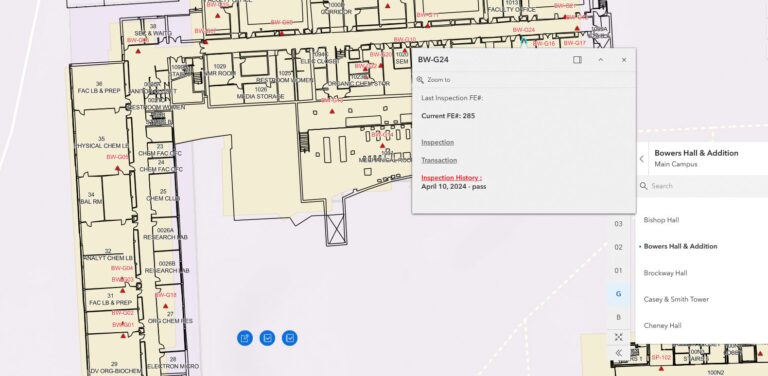
The department often collaborates with project planners, contractors, and the local community to create and maintain maps and digital request systems. One early GIS use case included using ArcGIS Experience Builder to create an app that tracked all 1,357 fire extinguishers on campus, which are required to be recharged every six years and inspected regularly to ensure functionality. The app includes an interactive map that displays the location of each fire extinguisher, ensuring that staff can quickly locate fire extinguishers and enabling inspectors to view each extinguisher’s maintenance history and record inspection details.
This app was the first big success for indoor GIS mapping at SUNY Cortland. And it was part of a series of GIS implementations that showed university administrators the technology’s potential for outdoor and indoor asset management.
Transforming Campus Assets
When Levine started managing the department’s work order system and other large-scale data systems in 1999, most processes were paper based. All asset updates were done manually on paper—something that became especially challenging as campus construction increased. Recognizing the need for better management, Levine’s supervisor decided to adopt GIS to handle the growing infrastructure and prevent errors related to outdated information. The university partnered with a full-service GIS solutions company to transform the data into an interactive, maintainable system.
Around the same time, Levine took a GIS course and began exploring potential uses for GIS around campus. As the university’s first GIS manager, he quickly found ways to leverage the technology and gain support.
“The variety of applications means there’s never a dull moment with GIS,” he said. “It applies to so many fields. . . . Keeping up with it while finding new ways to do things has been so much fun.”
One of his first GIS projects helped electricians and night crews replace light bulbs in 699 outdoor light fixtures on campus. Levine assigned each light a number and created an interactive web map with symbols that indicated the lights that needed attention. This system, which improved efficiency, is still used today.
Later, Levine and a team of talented interns created interactive web maps and apps covering everything from on-campus utilities and accessibility features to bike racks and roof warranties.
The Move to Mapping Indoors
Prior to the COVID-19 pandemic, Levine had taken over many space-management responsibilities across campus. At the time, the department had two distinct datasets to work with—one with small-scale CAD files and the other with building information that SUNY Cortland reports to the state, such as details about rooms on campus and what they contain.
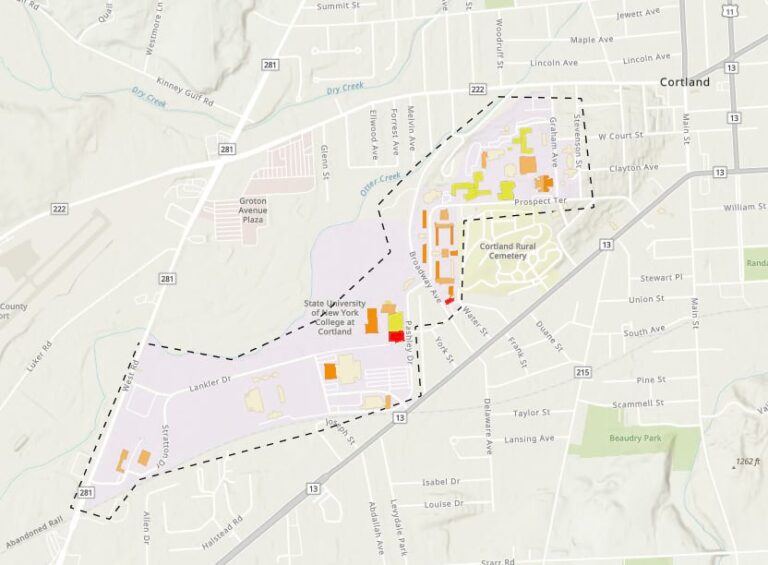
Levine saw an opportunity to merge these datasets into a space-management tool with GIS. He created dashboards that provide quick access to a variety of information such as the total number of classrooms, types of rooms, and square footage. The department updated data on campus buildings, and Levine used CAD drawings to gather information on other useful features.
“Details like the number of sinks [and] toilets and the need to replace or add fixtures are crucial,” said Levine.
Levine refined his indoor map as much as possible until he realized he needed a better way to connect the indoor assets to their physical locations.
The data model in ArcGIS Indoors ensured more accurate maps—integrated in Experience Builder through ArcGIS Online. The resultant indoor mapping system has helped modernize department operations.
Levine also built a space-management tool to help the department propose and review space and numbering changes. Proposed changes are highlighted in red, making it easy to track and approve before submitting them to the state system.
Other indoor map features include the ability to track vacant spaces. With a straightforward Yes/No field and a filtering option, staff can easily locate vacant spaces that are larger than a certain size, such as 1,000 square feet. This feature has provided the right conditions for future indoor applications.
“I’m always looking for different opportunities to use GIS and save others time,” Levine said.
Eventually, Levine expanded his indoor mapping system by using ArcGIS Field Maps for property control management. Property control managers can now record locations of university assets such as furniture and equipment and verify that they are still in use, helping ensure that all property is tracked and maintained.
Managers can also track changes to indoor wayfinding signage. Levine plans to use ArcGIS Field Maps to record assets including each type of sign. Each template will feature drop-down options, imagery, and sign locations while allowing staff to update and maintain signage details.
Impacting Campus Operations
Levine said indoor mapping has been crucial to inspiring broader GIS use at the university. One of several new products is a GIS-based exterior asset survey that streamlines tracking of requests for maintenance of sidewalks, roads, catch basins, and exterior stairs and railings. With automated workflows, Levine hopes to make it easier for staff to update and submit requests via web or mobile devices.
“What I’ve gathered from my career in GIS is that it’s just such a great collaborative tool and technology,” Levine said. “These projects are helping people see the benefits, get excited, and ask questions.”
About the author