

The Spalding County Water Authority (SCWA), a water utility based in Griffin, Georgia, conducts annual inspections of fire hydrants to check each one’s condition and functionality. Ensuring the hydrants are in working order is critical for public safety and fire response. With more than 3,200 hydrants throughout the county, SCWA has dedicated teams working almost full-time all year to perform inspections.
Inspectors look for physical damage, leaks, or missing parts, and they test water flow and pressure to ensure each hydrant will work in an emergency. They record the inspection results and hydrant conditions for maintenance and safety tracking. This used to be done manually, with inspectors jotting down critical details on paper in the field and then transferring the data to a spreadsheet when they got back to the office.
But the process was prone to data entry errors and incomplete records, according to Chris Reagan, GIS manager for SCWA. The delay in transferring data also led to hydrants being checked multiple times within the same cycle, causing unnecessary work. To streamline the workflow and improve data accuracy, SCWA staff began using ArcGIS Field Maps in the field and created a centralized database for inspection records.
Challenges of a Paper-Based System
The inspection-related data recorded in the field includes items like the inspector’s name; the inspection date; each hydrant’s location, brand, and model; and visual details such as defects observed. Previously, each field team maintained its own Microsoft Excel spreadsheet of daily inspection data. The manual process of recording this information resulted in several significant challenges.
One frequent issue was data entry errors. Some handwritten reports were illegible or missing information, and it was difficult to monitor hydrant inspection progress, leading field teams to visit hydrants that had already been inspected.
“With the old paper-based method, field teams sometimes inspected the same hydrants multiple times during a cycle, either within the same crew or across different crews, because there was no reliable way to track visits,” explains Reagan.
The manual process also caused delays in accessing data for reporting or analysis. When inspectors didn’t immediately transfer data they collected in the field to Excel, key stakeholders like senior managers weren’t able to see the status of an inspection or how many inspections remained. If inspection data was needed immediately, an SCWA staff member had to sort through forms, which was time-consuming.
Building a GIS-Powered Inspection Solution
While exploring best practices, SCWA staff discovered Esri’s video series on inspection workflows. The series provided a road map for developing a custom hydrant inspection solution using Esri technology, says Reagan. The first step in revamping the workflow was to design a new inspection form for mobile staff with input from major stakeholders, such as the SCWA general manager and the superintendent over field operations.
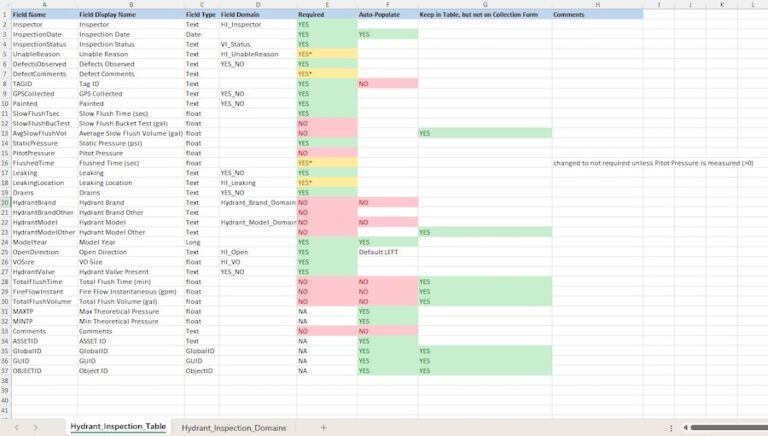
SCWA used the smart forms capability in ArcGIS Field Maps to create and customize the new inspection form. Customizations included required fields like the inspector’s name and optional fields such as inspection-related comments. The SCWA team also added a drop-down list with prefilled choices to ensure consistent, accurate data. The smart form is linked to a hydrant inspection table.
“This setup allows multiple inspections to be recorded for a single hydrant feature [and] ensures all relevant inspection data is captured efficiently,” explains Reagan.
A Centralized Database
SCWA previously had multiple versions of hydrant data in different systems, which created confusion among staff, according to Reagan. It was crucial to develop a centralized database that could give staff access to real-time data and improve collaboration. SCWA integrated historical inspection data using ArcGIS Pro so that details on previous inspections would be available in the new system.
The team also used the Extract Multi Values to Points tool in ArcGIS Pro to calculate theoretical pressure ranges for each hydrant. If, during an inspection, measured pressures fell outside these ranges, further investigation could be warranted, explains Reagan. This data is also accessible in the database.
“A centralized database gave us a true single source of truth,” says Reagan. “By storing everything in one place, inspections update in near real time, so as soon as a hydrant is inspected, everyone across the organization can instantly see the latest status.”
Enhancing Insights and Collaboration
SCWA created a web map that included each hydrant’s location, inspection details, and other useful data such as the locations of water mains and valves. The map also includes pop-ups that display inspection records when clicking a specific hydrant.
“From the pop-up, staff can open the inspection form, review attributes, and, because inspections are stored in a related table, view historical inspections,” says Reagan. “It becomes the hub for both current and past information.”
SCWA also built a digital dashboard with ArcGIS Dashboards to provide real-time visibility into inspections. The hydrant inspection dashboard includes a web map showing all hydrants color-coded by status. For example, green indicates inspected hydrants, while blue specifies ones that need inspection. The dashboard also includes key pieces of information such as the total number of inspections completed and the number of hydrants with defects.
The dashboard allows stakeholders to monitor hydrant inspection progress immediately and identify hydrants requiring follow-up. It also helps guide field crew assignments by showing which hydrants have been inspected and which haven’t. A line graph displays the number of inspections completed daily by each field team to help SWCA better allocate resources.
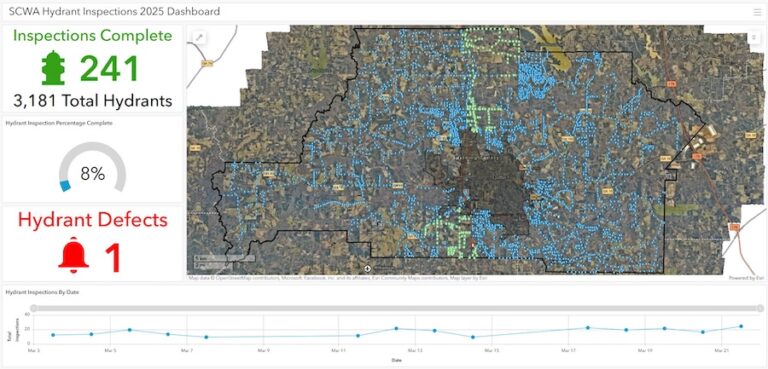
“This allows us to have daily discussions about where each team should focus their efforts to stay on track with the inspection schedule,” says Reagan.
Streamlining Inspections
Following a brief training session, field crews quickly adapted to the new process—and the benefits were immediately clear, says Reagan. He notes that each crew member saves at least one hour per day. The new process has also eliminated duplicate inspections and improved data accuracy with the digitized inspection form.
The new real-time inspection database makes inspection data accessible from anywhere. This success has paved the way for future GIS-driven initiatives at SCWA. As GIS becomes the center of operations, the team is already exploring new applications for asset management and system optimization.
“By using the Esri tools we already had, SCWA significantly improved operational efficiency—demonstrating the power of GIS in modern utility management,” says Reagan.