Esri is excited to introduce a new type of layer in the June 2026 release of ArcGIS Online, Parquet feature layers (Beta). This new layer type provides fast visualization and client-side querying capabilities, bringing the benefits of Parquet to your maps and apps. It’s especially optimized for read-only reference data and large datasets where quick filtering and drawing time will help improve the end-user experience. Using ArcGIS Data Pipelines, a no-code data engineering capability available to all ArcGIS organizations, existing data can be converted into Parquet feature layers, making it easy to integrate this high-performance file format into your maps.
This blog will cover what Parquet is and how it is extended with the new spatially optimized Parquet feature layers. It will also review how to create and work with Parquet feature layers in Map Viewer and other ArcGIS apps as well as recommendations on when to use them.
What is Parquet?
Parquet is an open-source columnar file format designed for efficient storage and analytics of large tabular datasets. It’s cloud-friendly and popular among data scientists, becoming an increasingly common data interchange format. Instead of storing data by row, Parquet organizes data by column. Client applications can make requests directly to the Parquet file, and the Parquet metadata provides clients with a way to identify and retrieve only the portions of data needed.
For example, to query the number of records in CA (California) in row-based database storage, the system must scan every row and all the attributes before returning the rows that meet the query.
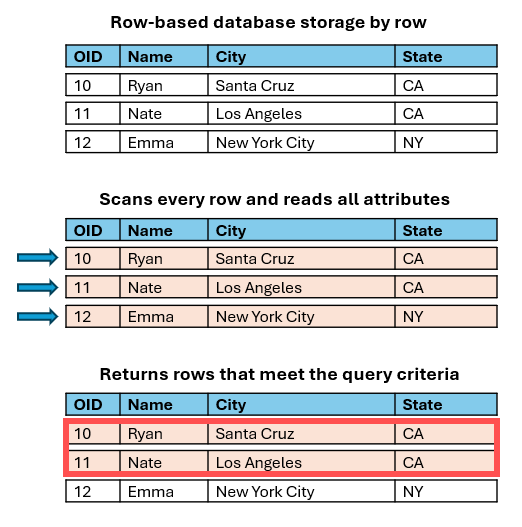
In columnar storage, the logic is flipped. Instead of structuring data using rows, the data is organized by columns. This allows for faster queries by only evaluating columns that store the data, resulting in better performance.
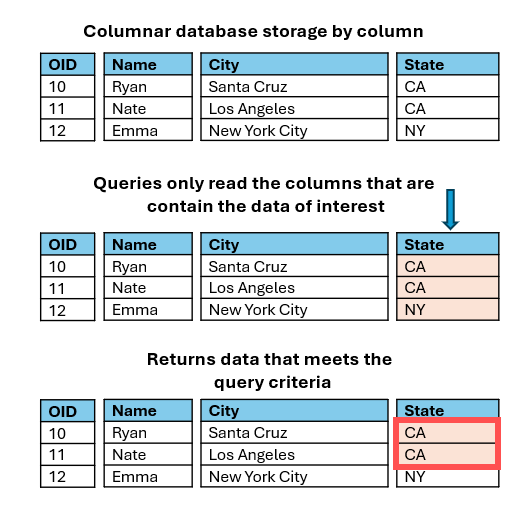
In addition to columnar data storage, Parquet files use other properties and metadata to improve query speed. This includes grouping data by type and using metadata like min/max values and null count to skip entire groups of the data if the metadata doesn’t meet the query request.
Finally, Parquet uses compression to reduce the overall file size, helping minimize storage while improving read speed and overall scalability. All these properties result in making Parquet a highly efficient file format with faster queries and better performance, especially with large datasets.
What is GeoParquet?
GeoParquet builds on the Parquet data storage standard by adding geospatial metadata and geometry types (point, line, and polygon). The geospatial metadata includes key information like the coordinate system, the spatial extent, and the geometry type of the data. The geometry is stored in a column encoded using WKB (Well-Known Binary). Geospatial metadata and geometry enable GeoParquet datasets to support mapping the data and other GIS workflows.
What are Parquet feature layers?
Esri leveraged the efficiency and scalability of Parquet data and extended it to support faster spatial queries and visualization through the development of a spatially optimized Parquet in a new layer type called Parquet feature layers. In the June 2026 update to ArcGIS Online, Parquet feature layers are introduced in beta and can be created using ArcGIS Data Pipelines.
The spatial optimization includes the addition of two key characteristics:
- Geographically adjacent data storage – Data that is geographically close is also stored close together within the file(s). This allows spatial queries to quickly access adjacent features without having to search the entire dataset. This significantly reduces the response time for spatial queries.
- Multi-scale geometry – Multiple generalized geometries are created and used by clients for optimal visual display. Based on the geographic range and number of features, multiple generalized geometries are created and stored in separate columns, each optimized for a specific scale. The different geometries can be used by the client for optimal visual display. At smaller scales, simplified geometry can be used to improve visualization speed, while at large scale the detailed geometry is returned.
Key considerations for using Parquet feature layers
Parquet feature layers can be used in many of the same ways as hosted feature layers and in some cases will perform better, especially with large datasets with complex polygon or polyline geometries. However, there are current limitations that should be considered when evaluating if Parquet feature layers are the right layer type for your downstream workflows.
Here are a few important notes:
- Read-only: Data cannot be edited directly. If the data needs to be updated, the layer can be overwritten.
- Web clients: Parquet feature layers can be used in apps that use the latest version of the ArcGIS Maps SDK for JavaScript.
- No offline support: Parquet feature layers cannot be taken offline or used in disconnected workflows.
- Coordinate system: All Parquet feature layers store spatial data in WGS 1984 in this release.
- Charts: Parquet feature layers cannot currently be used to configure charts.
- Z and M-values: Vertical elevation (z-values) and linear measurements (m-values) are not supported and will be ignored when converting data to parquet feature layers.
- Created and updated using ArcGIS Data Pipelines: Parquet feature layers can only be created and maintained using ArcGIS Data Pipelines in the June 2026 update to ArcGIS Online.
- Pop-ups: Arcade expressions using the FeatureSet() functions may not perform well with large datasets.
- Cannot be used in the Analysis tools in the Map Viewer: Parquet feature layers cannot be used as inputs to the analysis tools in Map Viewer at this time.
- Layer properties: Changes to symbology and pop-up cannot be saved to the layer and only persist within the web map where they are configured.
- Unsupported field types: Time only and timestamp offset field types are not supported in the June 2026 release.
When to use Parquet feature layers
Parquet feature layers are best suited for large, read-only datasets where scalability, efficient storage, and optimized visualization performance are critical. These layers are highly effective when dealing with very large datasets because they offer fast-drawing times like vector tile layers but provide the customization and attribute support of a feature layer. When determining whether a Parquet feature layer is the best format for your workflow, consider both the goals of the solution and the characteristics of your data.
Parquet feature layers are recommended for:
- Read-only operational or reference data
- Large datasets (millions of records)
- Datasets that cover large geographic areas
- Datasets with large complex geometries
- More consistent performance with less variance in query latency
- Full control of map visualization settings, including symbology, labeling, and pop-ups
Creating Parquet feature layers
Parquet feature layers can be created using ArcGIS Data Pipelines, a visual data engineering app in ArcGIS Online that makes it easy to integrate and prepare data.
Using the Data Pipelines editor, you can connect to data from a variety of sources, including URLs and APIs, cloud stores (Amazon S3 and Microsoft Azure Storage), cloud databases like Snowflake, Databricks, and Google BigQuery, and more. Then, apply common data preparation tools to enhance the quality and readiness of your data, with the resulting data written out to layers in your content.
In the past, Data Pipelines only supported writing prepared data to feature layers, but in this release, it’s been enhanced to also offer support for writing data out to the new Parquet feature layer (Beta). Data Pipelines also supports scheduled or on-demand updates to Parquet feature layers by using workflows to overwrite existing datasets.
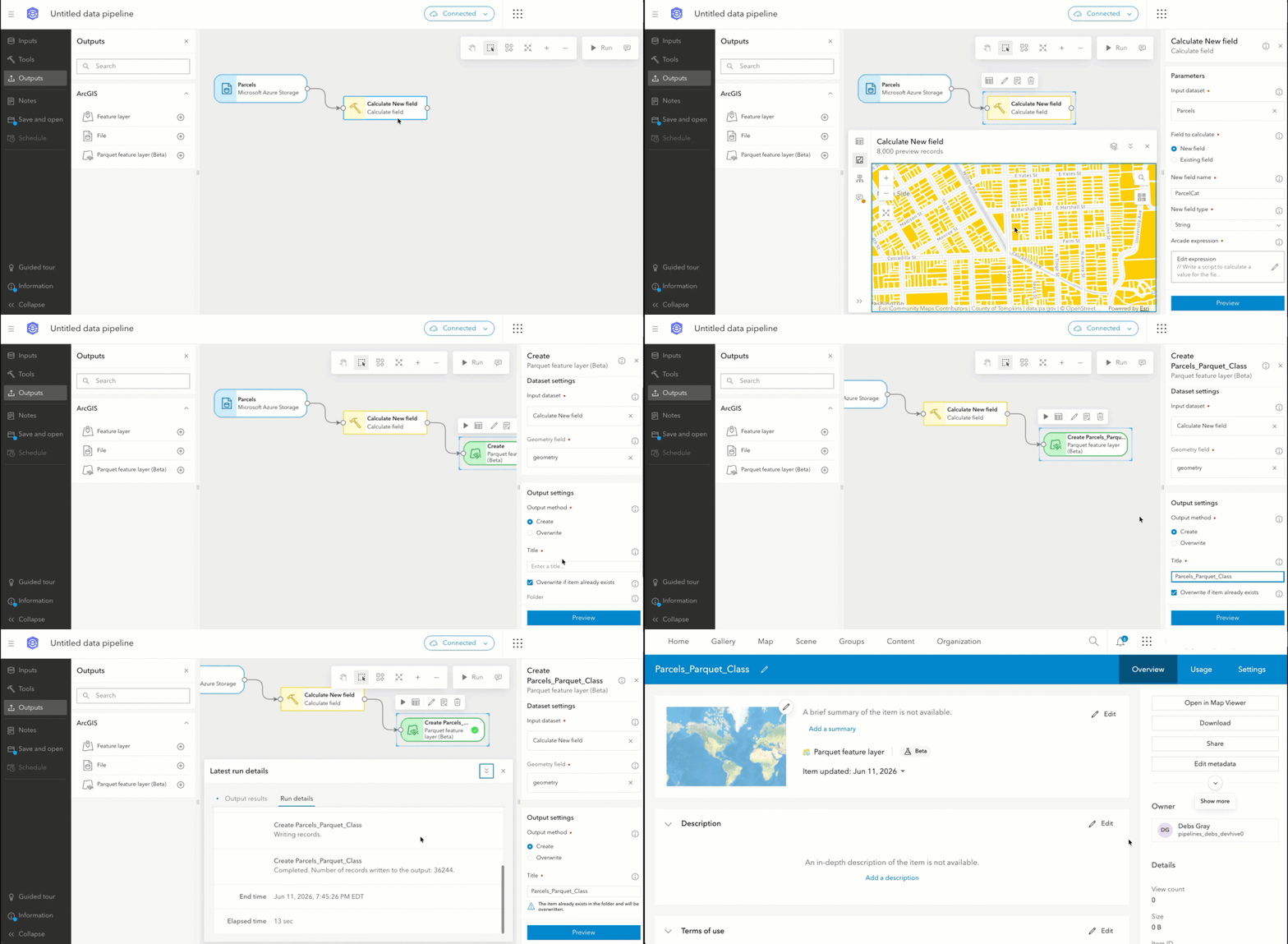
While ArcGIS Data Pipelines is a robust solution that supports a comprehensive set of data engineering needs and automation, in the future there will be more pathways to publish Parquet feature layers in ArcGIS Online.
There were many other exciting updates to ArcGIS Data Pipelines in the June 2026 update in ArcGIS Online, which you can review in this blog: What’s new in ArcGIS Data Pipelines (June 2026). If you’re new to Data Pipelines, review the documentation and consider starting with this tutorial.
Working with Parquet feature layers in ArcGIS Online
Once a Parquet feature layer is created, it will be available in your content. Like other data types, there are overview, usage, and settings tabs that can be used to set properties, download, and learn more about the layer. The owner of the layer can control the layer sharing, and settings including delete protection, item extent, and cache control.
A Parquet feature layer contains one or more underlying spatially optimized Parquet files. They can be downloaded and accessed directly from the Overview tab using the Download button. It provides a zipped file containing the Parquet file(s) which can be used in any external system that supports Parquet.
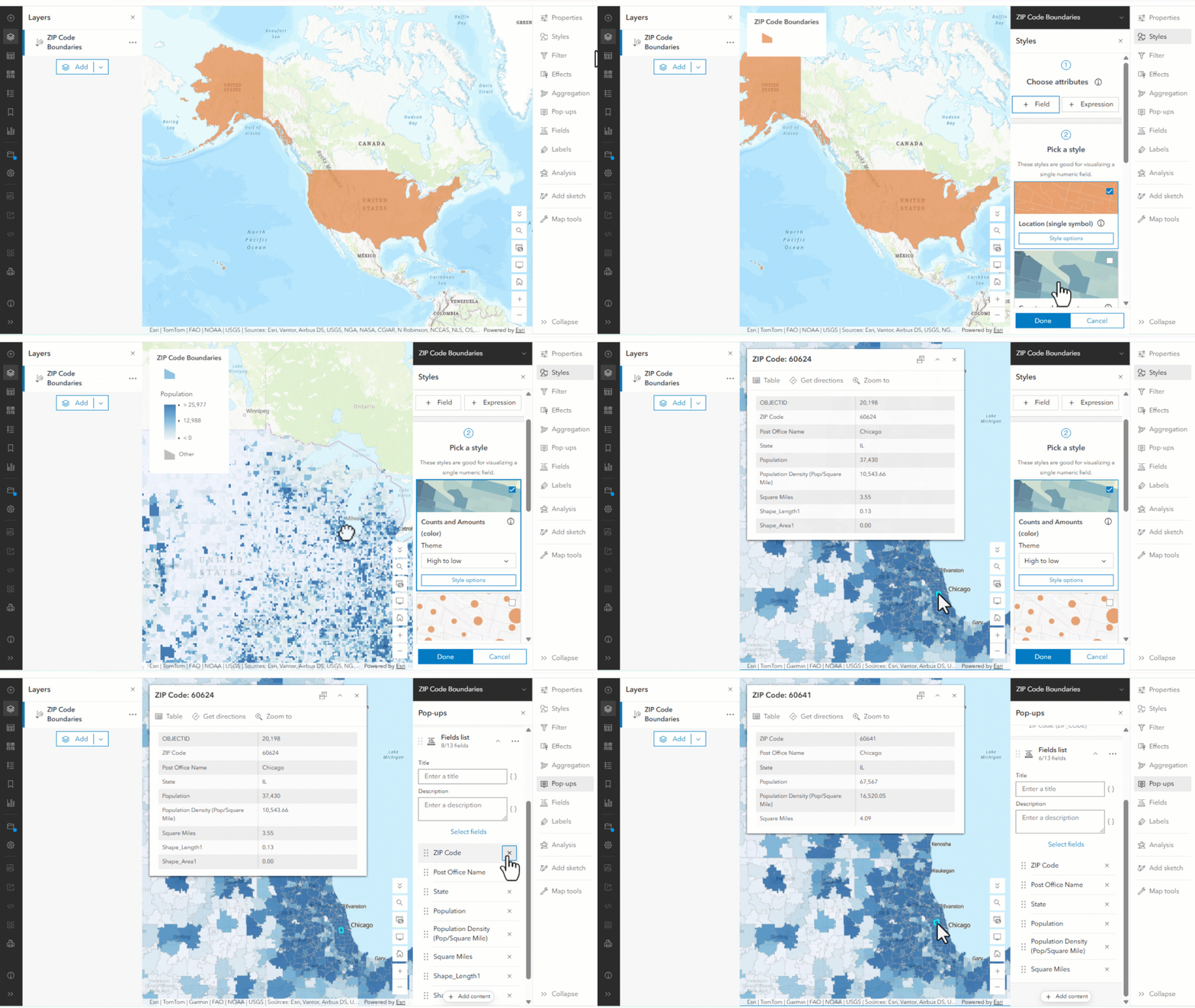
From the Overview tab or the content search in Map Viewer, the Parquet feature layer can be added to a web map. Once the layer is added to a web map, the display settings (styles, filters, effects, aggregation, pop-ups, fields, labels) can be used to control and customize how the data appears on the map.
Learn more about Map Viewer settings: Get started with Map Viewer.
Road ahead for Parquet feature layers
Support for Parquet feature layers in ArcGIS Online continues to evolve, with a focus on expanding how these layers can integrate into everyday workflows and improve performance. In upcoming releases, we’re working on:
- Moving Parquet feature layers out of Beta.
- Enabling offline support.
- Adding Data and Visualization tabs to explore and interact with the data outside of a web map.
- Expand support for analysis tools.
- Adding support for charts.
- Adding support for z- and m-values.
- Enabling support for projected coordinate systems.
- Allowing the creation of Parquet feature layers outside of Data Pipelines.
- Continued optimizations to improve drawing speed and query performance.
- Adding refresh interval settings to better support updates on maps.
- Expand capabilities to support ArcGIS Online applications.
- Support using Parquet feature layers in ArcGIS Pro.
- Bring Parquet feature layers to ArcGIS Enterprise.
Summary
In this blog, we introduce Parquet feature layers, a new output that can be created using ArcGIS Data Pipelines with the June 2026 update to ArcGIS Online. Parquet feature layers are optimized for storage and can be used to support read-only visualization workflows in Map Viewer and other supported applications.
We encourage you to share your experience, request enhancements, and seek support through the Beta Features Feedback forum in the Data Pipelines Community, as this new layer type is in Beta and is not yet supported by Esri Technical Support.


Commenting is not enabled for this article.