Starting at the ArcGIS Enterprise 12.1 release, you can use the Version Management server (VMS) to view version locks for a service by using two new endpoints. The locks resource and lockInfos operation return the lock information for all versions the current user has access to for the feature service.
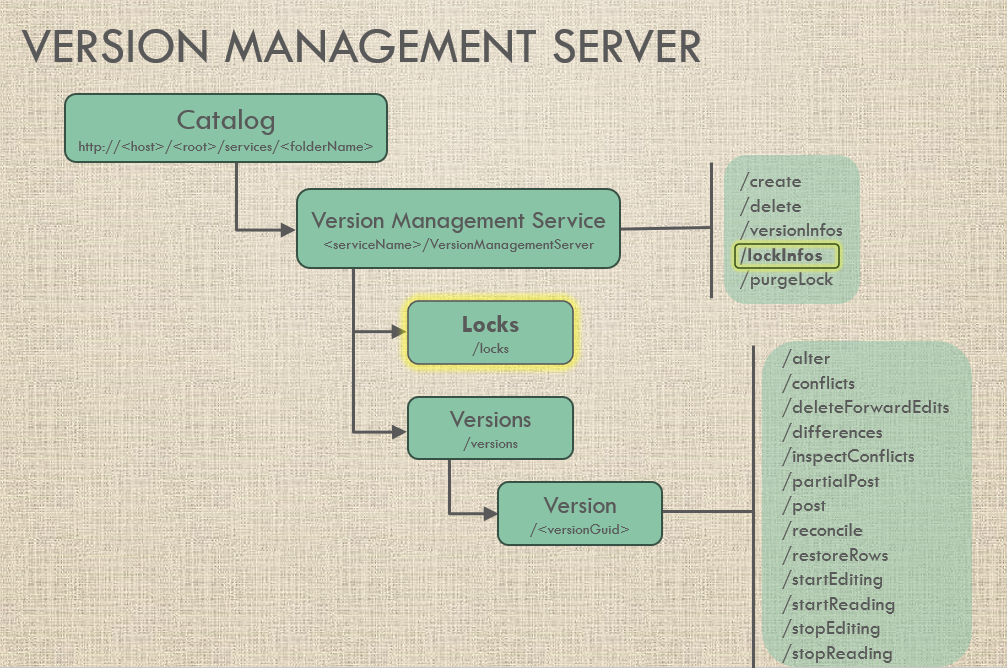
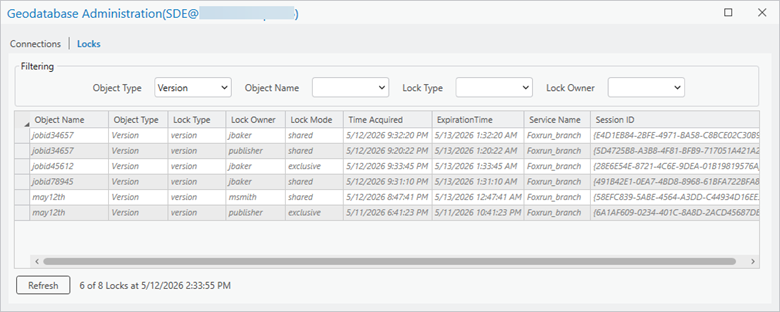
Before these REST API endpoints were available, viewing multiple version locks was only possible from an enterprise geodatabase database connection as the geodatabase administrator. See an example below in the section: Version locks via Geodatabase Administration dialog
Another option via the service, is the version resource – it’s been around since the inception of the VMS at ArcGIS Enterprise 10.6. This endpoint is handy if you’re just looking to quickly check if a version is locked (boolean true/false), if the lock is from a viewer and/or editor, and the lockOwner.
The version resource provides the following information about a version – notice the properties that help identify info about if the version is locked:
Example:
{
 "versionName": "msmith.jobid2346",
 "versionGuid": "{4F238DB7-D910-43B3-A295-BDDB85411F69}",
 "versionId": 26170,
 "description": "",
 "creationDate": 1778612353273,
 "modifiedDate": 1778612353273,
 "reconcileDate": null,
 "previousAncestorDate": null,
 "commonAncestorDate": 1778612353273,
 "evaluationDate": null,
 "isBeingEdited": true,
 "isBeingRead": true,
 "hasConflicts": false,
 "hasUninspectedConflicts": false,
 "isLocked": true,
 "lockOwner": "msmith",
 "lockDate": -1,
 "access": "public",
 "success": true
}
If you need more info about a version lock or want to view multiple locks on a version, the locks/lockInfos endpoints is exactly what you need – keep in mind that your ArcGIS Enterprise must be 12.1 or later to support this capability.
Capabilities
Take a look at the root of the Version Management service – you’ll notice there is a new capability of `supportsLockInfos` for the ArcGIS Enterprise 12.1 release. This capability indicates support for the following endpoints that provide details on version locks for a service:
- locks resource
- lockInfos operation
New endpoints – locks/lockInfos
Let’s dive into these endpoints a little more, so you can get familiar with them.
Locks resource
The locks resource represents all the locks on versions in a version management service that the current user has access to. This is a straight forward way to check locks that exist for the VMS that does not provide any filtering.
The JSON Response for the locks resource will include the following about the version locks:
- versionName – the fully qualified version name – owner.version
- versionGuid – the system-generated globally unique identifier (GUID) for a version
- lockOwner – the portal user that currently holds the version lock
- lockType – read / write
https://myserver.esri.com/server/rest/services/Foxrun_branch/VersionManagementServer/locks?f=pjson
{
"locks": [
{
"versionName": "PUBLISHER.may12th",
"versionGuid": "{4F238DB7-D910-43B3-A295-BDDB85411F69}",
"lockOwner": "msmith",
"lockType": "read"
},
{
"versionName": "PUBLISHER.jobid34657",
"versionGuid": "{8CB289AF-D0A8-4F53-A048-99FB68E31A17}",
"lockOwner": "publisher",
"lockType": "read"
},
{
"versionName": "JBAKER.jobid78945",
"versionGuid": "{B8D8C12E-FD64-4639-8A87-67CFB5E65D5D}",
"lockOwner": "jbaker",
"lockType": "read"
},
{
"versionName": "PUBLISHER.jobid34657",
"versionGuid": "{8CB289AF-D0A8-4F53-A048-99FB68E31A17}",
"lockOwner": "jbaker",
"lockType": "read"
},
{
"versionName": "JBAKER.jobid45612",
"versionGuid": "{C51D5111-8438-4ABE-9567-7AAB339A3094}",
"lockOwner": "jbaker",
"lockType": "write"
}
],
"success": true
}The lockInfos operation returns the information for version locks in a version management service that the current user has access to.
The lockInfos operation has the ability to filter based on several optional parameters:
- versionNameFilter – Filter the locks by the version name.
- versionOwnerFilter – Filter the locks by the version owner.
- lockOwnerFilter – Filter the locks by the lock owner.
- lockTypeFilter – Filter the locks by lock type. Values: read or write.
- includeHiddenVersions– Specifies whether to return locks of versions with hidden access. Values: true or false (default).
- includeExpiredLocks – Specifies whether to return locks that are expired based on the lockDate and lockDuration. Values: true or false (default).
The JSON response for the lockInfos operation will include the following about the version locks – notice the same 4 lock properties from the locks resource plus several additional properties shown in bold:
- versionName
- versionGuid
- lockOwner
- lockType
- sessionId – A unique client-generated identifier used to maintain a consistent read/edit session and enforce locking on a version.
- lockDate – The date/timestamp (unix timestamp in milliseconds) of when the lock was acquired or refreshed.
- lockDuration – the lock duration (in hours)
- canPost – true/false – Default is false. Set to true after a reconcile operation and set to false after the post operation is performed. When canPost = true, this prevents read and write locks from being taken.
{

"locks": [
{
"versionName": "PUBLISHER.may12th",
"versionGuid": "{4F238DB7-D910-43B3-A295-BDDB85411F69}",
"lockOwner": "msmith",
"sessionId": "{58EFC839-5ABE-4564-A3DD-C44934D16EE3}",
"lockDate": 1778618861000,
"lockDuration": 4,
"lockType": "read",
"canPost": false
},
{
"versionName": "PUBLISHER.jobid34657",
"versionGuid": "{8CB289AF-D0A8-4F53-A048-99FB68E31A17}",
"lockOwner": "publisher",
"sessionId": "{5D4725B8-A3B8-4F81-BFB9-717051A421A2}",
"lockDate": 1778620822000,
"lockDuration": 4,
"lockType": "read",
"canPost": false
},
{
"versionName": "JBAKER.jobid78945",
"versionGuid": "{B8D8C12E-FD64-4639-8A87-67CFB5E65D5D}",
"lockOwner": "jbaker",
"sessionId": "{491B42E1-0EA7-4BD8-8968-61BFA722BFA8}",
"lockDate": 1778621470000,
"lockDuration": 4,
"lockType": "read",
"canPost": false
},
{
"versionName": "PUBLISHER.jobid34657",
"versionGuid": "{8CB289AF-D0A8-4F53-A048-99FB68E31A17}",
"lockOwner": "jbaker",
"sessionId": "{E4D1EB84-2BFE-4971-BA58-C8BCE02C30B9}",
"lockDate": 1778621540000,
"lockDuration": 4,
"lockType": "read",
"canPost": false
},
{
"versionName": "JBAKER.jobid45612",
"versionGuid": "{C51D5111-8438-4ABE-9567-7AAB339A3094}",
"lockOwner": "jbaker",
"sessionId": "{28E6E54E-8721-4C6E-9DEA-01B19819576A}",
"lockDate": 1778621625000,
"lockDuration": 4,
"lockType": "write",
"canPost": false
}
],
"success": true
}
Version locks via Geodatabase Administration dialog
Outside of the REST API, you also have the ability to view many types of locks in ArcGIS Pro using the Geodatabase Administration dialog. To access this dialog, you’ll need a database connection that is established by the geodatabase administrator. In the Geodatabase Administration dialog, version locks can be viewed on the Locks tab by filtering using a Lock Type of Version. Since this dialog represents locks for the entire geodatabase, also take note of the Service Name column when reviewing.
Summary
At ArcGIS Enterprise 12.1, portal users can take advantage of the locks/lockInfos REST API endpoints to monitor the version locks when directly accessing the VMS service. This can be helpful in situations where a user receives an error attempting an operation and they want to inspect the version locks on the service to see who is accessing a version and the properties of that lock. Another use case is to use the lockInfos operation with the versionNameFilter to inspect the version lock properties to ensure it is safe to remove all locks on a version prior to using the purgeLock operation. When authoring custom applications that utilize long transaction editing, you can also take advantage of these endpoints to audit the version locks for your sessions to make sure that you are properly releasing locks (via stopEditing/stopReading operations).
We hope you are able to take advantage of these endpoint to help with your monitoring and management of version locks for your branch versioned data.

So, how does this work if the Services Directory is disabled as ESRI’s Security best practices suggest?
Hi Garret – If you disable your services directory, you just won’t have the HTML browsing access to the REST API endpoints. You’ll still be able to issue requests and the applications that use the REST API endpoint will still be able to function. Play around with sending the requests with the parameters embedded in the URL and you’ll see they still work.
https://doc.esri.com/en/arcgis-enterprise/latest/administer/disabling-the-services-directory.html?pivots=os-windows
“This is not a privacy setting. Disabling the Services Directory does not prevent access to or the ability to discover services and their operations; it only removes the HTML pages for viewing the services and the list of supported operations for each of the services. All services are still fully accessible in JSON format (f=json). Security restrictions on the services are still applicable.”