We’re excited to announce the public beta of ArcGIS Reality Server, a new capability for ArcGIS Enterprise 12.0 that brings scalable, self-hosted reality mapping to your organization. Reality Server empowers you to generate high-accuracy, photo-realistic 2D and 3D content from drone, aerial, and satellite imagery, securely and at scale.
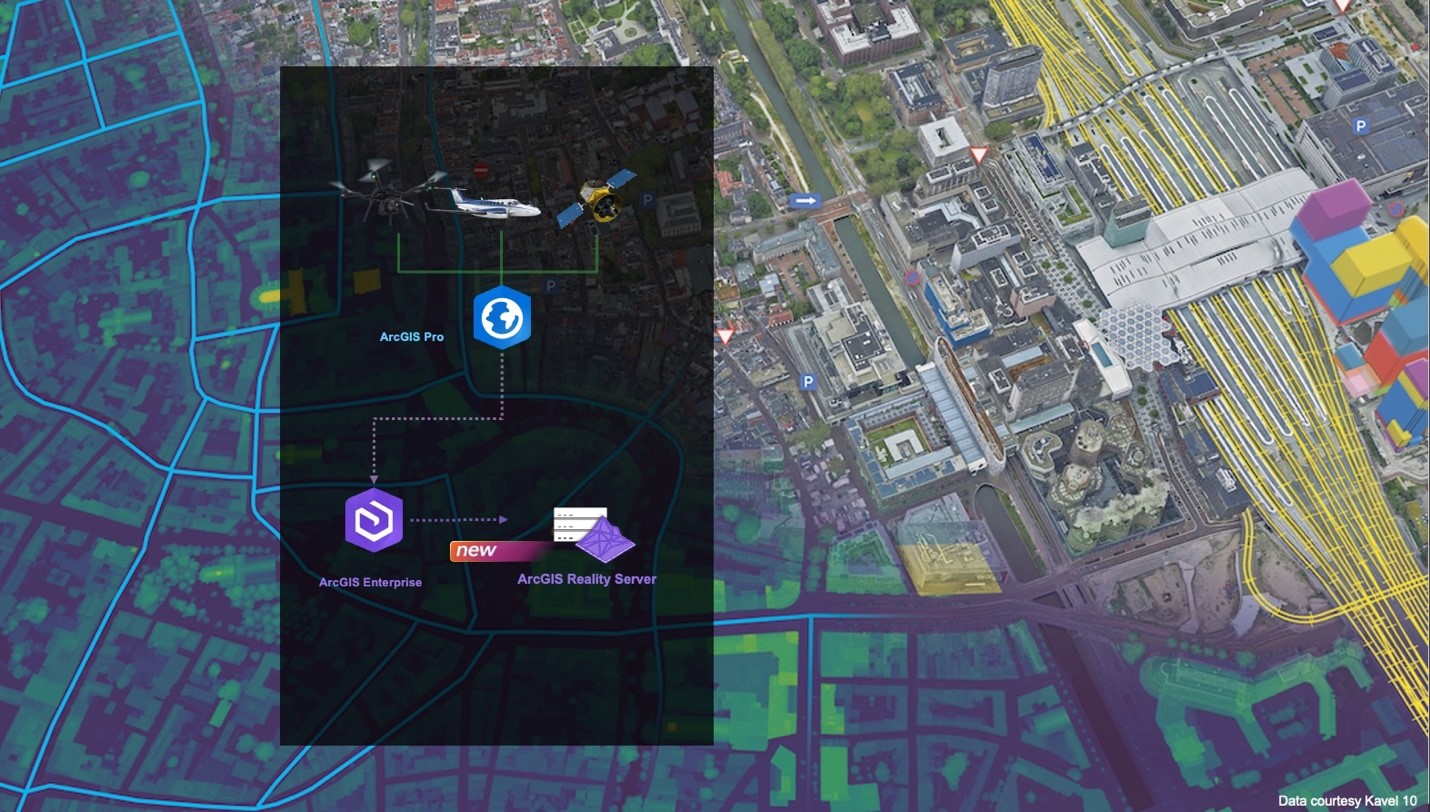
Designed for large-area projects and simultaneous multi-mission processing, Reality Server integrates seamlessly with ArcGIS workflows and runs entirely within your infrastructure, giving you full control over data and security. From small private firms to national agencies, this capability fills a critical gap for customers needing high-performance, self-hosted reality mapping within their existing GIS environment.
If you already using ArcGIS Enterprise 12.0, you can participate in testing today by joining the Esri Early Adopter Community Your feedback will help shape the future of ArcGIS Reality Server.
Why ArcGIS Reality Server?
- Scale without limits: Process massive areas and multiple missions in parallel, reducing turnaround from weeks to hours.
- Enterprise-ready: Runs entirely within your infrastructure for maximum security and compliance.
- Integrated workflows: Works with ArcGIS Pro and ArcGIS Enterprise for a familiar, streamlined experience.
- Actionable intelligence: Transform raw imagery into 2D and 3D products that power analysis, planning, and decision-making.
Self-hosted scalable infrastructure for reality mapping
ArcGIS Reality Server introduces distributed reality mapping through ArcGIS Enterprise, allowing you to configure a multi-machine deployment accessible to users across your organizations and scales with your processing needs.
- Faster turnaround: Complete projects in hours, not days.
- Parallel mission processing: Handle multiple drone flights, aerial surveys, or satellite tasks simultaneously.
- Enterprise control: Maintain full control over your data and security protocols.
Seamless integration with your Existing workflow
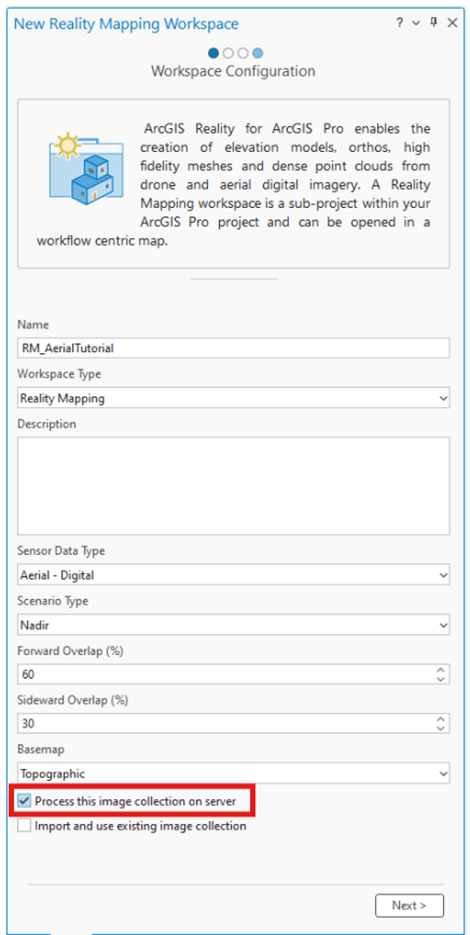
Already using ArcGIS Reality for ArcGIS Pro? Reality Server fits right in. The same workspace creation, adjustment, and product generation workflows apply; just select “Process this image collection on server” and let distributed computing do the heavy lifting.
Explore tutorials for different workflows:
Automation for Advanced Workflows
Reality Server integrates with the ArcGIS API for Python and ArcGIS REST API, enabling custom workflows and batch processing with minimal manual intervention.
The reality mapping module of the ArcGIS API for Python provides object-oriented methods for automating reality mapping tasks in a server environment. Access sample notebooks for different sensor workflows:
Enterprise Collaboration and Sharing
Reality Server is built for collaboration. Contributors across your organization can add data and expertise, with outputs shared as imagery layers, scene layers, or point clouds through your ArcGIS Enterprise portal.
Deployment Options
ArcGIS Reality Server (Beta) is enabled by licensing ArcGIS Server as Reality Server, a new server role in ArcGIS Enterprise 12.0. Deploy:
- On-premises for strict data governance
- In the cloud via AWS or Azure
For optimal performance:
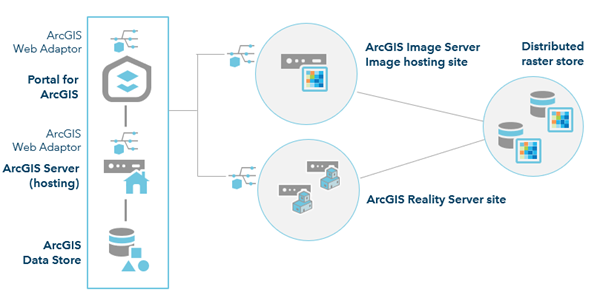
- Run Reality Server on dedicated machines
- Use a separate image hosting site for storage and serving
The figure below shows a conceptual model of a Reality Server Site configuration consisting of an image hosting site and a multi-machine reality server site.
See suggested system and architecture requirement and review documentation for step-by-step instructions for installation and configuration.
Getting Started and Providing Feedback
Share your experience and help shape the future of Reality Server by joining the ArcGIS Reality Server 12.0 Beta on the Esri Early Adopter Community.



Article Discussion: