The evolution of discussions
Discussions, available to all ArcGIS Hub Premium customers, enable participants to post on maps or boards to capture feedback, generate ideas, and communicate without leaving Hub.
We released private (group-only) discussions on content in 2022. Then we expanded to boards in 2024 for dedicated discussions. However, discussion channels have been limited in configuring who was allowed to participate and how, within groups, an organization, or the public.
Now, we offer even more control and flexibility over discussion participation with:
- New channel permissions
- Allowed channel list on boards and discussable content
- Coming soon: configuration of the default and allowed board layouts (map, grid, or list)
What are discussion channels?

The channel you select when posting determines who can see and respond to your post, much like the “To” line in an email or instant message.
It’s important to note that channels are not the same as ArcGIS Online groups, although they can include them. Channel permissions allow you to assign roles to members and managers, whether for the public, an organization, or specific groups. These roles dictate what managers and members can do when participating in discussions. Once you properly configure a channel, you can use it for multiple discussions.
For instance, if you want to engage your community using a public channel, anyone with an account can take part, and you can designate members from one or more groups to help moderate the conversation. Alternatively, you might create a read-only channel for your organization’s members and allow a specific group to participate, enabling them to share updates within the organization.
Updated channel permissions
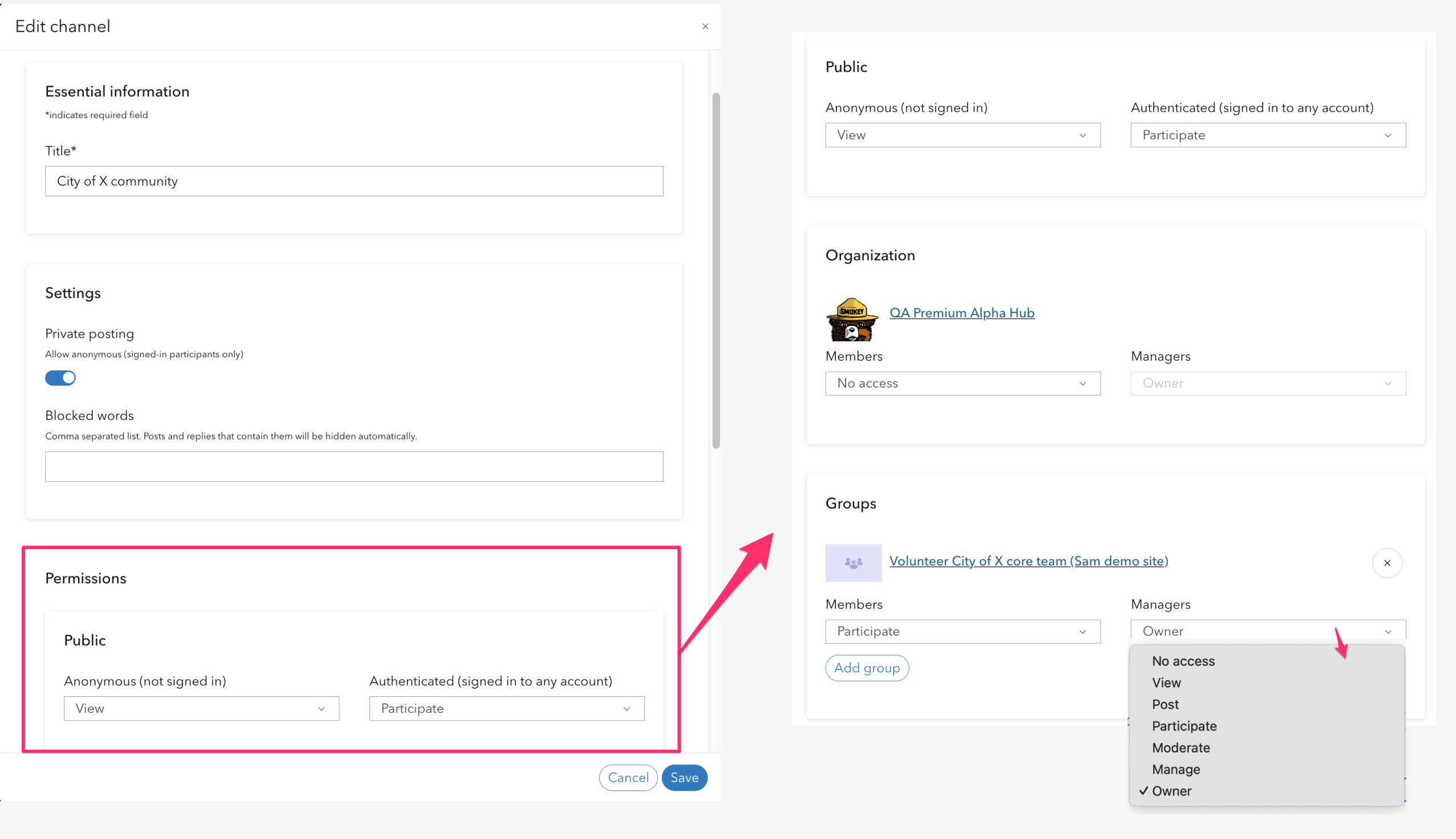
If you create a new channel, or edit an existing one, you will see the following roles:
- ✨ New: Viewers can only view all posts; they cannot contribute posts.
- ✨ New: Posters can only contribute posts; they cannot read others’ posts.
- Participants can view and contribute posts.
- Moderators can participate, update blocked words, and moderate posts.
- ✨ New: Managers can do all that moderators can and add other moderators.
- ✨ New: Owners can do all that managers can and delete the channel.
Configuring allowed channels
Previously, discussion boards were limited to a single channel, but any channel could participate in a content-based discussion. Now content/board managers can decide if they want one, many, or all available channels to participate in discussions for a more consistent and flexible approach.
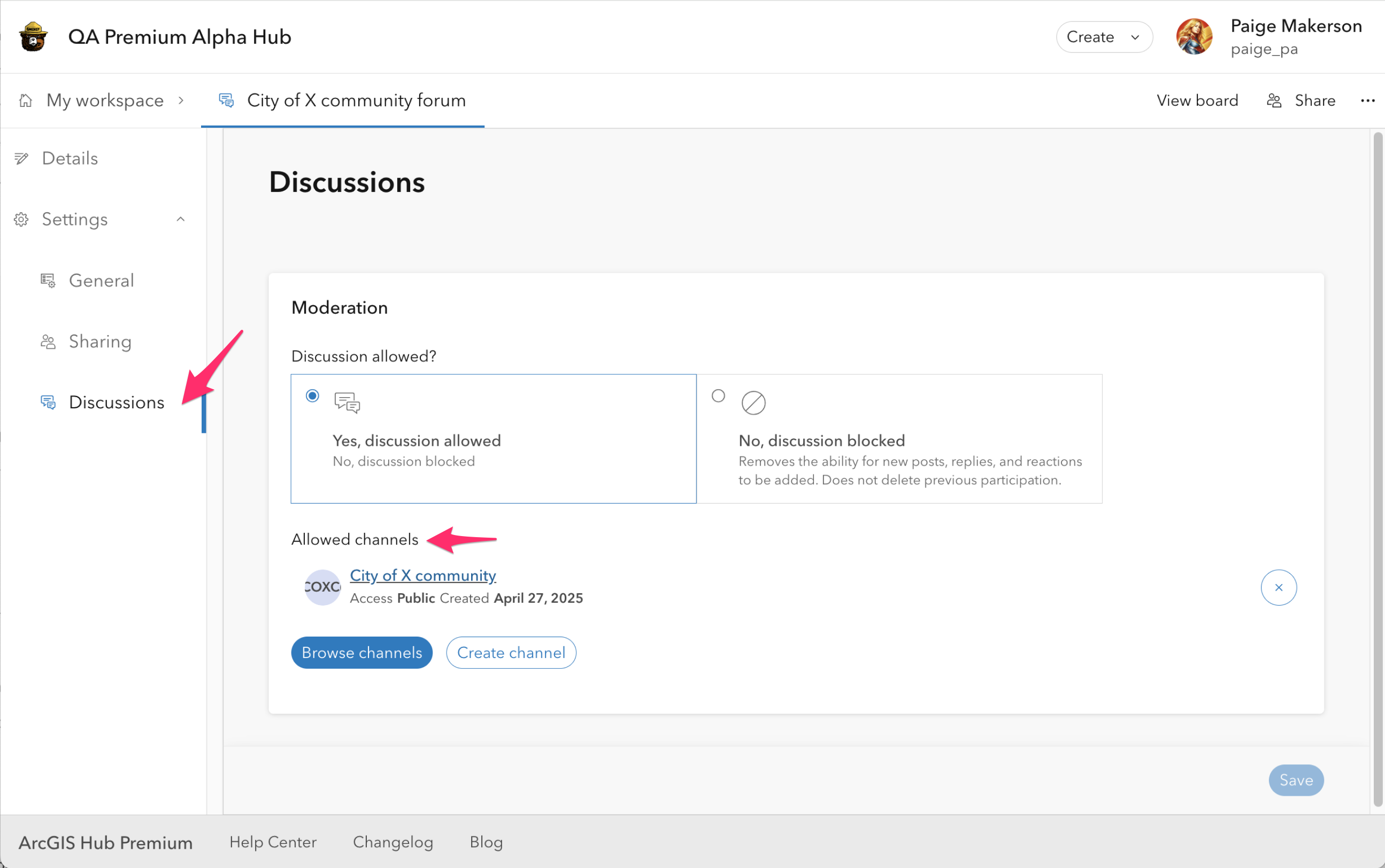
From the content/board workspace navigate to discussion settings to configure the allowed channels. Leave the allowed channels list empty if you want any channel to be able to have discussions. Select one or more channels to restrict participation to only those selected.
Tip: For controlled participation, we recommend setting a single allowed channel so that it is auto-applied when participants go to add a post. If many/any channels are allowed there is an additional step for participants when posting, to first select the channel (audience) of the post.
What’s next for discussions?
Soon, from the discussion board workspace, you will be able to set the layout that visitors will see first: map, grid, or list. And you will also be able to control which layouts are available for participants to toggle between. For example, if you want to use a board to collect ideas you will be able to hide the map layout and select grid layout as the default.
If you create or update channels using the new permissions and allowed channel list, we would love to hear your thoughts! Submit any questions or ideas in Esri Community under the ArcGIS Hub space.



Article Discussion: