In GIS, understanding location is essential. But understanding how things are connected unlocks even deeper insight. Knowledge graphs extend traditional GIS by linking people, organizations, places, and events, helping reveal patterns and relationships that are difficult to see using maps, rows, or layers alone.
With ArcGIS Pro 3.7 and an Advanced user license, knowledge graphs are easier to adopt than ever before.
File knowledge graphs work entirely on your local machine. This makes knowledge graphs more accessible to GIS professionals who want to explore graph-based analysis without, without standing up ArcGIS Enterprise services.
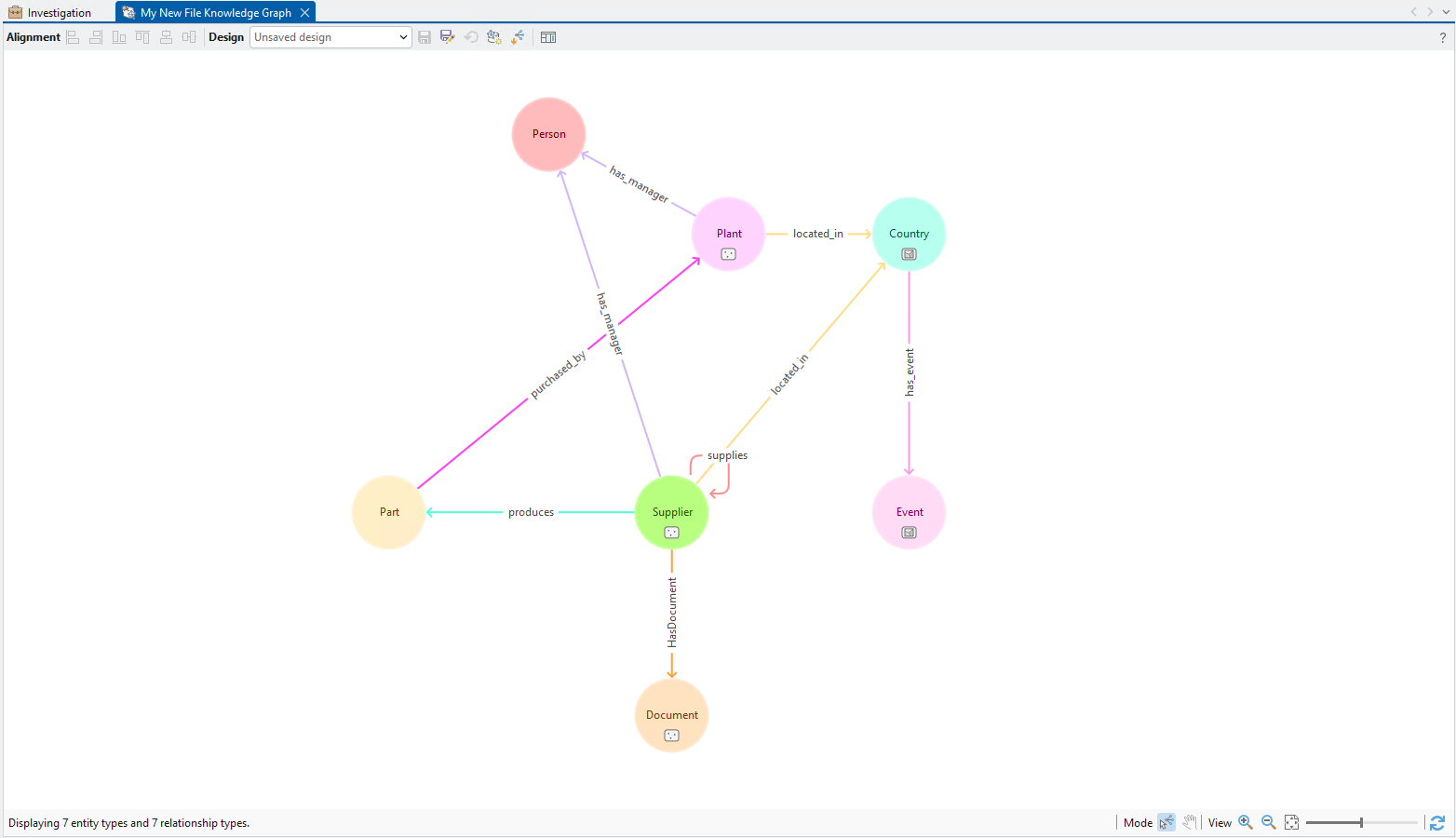
Think about a supply chain. You may know where suppliers, factories, and distribution centers are located. But a knowledge graph helps you connect that data by showing how materials move between them, how organizations depend on one another, and where disruptions might occur. This helps you identify where bottlenecks may occur and how risk propagates through the network.
This article is Part 1 of a two-part series. Here, we introduce file knowledge graphs and highlight general capabilities. In Graph Local Part 2, we’ll walk through common knowledge graph analysis tools and workflows. For anyone curious about using knowledge graphs in ArcGIS Pro, this article is a practical starting point.
Lowering the Barrier to Entry: A Familiar Experience in ArcGIS Pro
If you’ve worked with knowledge graphs in ArcGIS Pro before, nothing really changes. If you’re new, you’re learning the same workflows you’d use with knowledge graph services.
Before ArcGIS Pro 3.7, working with knowledge graphs in ArcGIS Pro meant managing ArcGIS Enterprise deployments. While that approach is essential for certain environments, it can be a barrier for learning, experimentation, and exploring graph data.
File knowledge graphs are designed as a lightweight alternative while providing the same user experience as a knowledge graph service. They let you focus on model design, relationships, and analytical questions without servers, services, or administrative setup.
Adding Spatial Context to Your Knowledge Graph
A knowledge graph organizes data as entities and relationships, making it easier to understand how things are connected. ArcGIS Knowledge builds on this foundation by adding something uniquely powerful: location.
While traditional graph approaches help uncover connections—such as identifying key entities, finding paths, or tracing relationships, ArcGIS Knowledge integrates these capabilities with spatial analysis. This allows you to not only ask how things are connected, but also where those connections occur and why that location matters.
Why Spatial Matters
Most real-world systems have a geographic component. Supply chains move through ports and warehouses, infrastructure networks span regions, and events unfold across space and time.
Using a file knowledge graph, you can:
- Combine spatial and nonspatial data into a single data model
- Visualize and query nonspatial relationships that connect your spatial data
- Incorporate proximity and geography into graph analysis
- Perform spatial analysis on entities in your knowledge graph
This integration provides a more complete understanding of complex systems by revealing patterns that would be difficult to see using GIS tools alone.
Returning to the supply chain example, the graph can reveal how suppliers, manufacturers, and distribution centers are connected and how materials flow between them. Adding spatial context shifts the analysis from what is connected to where and why it matters; making it possible to evaluate distances, transportation access, and regional risks that influence those connections.
This same approach applies to many other domains:
- Utilities and infrastructure: Understand how assets are connected across a network and analyze how outages or failures may spread geographically.
- Public safety and intelligence: Explore relationships between people, locations, and events while identifying where incidents cluster or how activity moves across regions.
- Healthcare networks: Analyze connections between providers, facilities, and patients alongside accessibility, coverage gaps, and regional demand.
A Unified Approach to Analysis
ArcGIS Knowledge brings together graph analytics and GIS into a single environment. You can perform link analysis and pattern detection while using maps and link charts together in your investigation. This unified approach is especially valuable for systems where relationships and geography are equally important.
All of these spatially enabled capabilities are available in file knowledge graphs, even though they run entirely on your local machine.
That means you can:
- Explore both relationships and geography together
- Build and test data models
- Experiment with graph analysis workflows
- Gain insight into complex systems—without needing ArcGIS Enterprise
For new users, this makes file knowledge graphs an ideal starting point. You can focus on understanding connections, exploring patterns, and incorporating location all within the familiar ArcGIS Pro experience.
Build and Analyze—Entirely Locally
File knowledge graphs bring the powerful graph analysis capabilities of ArcGIS Knowledge to your local machine. You use the same tools and experiences as enterprise knowledge graph services in ArcGIS Pro, including:
- Investigations to search, expand, and analyze connected data
- Link charts to visually explore relationships
- The Data Model Designer to define entities, relationships, and properties
Comparing types of knowledge graphs
| Key characteristics | Knowledge graph service | File knowledge graph |
| Define entity types and relationship types to model systems of real-world objects including people, places, events, and things. | Supported | Supported |
| Create entities and relationships that represent individual people, places, events, and things in the system from the investigation, from a map, or from a link chart. | Supported | Supported |
| Load spatial and nonspatial data into the knowledge graph to generate a representation of the system you want to interrogate. | Supported | Supported |
| Add documents that provide an authoritative source for the facts stated in properties of an entity or a relationship. | Supported | Supported |
| Add provenance that defines which source was used to specify which property of an entity or a relationship. | Supported | Not yet supported |
What’s Next
File knowledge graphs are a great way to get started with graph and spatial analytics in ArcGIS Pro. Be sure to check out Part 2 of graph Local, where we look at common knowledge graph tools and workflows. More resources are listed below to learn more about ArcGIS Knowledge and knowledge graphs:

Article Discussion: