Esri’s World Traffic Service has been updated in several ways to provide an enhanced view of traffic conditions.
- The congestion values at which road segments change color have been revised to best reflect reality.
- Additionally, the scale ranges at which road segments are rendered have also been adjusted.
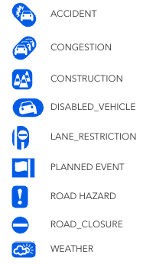
- There are new icons for traffic incidents to reflect a category instead of a severity.
- The symbol for road closures has been updated to indicate direction of travel.

Traffic Conditions
You can see these new improvements in the World Traffic layer from the ArcGIS Living Atlas.
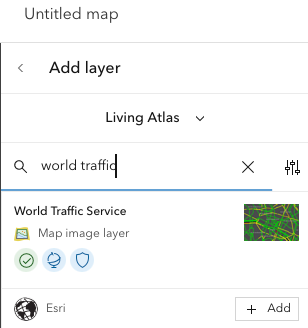
For every region, you can enable the visibility of “Live Traffic” to see traffic information for streets that support live traffic.
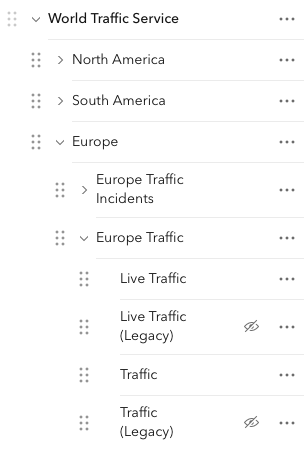
Alternatively, you can enable the visibility of the “Traffic” layer to draw traffic information for streets that support either live or historic traffic. For countries without live traffic, the “historic” depiction provides substantial value. To learn more about traffic coverage for individual countries, please visit this documentation page.
To explore the layers programmatically, review this topic to determine the layer IDs specific to your region.
For a limited time, Esri will continue to support the prior generation of the rendering engine for traffic information. Enable the visibility of the layers with (Legacy) in their name to see a different presentation of traffic information.
Traffic Incidents
When you’re looking for details about traffic congestion, it is important to understand why there is a slow-down in traffic. With new icons in place, you can quickly tell the difference between an accident and congestion. Whether it’s construction or a planned event such as a concert, these icons provide context for traffic congestion.
Road Closures
The key aspect of a road closure is knowing the lanes impacted by the closure. With new symbology to indicate the direction of travel, you can easily understand how traffic is changed by the closure. Pairing this symbol with the icon for a road closure provides a complete overview of traffic conditions.

Learn More About the World Traffic Service
Ready to explore World Traffic service? Click here for more information.
Additional Resources available:
- Overview of the traffic data
- Syntax and description for the REST API
- Coverage of the traffic service
- Learn more about sharing road closure data with Esri
- Discover the Road Closures solution
To learn how to use the ArcGIS Routing service, please visit our website.


Article Discussion: